
Collection of admin fields and decorators to help to create computed or custom fields more friendly and easy way

Project description
Collection of admin fields, decorators and mixin to help to create computed or custom fields more friendly and easy way











Installation
Requirements: Django > 1.5
pip install django-admin-easy==0.4.1
How it Works
When you want to display a field on Django Admin, and this field doesn’t exist in your Model or you need to compute some information, like a Image or Link, you will need to create a method on your ModelAdminClass like this:
from django.contrib import admin

class YourAdmin(admin.ModelAdmin):
    fields = ('sum_method', 'some_img', 'is_true')

    def sum_method(self, obj):
        sum_result = obj.field1 + obj.field2 + obj.field3
        return '<b>%s</b>' % sum_result
    sum_method.short_description = 'Sum'
    sum_method.admin_order_field = 'field1'
    sum_method.allow_tags = True

    def some_img(self, obj):
        return '<img scr="%s">' % obj.image
    some_img.short_description = 'image'
    some_img.admin_order_field = 'id'
    some_img.allow_tags = True

    def is_true(self, obj):
        return obj.value > 0
    is_true.short_description = 'Positive'
    is_true.admin_order_field = 'value'
    is_true.boolean = True
It takes too much lines! =D
With django-admin-easy you can easily create this field with less lines:
from django.contrib import admin
import easy

class YourAdmin(admin.ModelAdmin):
    fields = ('sum_method', 'some_img', 'is_true')

    sum_method = easy.SimpleAdminField(lambda obj: '<b>%s</b>' % (obj.field1 + obj.field2 + obj.field3), 'Sum', 'field1', True)
    some_img = easy.ImageAdminField('image', 'id')
    is_true = easy.BooleanAdminField('Positive', 'value')
If you still prefer using a custom method, you can use our decorators, like this:
from django.contrib import admin
import easy

class YourAdmin(admin.ModelAdmin):
    fields = ('sum_method', 'some_img', 'is_true')

    @easy.smart(short_description='Sum', admin_order_field='field1', allow_tags=True )
    def sum_method(self, obj):
        sum_result = obj.field1 + obj.field2 + obj.field3
        return '<b>%s</b>' % sum_result

    @easy.short(desc='image', order='id', tags=True)
    def some_img(self, obj):
        return '<img scr="%s">' % obj.image

    @easy.short(desc='Positive', order='value', bool=True)
    def is_true(self, obj):
        return obj.value > 0
Another Decorators
In all of this extra decorators, you can use short or smart arguments to complement field information.
Allow HTML tags
@easy.with_tags()
def some_field_with_html(self, obj):
    return '<b>{}</b>'.format(obj.value)
# output some as: mark_safe("<b>something</b>")
if value is 5, will display:
5 and not <b>5</b> on admin page.
Cached field
If you, for some reason, need to cache a custom field on admin
@easy.cache(10)# in secondd, default is 60
def some_field_with_html(self, obj):
    return obj.related.some_hard_word()
If you change something on your model, or some related object, you can clean this cache using this easy way:
import easy
# wherever you want
easy.cache_clear(my_model_instance)

# or
class MyModel(models.Model):
    # ... fields

    def save(*args, **kwargs):
        easy.cache_clear(self)
        super(MyModel, self).save(*args, **kwargs)
Django template filter
Can be used with all template filters on your project.
# builtin template filter like {{ value|title }}
@easy.filter('title')
def some_field_with_html(self, obj):
    return 'ezequiel bertti'
# output: "Ezequiel Bertti"

# like {% load i10n %} and {{ value|localize }}
@easy.filter('localize', 'l10n')
def some_field_with_html(self, obj):
    return 10000
# output: "10.000"

# like {{ value|date:'y-m-d' }}
@easy.filter('date', 'default', 'y-m-d')
def some_field_with_html(self, obj):
    return datetime(2016, 06, 28)
# output: "16-06-28"
Django utils functions
Tested with:
@easy.utils('html.escape')
@easy.utils('html.conditional_escape')
@easy.utils('html.strip_tags')
@easy.utils('safestring.mark_safe')
@easy.utils('safestring.mark_for_escaping')
@easy.utils('text.slugify')
@easy.utils('translation.gettext')
@easy.utils('translation.ugettext')
@easy.utils('translation.gettext_lazy')
@easy.utils('translation.ugettext_lazy')
@easy.utils('translation.gettext_noop')
@easy.utils('translation.ugettext_noop')
def your_method(self, obj):
    return obj.value
More Examples
from django.contrib import admin
import easy

class YourAdmin(admin.ModelAdmin):
    list_fields = ('id', 'custom1', 'custom2', 'custom3' ... 'customN')

    actions = ('simples_action',)

    @easy.action('My Little Simple Magic Action')
    def simple_action(self, request, queryset):
        return queryset.update(magic=True)


    # render a value of field, method, property or your model or related model
    simple1 = easy.SimpleAdminField('model_field')
    simple2 = easy.SimpleAdminField('method_of_model')
    simple3 = easy.SimpleAdminField('related.attribute_or_method')
    simple4 = easy.SimpleAdminField('related_set.count', 'count')
    simple5 = easy.SimpleAdminField(lambda x: x.method(), 'show', 'order_by')

    # render boolean fields
    bool1 = easy.BooleanAdminField(lambda x: x.value > 10, 'high')

    # render with string format fields
    format1 = easy.FormatAdminField('{o.model_field} - {o.date_field:Y%-%m}', 'column name')

    # render foreignkey with link to change_form in admin
    fk1 = easy.ForeignKeyAdminField('related')

    # render foreignkey with link to change_form in admin and related_id content as text
    fk2 = easy.ForeignKeyAdminField('related', 'related_id')

    # render template
    template1 = easy.TemplateAdminField('test.html', 'shorty description', 'order_field')

    # render to change_list of another model with a filter on query
    link1 = easy.LinkChangeListAdminField('app_label', 'model_name', 'attribute_to_text',
                                          {'field_name':'dynamic_value_model'})

    link2 = easy.LinkChangeListAdminField('app_label', 'model_name', 'attribute_to_text',
                                          {'field_name':'dynamic_value_model'},
                                          {'another_field': 'static_value'})

    # display image of some model
    image1 = easy.ImageAdminField('image', {'image_attrs':'attr_value'})

    # use django template filter on a field
    filter1 = easy.FilterAdminField('model_field', 'upper')
    filter2 = easy.FilterAdminField('date_field', 'date', 'django', 'y-m-d')
    filter3 = easy.FilterAdminField('float_field', 'localize', 'l18n')

    @easy.smart(short_description='Field Description 12', admin_order_field='model_field')
    def custom12(self, obj):
        return obj.something_cool()

    @easy.short(desc='Field Description 1', order='model_field', tags=True)
    def decorator1(self, obj):
        return '<b>' + obj.model_field + '</b>'

    @easy.short(desc='Field Description 2', order='model_field', bool=True)
    def decorator2(self, obj):
        return obj.model_field > 10
If you want to use on admin form to show some information, don’t forget to add your custom field on readonly_fields attribute of your admin class
from django.contrib import admin
import easy

class YourAdmin(admin.ModelAdmin):
    fields = ('custom1', 'custom2', 'custom3' ... 'customN')
    readonly_fields = ('custom1', 'custom2', 'custom3' ... 'customN')

    custom1 = easy.ForeignKeyAdminField('related')
    # ...
Another way to use is directly on list_fields declaration:
from django.contrib import admin
import easy

class YourAdmin(admin.ModelAdmin):
    list_fields = (
        easy.TemplateAdminField('test.html', 'shorty description', 'order_field'),
        easy.ImageAdminField('image', {'image_attrs':'attr_value'}),
        # ...
    )

    # ...
Mixin
To help you to create a custom view on django admin, we create de MixinEasyView for your Admin Classes
from django.contrib import admin
import easy

class MyModelAdmin(easy.MixinEasyView, admin.ModelAdmin):
    # ...

    def easy_view_jump(self, request, pk=None):
        # do something here
        return HttpResponse('something')
To call this view, you can use this reverse:
from django.core.urlresolvers import reverse

# to do something with one object of a model
reverse('admin:myapp_mymodel_easy', args=(obj.pk, 'jump'))

# or to do something with a model
reverse('admin:myapp_mymodel_easy', args=('jump',))
Or one HTML template
#<!-- to do something with one object of a model -->
{% url 'admin:myapp_mymodel_easy' obj.pk 'jump' %}

#<!-- or to do something with a model -->
{% url 'admin:myapp_mymodel_easy' 'jump' %}
Utilities
Response for admin actions
Return for the change list and show some message for the user keeping or not the filters.
from django.contrib import admin
from django.contrib import messages
import easy

class YourAdmin(admin.ModelAdmin):
    # ...
    actions = ('simples_action',)

    def simples_action(self, request, queryset):

        success = queryset.do_something()
        if success:
            return easy.action_response(request, 'Some success message for user', keep_querystring=False)
        else:
            return easy.action_response(request, 'Some error for user', messages.ERROR)

        # or just redirect to changelist with filters
        return easy.action_response()
So easy, no?
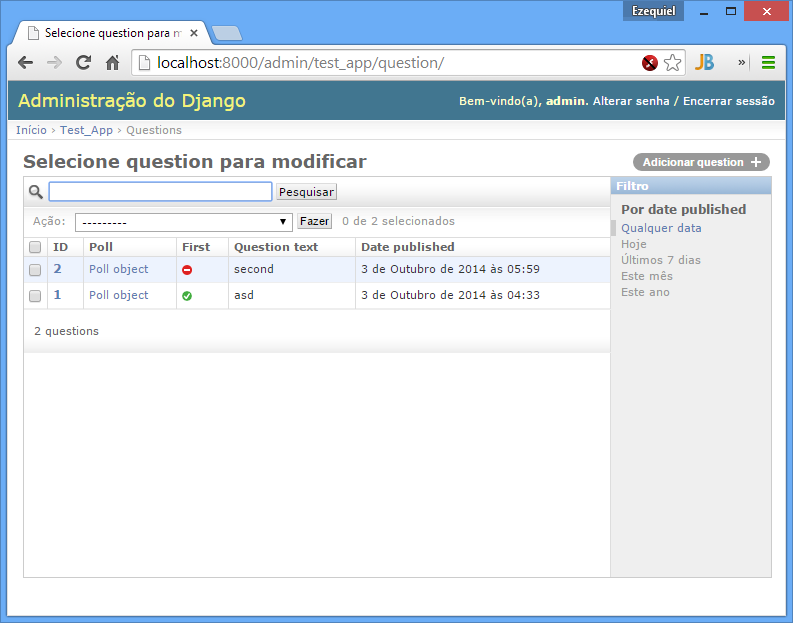
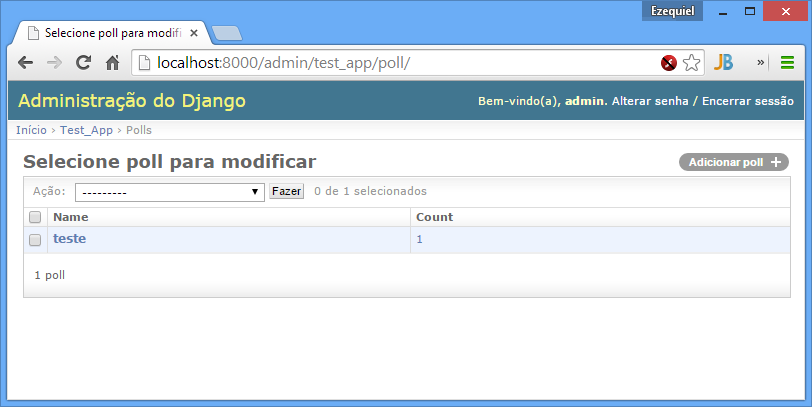
Screenshot
Using example of poll of django tutorial
Please help us
This project is still under development. Feedback and suggestions are very welcome and I encourage you to use the Issues list on Github to provide that feedback.


Changelog
0.4.1
Django 2.0
0.4
Django 1.11
Create module utils with action_response
0.3.2
Add params_static to LinkChangeListAdminField
0.3.1
Add FormatAdminField
0.3
Add import from __future__ on all files
Django 1.10
More decorators
More admin fields
0.2.2
Add MixinEasyView
0.2.1
Fix for Django 1.7 from @kevgathuku
Release history Release notifications | RSS feed


Download files
Download the file for your platform. If you're not sure which to choose, learn more about installing packages.
Source Distribution
Built Distribution
Filter files by name, interpreter, ABI, and platform.
If you're not sure about the file name format, learn more about wheel file names.
Copy a direct link to the current filters
File details
Details for the file django-admin-easy-0.4.1.tar.gz.
File metadata
- Download URL: django-admin-easy-0.4.1.tar.gz
- Upload date:
- Size: 16.1 kB
- Tags: Source
- Uploaded using Trusted Publishing? No
File hashes
| Algorithm | Hash digest | |
|---|---|---|
| SHA256 |
1c6f5af2fa37d7b85f360a59f0ffa8f43fc2ef8dd3feeeab9d81b492aedabfde
|
|
| MD5 |
3d4a443a050fb0462a6737d8e3140ffd
|
|
| BLAKE2b-256 |
89285f480d9610b75dbf7ddd171c55757535c7d331e911dbc229d21a7a430392
|
File details
Details for the file django_admin_easy-0.4.1-py3-none-any.whl.
File metadata
- Download URL: django_admin_easy-0.4.1-py3-none-any.whl
- Upload date:
- Size: 18.7 kB
- Tags: Python 3
- Uploaded using Trusted Publishing? No
File hashes
| Algorithm | Hash digest | |
|---|---|---|
| SHA256 |
1c40045f08add26eddbf8b59a1b463263dec4a2d92ca2f83eee8149d8994a6b5
|
|
| MD5 |
4dc42416b1dcea8de8d082fd7b01acfa
|
|
| BLAKE2b-256 |
219691281a69170858caf31a12f8b35b81e9153a301bc6a65bc3b4909cfabe4c
|






