
django-admin-fieldsets-extra





Extras for Django admin fieldsets:
- Interleave fieldsets and inlines in the change form: put an inline right after the fields it belongs with, instead of always at the bottom.
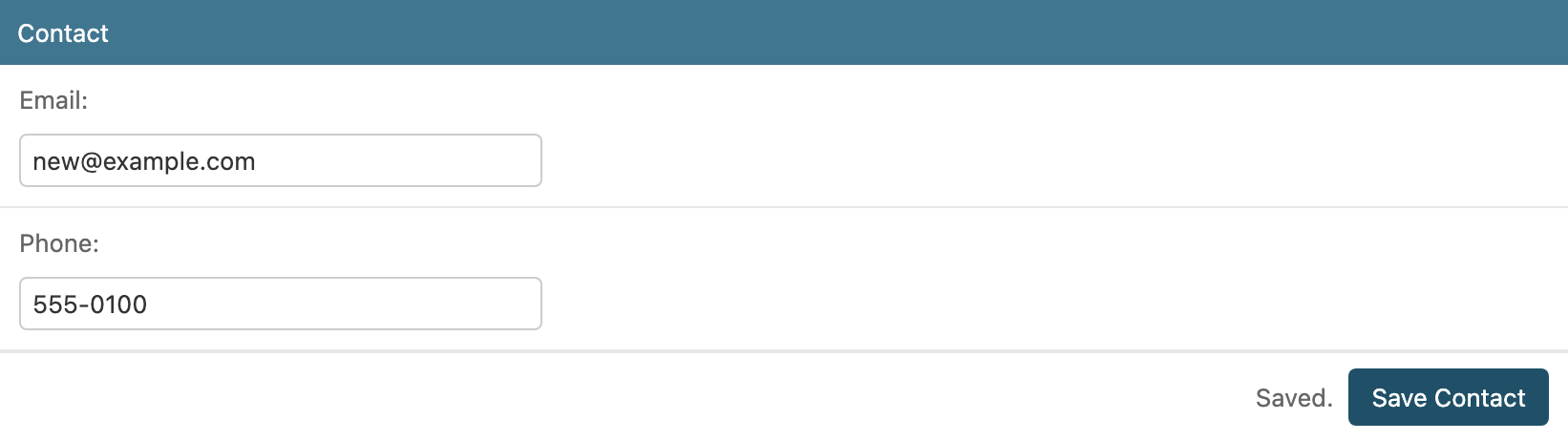
- Save a fieldset on its own with a "Save Contact" button, without submitting or reloading the rest of the page.
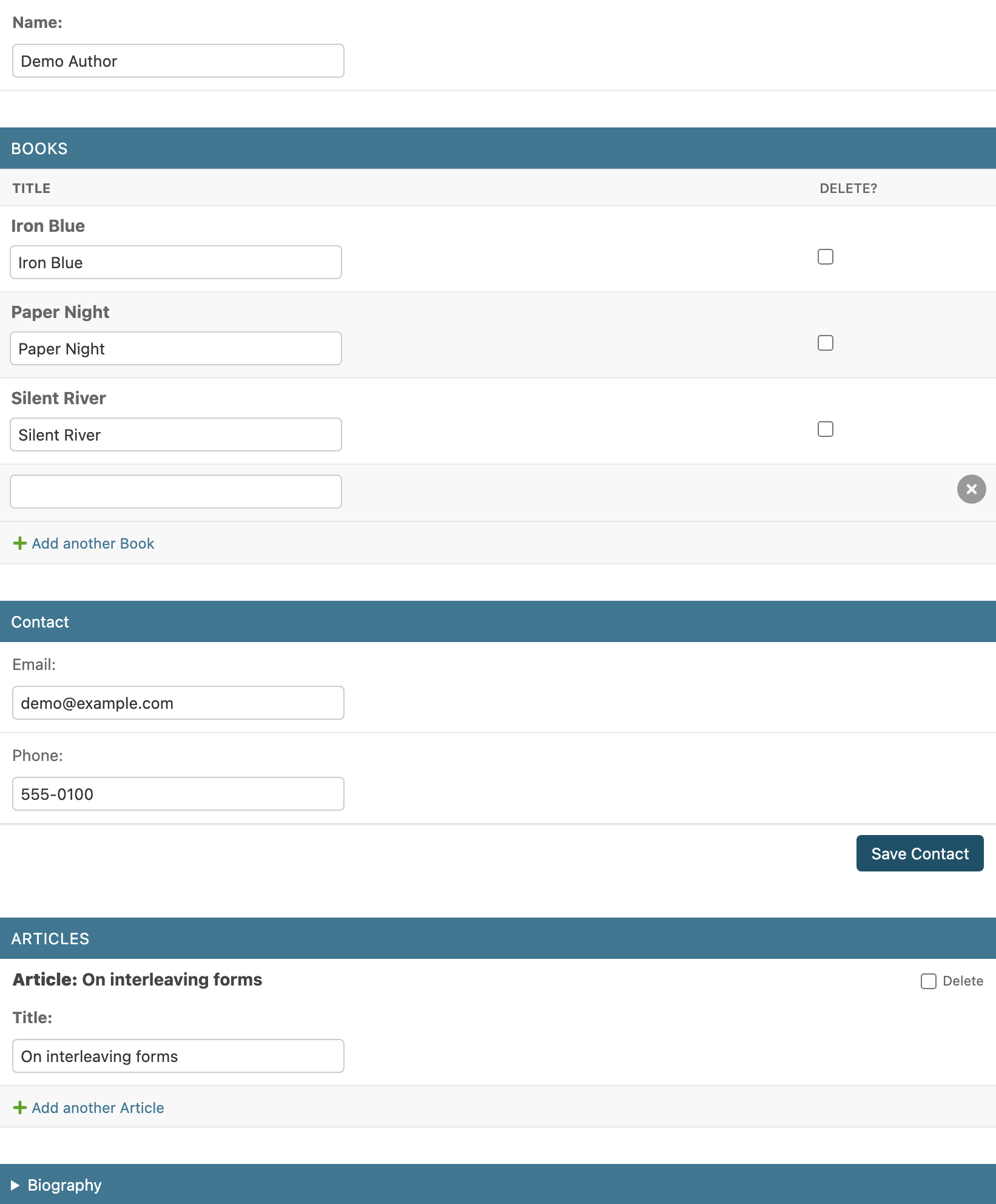
- One ordered list replaces
fieldsets+inlines(with or without inlines in it). - No copy of Django's
change_form.html: it only overrides itsfield_sets/inline_field_setsblocks, so it follows your Django version. - Nothing changes in the inlines' DOM: Django's inline JS ("Add another", autocomplete, date pickers…) and inline templates work as usual.
- Works with django-admin-inline-controls (paginated / filterable inlines, a save button per inline).
Install
pip install django-admin-fieldsets-extra
Add to INSTALLED_APPS:
INSTALLED_APPS = [
    ...
    "django_admin_fieldsets_extra",
]
Usage
from django.contrib import admin

from django_admin_fieldsets_extra.mixins import FieldsetsExtraMixin


class BookInline(admin.TabularInline):
    model = Book


class ArticleInline(admin.StackedInline):
    model = Article


@admin.register(Author)
class AuthorAdmin(FieldsetsExtraMixin, admin.ModelAdmin):
    fieldsets_with_inlines = [
        (None, {"fields": ["name"]}),
        BookInline,
        ("Contact", {"fields": ["email", "phone"], "save_button": True}),
        ArticleInline,
        ("Biography", {"fields": ["bio"], "classes": ["collapse"]}),
    ]
Each entry is either a fieldset, exactly as in ModelAdmin.fieldsets, or an
inline class, as in ModelAdmin.inlines. They are rendered in that order.
fieldsetsandinlinesare derived from it (in their relative order), so Django's admin checks and every hook that reads them keep working. Don't set them as well (admin_fieldsets_extra.E003).- Dynamic layouts: override
get_fieldsets_with_inlines(request, obj=None);get_fieldsets()andget_inlines()follow it. Staticfieldsets/inlineswould be ignored then (admin_fieldsets_extra.W001warns about it). - Permissions: an inline the user can't see is simply left out, as in the regular change form.
- Anything not in the layout (e.g. extra fieldsets or inlines from your
own
get_fieldsets()/get_inlines()) is rendered after it. - Without
fieldsets_with_inlines, the mixin does nothing: the regular change form.
Saving a fieldset
Add "save_button": True to a fieldset of the layout to give it a
"Save Contact" button (named after the fieldset; "Save" if it has no
name) that saves only its fields:
(("Contact", {"fields": ["email", "phone"], "save_button": True}),)
save_button is an option of this package: it is removed before the
fieldset reaches Django (whose Fieldset rejects unknown options), so
AuthorAdmin.fieldsets and get_fieldsets() never contain it.
How it works
- The button is rendered by the server under the fieldset, only on existing objects and for users with change permission. It is hidden while the fieldset is collapsed.
- Only the fields inside that fieldset are sent (files included), to
<object_id>/fieldsets/<n>/save/,nbeing its position inget_fieldsets(). - The server builds
get_form(request, obj, fields=<its editable fields>)on the object as stored in the database, validates it, callssave_form(),save_model()andform.save_m2m()in a transaction, and records the change in the history ("Changed Email and Phone."; nothing if nothing changed). - The fieldset is re-rendered and swapped in place: field errors on their
fields, form-wide errors (from
clean()) above the fieldset, "Saved." next to the button on success. The rest of the page (other fieldsets, inlines, unsaved edits) is left untouched. Afieldsets-extra:savedevent bubbles from the new fieldset.
Caveats
- Validation: only this fieldset's fields are validated as fields, but
Model.clean()/ModelForm.clean()still run, with the other fields' stored values. A rule that combines fields of two fieldsets sees the saved value of the other one, not what is unsaved on screen. save_model(request, obj, form, change)gets a form with only these fields. If you override it and read other fields fromform.cleaned_data, it won't work from this button.save_related()and the inlines' formsets are not called.- Concurrency: the object is re-read from the database right before saving, so the page's (possibly stale) values of other fields are never written back. As with the regular Save button, two people changing the same field at the same time: the last save wins.
- Read-only fields are never saved; a fieldset with only read-only fields has no button (the endpoint answers 404).
Customizing the template
The mixin sets change_form_template to
admin/fieldsets_extra/change_form.html, which extends
admin/change_form.html. For your own change form template, extend this
one instead:
{% extends "admin/fieldsets_extra/change_form.html" %}

{% block layout_inline %}
  <div class="my-inline">{{ block.super }}</div>
{% endblock %}
| Block | Contains |
|---|---|
field_sets |
The whole layout (falls back to Django's when there is none). |
layout_fieldset |
One fieldset (fieldset, and item.index, its position in get_fieldsets()); includes admin/fieldsets_extra/includes/fieldset.html. |
layout_inline |
One inline (inline_admin_formset). |
inline_field_sets |
Empty when there is a layout (the inlines are already rendered). |
admin/fieldsets_extra/includes/fieldset.html renders one fieldset
and, if it has one, its save button. Its blocks: non_field_errors,
fieldset, save_bar and save_label. It is also the save endpoint's
response (fieldset_response.html, block response; set
fieldset_save_response_template on the ModelAdmin to use another one).
The JS replaces the fieldset-with-save container by its id and relies on
the data-fieldset-save-url attribute and the data-fieldset-save button:
keep them when overriding blocks.
The layout is also in the context as fieldsets_with_inlines: a list of
items with is_inline, fieldset, index, inline_admin_formset,
save_url and save_label.
get_layout_items() builds it, if you need to change how the layout is
matched to the form.
With django-admin-inline-controls
Both mixins go on the ModelAdmin, InlineControlsAdminMixin first:
from django_admin_inline_controls.mixins import (
    InlineControlsAdminMixin,
    InlineControlsMixin,
)


class BookInline(InlineControlsMixin, admin.TabularInline):
    model = Book
    inline_per_page = 20
    inline_save_button = True


@admin.register(Author)
class AuthorAdmin(InlineControlsAdminMixin, FieldsetsExtraMixin, admin.ModelAdmin):
    fieldsets_with_inlines = [
        (None, {"fields": ["name"]}),
        BookInline,
        ("Contact", {"fields": ["email", "phone"], "save_button": True}),
    ]
Neither package knows about the other: the controls are part of each
inline's own template, and the fieldset save buttons belong to the
fieldsets, wherever the layout puts them. Fieldsets keep
their position in get_fieldsets(), which is how the save endpoint finds
them.
Themes
- django-unfold:
UnfoldFieldsetsExtraMixin(theunfoldextra).
System checks
| ID | Problem |
|---|---|
admin_fieldsets_extra.E001 |
fieldsets_with_inlines is not a list or tuple. |
admin_fieldsets_extra.E002 |
An entry is neither a (name, {"fields": ...}) fieldset nor an inline class. |
admin_fieldsets_extra.E003 |
fieldsets or inlines is set as well. |
admin_fieldsets_extra.E004 |
A fieldset's save_button is not True or False. |
admin_fieldsets_extra.E101 |
An Unfold tab fieldset ("classes": ["tab"]) has a save_button (UnfoldFieldsetsExtraMixin). |
admin_fieldsets_extra.W001 |
get_fieldsets_with_inlines() is overridden and fieldsets or inlines is set too: they are ignored whenever it returns a layout (warning). |
Translations
Ships a Spanish (es) translation: the save buttons, their tooltips and
the status messages follow the admin's active language.
Demo
cd example
python manage.py migrate
python manage.py seed_demo      # admin/admin + an author with books
python manage.py runserver
Compatibility
Django 4.2 – 6.1, Python 3.10+.
License
MIT
1 maintainer

Metadata
1 maintainer
Release files for django-admin-fieldsets-extra 0.1.1
For a detailed explanation of source distributions (sdists) and built distributions (wheels), please see the package formats documentation.
Source distribution (sdist)
| File | Size | Uploaded | |
|---|---|---|---|
| django_admin_fieldsets_extra-0.1.1.tar.gz | 373.5 kB | Details |
Built distribution (wheel)
| File | Interpreter | ABI | Platform | Reset |
|---|---|---|---|---|
| django_admin_fieldsets_extra-0.1.1-py3-none-any.whl | Python 3 | none | any | Details |
Total release size: 395.0 kB
Release files / django_admin_fieldsets_extra-0.1.1.tar.gz
| Download URL | django_admin_fieldsets_extra-0.1.1.tar.gz |
|---|---|
| Size | 373.5 kB |
| Tags | Source |
|
SHA-256 checksum How to use checksums |
a2949f860876e2af87532ced6eee12b651ad1bdbed378924e9e6dc69439fbe55
|
|
BLAKE2b-256 checksum How to use checksums |
f3f07f6e8c9d8cbf773c00c7ec13016de677fb31ed048e60936b3678029949f1
|
| Upload date | |
|
Uploaded using Trusted Publishing? What is trusted publishing? |
Yes |
| Uploaded via |
twine/7.0.0 CPython/3.13.14
|
Provenance
Provenance describes where a file came from. On PyPI, provenance is shared via attestations, which provide a verifiable record of the build or publishing details. View details, limitations and caveats.


PyPI Publish Attestation
PyPI verified that this artifact, at this checksum, originated from the publisher listed below.
Signed by GitHub Actions, verified by PyPI on Oct 7, 2026.
Transparency logRelease files / django_admin_fieldsets_extra-0.1.1-py3-none-any.whl
| Download URL | django_admin_fieldsets_extra-0.1.1-py3-none-any.whl |
|---|---|
| Size | 21.5 kB |
| Tags | Python 3 |
|
SHA-256 checksum How to use checksums |
12003b199389328f73a4e999f119488c712ceb99cf69fcfbc60405b2329422e1
|
|
BLAKE2b-256 checksum How to use checksums |
cd456ef1979b4dc798db86a93f0cfdd713f23fa02720ee846e0e732c91026531
|
| Upload date | |
|
Uploaded using Trusted Publishing? What is trusted publishing? |
Yes |
| Uploaded via |
twine/7.0.0 CPython/3.13.14
|
Provenance
Provenance describes where a file came from. On PyPI, provenance is shared via attestations, which provide a verifiable record of the build or publishing details. View details, limitations and caveats.
PyPI Publish Attestation
PyPI verified that this artifact, at this checksum, originated from the publisher listed below.
Signed by GitHub Actions, verified by PyPI on Oct 7, 2026.
Transparency log













