
A Django app that extends the admin interface with group-by functionality

Project description
Django Admin Group-By
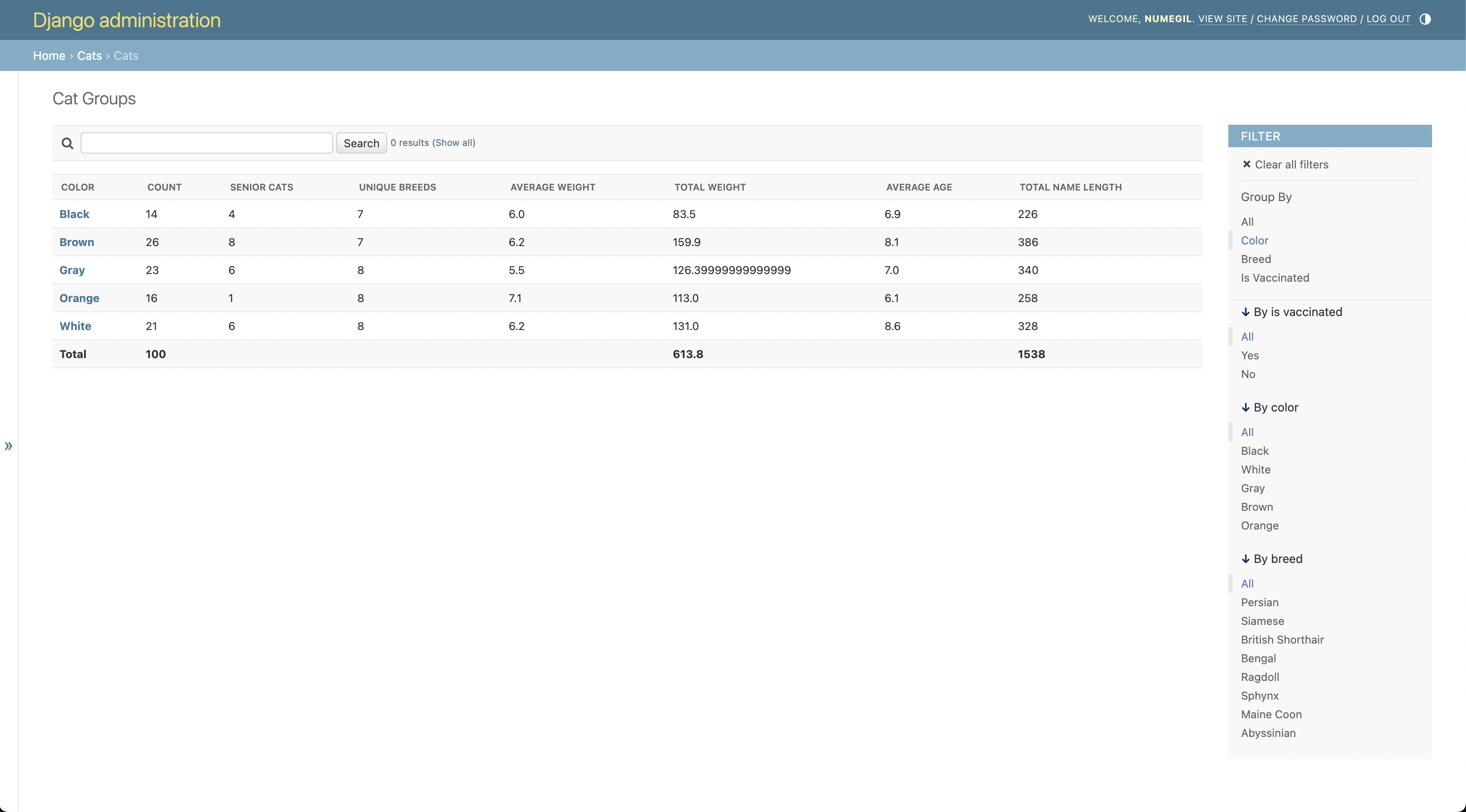
Django Admin Group-By adds SQL-style GROUP BY functionality to the Django admin, letting you easily group and summarize data with aggregations like counts, sums, and averages directly in the admin interface.
It works by adding a "Group by" filter in the admin sidebar, allowing you to select fields and instantly see summarized views of your data.
Key Features
- Group Data Directly in Admin: Easily group by model fields to quickly identify patterns.
- Built-in Aggregations: Perform counts, sums, averages and more including advanced custom aggregations.
- Date Grouping: Group by year, month, quarter, week, day and more with smart date formatting.
- Custom Calculations: Aggregate calculated fields with lambda functions that run after database queries.
- Compatible: Integrates seamlessly with Django admin filters, search, and permissions.
- Efficient: Performs aggregations server-side, suitable for large datasets.
Installation
pip install django-admin-groupby
Add the app to your INSTALLED_APPS in settings.py:
INSTALLED_APPS = [
    # ...
    'django.contrib.admin',
    # ...
    'django_admin_groupby',  # Add this line
]
Example Usage
Here's an example demonstrating both basic grouping and advanced aggregations:
from django.contrib import admin
from django.db.models import Count, Sum, Avg, Q
from django_admin_groupby.admin import GroupByAdminMixin
from django_admin_groupby import PostProcess
from .models import Product

@admin.register(Product)
class ProductAdmin(GroupByAdminMixin, admin.ModelAdmin):
    # ...

    # Date fields can use: year, month (includes year), quarter, week, day, weekday, hour
    group_by_fields = ['category', 'in_stock', 'created_at__month']

    # (optional, defaults to just counts if nothing is specified)
    group_by_aggregates = {
        'id': {
            'count': Count('id', extra={'verbose_name': "Total Products"}),
            'in_stock_count': Count('id', filter=Q(in_stock=True),
                                    extra={'verbose_name': "In-Stock Products"}),
        },
        'price': {
            'avg': Avg('price', extra={'verbose_name': "Average Price"}),
            'sum': Sum('price', extra={'verbose_name': "Total Value"}),
            'expensive_items': Count('id', filter=Q(price__gte=100),
                                     extra={'verbose_name': "Expensive Items (>= $100)"}),
        },
        'profit_margin': {
            'total': PostProcess(
                lambda product: product.price - product.cost,
                verbose_name="Profit Margin",
                aggregate="avg"
            )
        }
    }
Demo
A demo project is included in the repository to illustrate usage:
git clone https://github.com/numegil/django-admin-groupby.git
cd django-admin-groupby

# (optional)
python -m venv venv
source venv/bin/activate

pip install -e .
cd example
python manage.py migrate
python manage.py generate_cats --count 100
python manage.py createsuperuser
python manage.py runserver
Access the demo at http://localhost:8000/admin/cats/cat/.
License
MIT License. Feel free to use and modify this code.
Release history Release notifications | RSS feed


Download files
Download the file for your platform. If you're not sure which to choose, learn more about installing packages.
Source Distribution
Built Distribution
Filter files by name, interpreter, ABI, and platform.
If you're not sure about the file name format, learn more about wheel file names.
Copy a direct link to the current filters
File details
Details for the file django_admin_groupby-1.1.tar.gz.
File metadata
- Download URL: django_admin_groupby-1.1.tar.gz
- Upload date:
- Size: 15.2 kB
- Tags: Source
- Uploaded using Trusted Publishing? No
- Uploaded via: twine/6.1.0 CPython/3.9.6
File hashes
| Algorithm | Hash digest | |
|---|---|---|
| SHA256 |
1bf9a52ad34a7d62272b57d0ffc6c36576cb3f84ddc6d6931d44a57d8877be9a
|
|
| MD5 |
9d4a2aaf7cbea6a5f1db2b940059c701
|
|
| BLAKE2b-256 |
96cfc09698224c77662f9882f4e82a286922159818fc4c2e65f0f82b5ac6b232
|
File details
Details for the file django_admin_groupby-1.1-py3-none-any.whl.
File metadata
- Download URL: django_admin_groupby-1.1-py3-none-any.whl
- Upload date:
- Size: 14.2 kB
- Tags: Python 3
- Uploaded using Trusted Publishing? No
- Uploaded via: twine/6.1.0 CPython/3.9.6
File hashes
| Algorithm | Hash digest | |
|---|---|---|
| SHA256 |
f688cd05394c0538610c5888caee536618105fa377fa9d41cc0f2020323fda92
|
|
| MD5 |
ca27b779d3c9cf5194bdb5c96ad08ca9
|
|
| BLAKE2b-256 |
816c962f68dedbcf7ef2db3ca4730fc739f833d6974b986191bb7faf4f09f9c3
|






