
django-admin-inline-controls





Pagination, filtering and sortable columns for Django admin inlines — without leaving the change form.
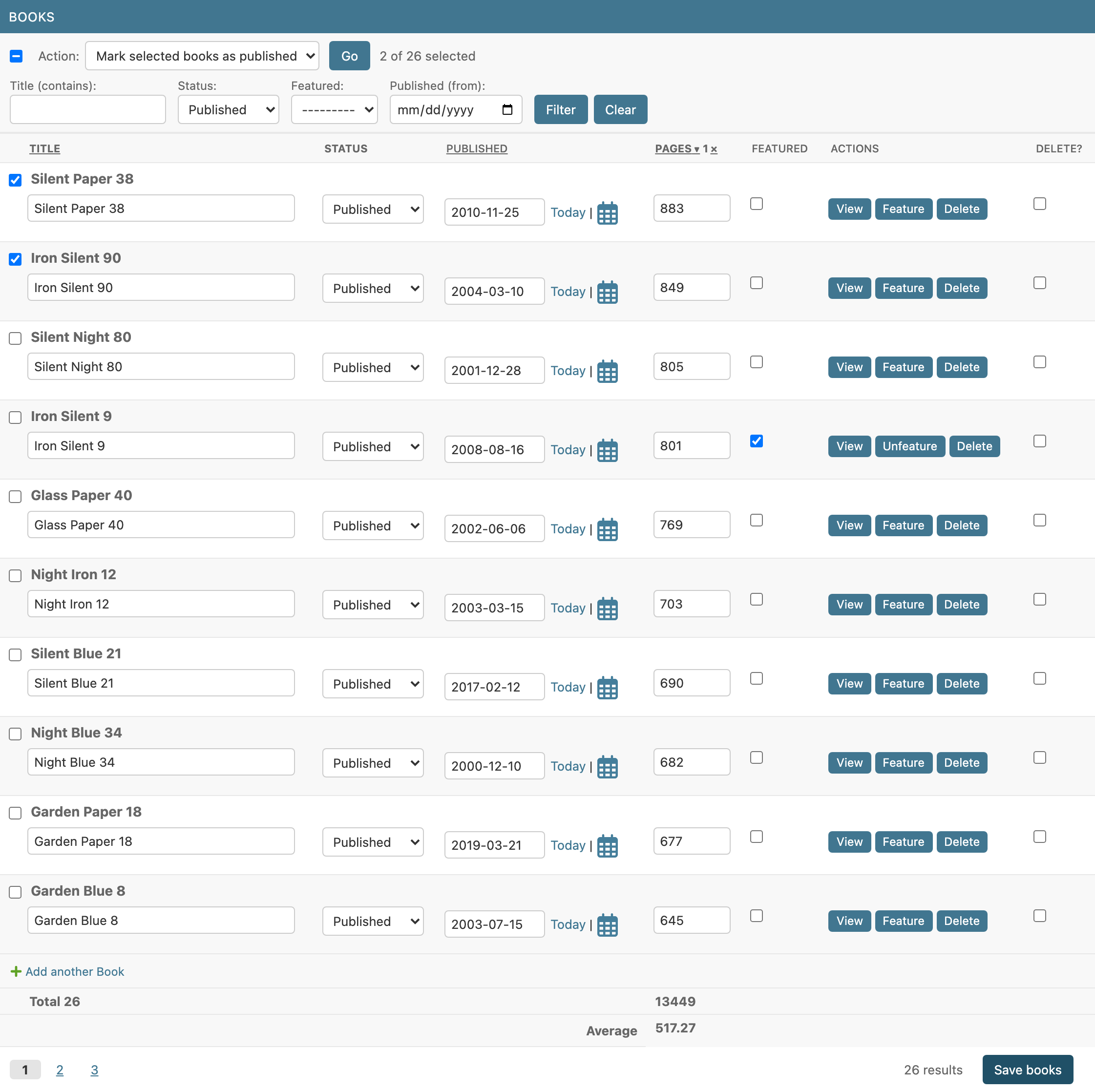
- Pagination: page links, or infinite scroll that appends rows as you reach the end of the inline.
- Filters: generated from lookups (
"status","title__icontains","published__gte"), your ownforms.Form, or a django-filterFilterSet. - Sortable columns: click a tabular header (or the toolbar links on stacked inlines); multi-column, like the changelist.
- Filters, sorting and page links refresh only that inline in place. Several controlled inlines on the same page keep independent state.
- Rows loaded from several pages are saved together, and unsaved edits are never silently thrown away.
- Optional "Save books" button that saves only that inline, without submitting (or reloading) the rest of the page.
- Actions on the selected rows, like the changelist's: checkboxes,
"select all", an action menu and a built-in
delete_selected. - Footer rows for totals, averages…:
Sum("pages")below its column. - Only depends on Django. No jQuery plugins, no htmx; works with
TabularInlineandStackedInline.
Install
pip install django-admin-inline-controls
Add to INSTALLED_APPS:
INSTALLED_APPS = [
    ...
    "django_admin_inline_controls",
]
Usage
Mix InlineControlsMixin in before TabularInline or StackedInline:
from django.contrib import admin
from django.db.models.functions import Lower

from django_admin_inline_controls.mixins import InlineControlsMixin


class BookInline(InlineControlsMixin, admin.TabularInline):
    model = Book
    extra = 0
    inline_per_page = 20
    inline_ordering_fields = {
        "title": Lower("title"),  # column name -> ordering expression
        "published": "published",
        "pages": "pages",
    }
    inline_filter_fields = ["title__icontains", "status", "featured", "published__gte"]


@admin.register(Author)
class AuthorAdmin(admin.ModelAdmin):
    inlines = [BookInline]
State lives in the URL, namespaced by the formset prefix
(?books-page=2&books-o=-pages&books-f-status=published), so links are
shareable and several inlines never clash.
Options
| Attribute | Default | |
|---|---|---|
inline_per_page |
None |
Rows per page. None disables pagination. |
inline_pagination |
"pages" |
"pages" or "infinite" (load more on scroll). |
inline_ordering_fields |
() |
Sortable columns: a list of field names, or {column: expression}. The expression can be a field path, an ORM expression (Lower("title"), F("date").asc(nulls_last=True)) or an explicit (ascending, descending) pair. |
inline_default_ordering |
() |
Applied after the user's ordering. Defaults to the queryset's / model's ordering; pk is always appended so pages are stable. |
inline_filter_fields |
() |
Filter lookups. A form is generated from them. |
inline_filter_form |
None |
Your own filter forms.Form. |
inline_controls_ajax |
True |
Refresh the inline in place instead of reloading the page. |
inline_save_button |
False |
Show a button that saves only this inline. See Saving only the inline. |
inline_bulk_actions |
() |
Actions for the selected rows. See Bulk actions. |
inline_actions |
() |
Buttons on each saved row, as in django-inline-actions. See Row actions. |
inline_footer_rows |
() |
Rows of totals, averages… below the table. See Footer rows. |
inline_footer_scope |
"filtered" |
What the footer rows add up: "filtered" or "page". |
inline_footer_tfoot |
True |
Render the footer rows in the table's <tfoot> (tabular inlines); False shows them as a summary line. |
inline_footer_tfoot_template |
django_admin_inline_controls/tfoot.html |
Template of that <tfoot>. |
Only columns declared in inline_ordering_fields can be sorted: ordering
by an arbitrary field from the URL would let anyone infer the values of
fields the inline never shows.
Custom filters
Generated fields depend on the model field and lookup (choices → select,
BooleanField → Yes/No/any, dates → date input, relations →
ModelChoiceField, __in → multiple select, __isnull → Yes/No/any…).
Override get_inline_filter_formfield(lookup) to change one, or bring
your own form and handle the fields that aren't plain lookups:
class BookFilterForm(forms.Form):
    q = forms.CharField(required=False, label="Search")
    status = forms.ChoiceField(
        required=False, choices=[("", "---"), *Book.Status.choices]
    )


class BookInline(InlineControlsMixin, admin.TabularInline):
    model = Book
    inline_per_page = 20
    inline_filter_form = BookFilterForm
    inline_filter_fields = ["status"]  # applied as lookups; "q" is handled below

    def filter_inline_queryset(self, request, queryset, filters):
        if search := filters.get("q"):
            queryset = queryset.filter(Q(title__icontains=search) | Q(isbn=search))
        return super().filter_inline_queryset(request, queryset, filters)
Every option also has a get_* hook taking (request, obj) —
get_inline_per_page, get_inline_ordering_fields,
get_inline_filter_fields, get_inline_filter_form_class,
get_inline_filter_form_kwargs (e.g. to pass the parent object to your
form) — and get_inline_filtered_queryset() is the single seam to plug in
any other filtering backend.
Infinite scroll
class ArticleInline(InlineControlsMixin, admin.TabularInline):
    model = Article
    inline_per_page = 30
    inline_pagination = "infinite"
The next page is appended when the "Load more" link scrolls into view (or
is clicked). Loaded rows join the formset, so everything visible is saved
with the object. Keep in mind Django's formset limits: by default a
formset accepts at most 1000 forms per submission (max_num).
Saving only the inline
from django_admin_inline_controls.mixins import (
    InlineControlsAdminMixin,
    InlineControlsMixin,
)


class BookInline(InlineControlsMixin, admin.TabularInline):
    model = Book
    inline_per_page = 20
    inline_save_button = True


@admin.register(Author)
class AuthorAdmin(InlineControlsAdminMixin, admin.ModelAdmin):
    inlines = [BookInline]
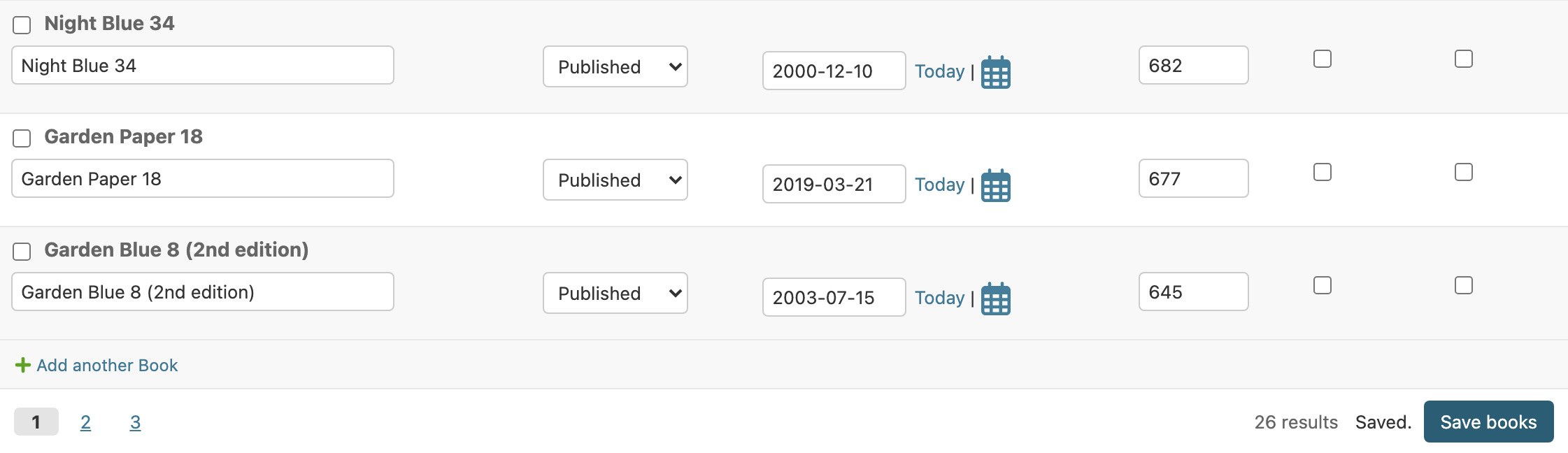
A "Save books" button (named after the inline's verbose_name_plural)
appears in the inline's footer, next to the pagination.
How it works
- Only that inline is sent: the JS posts its fields (files included), its
management form and the CSRF token with
fetch. Nothing from the parent form or from the other inlines. - The server builds just that formset against the parent object as
stored in the database (not the unsaved parent form), checks the
permissions, validates it and calls your
save_formset()inside a transaction. The change is recorded in the parent's history ("Changed Title for book X"), like a regular admin save; a save with no changes records nothing. - The response is the re-rendered inline, swapped in place:
- on errors, they are shown on their rows, as in a normal save, and the submitted values are kept so they can be fixed and saved again;
- on success, a "Saved." status is shown and the inline no longer counts as having unsaved changes.
- Unsaved changes elsewhere on the page (the parent form, other inlines) are left untouched: still on screen, still unsaved.
- The current filters, ordering and page are kept. In infinite mode, as many pages as were loaded are shown again after saving.
Requirements and caveats
- The parent
ModelAdminneedsInlineControlsAdminMixin. An inline cannot register URLs of its own, so the endpoint lives on the parent admin (<object_id>/inline-controls/<prefix>/save/). A system check (admin_inline_controls.E008) reports a missing mixin; without it no button is shown. - Permissions: the user needs change permission on the parent object (as for any save from the change form) and add, change or delete permission on the inline's model. Within the formset, the inline's own permissions apply exactly as in the change form (view-only rows are not validated, rows can only be deleted with delete permission, …).
save_formset(request, form, formset, change)gets an unchanged parent form, built from the saved instance (changed_datais empty), because the real one was not submitted. If you overridesave_formset()and readform.cleaned_data, that won't work from this button.save_model()andsave_related()are not called, so the parent's own fields (e.g. anauto_now"modified" date) are not updated.- Changes to the parent form are not saved by this button. It says so in its tooltip; use the admin's regular "Save" buttons to save everything.
- Not available on nested_admin inlines (
admin_inline_controls.E102).
Bulk actions
Like ModelAdmin.actions, for the rows of one inline:
from django.contrib import admin, messages
from django_admin_inline_controls.actions import inline_action
from django_admin_inline_controls.mixins import (
    InlineControlsAdminMixin,
    InlineControlsMixin,
)


class BookInline(InlineControlsMixin, admin.TabularInline):
    model = Book
    inline_per_page = 20
    inline_bulk_actions = ["mark_published", "export_csv", "delete_selected"]

    @inline_action(
        permissions=["change"],
        description="Mark selected %(verbose_name_plural)s as published",
    )
    def mark_published(self, request, queryset):
        count = queryset.update(status=Book.Status.PUBLISHED)
        self.message_user(request, f"{count} books published.", messages.SUCCESS)

    @inline_action(description="Export selected %(verbose_name_plural)s to CSV")
    def export_csv(self, request, queryset):
        response = HttpResponse(content_type="text/csv")
        response["Content-Disposition"] = 'attachment; filename="books.csv"'
        ...
        return response


@admin.register(Author)
class AuthorAdmin(InlineControlsAdminMixin, admin.ModelAdmin):
    inlines = [BookInline]
How it works
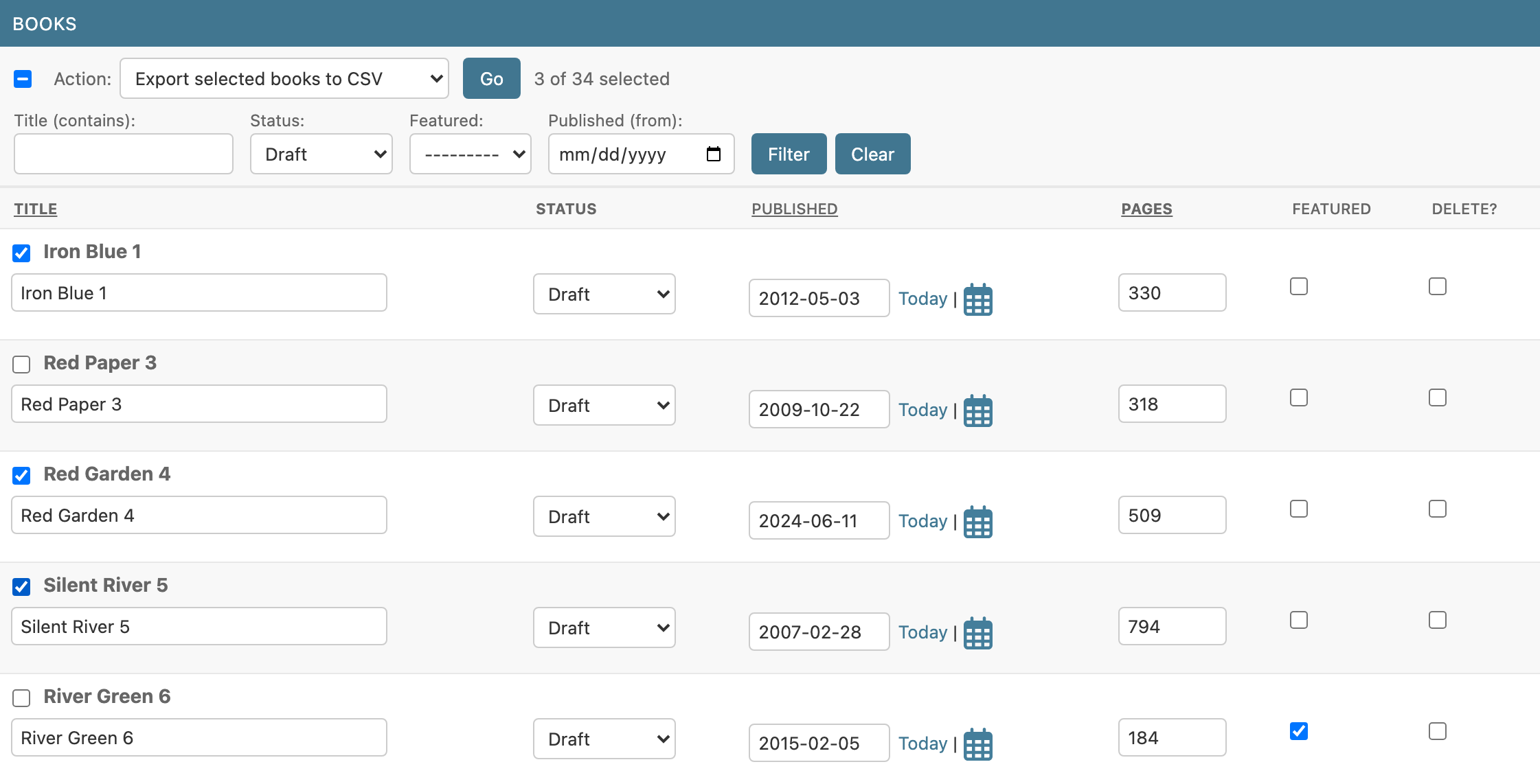
- Every saved row gets a checkbox next to its name; the action bar at the top of the inline has a "select all rows on this page" checkbox, the action menu, Go and the "2 of 25 selected" count. When the whole page is selected and there are more rows, "Select all 25" extends the selection to every row matching the current filters, on every page.
- The checkboxes and the menu are not part of the change form: they are never submitted when the object is saved, and ticking them doesn't count as an unsaved change.
- Go posts only the action name and the selected primary keys. The action runs on a queryset that is always restricted to children of the object being edited (and to the current filters), so a tampered primary key can't reach other rows.
- If the inline has unsaved edits, you are asked first: the inline is re-rendered after the action, so they would be lost.
Writing actions
- Same signature as changelist actions:
action(inline, request, queryset). Entries ofinline_bulk_actionscan be method names, callables or"delete_selected". The parent object isrequest.inline_controls_parent. @inline_actionis@admin.action(permissions,description) plusconfirmation: a prompt shown before running.descriptionandconfirmationmay use%(verbose_name)sand%(verbose_name_plural)s;confirmationalso%(count)s, the number of rows it will run on. Plain@admin.actionfunctions work too.permissions=["change"]checks the inline'shas_change_permission()(with the parent object); actions the user may not run are not offered, and are refused if posted anyway.- Use
self.message_user()as in aModelAdmin: the messages are shown next to the action menu. - Return
Noneto re-render the inline (keeping the page, filters and ordering; in infinite mode, the loaded rows), a file response (it is downloaded and the page stays as is), or a redirect (followed). Any other response replaces the page. - Actions don't record anything in the history by themselves, as in the
changelist. The built-in
delete_selecteddeletes the rows one by one (sodelete()overrides and signals run), asks "Delete 3 selected books? This cannot be undone.", records the deletions in the parent's history and reports rows protected byon_delete=PROTECTinstead of failing.
Requirements: like the save button, InlineControlsAdminMixin on the
parent ModelAdmin (admin_inline_controls.E010), and the user needs view
or change permission on the parent object. Not available on nested_admin
inlines (admin_inline_controls.E103).
Row actions
Buttons on each saved row, in an Actions column: no selection, no menu,
no "Go". The API is django-inline-actions's
— inline_actions, get_inline_actions(request, obj), ViewAction,
DeleteAction, (request, obj, parent_obj=None) — so its inlines move
here by changing the imports.
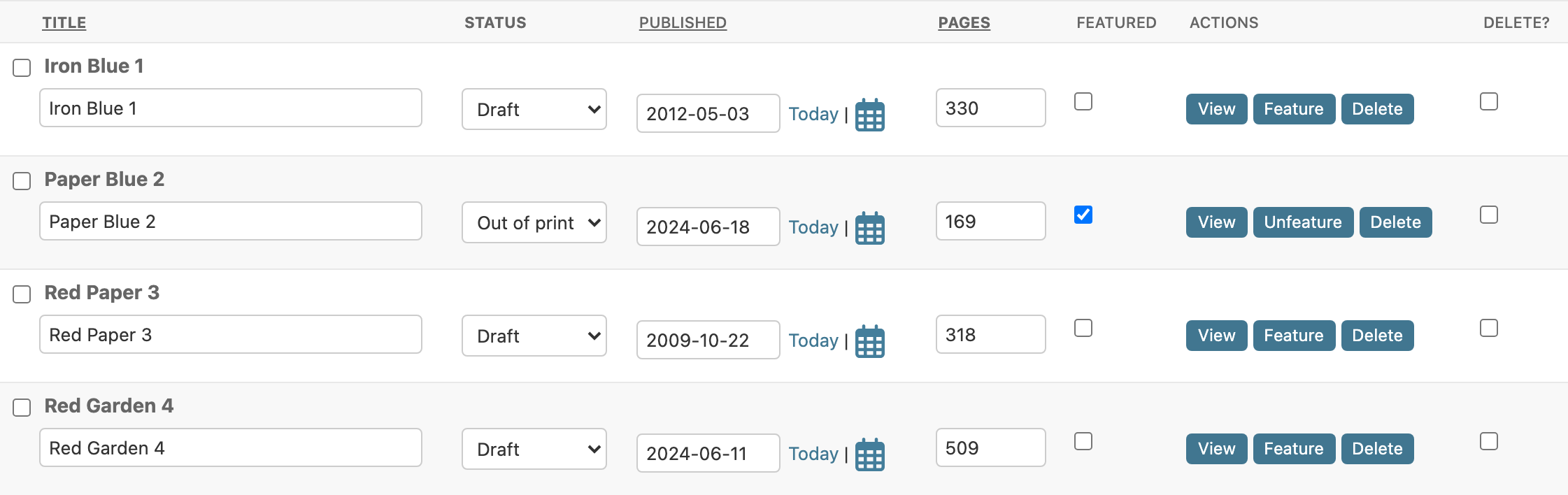
from django_admin_inline_controls.actions import DefaultActionsMixin


class BookInline(DefaultActionsMixin, InlineControlsMixin, admin.TabularInline):
    model = Book
    inline_actions = ["toggle_featured"]  # plus View and Delete

    def toggle_featured(self, request, obj, parent_obj=None):
        obj.featured = not obj.featured
        obj.save(update_fields=["featured"])
        self.message_user(request, f"“{obj}” updated.", messages.SUCCESS)

    def get_toggle_featured_label(self, obj):
        return "Unfeature" if obj.featured else "Feature"
inline_actionslists method names or callables, and is gathered from every class of the inline (bases first): mixins add theirs.inline_actions = Noneremoves the column.- Built-in: the mixins
ViewAction(view_action: a link to the row's change view, when its model has one on the site and the user may view it),DeleteAction(delete_action: asks "Delete “Book 01”? This cannot be undone.", deletes it likedelete_selectedand records it in the parent's history; needs the delete permission) andDefaultActionsMixin(both). Without a mixin, list"view"/"delete". - Your own, as methods or callables, in either form:
action(self, request, obj, parent_obj=None)for one row;action(self, request, queryset), like a bulk action (@inline_action,permissions,confirmation…), run on a queryset with only that row: the same function can be in both lists.
- Per row: the label, CSS classes and HTML attributes come from the
function's
short_description,css_classesandattribute_properties(a dict, escaped, or a string), or fromget_<action>_label(obj),get_<action>_css(obj)andget_<action>_attr(obj)on the inline. Overrideget_inline_actions(request, obj)to offer some actions on some rows only (objis the row; the parent isrequest.inline_controls_parent), asDeleteActiondoes. - They return what bulk actions do:
Nonere-renders the inline with the messages fromself.message_user()(shown in its footer), a file is downloaded, a redirect is followed. - The buttons are rendered by the server, in a read-only column added to
the inline's fields (
render_inline_actions, as in django-inline-actions; put it in yourfieldsorfieldsetsto place it yourself), and shown once the JS is ready. Its template isinline_actions_template(django_admin_inline_controls/row_actions.html).
Coming from django-inline-actions: change
inline_actions.admin.InlineActionsMixin for InlineControlsMixin,
inline_actions.actions for django_admin_inline_controls.actions, and put
InlineControlsAdminMixin on the parent ModelAdmin instead of
InlineActionsModelAdminMixin. The actions run without submitting the
whole change form (unsaved changes elsewhere on the page are kept), only
the inline is refreshed, and each action's permissions are checked by the
server before it runs. Buttons on the changelist's rows aren't covered:
keep InlineActionsModelAdminMixin for those, next to
InlineControlsAdminMixin (they don't clash on a ModelAdmin).
Requirements: as for bulk actions, InlineControlsAdminMixin on the
parent ModelAdmin (admin_inline_controls.E019); not available on
nested_admin inlines (admin_inline_controls.E105). They only appear in
the change view, once the parent exists.
Footer rows
Totals, averages or any other summary below the inline's columns:
from django.db.models import Avg, Count, Sum


class BookInline(InlineControlsMixin, admin.TabularInline):
    model = Book
    inline_per_page = 20
    inline_footer_rows = [
        ("Total", {"title": Count("pk"), "pages": Sum("pages")}),
        ("Average", {"pages": Avg("pages")}),
    ]
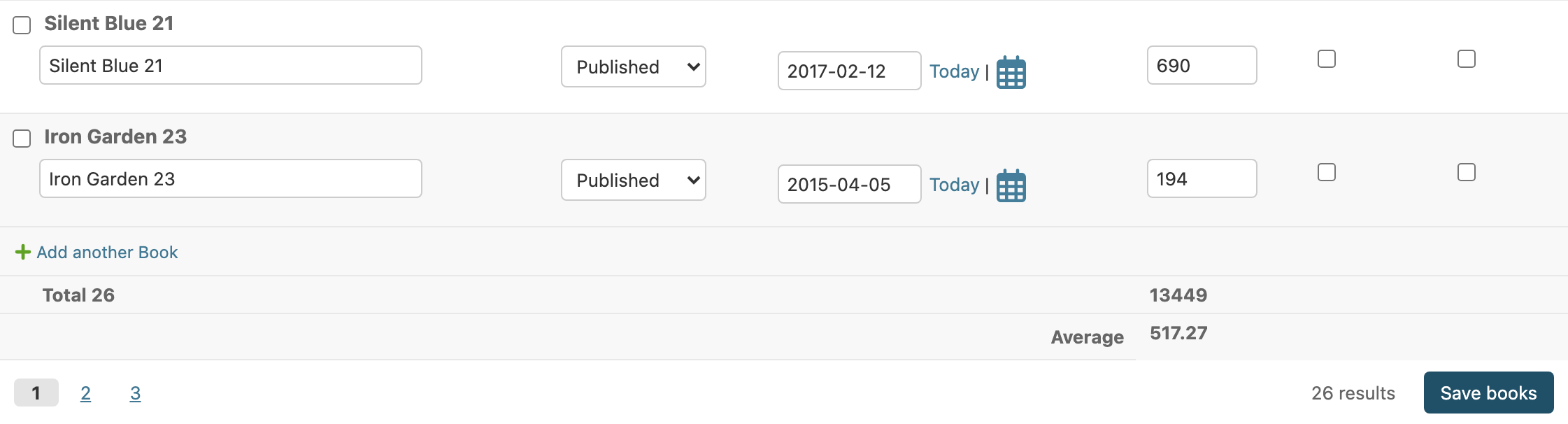
- Each row is a label and
{column: value}. A value is an aggregate (Sum,Avg,Count,Max…,filter=included), acallable(queryset)for anything else, or a constant. All the aggregates of all the rows run in one query. - What is added up —
inline_footer_scope:"filtered"(default): every row matching the current filters, on every page. With infinite scroll it doesn't depend on what is loaded."page": the rows shown (not available with infinite scroll,admin_inline_controls.E016).
- Values come from the database. The rows follow filtering, sorting,
paging, saving the inline and actions, since they arrive with the
refreshed inline — with
inline_save_button, saving the inline updates them without reloading the page. - Where they go — rendered by the server, no JS: on tabular inlines,
the rows are the table's own
<tfoot>, each value under its column; the label spans the columns before the first value. The inline's template is rendered as usual (Django's, a theme's or your own) and the<tfoot>is inserted before its</table>, so there is no copy of Django's template to keep in sync. On stacked inlines, withinline_footer_tfoot = False, or when a value's column isn't a column of the table, they are a summary line in the footer ("Total: Pages 3250"). - In the add view there are no saved rows to aggregate yet: tabular
inlines get the same
<tfoot>, labels anddata-*attributes with empty values (data-value=""), for your JS to fill in from the new rows if you want;get_inline_footer_rows(request, obj)getsobj=None. Stacked inlines show nothing until the object is saved.
Changing how they look
-
The values' format, in Python: by default the plain value, floats and decimals rounded to 2 decimals at most (
1234.5). Overrideformat_inline_footer_value(column, value)for currencies, units, localized numbers… (return safe HTML for markup):from django.utils.formats import number_format def format_inline_footer_value(self, column, value): if column == "amount": return format_html("{} <small>USD</small>", number_format(value, 2)) return super().format_inline_footer_value(column, value)
-
Which rows, in Python:
get_inline_footer_rows(request, obj)— e.g. one row per VAT rate from your own model method. -
The markup, in templates: the
<tfoot>isdjango_admin_inline_controls/tfoot.html(blockstfoot,tfoot_row,tfoot_label,tfoot_cell,tfoot_value), chosen per inline withinline_footer_tfoot_template; the summary line is infooter.html(blocksfooter_rows,footer_row,footer_cell). Extend them and override only the block you need:{% extends "django_admin_inline_controls/tfoot.html" %} {% block tfoot_value %}<strong>{{ slot.cell.value }}</strong>{% endblock %}
Using the values from your own JS
Every value is in the HTML the server renders, with its raw number, for your scripts to read — nothing to call:
| Attribute / selector | What it is |
|---|---|
[data-footer-key="<row index>:<column>"] |
A value's element (in the <tfoot> or the summary). |
data-footer-row, data-column |
Its row label and column. |
data-value |
Its number as plain digits ("1234.5"), "" when it isn't a number; the element's text is the formatted value. |
const total = document.querySelector(
    '#books-inline-controls [data-footer-row="Total"][data-column="pages"]',
);
Number(total.dataset.value); // 3250
When the inline is refreshed in place (filtering, paging, saving it,
actions) the footer comes back re-rendered, and inline-controls:updated
bubbles from the new content: read the values again there.
Optional extras
The core only depends on Django. Integrations with third-party packages are opt-in.
django-filter
pip install django-admin-inline-controls[filters]
from django_admin_inline_controls.contrib.filters import FilterSetInlineControlsMixin


class BookInline(FilterSetInlineControlsMixin, admin.TabularInline):
    model = Book
    inline_per_page = 20
    inline_filterset_class = BookFilterSet

    def get_inline_filterset_kwargs(self, request, obj):
        return {"parent": obj}  # extra kwargs for your FilterSet's __init__
The filterset gets the request too (self.request).
django-nested-admin
pip install django-admin-inline-controls[nested]
import nested_admin
from django_admin_inline_controls.contrib.nested import NestedInlineControlsMixin


class BookInline(NestedInlineControlsMixin, nested_admin.NestedTabularInline):
    model = Book
    inline_per_page = 20
nested_admin keeps its own client-side formset state, so with it filters, sorting and page links reload the page instead of swapping the inline, and infinite scroll, the save-inline button and bulk and row actions are not available.
Themes
- django-unfold:
UnfoldInlineControlsMixin(theunfoldextra).
Customizing templates
Three templates render the controls around the inline's own template
(which is left untouched: admin/edit_inline/tabular.html, a custom one,
…). Each is chosen per inline, so a template of yours can extend the
library's and override only the blocks it needs:
| Option | Default | Renders |
|---|---|---|
inline_controls_template |
django_admin_inline_controls/inline.html |
The wrapper: toolbar, the inline itself, footer. |
inline_controls_toolbar_template |
django_admin_inline_controls/toolbar.html |
Actions, filters, sort links. |
inline_controls_footer_template |
django_admin_inline_controls/footer.html |
Pagination / infinite scroll, save button. |
class BookInline(InlineControlsMixin, admin.TabularInline):
    model = Book
    inline_controls_toolbar_template = "admin/demo/book_inline_toolbar.html"
{# templates/admin/demo/book_inline_toolbar.html #}
{% extends "django_admin_inline_controls/toolbar.html" %}

{% block filter_apply_label %}Search{% endblock %}

{% block filter_field %}
  <div class="my-filter">{{ block.super }}</div>
{% endblock %}

{% block toolbar_end %}
  <a href="{% url 'book-help' %}">Help</a>
{% endblock %}
To change them for every inline, put templates with the same paths in your
project's templates/ directory (before the app templates), or set the
options on a base inline class of your own.
In all three, controls is the inline's state (filter form, ordering
columns, page links, actions, URLs…) and inline_admin_formset is
Django's. The JS finds its elements by the inline-controls-* classes, the
data-inline-controls-* attributes and the container's id: keep them when
you replace a block's markup ({{ block.super }} keeps the original).
inline.html
| Block | Contains |
|---|---|
container |
The whole wrapper <div>. |
container_classes, container_attrs |
Extra classes / attributes for the wrapper (empty). |
before_toolbar, before_inline, after_inline, after_footer |
Empty slots between the parts. |
toolbar |
Includes inline_controls_toolbar_template. |
inline |
Includes the inline's own template. |
footer |
Includes inline_controls_footer_template. |
inline_without_controls |
What is rendered when the controls are off (the add view): the inline and, if it has footer rows, their empty <tfoot>. |
toolbar.html
| Block | Contains |
|---|---|
toolbar |
The whole toolbar. |
toolbar_classes |
Extra classes (empty). |
toolbar_start, toolbar_end |
Empty slots at both ends. |
actions |
The action bar. |
action_menu, action_label, action_empty_option, action_option |
The "Action:" select and its options (action_option is rendered once per action, with action). |
action_button, action_button_label |
The Go button. |
action_selection |
The "2 of 25 selected" count and the "Select all" link. |
action_status |
Where action messages appear. |
filters |
The filter form. |
filter_fields, filter_field |
All fields / one field (once per field, with field). |
filter_buttons, filter_apply_button, filter_apply_label, filter_clear_button, filter_clear_label |
The Filter and Clear buttons. |
ordering, ordering_label, ordering_column |
The "Sort by:" links (once per column, with column). |
footer.html
| Block | Contains |
|---|---|
footer |
The whole footer. |
footer_classes |
Extra classes (empty). |
footer_start, footer_end |
Empty slots at both ends. |
footer_rows, footer_row, footer_cell |
The footer rows' summary line (footer_row once per row, with row; footer_cell once per value, with cell), when they aren't in the table's <tfoot>. |
pagination |
Page links or the infinite-scroll status. |
page_links, page_link |
The page links (page_link once per link, with link). |
result_count |
"25 results". |
infinite, infinite_count, load_more, load_more_label |
Infinite mode: "Showing 15 of 70" and "Load more". |
save, save_status, save_button, save_label |
The save-inline button and its status. |
row_actions_status |
Where the row actions' messages appear. |
row_actions.html (one row's buttons): row_actions, row_action
(once per action, with action: name, label, css_classes, attrs,
confirmation and, for view, url).
inline_response.html (the save/action endpoints' response):
response, inlines. Set inline_controls_response_template on the
ModelAdmin to use another one.
Adapting to another admin markup
The templates decide the HTML of the controls, but the JS also has to find
its way in the inline's markup — Django's tabular.html /
stacked.html, or whatever your theme (Unfold, Jazzmin, Grappelli…) or
your own inline template renders. Where to look is configurable per inline
with inline_controls_selectors, merged over these defaults
(DEFAULT_SELECTORS in django_admin_inline_controls.controls):
| Key | Default | Used for |
|---|---|---|
container |
.inline-group fieldset |
Where the toolbar and footer are moved to. |
heading |
h2 |
Inside container: the toolbar goes right after it (or its <summary>). |
footer_parent |
:scope > details |
Inside container: the footer is appended here, else to container. |
table_head |
.inline-group table thead |
The header row with the sortable columns. |
column_header |
th.column-{name} |
A sortable column's header ({name}: the column). |
form_rows |
[id] |
Inside the inline group: each form's container ({prefix}: the formset's). Its index comes from its id (<prefix>-<n>) or, without one, from its fields' names. |
saved_row |
.has_original |
A form container of a saved object (not a new one). |
row_label |
:scope > td.original > p, :scope > h3, :scope > td.original |
Inside a saved row: where its action checkbox goes. |
tabular_rows |
{group} .tabular.inline-related tbody:first > tr.form-row |
jQuery selector of the rows Django's inlines.js manages, re-initialized after a refresh ({group}: #<prefix>-group). |
stacked_rows |
{group} .inline-related |
The same for stacked inlines. |
Each value is one selector or a list tried in order. Only set the keys that differ:
class BookInline(InlineControlsMixin, admin.TabularInline):
    model = Book
    template = "admin/my_theme/tabular.html"
    inline_ordering_fields = ["title", "pages"]
    inline_controls_selectors = {
        "container": ".card",
        "heading": ".card-title",
        "table_head": "table.grid thead",
        "column_header": 'th[data-col="{name}"]',
        "row_label": ":scope > td.row-name > .label",
        "tabular_rows": "{group} table.grid tbody > tr.form-row",
    }
For a whole theme, set it on a base inline class of your own. When
something isn't found, the controls degrade instead of breaking: sort links
stay in the toolbar if a column header is missing, checkboxes go into the
row itself, and the toolbar and footer stay around the inline. The
management form and the fields' names come from Django's formset, so they
are never configured. On tabular inlines, the footer rows are laid out
under the header cells with the column-<field> class, whatever columns
come before or after them.
To place the toolbar and footer yourself, listen for
inline-controls:place (it bubbles from the controls' wrapper,
.inline-controls, before they are moved) and cancel it:
document.addEventListener("inline-controls:place", (event) => {
    const { toolbar, footer } = event.detail;
    event.target.querySelector(".my-panel-header").append(toolbar);
    event.target.querySelector(".my-panel-footer").append(footer);
    event.preventDefault();
});
System checks
Misconfigurations are reported by manage.py check (and at startup):
| ID | Problem |
|---|---|
admin_inline_controls.E001 |
inline_pagination is not "pages" or "infinite". |
admin_inline_controls.E002 |
inline_per_page is not a positive integer or None. |
admin_inline_controls.E003 |
inline_pagination = "infinite" without inline_per_page. |
admin_inline_controls.E004 |
inline_filter_fields is a string instead of a list or tuple. |
admin_inline_controls.E005 |
inline_filter_fields refers to a field the model doesn't have. |
admin_inline_controls.E006 |
inline_ordering_fields is not a list, tuple or dict. |
admin_inline_controls.E007 |
An inline_ordering_fields column starts with - or contains a comma. |
admin_inline_controls.E008 |
inline_save_button = True but the parent ModelAdmin lacks InlineControlsAdminMixin. |
admin_inline_controls.E009 |
An inline_bulk_actions entry is not a method of the inline, a callable or a built-in action. |
admin_inline_controls.E010 |
inline_bulk_actions is set but the parent ModelAdmin lacks InlineControlsAdminMixin. |
admin_inline_controls.E018 |
An inline_actions entry is not a method of the inline, a callable or a built-in row action. |
admin_inline_controls.E019 |
inline_actions is set but the parent ModelAdmin lacks InlineControlsAdminMixin. |
admin_inline_controls.E011 |
inline_controls_selectors is not a dict. |
admin_inline_controls.E012 |
An inline_controls_selectors key is unknown, or its value is not a selector or a non-empty list of selectors. |
admin_inline_controls.E013 |
inline_footer_rows is not a list of (label, {column: value}) pairs. |
admin_inline_controls.E014 |
An inline_footer_rows column is not a field of the model or of the inline. |
admin_inline_controls.E015 |
inline_footer_scope is not "filtered" or "page". |
admin_inline_controls.E016 |
inline_footer_scope = "page" with infinite scroll. |
admin_inline_controls.E017 |
inline_footer_tfoot is not True or False. |
admin_inline_controls.E101 |
inline_pagination = "infinite" on a nested_admin inline. |
admin_inline_controls.E102 |
inline_save_button = True on a nested_admin inline. |
admin_inline_controls.E103 |
inline_bulk_actions on a nested_admin inline. |
admin_inline_controls.E104 |
Unfold's per_page on an inline with UnfoldInlineControlsMixin. |
admin_inline_controls.E105 |
inline_actions on a nested_admin inline. |
JavaScript files
Each inline loads only the scripts it uses, through its media: core.js
(pagination, filters, sorting, placing the controls) always, save.js
with inline_save_button, actions.js with inline_bulk_actions or
inline_actions, and
contrib/unfold.js with UnfoldInlineControlsMixin. The admin merges the
media of every inline on the page, so each file loads at most once.
JavaScript events
After an inline is refreshed in place, or rows are appended, an
inline-controls:updated event bubbles from the new content: hook your own
widget initialization there (or read the footer values again, see
Using the values from your own JS).
Before the toolbar and footer are placed, a
cancelable inline-controls:place event bubbles from the controls'
wrapper (see Adapting to another admin markup). The admin's own inline machinery, autocomplete,
date/time shortcuts and filter_horizontal widgets are re-initialized
automatically.
Demo
cd example
python manage.py migrate
python manage.py seed_demo      # admin/admin + an author with many books
python manage.py runserver
Translations
Ships a Spanish (es) translation; every text of the controls — the
toolbar, the footer, the generated filter labels ("Title (contains)"), the
action messages and the JS prompts, which the server sends already
translated — follows the admin's active language.
Messages identical to Django admin's own ("Filter", "Delete selected
%(verbose_name_plural)s", …) use the admin's translation, since
django.contrib.admin comes first in INSTALLED_APPS: the inline then
reads exactly like the changelist.
Compatibility
Django 4.2 – 6.1, Python 3.10+.
License
MIT
1 maintainer

Metadata
1 maintainer
Release files for django-admin-inline-controls 0.1.1
For a detailed explanation of source distributions (sdists) and built distributions (wheels), please see the package formats documentation.
Source distribution (sdist)
| File | Size | Uploaded | |
|---|---|---|---|
| django_admin_inline_controls-0.1.1.tar.gz | 1.4 MB | Details |
Built distribution (wheel)
| File | Interpreter | ABI | Platform | Reset |
|---|---|---|---|---|
| django_admin_inline_controls-0.1.1-py3-none-any.whl | Python 3 | none | any | Details |
Total release size: 1.5 MB
Release files / django_admin_inline_controls-0.1.1.tar.gz
| Download URL | django_admin_inline_controls-0.1.1.tar.gz |
|---|---|
| Size | 1.4 MB |
| Tags | Source |
|
SHA-256 checksum How to use checksums |
26db83e7eb173a09967c1533d9db240e0418ccf5473455e47df1653323769577
|
|
BLAKE2b-256 checksum How to use checksums |
f621b485fecbcd8787329e0b4595cbebe3d4f0f27a0f0a53ee462e15ace6395f
|
| Upload date | |
|
Uploaded using Trusted Publishing? What is trusted publishing? |
Yes |
| Uploaded via |
twine/7.0.0 CPython/3.13.14
|
Provenance
Provenance describes where a file came from. On PyPI, provenance is shared via attestations, which provide a verifiable record of the build or publishing details. View details, limitations and caveats.


PyPI Publish Attestation
PyPI verified that this artifact, at this checksum, originated from the publisher listed below.
Signed by GitHub Actions, verified by PyPI on Oct 7, 2026.
Transparency logRelease files / django_admin_inline_controls-0.1.1-py3-none-any.whl
| Download URL | django_admin_inline_controls-0.1.1-py3-none-any.whl |
|---|---|
| Size | 69.0 kB |
| Tags | Python 3 |
|
SHA-256 checksum How to use checksums |
5243e7e74ed05baeae69e2d5d1924d423a4ca04d08a700048faa44d7a4c8027d
|
|
BLAKE2b-256 checksum How to use checksums |
0a52de89fab1607c7341aa53c94058b73a8cfaf955870d033a5d82adcf5e0b9d
|
| Upload date | |
|
Uploaded using Trusted Publishing? What is trusted publishing? |
Yes |
| Uploaded via |
twine/7.0.0 CPython/3.13.14
|
Provenance
Provenance describes where a file came from. On PyPI, provenance is shared via attestations, which provide a verifiable record of the build or publishing details. View details, limitations and caveats.
PyPI Publish Attestation
PyPI verified that this artifact, at this checksum, originated from the publisher listed below.
Signed by GitHub Actions, verified by PyPI on Oct 7, 2026.
Transparency log













