
django-admin-rangefilter-jazzmin app, add the filter by a custom date range on the Django Jazzmin admin UI.

Project description


django-jazzmin-admin-rangefilter
A Django app that adds a filter by date range and numeric range to the Django Jazzmin admin UI.
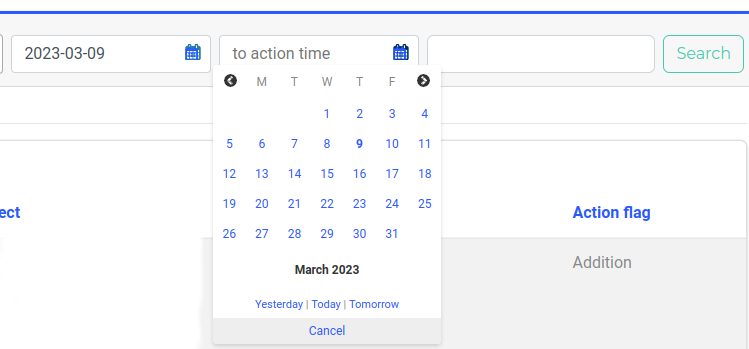
Requirements
Python 2.7+ or Python 3.6+
Django 1.8+
Installation
Use your favorite Python package manager to install the app from PyPI, e.g.
Example:
pip install django-jazzmin-admin-rangefilter
Add rangefilter to INSTALLED_APPS:
Example:
INSTALLED_APPS = (
    ...
    'rangefilter',
    ...
)
Example usage
In admin
from django.contrib import admin
from rangefilter.filters import DateRangeFilter, DateTimeRangeFilter, NumericRangeFilter

from .models import Post


@admin.register(Post)
class PostAdmin(admin.ModelAdmin):
    list_filter = (
        ('created_at', DateRangeFilter), ('updated_at', DateTimeRangeFilter),
        ('num_value', NumericRangeFilter),
    )

    # If you would like to add a default range filter
    # method pattern "get_rangefilter_{field_name}_default"
    def get_rangefilter_created_at_default(self, request):
        return (datetime.date.today, datetime.date.today)

    # If you would like to change a title range filter
    # method pattern "get_rangefilter_{field_name}_title"
    def get_rangefilter_created_at_title(self, request, field_path):
        return 'custom title'
Support Content-Security-Policy
For Django 1.8+, if django-csp is installed, nonces will be added to style and script tags. The setting ADMIN_RANGEFILTER_NONCE_ENABLED controls this behavior.
INSTALLED_APPS = (
    ...
    'rangefilter',
    'csp',
    ...
)Release history Release notifications | RSS feed

Download files
Download the file for your platform. If you're not sure which to choose, learn more about installing packages.
Source Distribution
Built Distribution
Filter files by name, interpreter, ABI, and platform.
If you're not sure about the file name format, learn more about wheel file names.
Copy a direct link to the current filters
File details
Details for the file django_admin_rangefilter_jazzmin-1.0.0.tar.gz.
File metadata
- Download URL: django_admin_rangefilter_jazzmin-1.0.0.tar.gz
- Upload date:
- Size: 22.4 kB
- Tags: Source
- Uploaded using Trusted Publishing? No
- Uploaded via: twine/6.1.0 CPython/3.12.3
File hashes
| Algorithm | Hash digest | |
|---|---|---|
| SHA256 |
3f62efd504033b4ca3bf4ae29c499a7b6df9541c5c5de00d6e5fb0c898f2d81c
|
|
| MD5 |
1f3a9734d33af511ebe5cb0a772c5907
|
|
| BLAKE2b-256 |
08f3f71d2a76826df654578f1971c9770c16701b761aedeb1ce0cd09f91857b9
|
File details
Details for the file django_admin_rangefilter_jazzmin-1.0.0-py3-none-any.whl.
File metadata
- Download URL: django_admin_rangefilter_jazzmin-1.0.0-py3-none-any.whl
- Upload date:
- Size: 44.7 kB
- Tags: Python 3
- Uploaded using Trusted Publishing? No
- Uploaded via: twine/6.1.0 CPython/3.12.3
File hashes
| Algorithm | Hash digest | |
|---|---|---|
| SHA256 |
f4df810eba7135a6a1645ce8b9f2ac5db4959b982467490d00fa1e86a2dbf671
|
|
| MD5 |
e00e4683979979b6a8c4f62e4f1a8d4b
|
|
| BLAKE2b-256 |
d26f14c6fd21f342203f4ea22758ec15670153388e2c72eace1d65f3b1511ed8
|






