
Django Admin relation links
An easy way to add links to relations in the Django Admin site.
Preview
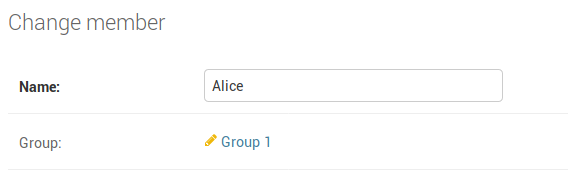
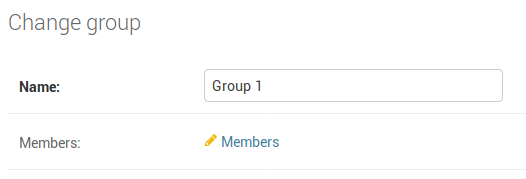
Imagine you have admin pages for 2 models: Member and Group. Member has a ForeignKey relation to Group.
- When you look at a member, you want to easily navigate to its group.
- When you look at a group, you want to easily navigate to a list of the members in that group.
With the help of this app you can easily create these links:
Member list page:

Member change page:
Group list page:

Group change page:
Install
pip install django-admin-relation-links
How to use
The links are placed on the change page of the model and go to the change
list page or the change page of the related model, depending on whether the
related model has a ForeignKey to this model or this model has a ForeignKey
to the related model, or if it's a OneToOneField.
So for example, if you have these models:
from django.db import models


class Group(models.Model):
    name = models.CharField(max_length=200)


class Member(models.Model):
    name = models.CharField(max_length=200)
    group = models.ForeignKey(Group, related_name='members')
Then in the admin you can add links on the Group change page to the
Member change list page (all the members of that group) and on the Member
change page a link to the Group change page (the group of that member).
Use the changelist_links and change_links fields:
from django.contrib import admin
from django_admin_relation_links import AdminChangeLinksMixin


@admin.register(Group)
class GroupAdmin(AdminChangeLinksMixin, admin.ModelAdmin):

    list_display = ['name']

    # Use the `related_name` of the `Member.group` field.
    # If you have no `related_name` specified on your model, use the default
    # `related_name` assigned by Django.
    changelist_links = ['members']

@admin.register(Member)
class MemberAdmin(AdminChangeLinksMixin, admin.ModelAdmin):
    list_display = ['name']

    # Here we just specify the name of the `ForeignKey` field.
    change_links = ['group']
List page links
It is possible to show links on admin list page as well, using the field {field_name}_link:
@admin.register(Member)
class MemberAdmin(AdminChangeLinksMixin, admin.ModelAdmin):
    list_display = ['name', 'group_link']  # Show link to group *change page* on member *list page*
    change_links = ['group']
Link label
By default, the label of the link is the string representation of the model
instance. You can change the label by creating a method named
{field_name}_link_label() like this:
    def group_link_label(self, group):
        return '{} ({} members)'.format(
            group.name,
            group.members.count()
        )
Extra options
You can also set extra options like label, model and lookup_filter like this:
@admin.register(Group)
class GroupAdmin(AdminChangeLinksMixin, admin.ModelAdmin):
    list_display = ['name']
    changelist_links = [
        ('members', {
            'label': 'All members',  # Used as label for the link
            'model': 'Member',  # Specify a different model, you can also specify an app using `app.Member`
            'lookup_filter': 'user_group'  # Specify the GET parameter used for filtering the queryset
        })
    ]
List page ordering
When showing links on the list page, when you use that field for ordering, the
default ordering field is the first field in the ordering option on the
Meta class of the model of the related field. You can specify an alternative
ordering like this:
@admin.register(Group)
class MemberAdmin(AdminChangeLinksMixin, admin.ModelAdmin):
    list_display = ['name', 'group_link']
    change_links = [
        ('group', {
            'admin_order_field': 'group__name',  # Allow to sort members by `group_link` column
        })
    ]
1 maintainer

Metadata
1 maintainer
Release files for django-admin-relation-links 0.2.5
For a detailed explanation of source distributions (sdists) and built distributions (wheels), please see the package formats documentation.
Source distribution (sdist)
| File | Size | Uploaded | Provenance | |
|---|---|---|---|---|
| django-admin-relation-links-0.2.5.tar.gz | 4.4 kB | Without provenance | Details |
Release files / django-admin-relation-links-0.2.5.tar.gz
| Download URL | django-admin-relation-links-0.2.5.tar.gz |
|---|---|
| Size | 4.4 kB |
| Tags | Source |
|
SHA-256 checksum How to use checksums |
9aef78ff04b321ee2117856ecb67a304c6519be6fa03f17cfc7400cb0dfe5038
|
|
BLAKE2b-256 checksum How to use checksums |
32bbe3a3cfe344c15506b9c87a431629d96a6ebd9d835a2bba218a0e527c9676
|
| Upload date | |
|
Uploaded using Trusted Publishing? What is trusted publishing? |
No |
| Uploaded via |
twine/3.2.0 pkginfo/1.6.1 requests/2.25.0 setuptools/50.3.2 requests-toolbelt/0.9.1 tqdm/4.54.0 CPython/3.6.9
|
Security for django-admin-relation-links 0.2.5
Provenance
Provenance describes where a file came from. On PyPI, provenance is shared via attestations, which provide a verifiable record of the build or publishing details. View details, limitations and caveats.
No provenance found
None of the files in this release were uploaded with provenance metadata.
A note on package security
PyPI is a repository for distributing packages, not a service for auditing them. While third-party security researchers and our staff do their best to detect and remove malicious packages, PyPI cannot guarantee the quality, security or suitability of any given package.














