


 ░▒▓███████▓▒░▒▓█▓▒░░▒▓█▓▒░▒▓████████▓▒░▒▓█▓▒░      ░▒▓████████▓▒░
░▒▓█▓▒░      ░▒▓█▓▒░░▒▓█▓▒░▒▓█▓▒░      ░▒▓█▓▒░      ░▒▓█▓▒░
░▒▓█▓▒░      ░▒▓█▓▒░░▒▓█▓▒░▒▓█▓▒░      ░▒▓█▓▒░      ░▒▓█▓▒░
 ░▒▓██████▓▒░░▒▓████████▓▒░▒▓██████▓▒░ ░▒▓█▓▒░      ░▒▓██████▓▒░
       ░▒▓█▓▒░▒▓█▓▒░░▒▓█▓▒░▒▓█▓▒░      ░▒▓█▓▒░      ░▒▓█▓▒░
       ░▒▓█▓▒░▒▓█▓▒░░▒▓█▓▒░▒▓█▓▒░      ░▒▓█▓▒░      ░▒▓█▓▒░
░▒▓███████▓▒░░▒▓█▓▒░░▒▓█▓▒░▒▓████████▓▒░▒▓████████▓▒░▒▓█▓▒░
Who?
Django Shelf is meant to be a simple way to categorize your model admins instead of relying on creating new apps for each category.
Bu... but why?
The main reason is simply to avoid creating new apps for each category of model admins. This is especially useful if you got legacy applications that will break if you try to split them into new apps.
Yes, I know that this is not the best practice, but sometimes you just need to do it.
How do I use it?
- Install the package using
pip install django-admin-shelf. - Add
admin_shelfto yourINSTALLED_APPSin your Django settings. - Create categories in your
admin.pyfile as follows:
from admin_shelf.admin import Category
from example.models import Model1

custom_category = Category(name="Custom Category")

@custom_category.register(Model1)
class Model1Admin(admin.ModelAdmin):
    pass
A little piece of documentation
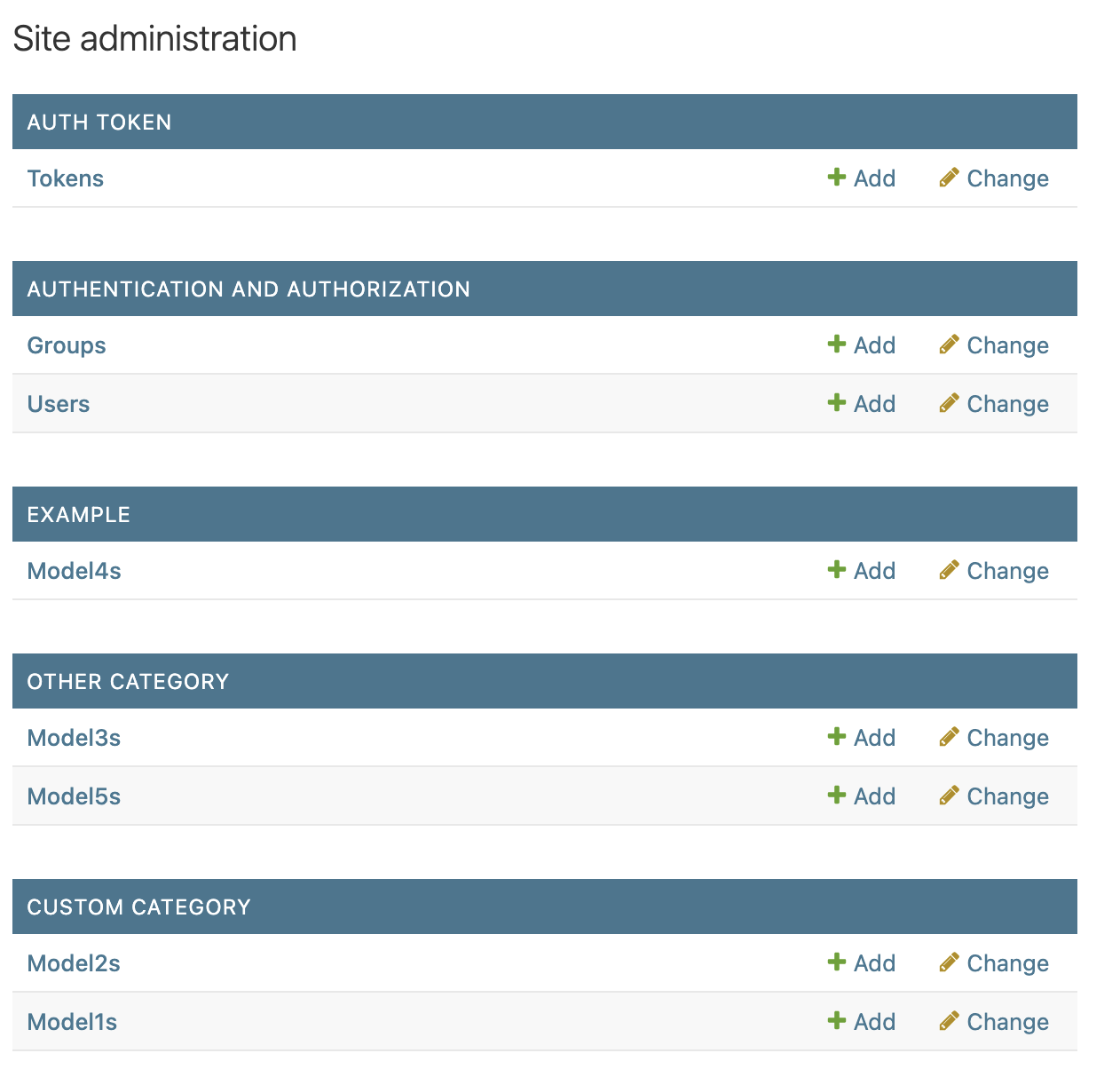
The admin_shelf.admin.Category class is used to create categories for your model admins. You can register your model admins to these categories using the @category.register(Model) decorator.
You can set a order for both the categories and the model admins by passing an order argument to the Category class and the @register decorator, respectively.
Example:
from admin_shelf.admin import Category
from example.models import Model1, Model2

custom_category = Category(name="Custom Category", order=1)

@custom_category.register(Model1, order=2)
class Model1Admin(admin.ModelAdmin):
    pass

@custom_category.register(Model2, order=1)
class Model2Admin(admin.ModelAdmin):
    pass
Yes, it is just that simple. You can also use the @register decorator without passing a category, in which case it will be registered to the default category. Or use the default register from django admin if you want to register your model admin without a category.
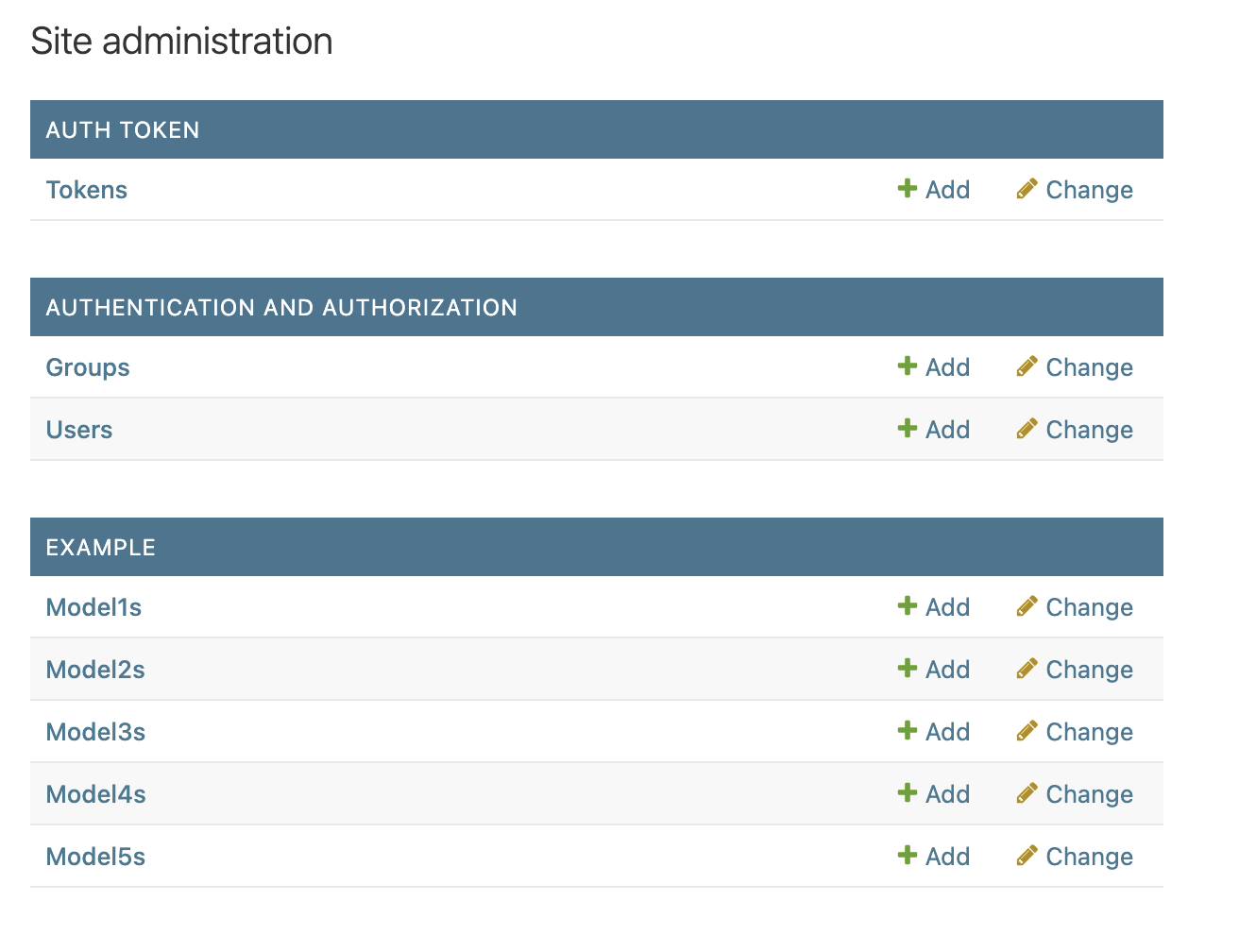
Before shelf:
After shelf:
Translation support
Category(name=...) accepts both plain strings and Django's lazy translation
proxies. To localize a category, pass a gettext_lazy value:
from django.utils.translation import gettext_lazy as _
from admin_shelf.admin import Category

shop_category = Category(name=_("Shop"))

@shop_category.register(Product)
class ProductAdmin(admin.ModelAdmin):
    pass
The name is resolved against the active language on every request, so users switching languages see the category label update accordingly.
Recommendation: define each Category once and reuse the same instance
across @register calls. Categories are deduplicated by the identity of the
name value; two lazy proxies built from the same source string are distinct
Python objects and would create separate buckets.
Anything else?
Running the example app
To run the example app, you can use the following commands:
# You need to have docker installed
docker compose up example
Running the tests
To run the tests, you can use the following commands:
# You need to have docker installed
docker compose up test
How do I contribute?
If you want to contribute to this project, you can do so by creating an issue! And if you want to contribute with code, you can fork the repository and create a pull request.
Check the CONTRIBUTING.md file for more information on how to contribute.
Is it true that bananas are radioactive?
Yes.
1 maintainer

Metadata
1 maintainer
Release files for django-admin-shelf 0.2.2
For a detailed explanation of source distributions (sdists) and built distributions (wheels), please see the package formats documentation.
Source distribution (sdist)
| File | Size | Uploaded | Provenance | Actions |
|---|---|---|---|---|
| django_admin_shelf-0.2.2.tar.gz | 23.3 kB | With provenance | Details for django_admin_shelf-0.2.2.tar.gz |
Built distribution (wheel)
| File | Interpreter | ABI | Platform | Actions Reset |
|---|---|---|---|---|
| django_admin_shelf-0.2.2-py3-none-any.whl | Python 3 | none | any | Details for django_admin_shelf-0.2.2-py3-none-any.whl |
Total release size: 42.3 kB
Release files / django_admin_shelf-0.2.2.tar.gz
| Download URL | django_admin_shelf-0.2.2.tar.gz |
|---|---|
| Size | 23.3 kB |
| Tags | Source |
|
SHA-256 checksum How to use checksums |
3f5cd20eef3e2c582d416d33a3c116eaca77b836cc67459fa8f4e9cfab411ff9
|
|
BLAKE2b-256 checksum How to use checksums |
c181bedb035473ab8afa66a93a52dc308083d22016af9e3521b4b258d29a1063
|
| Upload date | |
|
Uploaded using Trusted Publishing? What is trusted publishing? |
Yes |
| Uploaded via |
twine/6.1.0 CPython/3.13.12
|
Provenance
Provenance describes where a file came from. On PyPI, provenance is shared via attestations, which provide a verifiable record of the build or publishing details. View details, limitations and caveats.


PyPI Publish Attestation
PyPI verified that this artifact, at this checksum, originated from the publisher listed below.
Signed by GitHub Actions, verified by PyPI on May 29, 2026.
Transparency logRelease files / django_admin_shelf-0.2.2-py3-none-any.whl
| Download URL | django_admin_shelf-0.2.2-py3-none-any.whl |
|---|---|
| Size | 18.9 kB |
| Tags | Python 3 |
|
SHA-256 checksum How to use checksums |
90397cf0b1e9b65ae44af41d7ccad68c41e7ac5df7e3664842075a9b5b011781
|
|
BLAKE2b-256 checksum How to use checksums |
1b2e511eb8d7fb64ffd2e7e0eae0c72f67ac3127cb65eb10bb4392a1a4d6754b
|
| Upload date | |
|
Uploaded using Trusted Publishing? What is trusted publishing? |
Yes |
| Uploaded via |
twine/6.1.0 CPython/3.13.12
|
Provenance
Provenance describes where a file came from. On PyPI, provenance is shared via attestations, which provide a verifiable record of the build or publishing details. View details, limitations and caveats.
PyPI Publish Attestation
PyPI verified that this artifact, at this checksum, originated from the publisher listed below.
Signed by GitHub Actions, verified by PyPI on May 29, 2026.
Transparency logSecurity for django-admin-shelf 0.2.2
Provenance
Provenance describes where a file came from. On PyPI, provenance is shared via attestations, which provide a verifiable record of the build or publishing details. View details, limitations and caveats.
Full provenance
Both files in this release have been uploaded with provenance metadata.
Attestation for django_admin_shelf-0.2.2.tar.gz
PyPI Publish Attestation
PyPI verified that this artifact, at this checksum, originated from the publisher listed below.
Signed by GitHub Actions, verified by PyPI on May 29, 2026.
Transparency logA note on package security
PyPI is a repository for distributing packages, not a service for auditing them. While third-party security researchers and our staff do their best to detect and remove malicious packages, PyPI cannot guarantee the quality, security or suitability of any given package.
To learn more about protecting yourself from malicious actors, visit our package security documentation.














