
A Django app that takes all of the work out of making a beautiful and functional web application pretty darn quickly (PDQ) using the AdminLTE2 theme.
Verified details
These details have been verified by PyPIProject links
GitHub Statistics
Maintainers

Project description
Django-AdminLTE2-PDQ








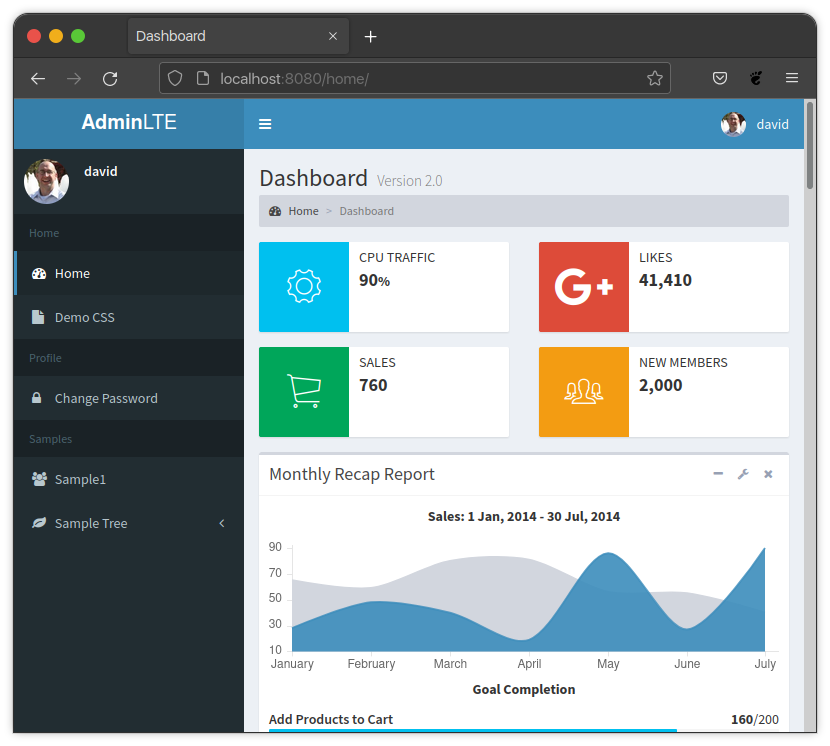
Django-AdminLTE2-PDQ is a Django app that takes all of the work out of making a beautiful and functional web application pretty darn quickly (PDQ) using the AdminLTE2 theme.
Additionally, the app provides decorators, mixins, template filters, and template tags to aid in the rapid development of a site.
Features include:
- Styled with AdminLTE2.
- Easy sidebar menu creation.
- Automatic Django Admin styling that matches AdminLTE2.
- Automatic inclusion of Admin links in the sidebar.
- Automatic menu link hiding based on user permissions to views.
- Template filters to aid in manual styling.
- Template tags for form rendering that matches AdminLTE2.
- Automatic form error and message styling.
- Font Awesome 4 & Font Awesome 5 integration.
- Highly configurable functionality, via project Django settings variables.
The full documentation can be found on Read The Docs.
Quickstart
-
Install the Django App via GitHub for now. Working on getting on Pypi soon.
python -m pip install django-adminlte2-pdq
-
Add "adminlte2_pdq" to your INSTALLED_APPS setting like this:
INSTALLED_APPS = [
    'adminlte2_pdq',
    ...
]
:information_source: NOTE The adminlte2_pdq app should be listed before any Django apps so that template overriding works correctly.
-
Django-AdminLTE2-PDQ provides a middleware that is required for some of the available authentication and authorization scenarios from this package to function.
Add this middleware to your middleware list in
<PROJECT_FOLDER>/settings.py.MIDDLEWARE = [ ... 'adminlte2_pdq.middleware.AuthMiddleware', ]
-
Django-AdminLTE2-PDQ provides routes and templates for a default home page, some sample pages, and Django's account pages. You should add these default routes to your root URLconf in
<PROJECT_FOLDER>/urls.pyfrom django.contrib import admin from django.urls import include urlpatterns = [ # Adminlte2 default routes for demo purposes path('', include('adminlte2_pdq.urls')), # Django Account Routes - Styled in AdminLTE2 path('accounts/', include('django.contrib.auth.urls')), # Admin - Styled in Django but hosted in AdminLTE2 layout path('admin/', admin.site.urls), ]
-
Ensure that successful logins redirect to a valid endpoint.
Django-AdminLTE2-PDQ does not include a route or templates for
/accounts/profilewhich is the default Django Login redirect. Adding the above entry to yoursettings.pyfile will allow successful logins to redirect to the default provided home page included in step 4.LOGIN_REDIRECT_URL = 'adminlte2_pdq:home'
-
The package should now have the required bare minimum setup complete. You should be able to run the server and see the default pages located at:
http://localhost:8000For a more detailed setup, consider reading the Longstart and the rest of the full documentation on Read The Docs.
Project details
Verified details
These details have been verified by PyPIProject links
GitHub Statistics
Maintainers
Release history Release notifications | RSS feed


Download files
Download the file for your platform. If you're not sure which to choose, learn more about installing packages.
Source Distribution
Built Distribution
Filter files by name, interpreter, ABI, and platform.
If you're not sure about the file name format, learn more about wheel file names.
Copy a direct link to the current filters
File details
Details for the file django_adminlte2_pdq-0.2.1.tar.gz.
File metadata
- Download URL: django_adminlte2_pdq-0.2.1.tar.gz
- Upload date:
- Size: 11.1 MB
- Tags: Source
- Uploaded using Trusted Publishing? Yes
- Uploaded via: twine/6.1.0 CPython/3.13.7
File hashes
| Algorithm | Hash digest | |
|---|---|---|
| SHA256 |
061837c92cbe6bac3376659580745a287a555caf90c63f2acfa1c5865ef8709f
|
|
| MD5 |
c14e23905f173c4be9fe62272a867330
|
|
| BLAKE2b-256 |
fbd0c50f01a7ab1b1b7acfa74eb6130091e0fa05ecf04470b03ab59cecd91a54
|
Provenance
The following attestation bundles were made for django_adminlte2_pdq-0.2.1.tar.gz:
Publisher:
release.yaml on DJBarnes/django-adminlte2-pdq
-
Statement:
-
Statement type:
https://in-toto.io/Statement/v1 -
Predicate type:
https://docs.pypi.org/attestations/publish/v1 -
Subject name:
django_adminlte2_pdq-0.2.1.tar.gz -
Subject digest:
061837c92cbe6bac3376659580745a287a555caf90c63f2acfa1c5865ef8709f - Sigstore transparency entry: 664213817
- Sigstore integration time:
-
Permalink:
DJBarnes/django-adminlte2-pdq@1a6b4b28a18c92b72edf068ec8741bd74043b08b -
Branch / Tag:
refs/tags/0.2.1 - Owner: https://github.com/DJBarnes
-
Access:
public
-
Token Issuer:
https://token.actions.githubusercontent.com -
Runner Environment:
github-hosted -
Publication workflow:
release.yaml@1a6b4b28a18c92b72edf068ec8741bd74043b08b -
Trigger Event:
push
-
Statement type:
File details
Details for the file django_adminlte2_pdq-0.2.1-py3-none-any.whl.
File metadata
- Download URL: django_adminlte2_pdq-0.2.1-py3-none-any.whl
- Upload date:
- Size: 9.7 MB
- Tags: Python 3
- Uploaded using Trusted Publishing? Yes
- Uploaded via: twine/6.1.0 CPython/3.13.7
File hashes
| Algorithm | Hash digest | |
|---|---|---|
| SHA256 |
5f2e21914f516e7b50406221d8643e240a9b77a094efcde18255be2cff1c4da5
|
|
| MD5 |
8adbb958acb07caf7bed019598e7320f
|
|
| BLAKE2b-256 |
3e951257ac82894363c5f299c22e2ad6e7d41bfb615e0ae6b207beb22db27f69
|
Provenance
The following attestation bundles were made for django_adminlte2_pdq-0.2.1-py3-none-any.whl:
Publisher:
release.yaml on DJBarnes/django-adminlte2-pdq
-
Statement:
-
Statement type:
https://in-toto.io/Statement/v1 -
Predicate type:
https://docs.pypi.org/attestations/publish/v1 -
Subject name:
django_adminlte2_pdq-0.2.1-py3-none-any.whl -
Subject digest:
5f2e21914f516e7b50406221d8643e240a9b77a094efcde18255be2cff1c4da5 - Sigstore transparency entry: 664213819
- Sigstore integration time:
-
Permalink:
DJBarnes/django-adminlte2-pdq@1a6b4b28a18c92b72edf068ec8741bd74043b08b -
Branch / Tag:
refs/tags/0.2.1 - Owner: https://github.com/DJBarnes
-
Access:
public
-
Token Issuer:
https://token.actions.githubusercontent.com -
Runner Environment:
github-hosted -
Publication workflow:
release.yaml@1a6b4b28a18c92b72edf068ec8741bd74043b08b -
Trigger Event:
push
-
Statement type:






