
Django app that adds AI-powered chat to Django admin interface

Project description
Django AI Admin Chat
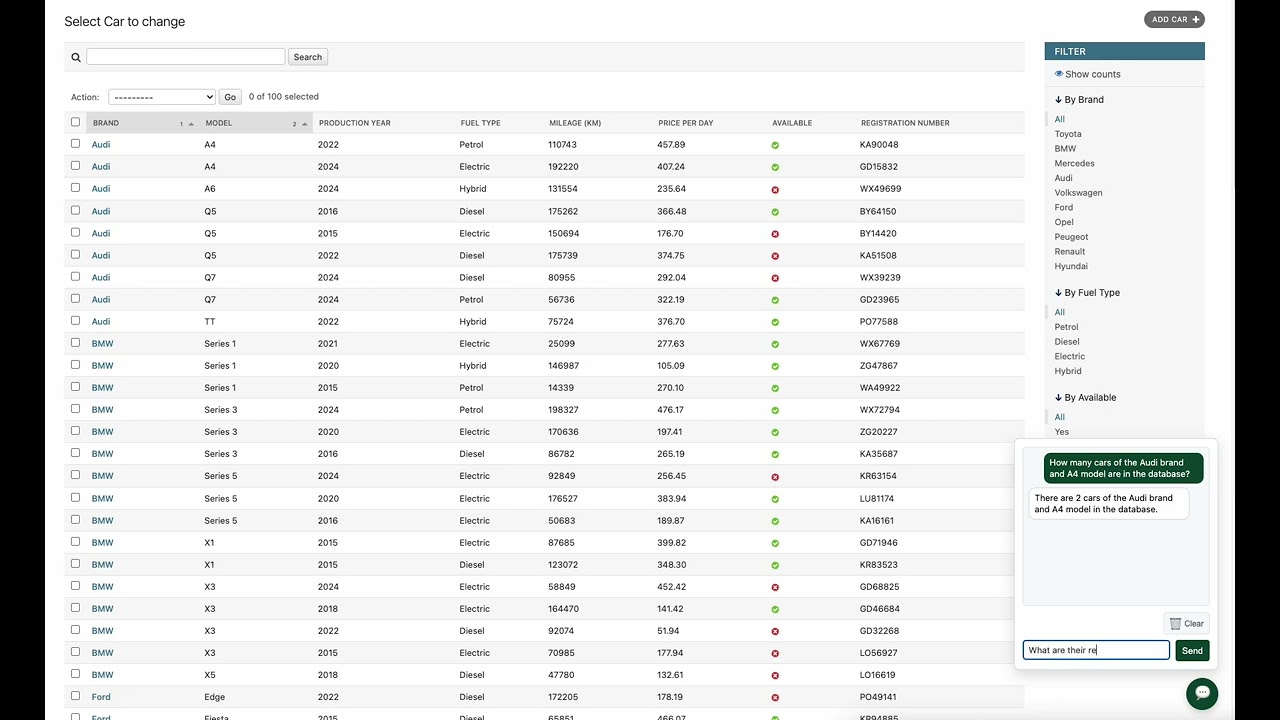
An intelligent AI assistant integrated into Django admin panel that allows you to ask questions about your database data in natural language and receive instant answers.
How It Works
Django AI Admin Chat is a plugin that adds an intelligent AI assistant to your Django admin panel. Instead of manually searching through tables and writing SQL queries, you can simply ask a question in natural language, and the assistant will:
- Analyze your question and understand what you're looking for
- Automatically generate SQL queries to your database
- Search for relevant data in your Django models
- Formulate a readable answer based on the found information
- Maintain conversation context, allowing you to ask follow-up questions
Everything happens in real-time, directly in the Django admin panel, without the need to switch between different tools.
Demo
Key Features
🤖 Intelligent AI Assistant
The assistant uses advanced language models (only OpenAI GPT for now) to understand natural language questions and generate answers based on your database data.
🔍 Automatic Database Search
The system automatically analyzes your Django models structure, generates appropriate SQL queries, and searches for needed information without requiring manual code writing.
💬 Chat Interface in Admin Panel
A convenient chat panel available directly in Django admin - just click the chat icon in the bottom-right corner to start a conversation.
📊 Conversation History
All conversations are automatically saved, enabling:
- Tracking questions and answers
- System usage analysis
- Cost control (token usage monitoring)
- Reviewing generated SQL queries
🎯 Data Access Control
You can precisely control which Django models are available to the assistant, ensuring data security and privacy.
⚡ Streaming Responses
Responses are streamed in real-time, so you don't have to wait for the complete answer - you see results as they come.
Installation
1. Install the Package
pip install django-ai-admin-chat
2. Add to INSTALLED_APPS
In your settings.py file, add:
INSTALLED_APPS = [
    # ... other apps
    'django_ai_admin_chat',
]
3. Add URLs
In your main urls.py file:
from django.urls import include, path

urlpatterns = [
    # ... other URL patterns
    path('', include('django_ai_admin_chat.urls')),
]
4. Run Migrations
python manage.py migrate
4.1 Configure a Read-Only DB User (Recommended for Production)
Production safety tip: Create a dedicated read-only database user to prevent accidental data modifications.
Example configuration:
DJANGO_AI_ADMIN_CHAT_DATABASE_CONFIG = {
    "ENGINE": "django.db.backends.postgresql",
    "NAME": "my_database",
    "USER": "readonly_user",
    "PASSWORD": "readonly_password",
    "HOST": "localhost",
    "PORT": "5432",
}
If DJANGO_AI_ADMIN_CHAT_DATABASE_CONFIG is not set, the system falls back to your default DATABASES["default"] configuration.
5. Configure API Key
Required: Add your OpenAI API key to settings.py:
DJANGO_AI_ADMIN_CHAT_API_KEY = "your-openai-api-key"
That's it! After logging into the Django admin panel, you'll see the chat icon in the bottom-right corner.
Usage
After installation and configuration, simply:
- Log in to your Django admin panel
- Click the chat icon (💬) in the bottom-right corner
- Start asking questions about your data!
Example Questions:
- "How many users are in the system?"
- "Show me the latest orders from the last week"
- "Which product has the highest sales?"
- "How many orders have 'pending' status?"
The assistant will understand your question, find the relevant data, and present it in a readable format.
Requirements
- Python >= 3.10
- Django >= 4.2
- OpenAI API Key
License
MIT License
Release history Release notifications | RSS feed


Download files
Download the file for your platform. If you're not sure which to choose, learn more about installing packages.
Source Distribution
Built Distribution
Filter files by name, interpreter, ABI, and platform.
If you're not sure about the file name format, learn more about wheel file names.
Copy a direct link to the current filters
File details
Details for the file django_ai_admin_chat-0.1.1.tar.gz.
File metadata
- Download URL: django_ai_admin_chat-0.1.1.tar.gz
- Upload date:
- Size: 20.9 kB
- Tags: Source
- Uploaded using Trusted Publishing? No
- Uploaded via: twine/6.2.0 CPython/3.10.17
File hashes
| Algorithm | Hash digest | |
|---|---|---|
| SHA256 |
216eb233abe90b19b4d44d647a949a5ddadd0025125f47457a7fd2ea9bd25e52
|
|
| MD5 |
e5eb007f913ff7c410ac76102dcb7117
|
|
| BLAKE2b-256 |
6d7d1b9d0b1dd68e4fc864b47be7d2fda741f3cda93fb53b0cc9f4ed43db1c4b
|
File details
Details for the file django_ai_admin_chat-0.1.1-py3-none-any.whl.
File metadata
- Download URL: django_ai_admin_chat-0.1.1-py3-none-any.whl
- Upload date:
- Size: 24.6 kB
- Tags: Python 3
- Uploaded using Trusted Publishing? No
- Uploaded via: twine/6.2.0 CPython/3.10.17
File hashes
| Algorithm | Hash digest | |
|---|---|---|
| SHA256 |
40cc325a28c47fcc1f98e896fee8d0082521601408c63faa2eebf3ee56f6cc39
|
|
| MD5 |
a458f3caafa88a9d3ecef79e7ab72d1d
|
|
| BLAKE2b-256 |
ec83fde280f346526f26eb142dd15275daea571e0219d050bf055aac57ecc173
|






