
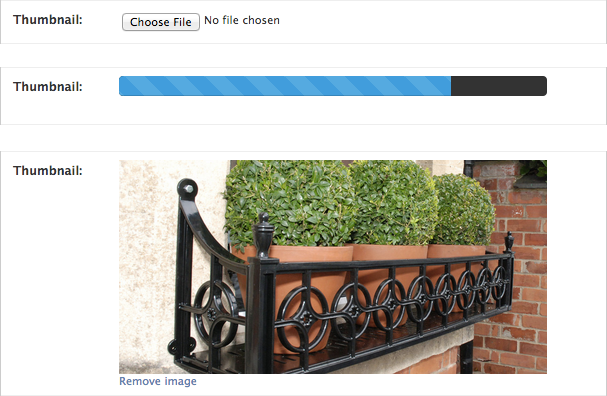
Add ajax image upload functionality with a progress bar to file input fields within Django admin. Images are optionally resized.

Project description
##Ajax file uploads
[https://github.com/bradleyg/django-ajaximage](https://github.com/bradleyg/django-ajaximage)
Add ajax image upload functionality with a progress bar to file input fields within Django admin. Images are optionally resized.
```pip install django-ajaximage```
```python
# settings.py
AJAXIMAGE_DIR = 'ajaximage/' # (optional, default is 'ajaximage/')
```
```python
# urls.py
urlpatterns = patterns('',
url(r'^ajaximage/', include('ajaximage.urls')),
)
```
```python
# models.py
from django.db import models
from ajaximage.fields import AjaxImageField
class Example(models.Model):
thumbnail = AjaxImageField(upload_to='thumbnails'
max_height=200, #optional
max_width=200, # optional
crop=True) # optional
# if crop is provided both max_height and max_width are required
```
[https://github.com/bradleyg/django-ajaximage](https://github.com/bradleyg/django-ajaximage)
Add ajax image upload functionality with a progress bar to file input fields within Django admin. Images are optionally resized.

```pip install django-ajaximage```
```python
# settings.py
AJAXIMAGE_DIR = 'ajaximage/' # (optional, default is 'ajaximage/')
```
```python
# urls.py
urlpatterns = patterns('',
url(r'^ajaximage/', include('ajaximage.urls')),
)
```
```python
# models.py
from django.db import models
from ajaximage.fields import AjaxImageField
class Example(models.Model):
thumbnail = AjaxImageField(upload_to='thumbnails'
max_height=200, #optional
max_width=200, # optional
crop=True) # optional
# if crop is provided both max_height and max_width are required
```
Release history Release notifications | RSS feed


Download files
Download the file for your platform. If you're not sure which to choose, learn more about installing packages.
Source Distribution
django-ajaximage-0.1.12.tar.gz
(27.7 kB
view details)
File details
Details for the file django-ajaximage-0.1.12.tar.gz.
File metadata
- Download URL: django-ajaximage-0.1.12.tar.gz
- Upload date:
- Size: 27.7 kB
- Tags: Source
- Uploaded using Trusted Publishing? No
File hashes
| Algorithm | Hash digest | |
|---|---|---|
| SHA256 |
e1c546d380c3a21767430d276e2af6e204f5c43fe5092d7a192a0b35db23aca7
|
|
| MD5 |
ce24289b9b92553730ebad01a8c15c89
|
|
| BLAKE2b-256 |
cc6567638c4197da20cac0174793cbd5d1192fe5e358e3e51fce87a4aa427035
|






