
Django AskLens










Safe natural-language querying over explicitly registered Django models. AskLens does not let an LLM write SQL. It asks a provider for structured JSON, validates that plan against your catalog and the current request's permissions, compiles a read-only Django ORM query, and returns table-ready JSON.
django-asklens==0.3.2 is the prepared alpha release line, not a stable or production-certified release. Its public availability and immutable artifact identity are established only by the v0.3.2 GitHub Release and PyPI version record; until those exist and public verification succeeds, 0.3.1 remains current. Adapters may still change. Authenticate public artifacts before use; hashes and upgrade origins are in Installation, and the 0.3.2 preparation record preserves candidate scope and evidence.
Django AskLens was created by Revaz Zakalashvili.
Try AskLens locally — no API key
Prerequisites are Python 3.12 or newer, uv, and a source checkout; Docker and provider credentials are not needed. If you do not already have the repository locally:
git clone https://github.com/revazi/django-asklens.git
cd django-asklens
uv sync --locked --group dev
DJANGO_SETTINGS_MODULE=tests.test_project.demo_settings \
  uv run python -m django migrate --run-syncdb
DJANGO_SETTINGS_MODULE=tests.test_project.demo_settings \
  uv run python -m django seed_complex_test_project --size small
DJANGO_ASKLENS_DEMO_LIVE_LLM=0 \
  DJANGO_SETTINGS_MODULE=tests.test_project.demo_settings \
  uv run python -m django runserver 127.0.0.1:8000
Open http://127.0.0.1:8000/, sign in as facility-owner with password
12admin34, and click the exact starter question Show paid billing revenue by
product. The result should contain North-scoped products such as North membership, never South rows. No provider credentials or network provider call
are involved. Offline mode matches only the displayed exact questions; it does
not support arbitrary natural-language wording. Show paid billing revenue for
the no-sales demo product is the intentional successful empty-result example.
This is 0.3.2 release-source demo evidence when viewed at the immutable
v0.3.2 tag; mutable main may be newer. It is not production certification
or external usability evidence. See the complete start, expected-result,
troubleshooting, security,
host-transition, and cleanup guide.
Synthetic browser showcase
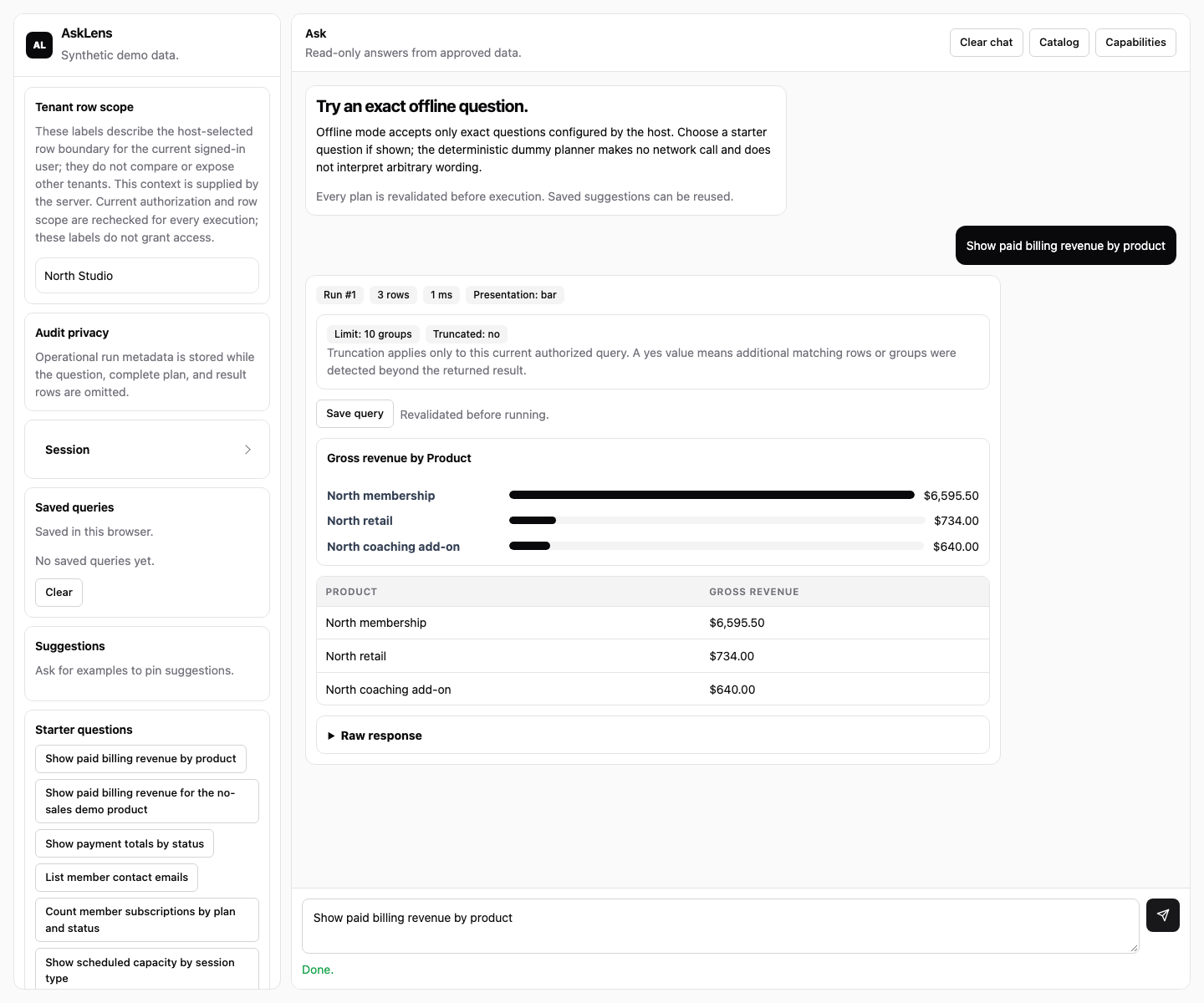
facility-owner runs the exact configured question Show paid billing revenue
by product against seeded synthetic data. The host-selected scope is North
Studio; the offline deterministic planner makes no network call and does not
support arbitrary wording.
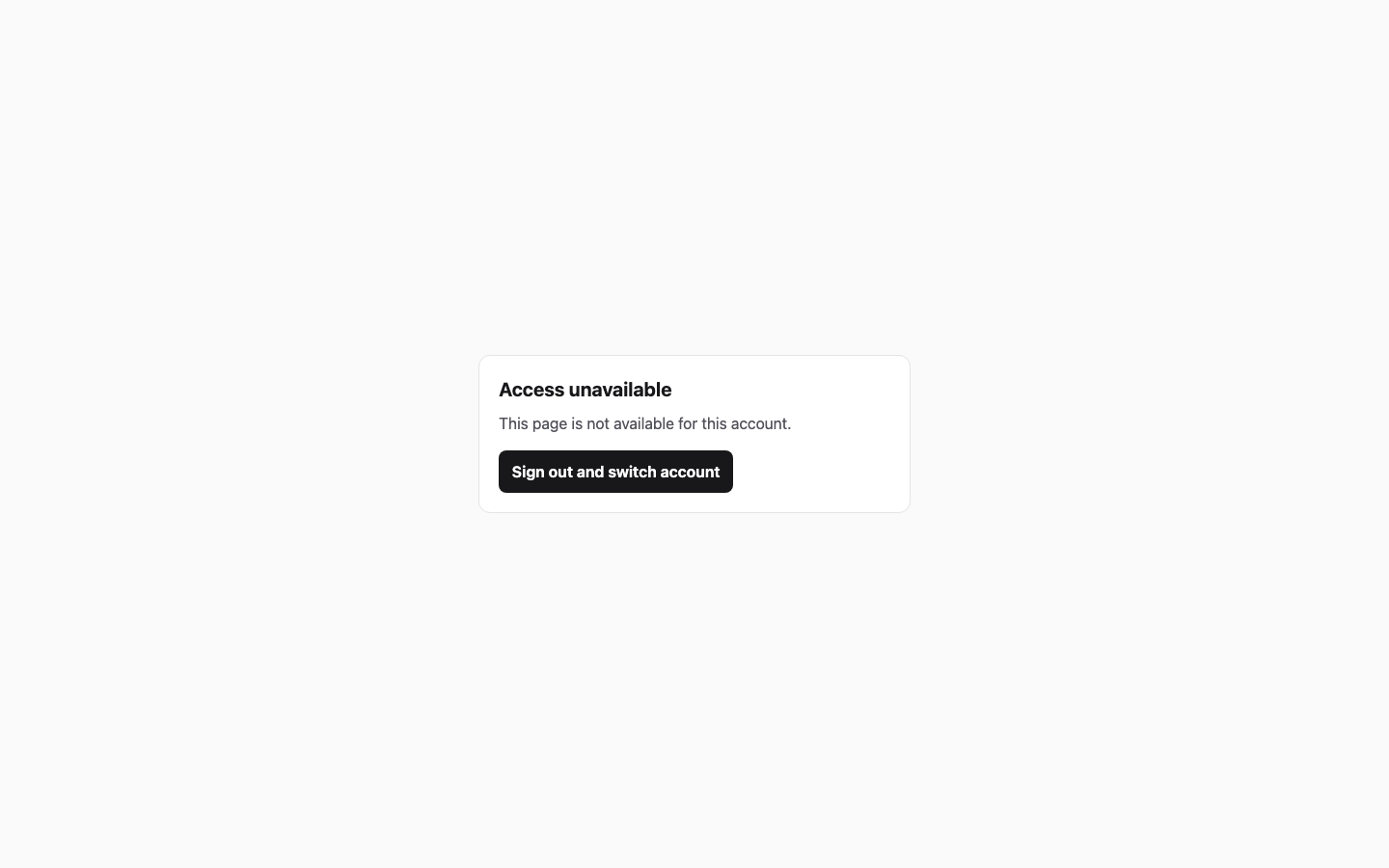
The smaller denial capture shows the seeded no-report account receiving an
opaque host response; it does not disclose the policy or another tenant's
existence.
Watch the 36-second browser recording (WebM) — Django login, current-user scope, the grouped result above, and the exact successful empty fixture Show paid billing revenue for the no-sales demo product. The showcase page also includes captions, a text walkthrough, the neutral denial capture, and reproducible no-Docker capture instructions. All shown credentials and rows are synthetic and local-only; authentication, CSRF, explicit catalog, current-request permissions, row scope, and query limits remain active.
Features
- No generated SQL — the model proposes a
QueryPlan; AskLens validates it and compiles Django ORM only - Explicit catalog — only registered resources, fields, and metrics are queryable
- Current-request authorization — resource and field permissions apply to the user making the request
- Row scope — context-scoped resources require a trusted
scope_provider(request)and do not fall back to the model manager - Read-only execution — list and aggregate questions only; AskLens does not create, update, or delete application data
- Deterministic dummy provider — exact questions map to reviewed plans, with no network call
- OpenAI-compatible providers — optional live planning through an OpenAI-compatible endpoint
- Optional DRF API — catalog, capabilities, query, and run-detail endpoints
- Optional MCP adapter — the same execution path for MCP clients
- Audit records — metadata-only by default; questions and plans stay out unless you opt in
- UI-agnostic results —
columns+dataJSON for your own table or chart
Installation
After confirming that the 0.3.2 PyPI record exists and authenticating the
release artifacts:
python -m pip install 'django-asklens==0.3.2'
python -m pip install 'django-asklens[api]==0.3.2'   # optional DRF API and reference UI
python -m pip install 'django-asklens[mcp]==0.3.2'   # optional MCP adapter
Core dependencies are Django and Pydantic. DRF and the MCP stack are extras, not required to register resources or call execute_plan().
This is an alpha package. Confirm the wheel or sdist digest in Installation before installing. A same-version local rebuild is not the public artifact.
Quick start
1. Add the app
INSTALLED_APPS = [
    # ...
    "rest_framework",
    "django_asklens",
]
from django.urls import include, path

urlpatterns = [
    path("", include("django_asklens.api.urls")),
]
python -m django migrate asklens
For a path with no DRF, provider call, or frontend, use the Core-only executable quickstart.
2. Register one resource
Import this once from your app's AppConfig.ready(). Bindings stay private; plans use the semantic names.
from django_asklens import Metric, register
from shop.models import Order


def visible_orders(request):
    if not getattr(request.user, "is_authenticated", False):
        return Order.objects.none()
    return Order.objects.filter(account__memberships__user=request.user)


register(
    timezone="UTC",
    model=Order,
    name="orders",
    label="Orders",
    description="Orders visible to the current user.",
    default_date_field="created_at",
    fields={
        "status": {
            "binding": "status",
            "type": "string",
            "nullable": False,
            "label": "Status",
        },
        "created_at": {
            "binding": "created_at",
            "type": "datetime",
            "nullable": False,
            "label": "Created date",
        },
        "customer.email": {
            "binding": "customer__email",
            "type": "string",
            "nullable": False,
            "label": "Customer email",
            "sensitive": True,
            "requires_permission": "customers.view_pii",
        },
        "total_cents": {
            "binding": "total_cents",
            "type": "integer",
            "nullable": False,
            "label": "Total in cents",
        },
    },
    metrics=[
        Metric(
            "order_count",
            op="count",
            binding="id",
            result_type="integer",
            label="Orders",
        ),
        Metric(
            "revenue",
            op="sum",
            binding="total_cents",
            result_type="integer",
            label="Revenue",
        ),
    ],
    default_order=(("created_at", "desc"),),
    requires_permission="orders.view_reports",
    scope_provider=visible_orders,
)
3. Start with the dummy provider
DJANGO_ASKLENS = {
    "DEFAULT_SCOPE_MODE": "context_scoped",
    "LLM_BACKEND": "dummy",
    "DUMMY_PLANS": {
        "Show orders by status": {
            "query_plan": {
                "resource": "orders",
                "intent": "aggregate",
                "group_by": [{"field": "status"}],
                "metrics": [{"metric": "order_count"}],
                "limit": 100,
            },
            "presentation": {"kind": "bar", "x": "status", "y": "order_count"},
        }
    },
}
4. Ask
AskLens uses the host's existing authentication. It does not provide a login or token endpoint. The optional API quickstart uses a host-created authenticated user and checks that user's permission-scoped catalog first. See the Authenticated normal-user API quickstart.
POST /asklens/query/
Content-Type: application/json

{"question": "Show orders by status"}
{
  "run_id": 1,
  "question": "Show orders by status",
  "response_type": "query",
  "result": {
    "columns": [
      {"key": "status", "label": "Status", "type": "string", "nullable": false},
      {"key": "order_count", "label": "Orders", "type": "integer", "nullable": false}
    ],
    "data": [{"status": "paid", "order_count": 12}],
    "row_count": 1,
    "duration_ms": 4,
    "result_metadata": {"limit": 100, "limit_scope": "groups", "truncated": false}
  },
  "presentation": {"kind": "bar"}
}
Help questions such as show me example queries return capabilities and a permission-scoped catalog. They do not run a database query.
Optional UI and live providers
Render result.columns and result.data in your own UI. The packaged page is a demo, not a product frontend:
urlpatterns = [
    path("", include("django_asklens.api.urls")),
    path("", include("django_asklens.frontend.urls")),  # /asklens/ui/
]
The default backend makes no network calls. An OpenAI-compatible provider is opt-in:
import os

DJANGO_ASKLENS = {
    "LLM_BACKEND": "openai_compatible",
    "LLM_BASE_URL": "https://api.openai.com/v1",
    "LLM_API_KEY": os.environ["OPENAI_API_KEY"],
    "LLM_MODEL": "gpt-4.1-mini",
    "LLM_TEMPERATURE": 0,
}
See Provider configuration and Building a custom AskLens UI.
Security
- Unregistered models, fields, and metrics are not queryable.
globalscope must be explicit. Context-scoped resources fail closed without a trusted scope provider.- Sensitive fields stay hidden unless the current user has the field permission.
- Plans are size-limited before compilation. AskLens executes read-only ORM queries only.
- The query API rejects unknown body keys, including client policy claims, before execution.
- Default audit records omit the question, filter values, and complete plan.
- AskLens does not send database rows, sample values, or secrets to providers by default.
Review the security checklist and production checklist before using AskLens outside local development. This alpha is not a production-security certification. Host applications still own authentication, scope policy, timeouts, and rate limits.
Requirements
| Dependency | Version |
|---|---|
| Python | >= 3.12 |
| Django | >= 5.2, < 7.0 |
| Pydantic | >= 2, < 3 |
Installation metadata remains Django>=5.2,<7.0, but current CI support evidence is deliberately limited to Django 5.2 LTS, 6.0, and 6.1.
Release checks cover Python 3.12 and 3.13.
Documentation
- Live documentation and showcase
- Installation
- Core-only executable quickstart
- Authenticated normal-user API quickstart
- Usage guide
- Registration API
- Provider configuration
- MCP integration
- Security checklist
- source demo frontend/admin first run
- Synthetic browser showcase and reproducible capture
- Changelog
- Contributing
- Security policy
Development
uv sync --group dev
uv run pytest
uv run ruff check .
uv run ruff format --check .
The opt-in synthetic browser smoke is bash scripts/reference-demo-smoke.sh after uv run playwright install chromium. It is contributor evidence, not production certification.
License
BSD 3-Clause. See LICENSE.
1 maintainer

Metadata
1 maintainer
Release files for django-asklens 0.3.2
For a detailed explanation of source distributions (sdists) and built distributions (wheels), please see the package formats documentation.
Source distribution (sdist)
| File | Size | Uploaded | Provenance | Actions |
|---|---|---|---|---|
| django_asklens-0.3.2.tar.gz | 352.2 kB | With provenance | Details for django_asklens-0.3.2.tar.gz |
Built distribution (wheel)
| File | Interpreter | ABI | Platform | Actions Reset |
|---|---|---|---|---|
| django_asklens-0.3.2-py3-none-any.whl | Python 3 | none | any | Details for django_asklens-0.3.2-py3-none-any.whl |
Total release size: 495.9 kB
Release files / django_asklens-0.3.2.tar.gz
| Download URL | django_asklens-0.3.2.tar.gz |
|---|---|
| Size | 352.2 kB |
| Tags | Source |
|
SHA-256 checksum How to use checksums |
e522055e3b34eac434cabff6db8bb4c278e210591bcd95027956f2449daee177
|
|
BLAKE2b-256 checksum How to use checksums |
ccdfe8f35d752849cef69c7f41ee0e623009f13c4d6496fbed9ef8bd35eb6a95
|
| Upload date | |
|
Uploaded using Trusted Publishing? What is trusted publishing? |
Yes |
| Uploaded via |
twine/7.0.0 CPython/3.13.14
|
Provenance
Provenance describes where a file came from. On PyPI, provenance is shared via attestations, which provide a verifiable record of the build or publishing details. View details, limitations and caveats.


PyPI Publish Attestation
PyPI verified that this artifact, at this checksum, originated from the publisher listed below.
Signed by GitHub Actions, verified by PyPI on Oct 27, 2026.
Transparency logRelease files / django_asklens-0.3.2-py3-none-any.whl
| Download URL | django_asklens-0.3.2-py3-none-any.whl |
|---|---|
| Size | 143.7 kB |
| Tags | Python 3 |
|
SHA-256 checksum How to use checksums |
739d5411cd0b0ab63ac8dae9e9a0a4f2cf396cb2e0f0ef5bbfac9a2c4607b050
|
|
BLAKE2b-256 checksum How to use checksums |
a91da4b37b466ca47229115ac7eb44e8e6e309592f19b75e1d3a56eb19752c5c
|
| Upload date | |
|
Uploaded using Trusted Publishing? What is trusted publishing? |
Yes |
| Uploaded via |
twine/7.0.0 CPython/3.13.14
|
Provenance
Provenance describes where a file came from. On PyPI, provenance is shared via attestations, which provide a verifiable record of the build or publishing details. View details, limitations and caveats.
PyPI Publish Attestation
PyPI verified that this artifact, at this checksum, originated from the publisher listed below.
Signed by GitHub Actions, verified by PyPI on Oct 27, 2026.
Transparency logSecurity for django-asklens 0.3.2
Provenance
Provenance describes where a file came from. On PyPI, provenance is shared via attestations, which provide a verifiable record of the build or publishing details. View details, limitations and caveats.
Full provenance
Both files in this release have been uploaded with provenance metadata.
Attestation for django_asklens-0.3.2.tar.gz
PyPI Publish Attestation
PyPI verified that this artifact, at this checksum, originated from the publisher listed below.
Signed by GitHub Actions, verified by PyPI on Oct 27, 2026.
Transparency logA note on package security
PyPI is a repository for distributing packages, not a service for auditing them. While third-party security researchers and our staff do their best to detect and remove malicious packages, PyPI cannot guarantee the quality, security or suitability of any given package.
To learn more about protecting yourself from malicious actors, visit our package security documentation.














