
django-auth-style

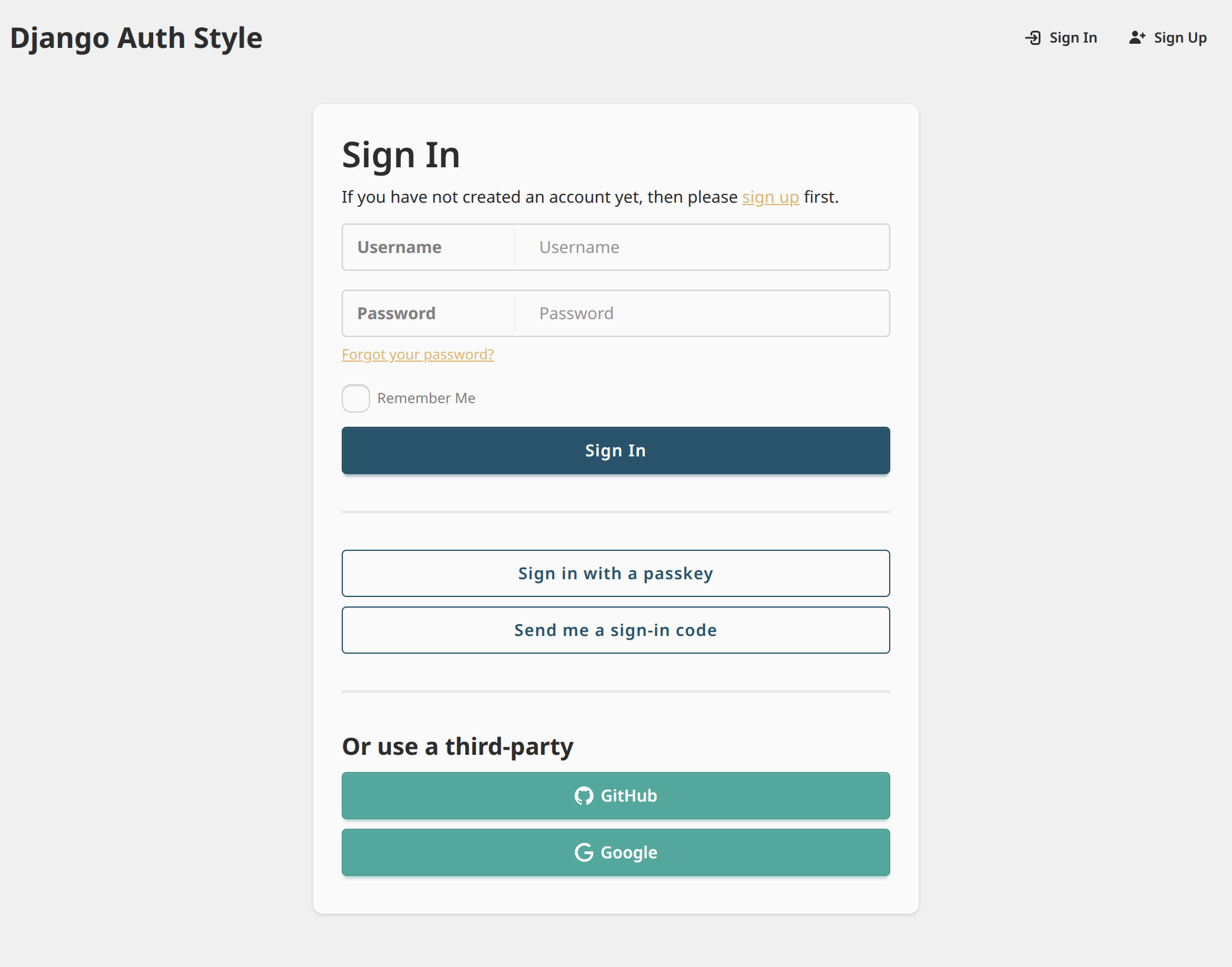
django-auth-style provides Django template styling for
django-allauth
and django-oauth-toolkit.
Features
- All
django-allauthanddjango-oauth-toolkitviews are automatically augmented with styling - Built-in support for dark color schemes ("dark mode")
- Django site name branding on all pages
- Branding can be further customized with a single template override
- Theme colors can be further customized via CSS variables
Installation
django-allauth Support
To enable support for django-allauth, install with:
pip install django-auth-style[allauth]
Then enable the Django app:
# settings.py
INSTALLED_APPS = [
    # Any project-local apps should come before "auth_style",
    # so templates can be overridden as needed
    "my_django_app.apps.MyDjangoAppConfig",
    ...,
    "auth_style",
    ...,
    # "allauth" must come after "auth_style"
    "allauth",
    "allauth.account",
    "allauth.socialaccount",
]
MIDDLEWARE = [
    ...,
    # CurrentSiteMiddleware is optional, but recommended to show site branding
    "django.contrib.sites.middleware.CurrentSiteMiddleware",
    ...,
]
django-oauth-toolkit Support
To enable support for django-oauth-toolkit, install with:
pip install django-auth-style[oauth-toolkit]
Then enable the Django app:
# settings.py
INSTALLED_APPS = [
    # Any project-local apps should come before "auth_style",
    # so templates can be overridden as needed
    "my_django_app.apps.MyDjangoAppConfig",
    ...,
    "auth_style",
    ...,
    # "oauth2_provider" must come after "auth_style"
    "oauth2_provider",
]
Customization
Customize the Site Name Branding
To customize the site name (in the upper-left corner),
create auth_style/site_name.html within your project's templates directory,
then insert any desired HTML. You will be responsible for applying appropriate styling.
For example:
<span style="font-size: 1.5rem; font-weight: bold; color: #2563eb;">
  🚀 My Custom App
</span>
Customize the Theme
To override the overall style theme of all pages,
create auth_style/extra_head.html within your project's templates directory.
Then, within a <style> tag,
define new DaisyUI theme CSS variables,
which will override the defaults. You may override some or all theme variables.
For example:
<style>
  :root {
    color-scheme: light;  /* Optional. Hints to browser which color scheme to use based on user's system settings */
    --color-base-100: #ffffff;
    /* ...rest of CSS variables */
  }
  /* If you would like to support dark mode */
  @media (prefers-color-scheme: dark) {
    :root {
      color-scheme: "dark";  /* Optional. Hints to browser which color scheme to use based on user's system settings */
      --color-base-100: #000000;
      /* ...rest of CSS variables */
    }
  }
</style>
1 maintainer

Metadata
1 maintainer
Release files for django-auth-style 0.15.1
For a detailed explanation of source distributions (sdists) and built distributions (wheels), please see the package formats documentation.
Source distribution (sdist)
| File | Size | Uploaded | |
|---|---|---|---|
| django_auth_style-0.15.1.tar.gz | 31.1 kB | Details |
Built distribution (wheel)
| File | Interpreter | ABI | Platform | Reset |
|---|---|---|---|---|
| django_auth_style-0.15.1-py3-none-any.whl | Python 3 | none | any | Details |
Total release size: 65.7 kB
Release files / django_auth_style-0.15.1.tar.gz
| Download URL | django_auth_style-0.15.1.tar.gz |
|---|---|
| Size | 31.1 kB |
| Tags | Source |
|
SHA-256 checksum How to use checksums |
f206a2ad11162e4d786668684c91d775bb3659372f0b751fa6159fe939b3dd19
|
|
BLAKE2b-256 checksum How to use checksums |
74f917f5984884ae4633a33ff5db0c51fd4dd79e6101d688775921b59a596786
|
| Upload date | |
|
Uploaded using Trusted Publishing? What is trusted publishing? |
Yes |
| Uploaded via |
uv/0.12.20 {"installer":{"name":"uv","version":"0.12.20","subcommand":["publish"]},"python":null,"implementation":{"name":null,"version":null},"distro":{"name":"Ubuntu","version":"24.04","id":"noble","libc":null},"system":{"name":null,"release":null},"cpu":null,"openssl_version":null,"setuptools_version":null,"rustc_version":null,"ci":true}
|
Release files / django_auth_style-0.15.1-py3-none-any.whl
| Download URL | django_auth_style-0.15.1-py3-none-any.whl |
|---|---|
| Size | 34.6 kB |
| Tags | Python 3 |
|
SHA-256 checksum How to use checksums |
309befe0cc738f44e780586621db3bc42c0e6b0cd6accc425da2f10d2577814d
|
|
BLAKE2b-256 checksum How to use checksums |
8d25a0d06f07dbfa11b0c5a560218d83d01f1730a5b7551cabc390ae5594148d
|
| Upload date | |
|
Uploaded using Trusted Publishing? What is trusted publishing? |
Yes |
| Uploaded via |
uv/0.12.20 {"installer":{"name":"uv","version":"0.12.20","subcommand":["publish"]},"python":null,"implementation":{"name":null,"version":null},"distro":{"name":"Ubuntu","version":"24.04","id":"noble","libc":null},"system":{"name":null,"release":null},"cpu":null,"openssl_version":null,"setuptools_version":null,"rustc_version":null,"ci":true}
|














