
Django Awesomplete
A django app that provides suggestions while you type into the field.



Requirements
- Python >= 3.6
- Django >= 1.11
Installation
Install the desired version with pip:
pip install django-awesomplete
Then add awesomplete to INSTALLED_APPS in your settings file:
INSTALLED_APPS = (
    # ...
    'awesomplete',
    # ...
)
Quickstart
Let's assume we are making a cities app in django and our models.py is:
from django.db import models


class City(models.Model):
    name = models.CharField(max_length=255)
    country = models.CharField(max_length=255)

    def __str__(self):
        return self.name
To use suggestions we need to override widget in admin.py:
from django import forms
from django.contrib import admin
from awesomplete.widgets import AwesompleteWidgetWrapper
from .models import City


def get_country_suggestions():
    """
    Get a suggestions list from existing records.
    """
    return City.objects.values_list(
        'country',
        flat=True
    ).order_by('country').distinct()


class CityAdminForm(forms.ModelForm):
    class Meta:
        model = City
        fields = forms.ALL_FIELDS
        widgets = {
            'country': AwesompleteWidgetWrapper(
                suggestions=get_country_suggestions
            )
        }


@admin.register(City)
class CityAdmin(admin.ModelAdmin):
    form = CityAdminForm
Result:
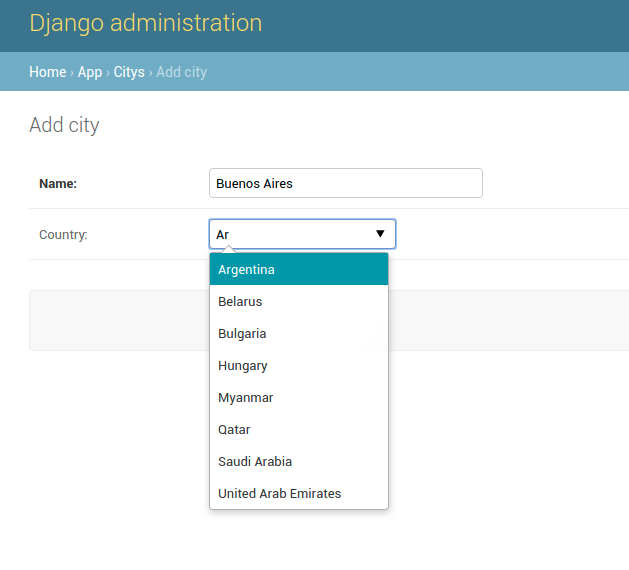
Suggestions
You can pass either an iterable of strings, 2-tuples, dicts or a callable that returns such an iterable.
# iterable of strings
AwesompleteWidgetWrapper(
    suggestions=['one', 'two', 'three']
)

# iterable of 2-tuples (value, label)
AwesompleteWidgetWrapper(
    suggestions=(
        ('en', 'English'),
        ('es', 'Spanish')
    )
)

# iterable of dicts
AwesompleteWidgetWrapper(
    suggestions=(
        {
            'label': 'English',
            'value': 'en'
        },
        {
            'label': 'Spanish',
            'value': 'es'
        }
    )
)
AwesompleteWidgetWrapper
Actually, AwesompleteWidgetWrapper is a wrapper for a widget.
When the widget is not defined, it defaults to TextInput.
You can specify another widget explicitly, e.g. EmailInput:
from django import forms
from awesomplete.widgets import AwesompleteWidgetWrapper
from .models import City


class CityAdminForm(forms.ModelForm):
    class Meta:
        model = City
        fields = forms.ALL_FIELDS
        widgets = {
            'email': AwesompleteWidgetWrapper(
                widget=forms.EmailInput,
                min_chars=0,
                suggestions=(
                    'noreply@mail.com',
                    'dont_disturb@mail.com',
                    'mayor@mail.com',
                    'support@mail.com',
                ),
            )
        }
You can also pass additional parameters to AwesompleteWidgetWrapper:
-
min_chars
Minimum characters the user has to type before the autocomplete popup shows up.
Default:1 -
max_items
Maximum number of suggestions to display.
Default:10 -
autofirst
Should the first element be automatically selected?
Default:True
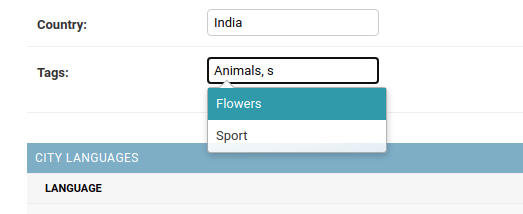
AwesompleteTagsWidgetWrapper
This widget is a subclass of the AwesompleteWidgetWrapper and intended to be used
for entering comma-separated values.
This widget can be used with django-taggit
from django import forms
from awesomplete.widgets import AwesompleteTagsWidgetWrapper
from taggit.models import Tag
from taggit.forms import TagWidget
from .models import City


def get_tag_suggestions():
    return Tag.objects.values_list(
        'name',
        flat=True
    ).order_by('name').distinct()


class CityForm(forms.ModelForm):
    class Meta:
        model = City
        fields = forms.ALL_FIELDS
        widgets = {
            'tags': AwesompleteTagsWidgetWrapper(
                widget=TagWidget,
                suggestions=get_tag_suggestions
            )
        }
Links
- awesomplete created by Lea Verou.
License
Copyright (c) 2018 Mihail Mishakin Released under the BSD license (see LICENSE)
1 maintainer

Metadata
1 maintainer
Release files for django-awesomplete 0.6.0
For a detailed explanation of source distributions (sdists) and built distributions (wheels), please see the package formats documentation.
Source distribution (sdist)
| File | Size | Uploaded | |
|---|---|---|---|
| django-awesomplete-0.6.0.tar.gz | 26.1 kB | Details |
Built distribution (wheel)
| File | Interpreter | ABI | Platform | Reset |
|---|---|---|---|---|
| django_awesomplete-0.6.0-py2.py3-none-any.whl | Python 2, Python 3 | none | any | Details |
Total release size: 51.7 kB
Release files / django-awesomplete-0.6.0.tar.gz
| Download URL | django-awesomplete-0.6.0.tar.gz |
|---|---|
| Size | 26.1 kB |
| Tags | Source |
|
SHA-256 checksum How to use checksums |
d4df7e470593846f91e1d14f20edc2f24476782d35ff7075714a0afe08fabdb2
|
|
BLAKE2b-256 checksum How to use checksums |
333924c991b3138e4d7d70f61081d0451d5dfcc1b3106c125f74e54de5a851a6
|
| Upload date | |
|
Uploaded using Trusted Publishing? What is trusted publishing? |
No |
| Uploaded via |
twine/5.0.0 CPython/3.10.12
|
Release files / django_awesomplete-0.6.0-py2.py3-none-any.whl
| Download URL | django_awesomplete-0.6.0-py2.py3-none-any.whl |
|---|---|
| Size | 25.6 kB |
| Tags | Python 2 Python 3 |
|
SHA-256 checksum How to use checksums |
fb6884deeff964041b0f2650eef383378db9aacc42a666112953925725241502
|
|
BLAKE2b-256 checksum How to use checksums |
db4370f3509f35529a5f495f1fbd6c3ea849b911f189a4773fbe9e3c6f022a59
|
| Upload date | |
|
Uploaded using Trusted Publishing? What is trusted publishing? |
No |
| Uploaded via |
twine/5.0.0 CPython/3.10.12
|














