
Big Red Button
For Django



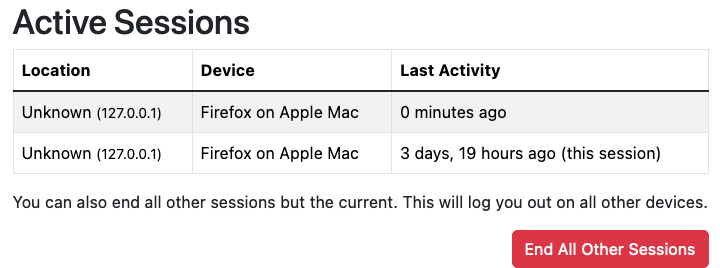
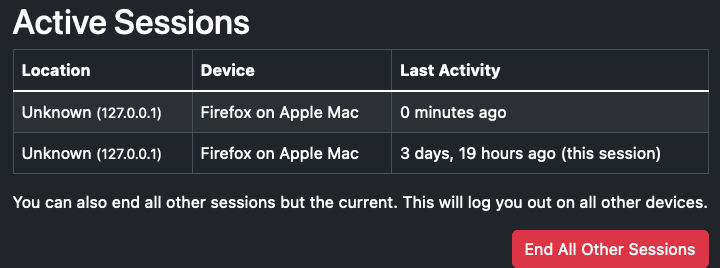
django-bigredbutton provides a big red "End All Other Sessions" button in a list of a user's current sessions.
Rendered with a light theme:
Rendered with a dark theme:
It can work with multiple session backends, and includes built-in templates for both django-qsessions and django-user-sessions, and dynamically switches between them depending on which one is identified in settings.SESSION_ENGINE.
Compatibility
- Python: >= 3.11
- Django: >= 4.0
Installation
-
Install the latest version:
pip install django-bigredbutton
poetry add django-bigredbutton
uv add django-bigredbutton
-
Add a session backend, like django-qsessions or django-user-sessions. You can use the optional packaging shortcuts:
pip install 'django-bigredbutton[qsessions]'
poetry add 'django-bigredbutton[qsessions]'
uv add 'django-bigredbutton[qsessions]'
pip install 'django-bigredbutton[user-sessions]'
poetry add 'django-bigredbutton[user-sessions]'
uv add 'django-bigredbutton[user-sessions]'
But there may be additional steps required for each session backend. Refer to the documentation for your session backend package for their installation instructions.
-
Add
bigredbuttontoINSTALLED_APPSin your project'ssettings.py, and optionally setBIGREDBUTTON_DELETE_SUCCESS_URL_NAMEto the URL name of your choice (default:list_sessions). -
Register
bigredbuttonin your projects root URLConf:urlpatterns = [ ... path("account/sessions/", include("bigredbutton.urls")), ... ]
Usage
Run Django's development server and navigate to the configured root for
bigredbutton. The URL in these instructions will be
http://localhost:8000/account/sessions/.
You will see a list of all of your current sessions. If you have more than one session (eg: you are signed in on more than one browser or device), you will see a big red "End All Other Sessions" button. That button will sign you out of all of your other sessions.
TODO
I have intentionally kept this app very small to minimize the maintenance burden. But contributions are very welcome!
License
MIT
1 maintainer

Release files for django-bigredbutton 0.3.4
For a detailed explanation of source distributions (sdists) and built distributions (wheels), please see the package formats documentation.
Source distribution (sdist)
| File | Size | Uploaded | |
|---|---|---|---|
| django_bigredbutton-0.3.4.tar.gz | 5.7 kB | Details |
Built distribution (wheel)
| File | Interpreter | ABI | Platform | Reset |
|---|---|---|---|---|
| django_bigredbutton-0.3.4-py3-none-any.whl | Python 3 | none | any | Details |
Total release size: 13.7 kB
Release files / django_bigredbutton-0.3.4.tar.gz
| Download URL | django_bigredbutton-0.3.4.tar.gz |
|---|---|
| Size | 5.7 kB |
| Tags | Source |
|
SHA-256 checksum How to use checksums |
6fe486264c4788c9203c030afc6afc3ffe473858d80b0c2ba26e3495d49c126d
|
|
BLAKE2b-256 checksum How to use checksums |
6bd6215c78ee016e99c9494289787c514e40b87c861dffe1c2d3b5cc2bfb89bb
|
| Upload date | |
|
Uploaded using Trusted Publishing? What is trusted publishing? |
Yes |
| Uploaded via |
twine/6.1.0 CPython/3.13.7
|
Provenance
Provenance describes where a file came from. On PyPI, provenance is shared via attestations, which provide a verifiable record of the build or publishing details. View details, limitations and caveats.


PyPI Publish Attestation
PyPI verified that this artifact, at this checksum, originated from the publisher listed below.
Signed by GitHub Actions, verified by PyPI on Nov 30, 2025.
Transparency logRelease files / django_bigredbutton-0.3.4-py3-none-any.whl
| Download URL | django_bigredbutton-0.3.4-py3-none-any.whl |
|---|---|
| Size | 8.0 kB |
| Tags | Python 3 |
|
SHA-256 checksum How to use checksums |
a94aa41b0e665896773bd3f075de4e191bc2860e6a79974efaabd3e6efbc5896
|
|
BLAKE2b-256 checksum How to use checksums |
e28d13f55aeb1c3bc90054aa608f4aa6f75324b82df83c9f7d9237478a181f55
|
| Upload date | |
|
Uploaded using Trusted Publishing? What is trusted publishing? |
Yes |
| Uploaded via |
twine/6.1.0 CPython/3.13.7
|
Provenance
Provenance describes where a file came from. On PyPI, provenance is shared via attestations, which provide a verifiable record of the build or publishing details. View details, limitations and caveats.
PyPI Publish Attestation
PyPI verified that this artifact, at this checksum, originated from the publisher listed below.
Signed by GitHub Actions, verified by PyPI on Nov 30, 2025.
Transparency log













