
django-calculation




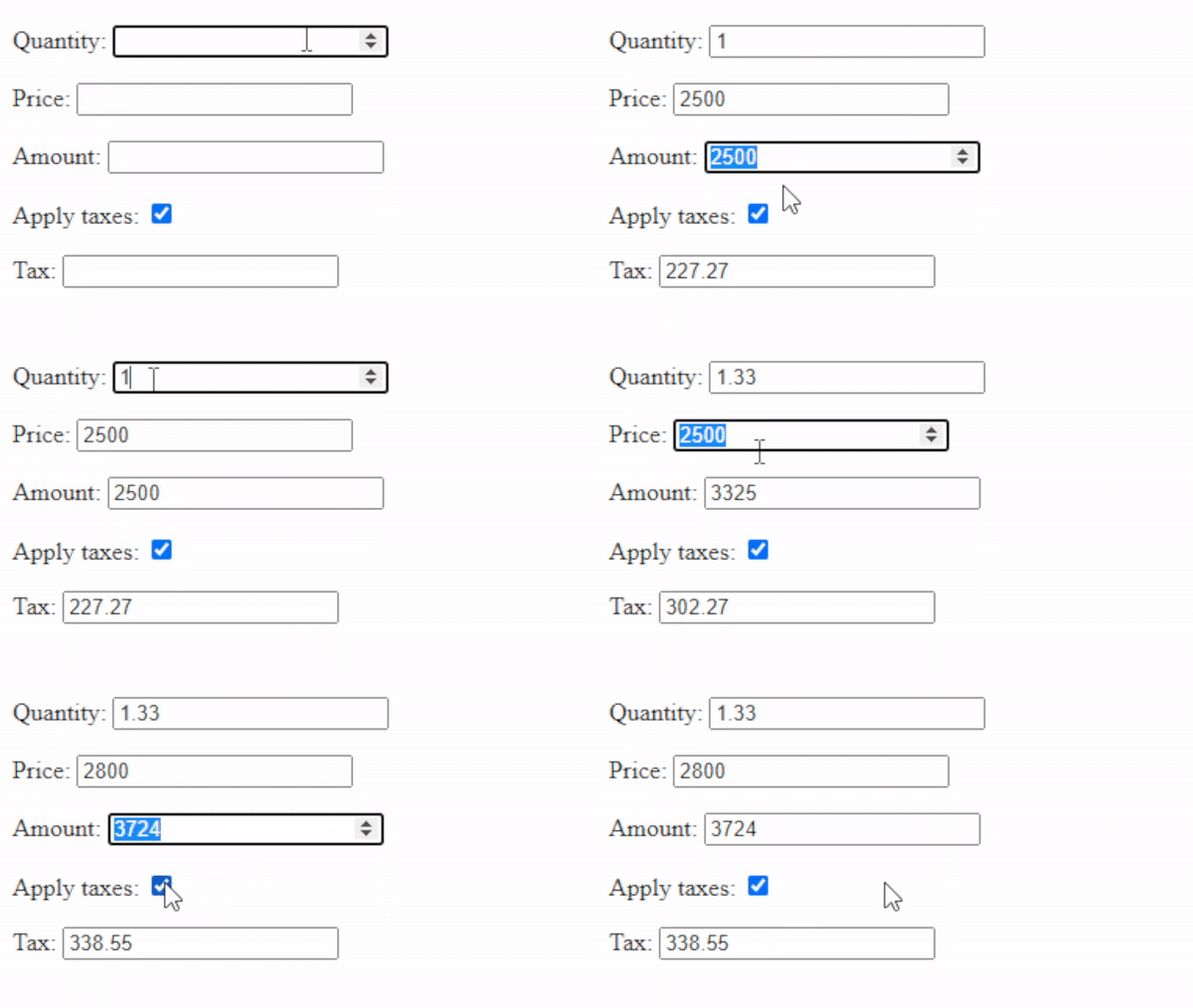
Make simple calculations in your django forms using django-calculation. This app provide a Django Widget that derives its value from a expression defined in the widget instance.
The field is updated when any of the source fields change.
Installation
pip install django-calculation
Add calculation to your INSTALLED_APPS
INSTALLED_APPS = [
    ...
    'calculation',
]
Usage
Import calculation and complete the definition.
Example
Using FormulaInput widget
from django import forms

import calculation


class TestForm(forms.Form):
    quantity = forms.DecimalField()
    price = forms.DecimalField()
    amount = forms.DecimalField(
        widget=calculation.FormulaInput('quantity*price') # <- using single math expression
    )
    apply_taxes = forms.BooleanField(initial=True)
    tax = forms.DecimalField(
        # using math expression and javascript functions.
        widget=calculation.FormulaInput('apply_taxes ? parseFloat(amount/11).toFixed(2) : 0.0')
    )
django-calculation works with static files and therefore it is necessary to include the media of the form in the template file.
<form method="post">
    {% csrf_token %}
    {{ form }}
    <input type="submit" value="Submit">
</form>

{{ form.media }}
Modes
Currently the app support two modes of calculation FORMULA and SUMMARY.
FORMULA
The field value derive from a formula expression. In the expression you can refer to the form field using its name.
amount = forms.DecimalField(
    widget=calculation.FormulaInput('quantity*price')
)
SUMMARY
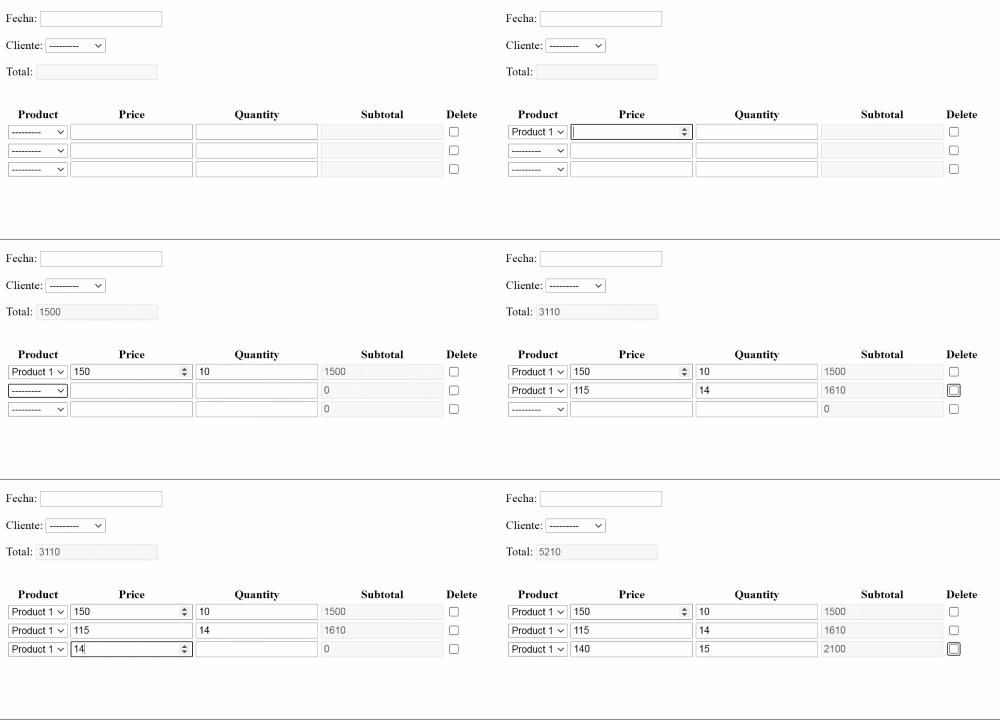
The field value derive from a summary definition, it is useful when you need to get the sum of a django formset field.
total = forms.DecimalField(
    widget=calculation.SummaryInput(
            function=calculation.SUM,
            field='amount'
    )
Summary example
Summary definition in OrderForm
class OrderForm(forms.ModelForm):
    total = forms.DecimalField(
        # using SumInput a SummaryInput abstraction
        widget=calculation.SumInput('subtotal')
    )
    class Meta:
        model = Order
        fields = ['date', 'customer']
OrderDetForm also contain a calculated field subtotal.
class OrderDetForm(forms.ModelForm):
    subtotal = forms.DecimalField(
        widget=calculation.FormulaInput('quantity*price')
    )
    class Meta:
        model = OrderDet
        fields = ['product', 'price', 'quantity', 'subtotal']

# formset definition
OrderDetFormSet = forms.inlineformset_factory(Order, OrderDet, OrderDetForm)
Roadmap
- Create demo project.
- Create documentation.
Add changelog.
1 maintainer

Metadata
1 maintainer
Release files for django-calculation 1.0.0
For a detailed explanation of source distributions (sdists) and built distributions (wheels), please see the package formats documentation.
Source distribution (sdist)
| File | Size | Uploaded | |
|---|---|---|---|
| django-calculation-1.0.0.tar.gz | 9.2 kB | Details |
Built distribution (wheel)
| File | Interpreter | ABI | Platform | Reset |
|---|---|---|---|---|
| django_calculation-1.0.0-py3-none-any.whl | Python 3 | none | any | Details |
Total release size: 17.3 kB
Release files / django-calculation-1.0.0.tar.gz
| Download URL | django-calculation-1.0.0.tar.gz |
|---|---|
| Size | 9.2 kB |
| Tags | Source |
|
SHA-256 checksum How to use checksums |
125136fdb06ca6ed118843f1fdf354ffd4554dfa0d67f684a6c86a8e5c07016d
|
|
BLAKE2b-256 checksum How to use checksums |
a0036b5b04e13fa7386cbc3ba64af53a5030a22d771fca51c506c5a3e0c260d5
|
| Upload date | |
|
Uploaded using Trusted Publishing? What is trusted publishing? |
No |
| Uploaded via |
twine/4.0.1 CPython/3.9.13
|
Release files / django_calculation-1.0.0-py3-none-any.whl
| Download URL | django_calculation-1.0.0-py3-none-any.whl |
|---|---|
| Size | 8.1 kB |
| Tags | Python 3 |
|
SHA-256 checksum How to use checksums |
7d6144aae369c49b8e3e7011a491948d906df383ad7dedf5b0d1d0b5ff0cb0fa
|
|
BLAKE2b-256 checksum How to use checksums |
6b00dc55b77288fac344162da7ac15a233d2c01bced0e538f808c1191e7bc91a
|
| Upload date | |
|
Uploaded using Trusted Publishing? What is trusted publishing? |
No |
| Uploaded via |
twine/4.0.1 CPython/3.9.13
|














