
django-cc-admin
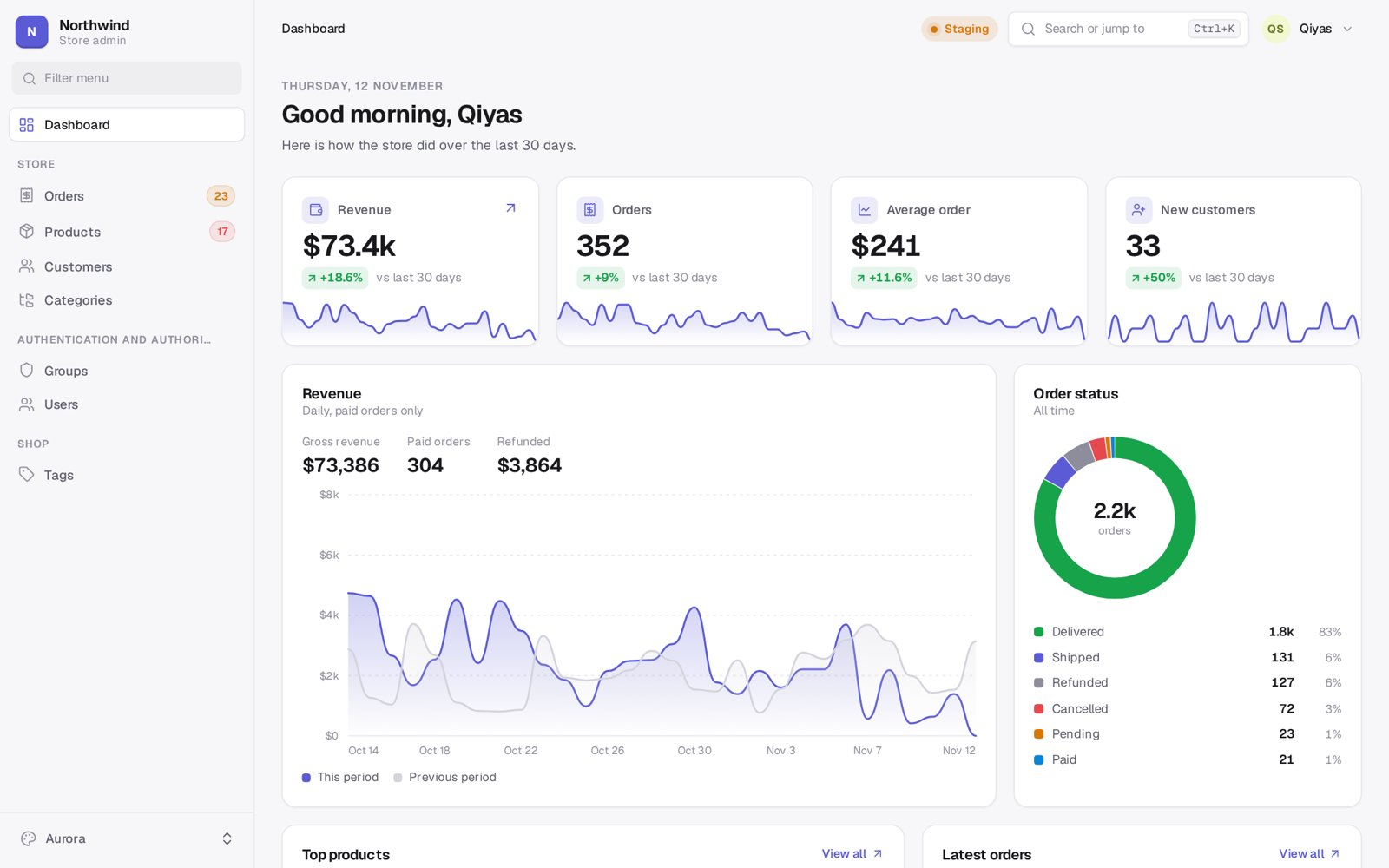
A new skin and a set of tools for the Django admin. It replaces the default look with one of fifteen themes, builds the dashboard from your settings, and updates lists, dashboards and badges live without a page reload. It adds realtime notifications with popups, sounds, desktop and push notifications, a command palette, keyboard shortcuts you can rebind, a GitHub style activity page for your team, better filters, row and page actions, CSV and JSON export, and a lot of small things the stock admin never had.
Your existing ModelAdmin classes keep working. Swap in cc_admin.admin.ModelAdmin only where you want the extra features.
Works with Django 5.0, 5.1, 5.2, 6.0 and 6.1, Python 3.10 and up.
Install
pip install django-cc-admin
Put cc_admin above django.contrib.admin:
INSTALLED_APPS = [
    "cc_admin",
    "django.contrib.admin",
    ...
]
Then run python manage.py migrate once, for the notification tables.
That is all you need. Open /admin/ and you get the new look, the palette, the theme switcher, live updates and the notification bell. A system check tells you if the app order is wrong.
Optional extras:
pip install "django-cc-admin[live]"   # WebSocket transport through Django Channels
pip install "django-cc-admin[push]"   # Web Push to phones and closed browsers
Themes
| Theme | Layout | Modes | Feel |
|---|---|---|---|
aurora |
sidebar | light, dark | Clean indigo, the default |
midnight |
sidebar | dark | Deep navy with a cyan edge |
paper |
top bar | light, dark | Serif headings on warm paper |
terminal |
icon rail | dark | Green phosphor, monospace everywhere |
nord |
sidebar | light, dark | The Nord palette |
brutal |
top bar | light | Thick borders and hard shadows |
glass |
floating | dark, light | Frosted panels over a soft glow |
slate |
sidebar | light, dark | Dense, dark menu, built for long tables |
sunset |
floating | light, dark | Coral gradient menu |
forest |
sidebar | light, dark | Moss green, Fraunces titles |
mono |
top bar | light, dark | Black and white only |
rose |
floating | light, dark | Pink, round corners, pill buttons |
ocean |
icon rail | light, dark | Deep teal |
classic |
sidebar | light | A desktop from 1995 |
cc |
sidebar | dark, light | Ink and ice blue, from theqiyas.cc |
Every user can pick a theme, mode (auto, light, dark) and density (compact, default, roomy) from the user menu or by pressing t. The choice is kept in a cookie, so the page renders in the right theme with no flash. Turn the switcher off with THEME_SWITCHER: False to force one theme for everybody.
All fonts and icons ship with the package. Nothing is loaded from a CDN.
Screenshots
Each picture shows the dashboard, the order list and a product form.
Aurora 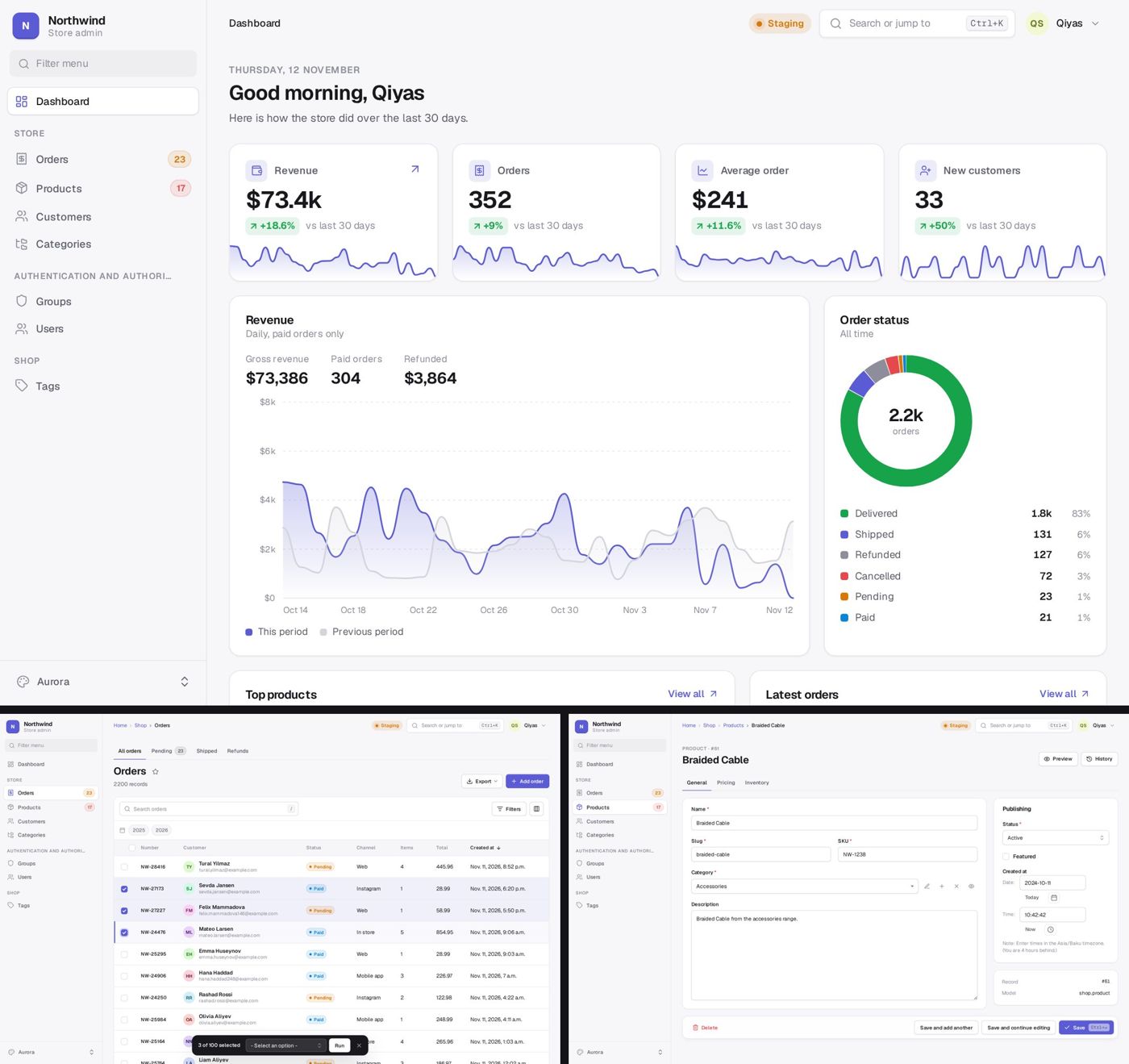 |
Midnight 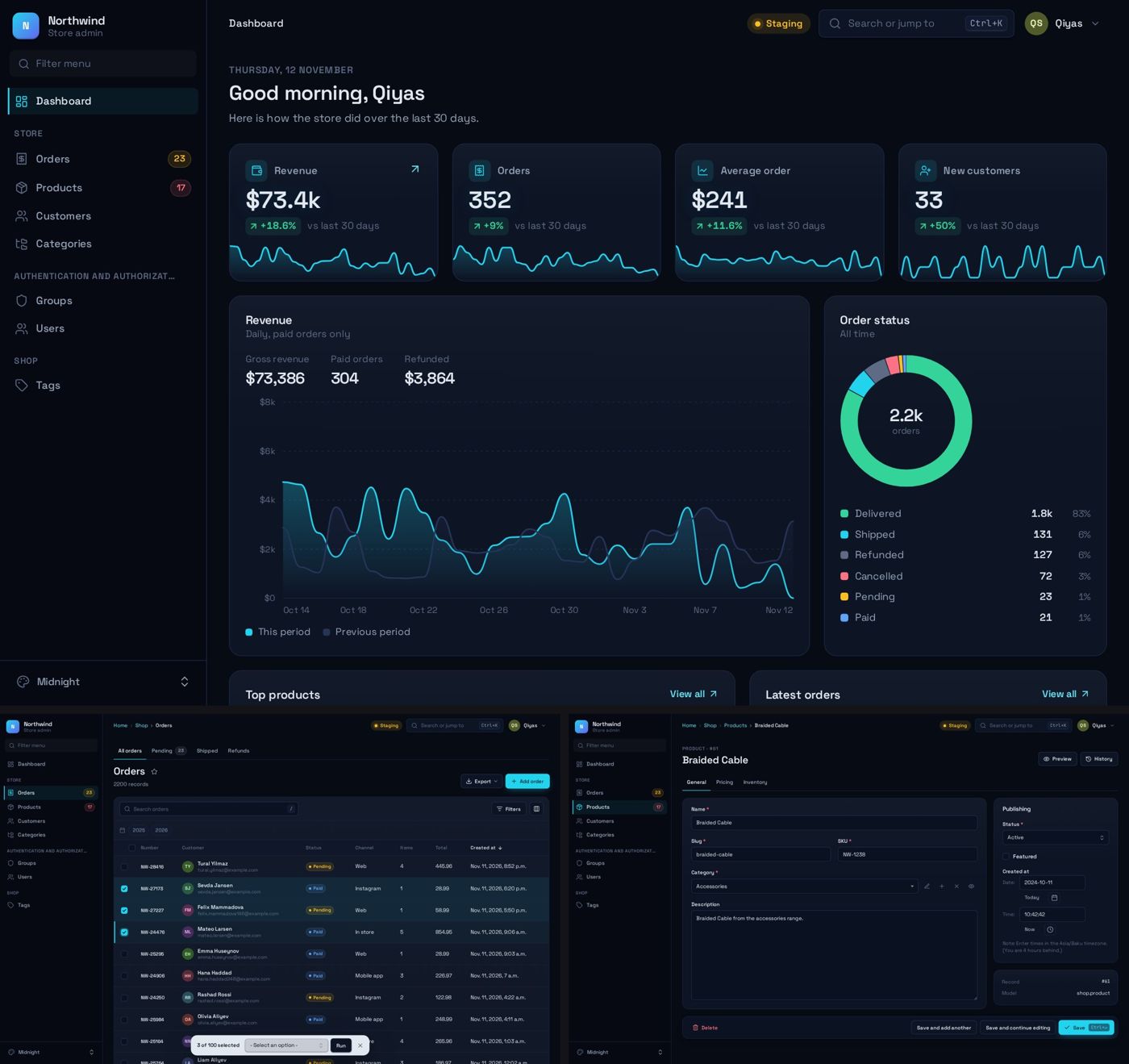 |
Paper 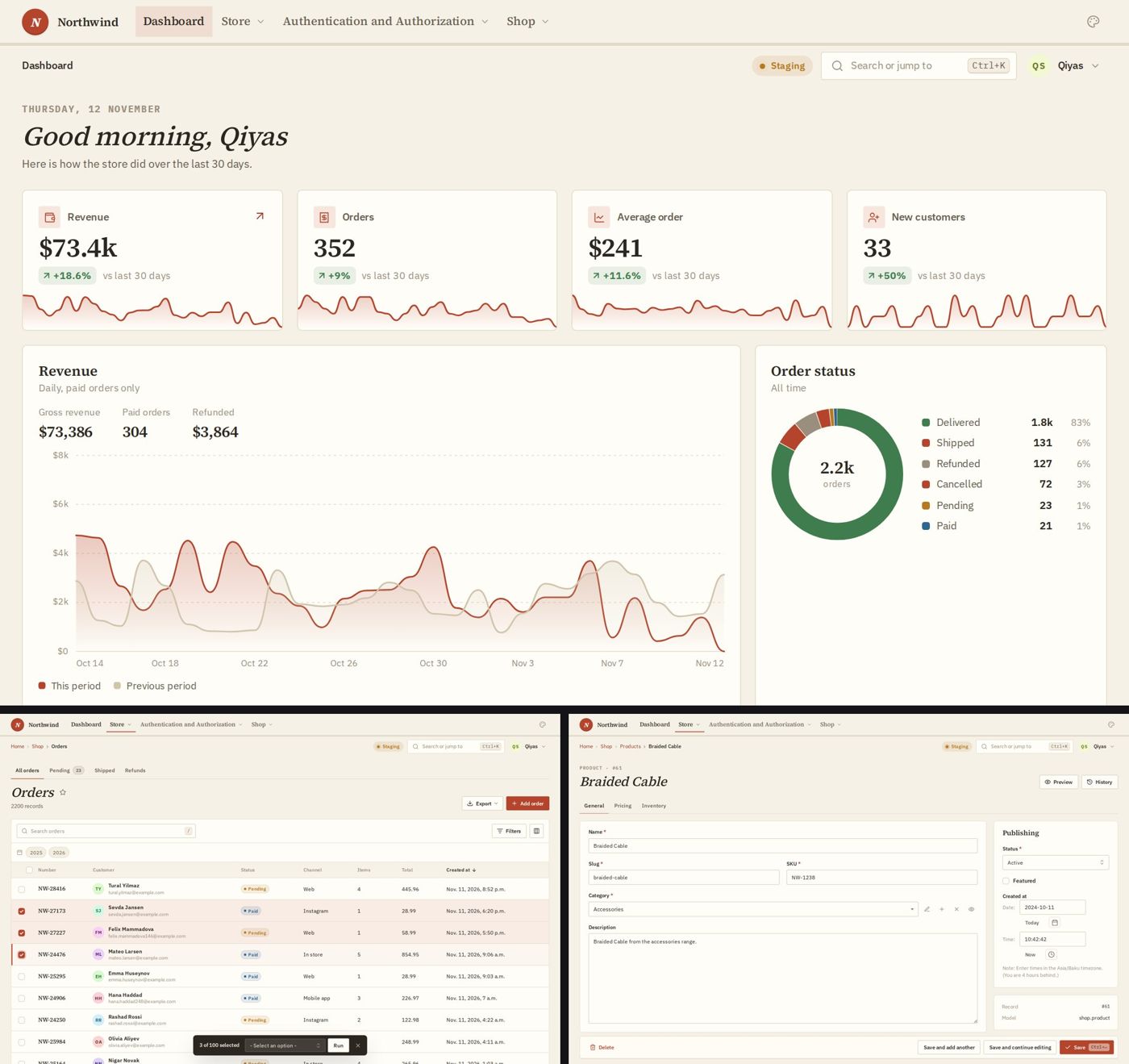 |
Terminal 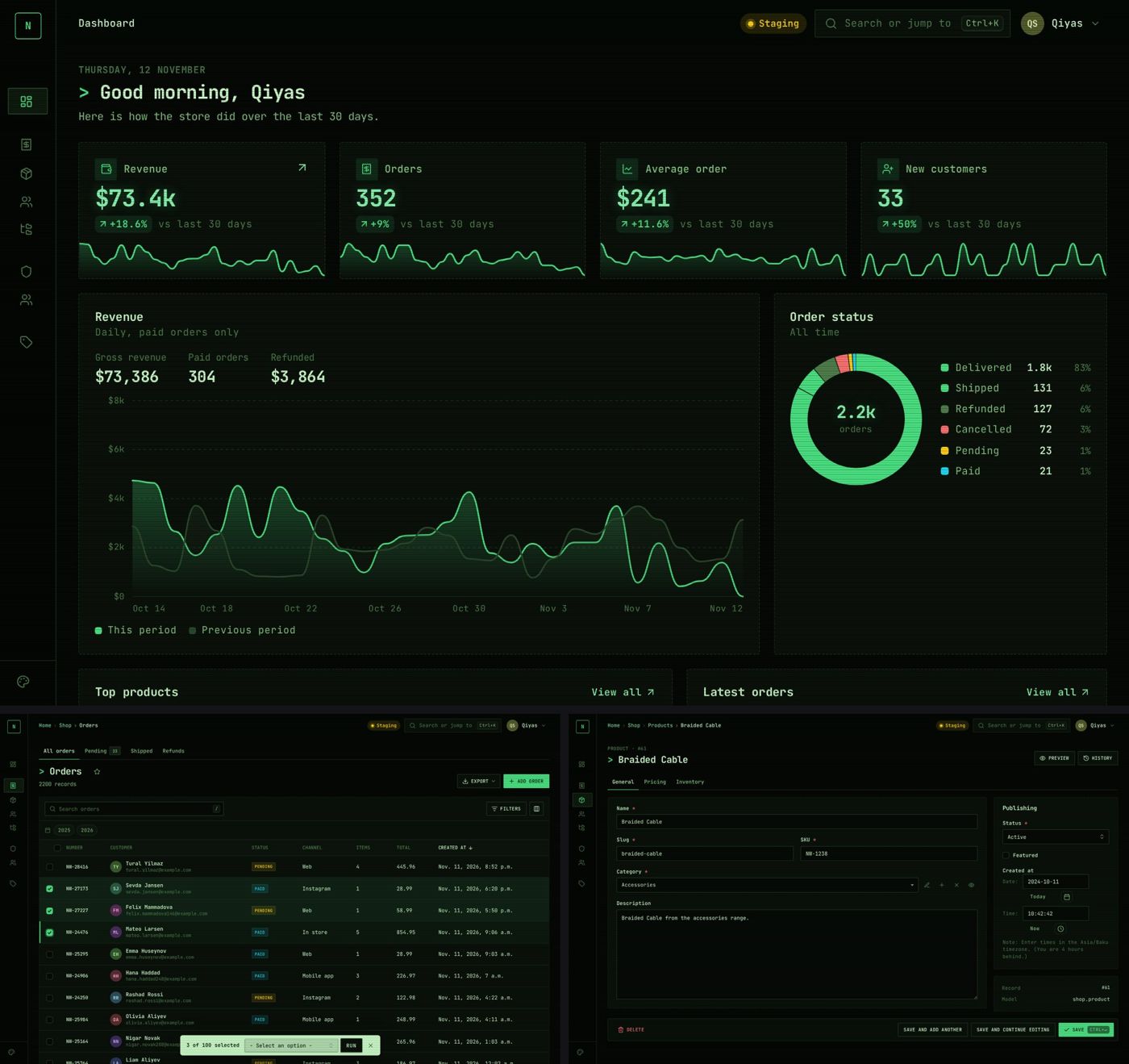 |
Nord 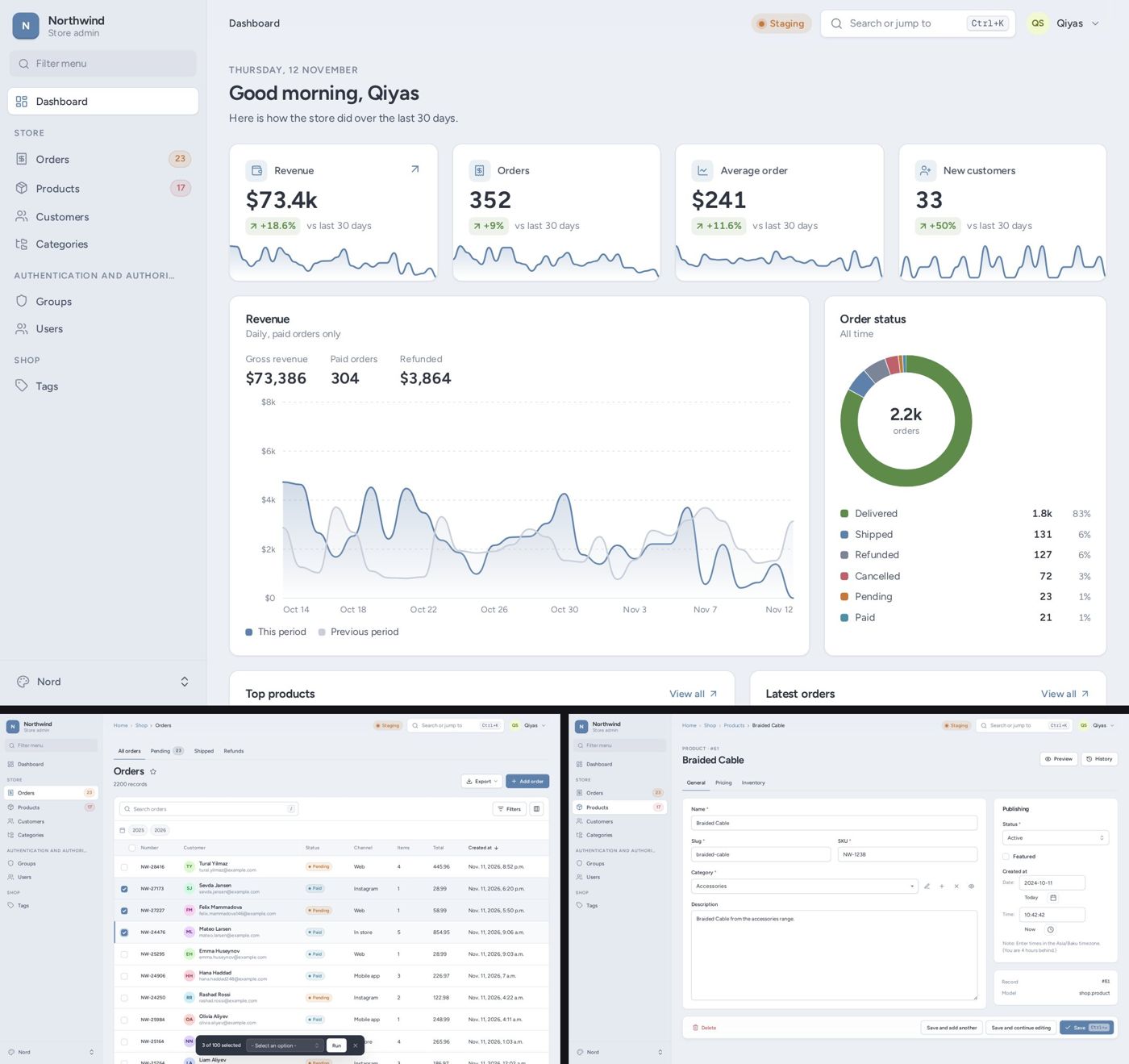 |
Brutal 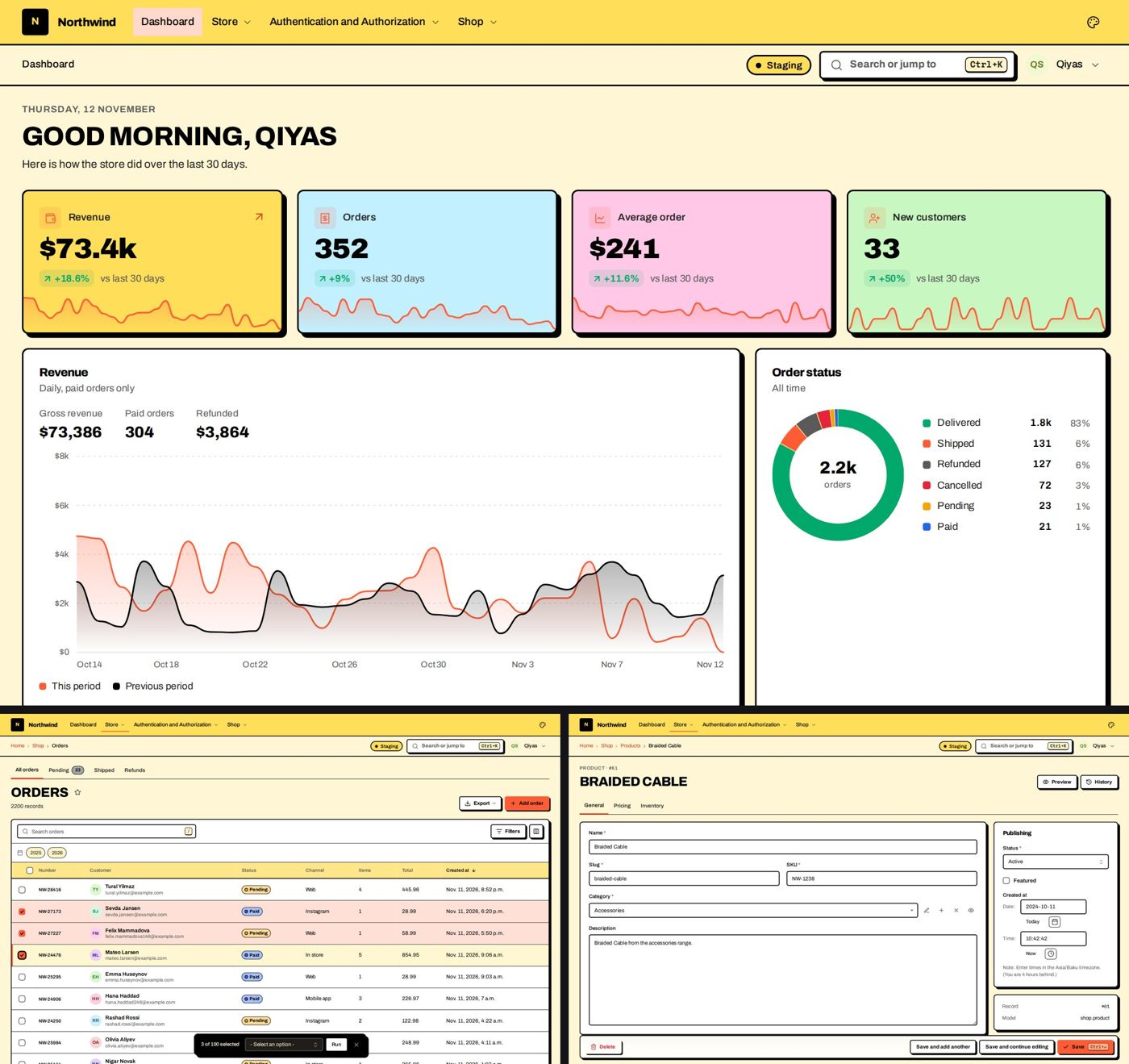 |
Glass 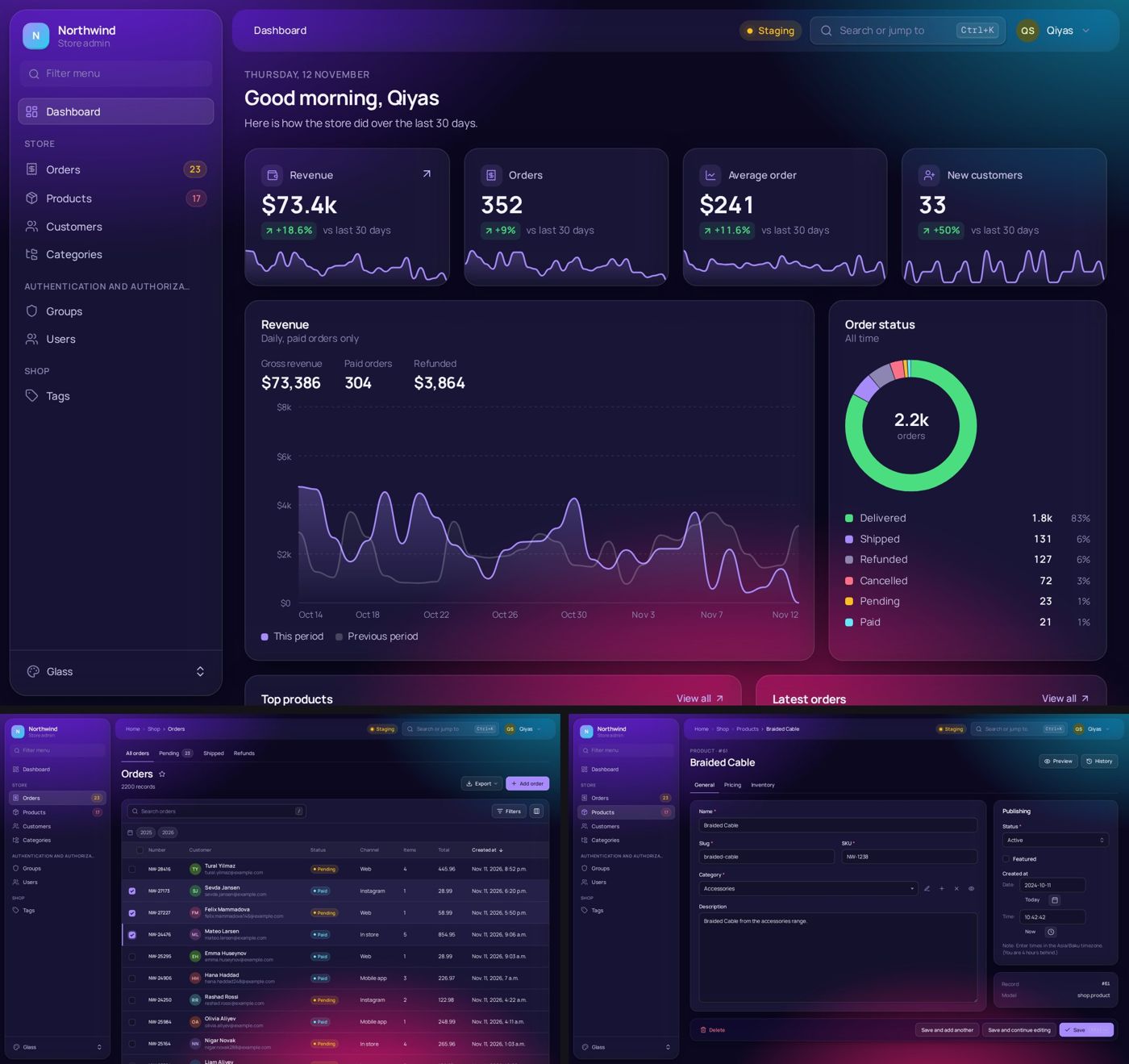 |
Slate 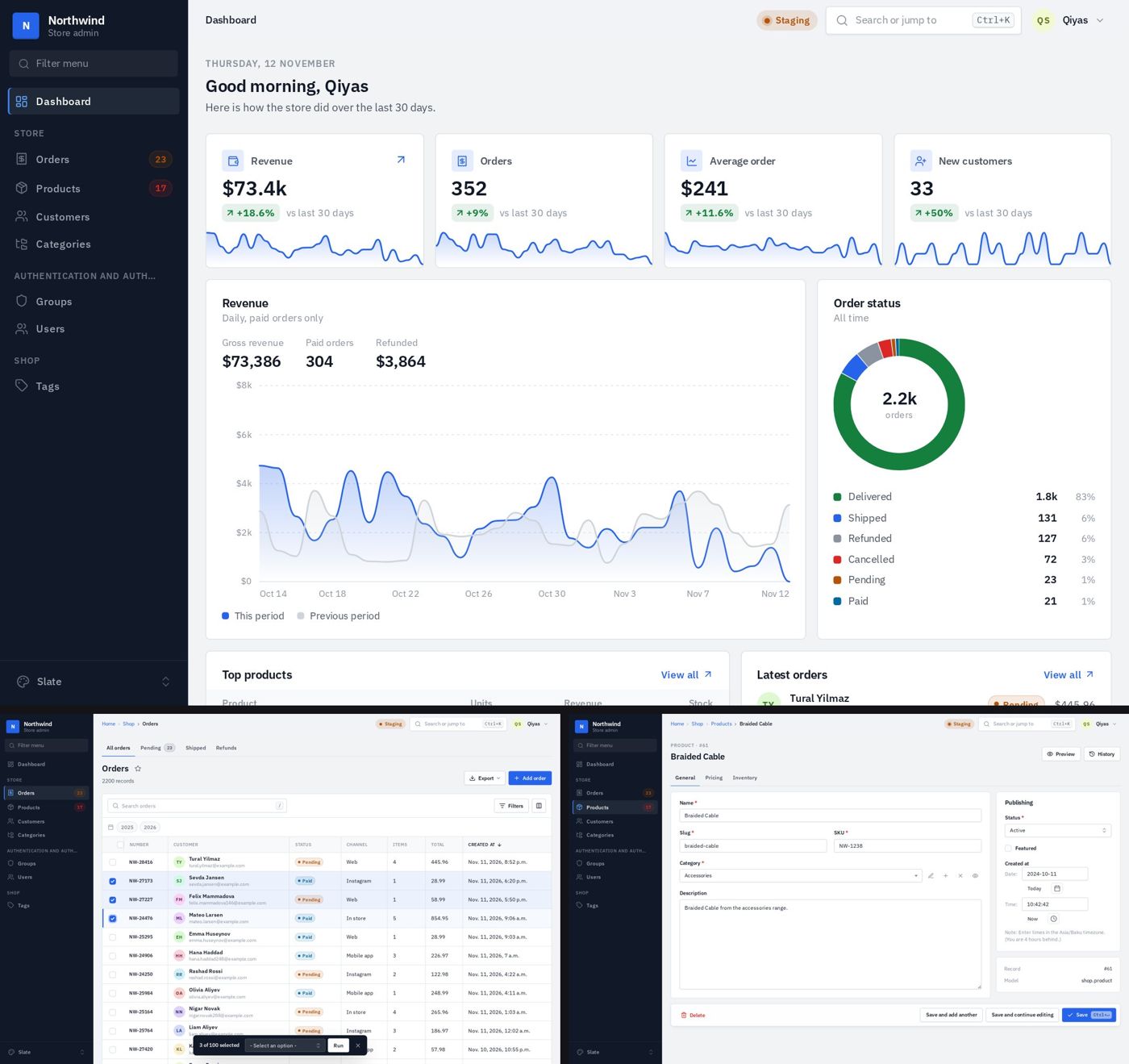 |
Sunset 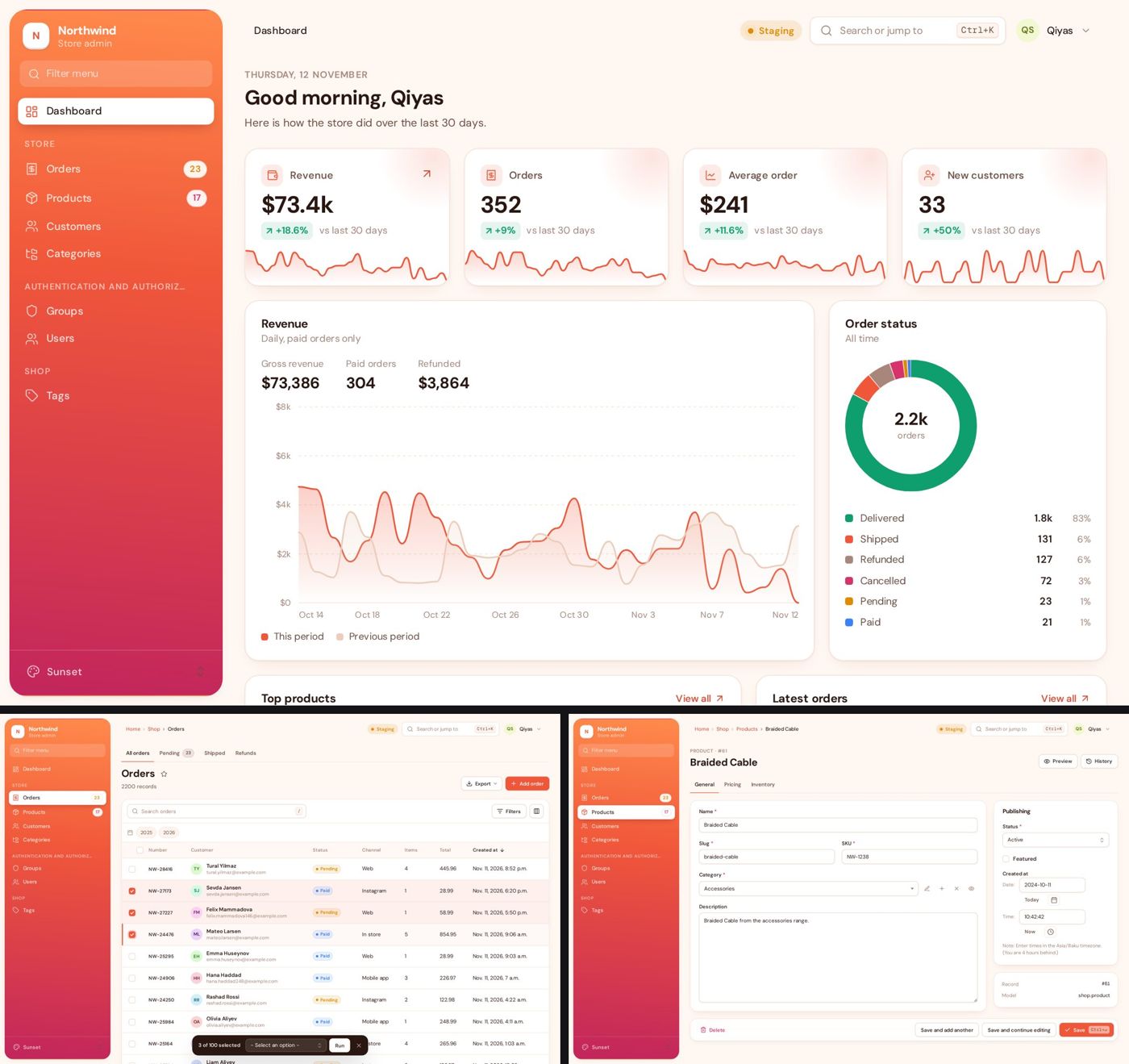 |
Forest 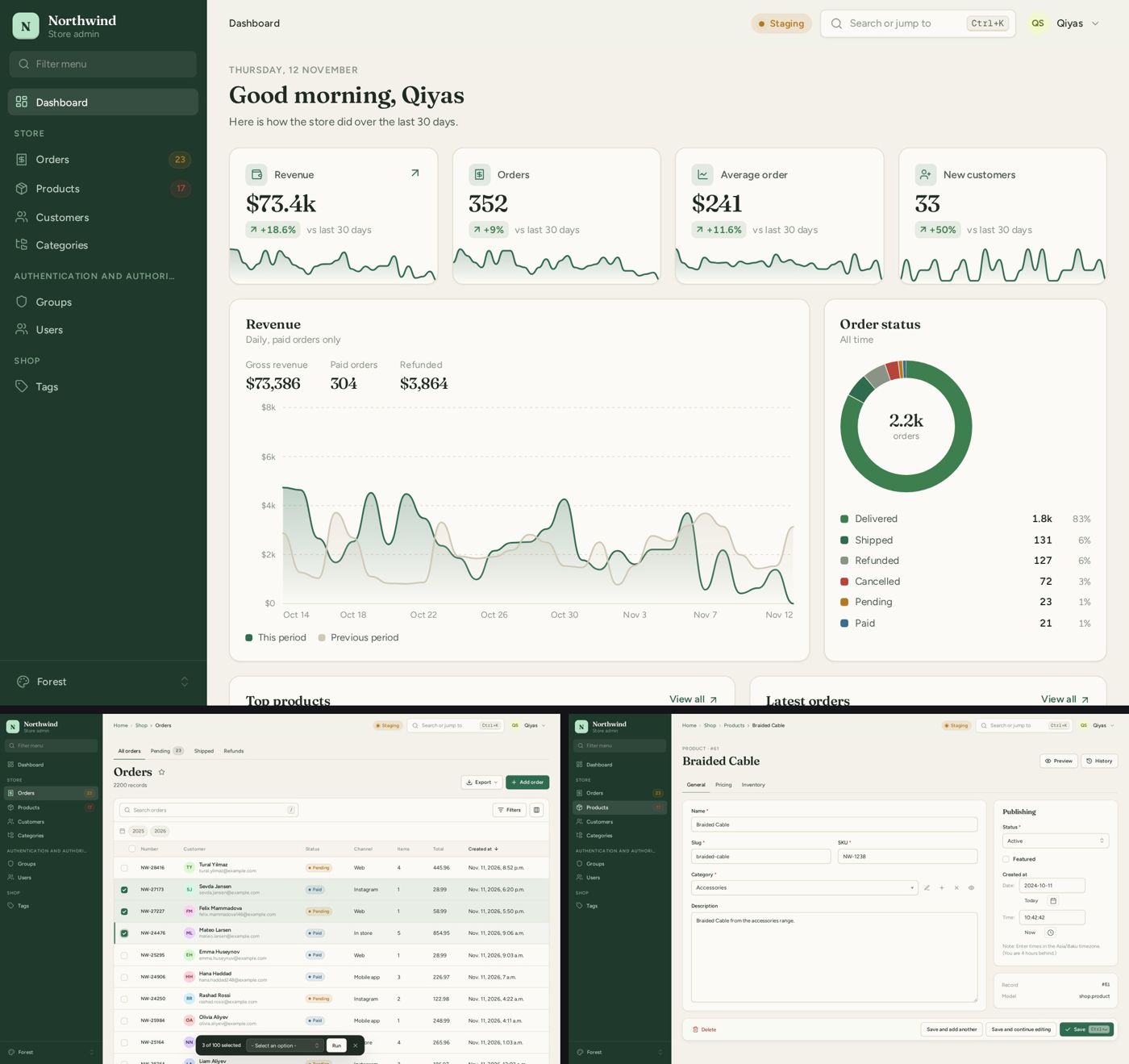 |
Mono 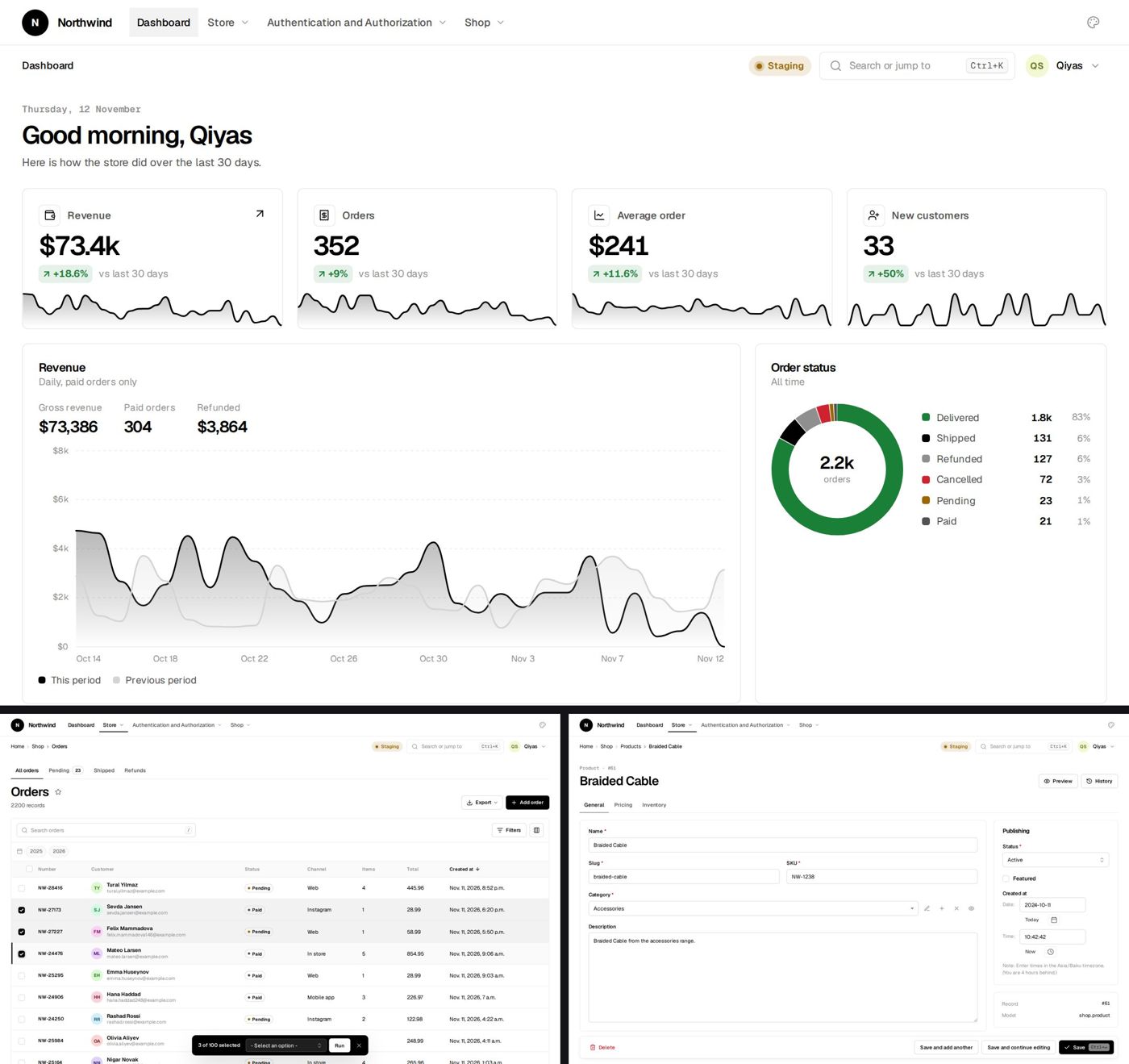 |
Rose 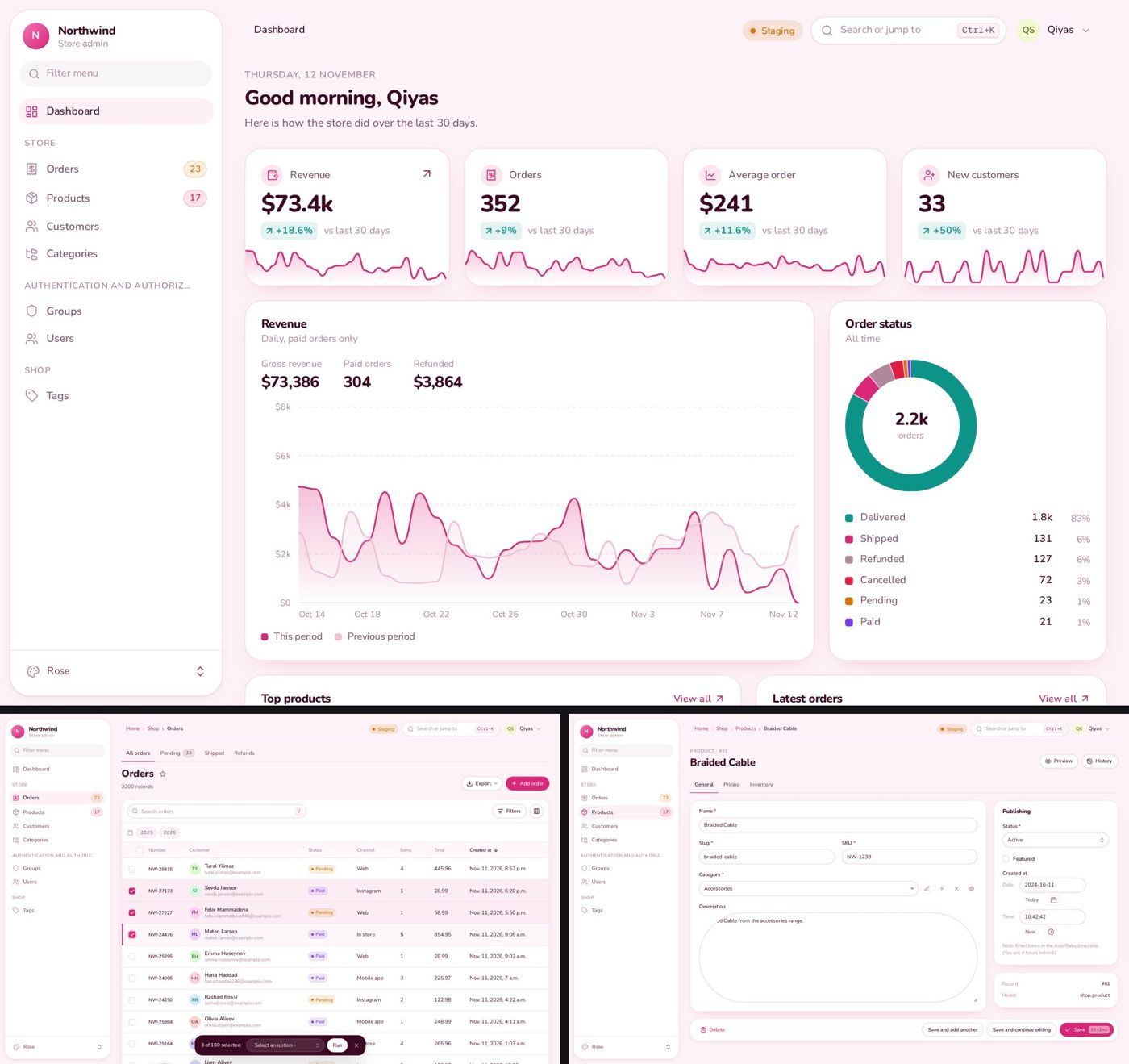 |
Ocean 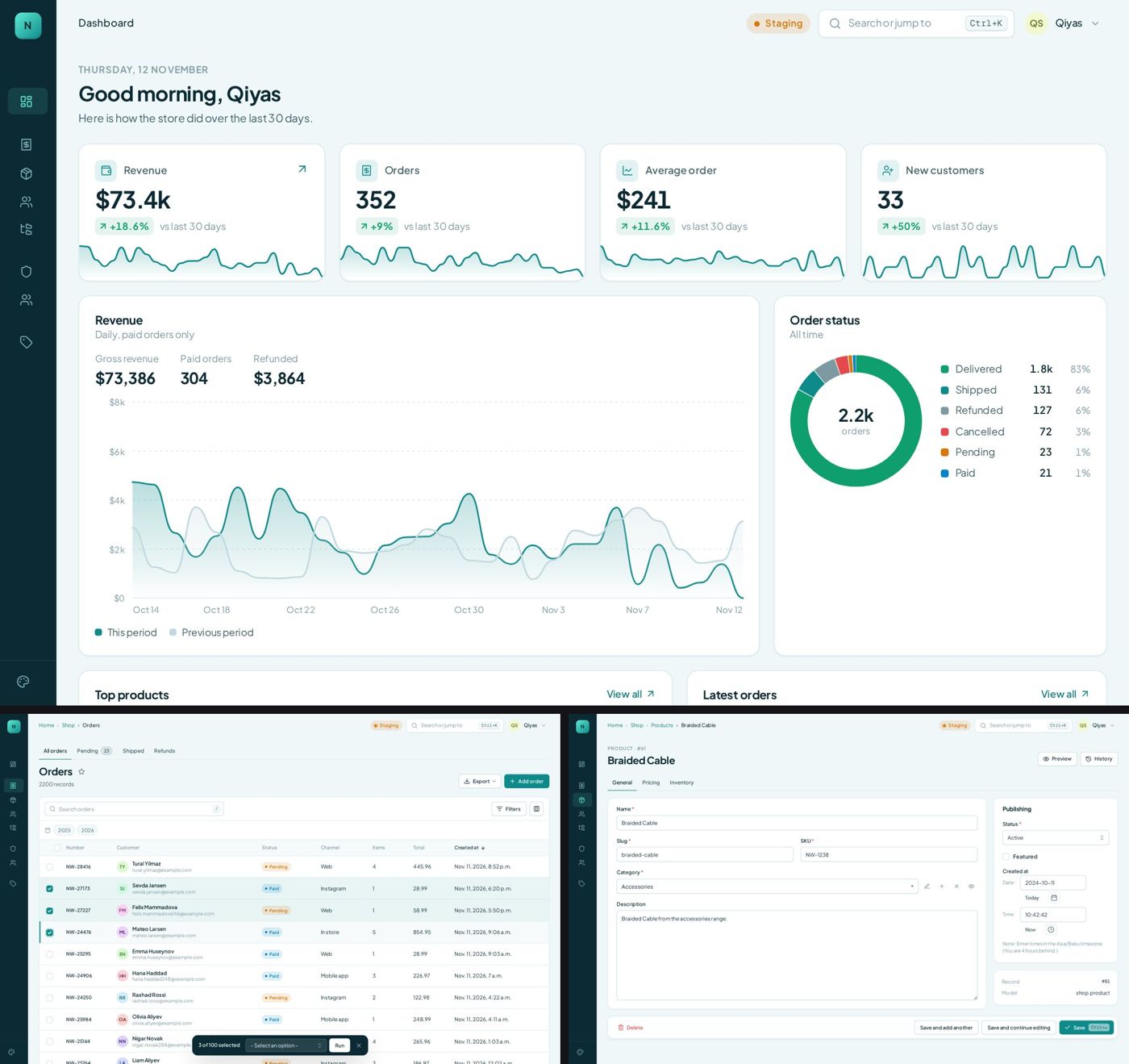 |
Classic 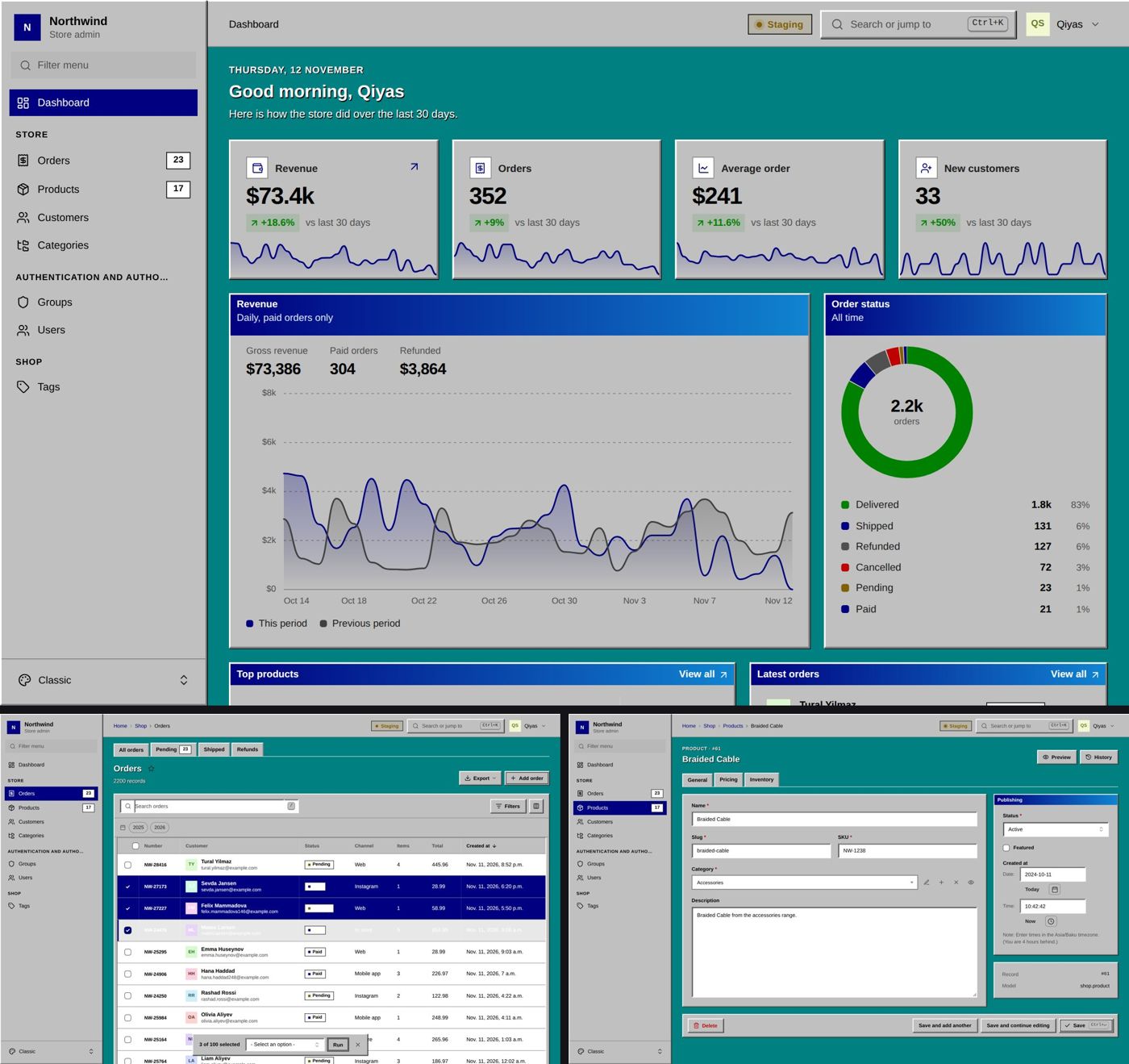 |
CC 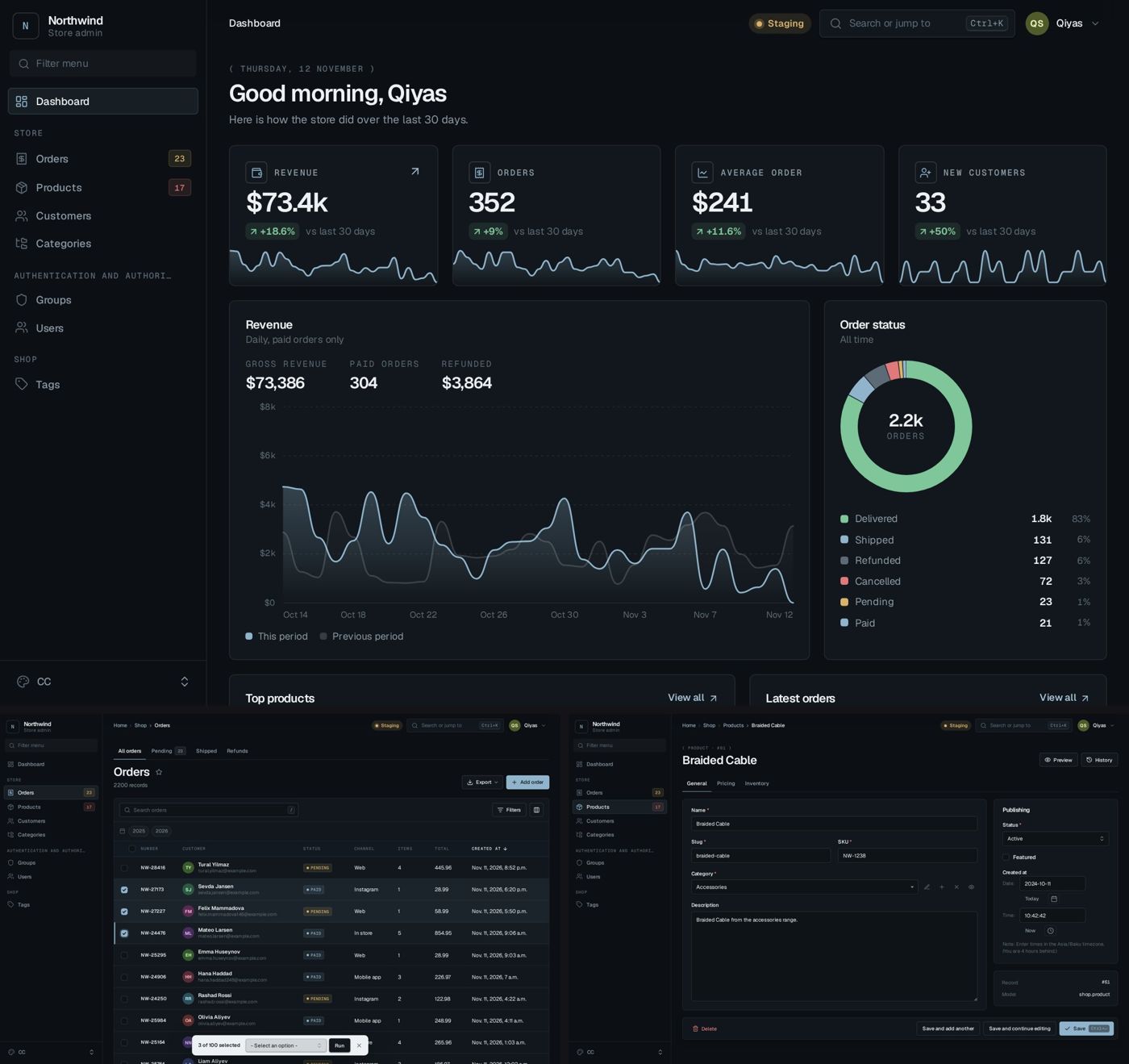 |
Settings
Everything lives in one dict. All keys are optional.
CC_ADMIN = {
    "SITE_HEADER": "Northwind",
    "SITE_SUBHEADER": "Store admin",
    "SITE_TITLE": "Northwind admin",
    "SITE_URL": "/",
    "SITE_LOGO": {"light": "img/logo-dark.svg", "dark": "img/logo-light.svg"},
    "SITE_ICON": "img/icon.svg",
    "SITE_FAVICON": "img/favicon.png",

    "SITE_SYMBOL": "store",
    "SITE_DROPDOWN": [{"title": "Warehouse admin", "icon": "warehouse", "link": "https://warehouse.example.com/admin/"}],

    "THEME": "aurora",
    "THEME_SWITCHER": True,
    "COLOR_SCHEME": "auto",
    "DENSITY": "comfortable",
    "LAYOUT": None,

    "COLORS": {"accent": "#e11d48", "sidebar": "#0f172a", "dark": {"background": "#0b0b0f"}},
    "FONTS": {"body": "Manrope", "heading": "Fraunces", "mono": "JetBrains Mono", "size": 15},
    "RADIUS": "soft",
    "TOKENS": {"side-w": "280px"},
    "THEMES": {
        "acme": {"extends": "midnight", "label": "Acme", "colors": {"accent": "#f97316"}},
        "classic": {"enabled": False},
    },
    "THEME_ORDER": None,
    "APPEARANCE": {"accent": True, "font": True, "font_size": True, "radius": True},

    "ENVIRONMENT": ("Staging", "warning"),
    "ENVIRONMENT_TITLE_PREFIX": True,
    "STYLES": ["css/admin-extra.css"],
    "SCRIPTS": ["js/admin-extra.js"],
    "USER_LINKS": [{"title": "Store front", "icon": "store", "link": "/"}],
    "FOOTER": None,

    "SIDEBAR": {...},
    "TABS": [...],
    "DASHBOARD": {...},
    "COMMAND_PALETTE": {...},
    "SHORTCUTS": {...},
    "ACTIVITY": {...},
    "LIVE": {...},
    "NOTIFICATIONS": {...},
    "PUSH": {...},
    "ANNOUNCEMENTS": [...],
    "LOGIN": {"title": "Run the whole store from one place.", "text": "...", "image": "img/login.jpg"},
    "FORMS": {"switches": False, "json_editor": True, "show_cancel": True, "char_counter": True},
    "LIST_EXPORT": True,
    "LIST_PER_PAGE_OPTIONS": [25, 50, 100, 200],
    "WARN_UNSAVED_FORMS": True,
    "SHOW_HISTORY": True,
    "SHOW_VIEW_ON_SITE": True,
    "SHOW_BACK_BUTTON": True,
    "SHOW_LANGUAGES": False,
}
Any value can be a callable that takes the request. Callbacks such as badges, permissions and dashboard data can also be given as a dotted path, like "shop.dashboard.revenue".
Links accept a URL name ("admin:shop_order_changelist"), a path, or a full URL.
LAYOUT forces one of sidebar, topbar, rail or float for every theme.
SITE_SYMBOL puts a Lucide icon in the brand square instead of initials. SITE_DROPDOWN adds a small menu next to the brand for jumping between sites. ENVIRONMENT_TITLE_PREFIX puts the environment name in the browser tab, so [Staging] Orders never gets mixed up with production. SHOW_LANGUAGES adds a language menu when django.conf.urls.i18n is in your URLs.
Permission values used across the settings (permission, ACTIVITY.view, ACTIVITY.others and so on) accept "staff", "superuser", "none", "perm:app.codename", "group:Name", a list of those, a callable or a dotted path.
Colours, fonts and corners
COLORS takes friendly names and applies them on top of whatever theme is active. Put the same keys under "dark" for dark mode only.
| Key | What it changes |
|---|---|
accent, accent_hover, on_accent, accent_text |
Buttons, links, focus rings, active items. Setting only accent derives the rest |
background, background_2, surface, surface_2, surface_3 |
Page and card backgrounds |
border, border_strong |
Lines |
text, text_muted, text_subtle |
Text |
success, warning, danger, info |
Status colours used by badges, toasts and charts |
sidebar, sidebar_text, sidebar_active, sidebar_active_text, topbar, input, heatmap |
Specific parts |
chart |
A list of up to six chart colours |
FONTS takes body, heading, mono and size. Any of the bundled fonts works by name: Geist, Manrope, DM Sans, Figtree, Plus Jakarta Sans, IBM Plex Sans, Nunito, Archivo, Space Grotesk, Source Serif 4, Fraunces, Geist Mono, JetBrains Mono, IBM Plex Mono and Space Mono. For anything else add "files": ["css/my-font.css"] (or a Google Fonts URL) and use the family name. "bundled": False stops loading the bundled fonts. FONTS: False does the same.
RADIUS is a length ("8px", 0) or one of sharp, soft, round.
Settings for each theme
THEMES also takes the name of a built in theme, which changes that theme only. Every key is optional.
"THEMES": {
    "aurora": {
        "label": "Company",
        "note": "Our colours",
        "colors": {"accent": "#0e8a8a", "sidebar": "#f2f7f7", "dark": {"accent": "#2dd4bf"}},
        "fonts": {"body": "Manrope", "heading": "Fraunces"},
        "radius": "soft",
        "layout": "topbar",
        "scheme": "dark",
        "density": "compact",
        "schemes": ["light", "dark"],
        "swatch": ["#f6fafa", "#ffffff", "#0e8a8a", "#13262b"],
        "tokens": {"side-w": "300px"},
    },
    "classic": {"enabled": False},
    "acme": {"extends": "midnight", "label": "Acme", "colors": {"accent": "#f97316"}},
},
"THEME_ORDER": ["acme", "aurora", "midnight"],
scheme and density are the defaults for that theme until the user picks their own. enabled: False removes a theme from the switcher. A key that is not a built in theme makes a new theme on top of extends. THEME_ORDER sorts the switcher.
TOKENS is the low level escape hatch. Every CSS variable behind the themes can be set there, so {"side-w": "280px"} becomes --cc-side-w. Look at the top of cc_admin/static/cc_admin/css/cc.css for the full list.
Appearance panel
Besides theme, mode and density, each user can pick an accent colour, a font, the text size and corner style. It is saved in a cookie, so the page renders right on the first byte. APPEARANCE turns each control on or off and sets the choices:
"APPEARANCE": {
    "accent": True,
    "accents": ["#5b5bd6", "#0e8a8a", "#e5484d"],
    "font": True,
    "fonts": ["Geist", "Manrope", "Source Serif 4", "system"],
    "font_size": True,
    "radius": True,
},
APPEARANCE: False hides all of them. THEME_SWITCHER: False hides the whole panel.
Sidebar
"SIDEBAR": {
    "search": True,
    "show_all_applications": True,
    "pinned": True,
    "icons": {"shop.category": "folder-tree", "shop": "shopping-bag"},
    "navigation": [
        {
            "title": "Store",
            "collapsible": False,
            "items": [
                {
                    "title": "Orders",
                    "icon": "receipt",
                    "link": "admin:shop_order_changelist",
                    "badge": "shop.dashboard.pending_orders",
                    "badge_variant": "warning",
                    "permission": lambda request: request.user.has_perm("shop.view_order"),
                },
            ],
        },
    ],
},
Icons are Lucide names. Models without an icon get one guessed from their name, so Order gets a receipt and Customer gets a person. Users can pin any model to the top of the menu with the star next to its title.
Tabs
Show a row of tabs above the pages of some models:
"TABS": [
    {
        "models": ["shop.order"],
        "items": [
            {"title": "All orders", "link": "/admin/shop/order/"},
            {"title": "Pending", "link": "/admin/shop/order/?status__in=pending", "badge": "shop.dashboard.pending_orders"},
            {"title": "Refunds", "link": "/admin/shop/order/?status__in=refunded"},
        ],
    },
],
Dashboard
The dashboard is a twelve column grid of widgets. Each widget picks its data from a value, a callable or a dotted path.
"DASHBOARD": {
    "subtitle": "Here is how the store did over the last 30 days.",
    "callback": "shop.dashboard.context",
    "widgets": [
        {"type": "kpi", "title": "Revenue", "icon": "wallet", "value": "shop.dashboard.revenue"},
        {"type": "chart", "kind": "area", "title": "Revenue", "data": "shop.dashboard.revenue_chart", "prefix": "$", "width": 8},
        {"type": "chart", "kind": "donut", "title": "Order status", "data": "shop.dashboard.status_split", "width": 4},
        {"type": "table", "title": "Top products", "data": "shop.dashboard.top_products", "width": 7},
        {"type": "list", "title": "Latest orders", "items": "shop.dashboard.latest_orders", "width": 5},
        {"type": "heatmap", "title": "Order activity", "data": "shop.dashboard.order_days", "weeks": 52},
        {"type": "activity", "title": "Recent changes", "width": 6},
        {"type": "recent", "title": "Recently opened", "width": 6},
    ],
},
| Type | Data it expects |
|---|---|
kpi |
value: a number, or a dict with value, delta (percent), delta_label, spark (list of numbers), prefix, suffix |
chart |
kind is line, area, stacked-area, bar, stacked-bar or donut. Line and bar take {"labels": [...], "series": [{"name": ..., "values": [...]}]}. Donut takes [{"label": ..., "value": ..., "color": ...}] |
table |
{"headers": [...], "rows": [[cell, ...]], "align": ["", "right"]}. A cell is text or a dict with text, sub, link, badge |
list |
items with title, subtitle, meta, link, icon, avatar, badge, badge_tone |
progress |
items with label, value, total, display, tone |
links |
items with title, text, icon, link |
heatmap |
a dict of date: count |
models |
models: a list like ["shop.order"], or nothing for every model. Shows counts |
activity |
the admin log. scope is all or mine, limit sets the length |
recent |
records the user opened lately. Kept in the browser |
note |
text and tone |
contributions |
The admin log as a GitHub style calendar. scope is me or all, weeks sets the length. Days link to the activity page |
team |
Who changed the most in the last days days. Only shown to users who may see other people's activity |
cohort |
{"headers": [...], "rows": [{"label": ..., "total": ..., "values": [...]}]}. Cells show the share of total |
tracker |
A row of coloured bars, like an uptime chart: [{"label": ..., "summary": ..., "items": [{"tone": "success", "title": ...}]}] |
html |
template plus an optional context callable, or html |
Every widget also takes title, subtitle, icon, width (1 to 12), link, link_text and permission. Charts are plain SVG drawn on the server and pick their colours from the theme.
Activity
/admin/cc/activity/ shows what everyone did in the admin, built from Django's own LogEntry table. Nothing extra is recorded.
- A year long calendar, coloured by how many changes were made each day. Click a day to see exactly what happened: who, which record, and which fields changed.
- Totals, active days, the longest and current streak, the busiest day, and the split between added, changed and deleted.
- A monthly feed, like GitHub's: "Made 368 changes in 4 models", with a bar per model.
- A list of people with their share, the last twelve weeks and the model they touch most. Each person has their own page at
/admin/cc/activity/<id>/. - Year tabs, and the same views on the dashboard through the
contributionsandteamwidgets.
"ACTIVITY": {
    "enabled": True,
    "view": "staff",
    "others": "superuser",
    "team": True,
    "details": True,
    "weeks": 53,
    "exclude": ["auth.user"],
    "menu": True,
},
view decides who can open the activity pages at all. others decides who can see other people; everyone else only sees their own page. Use "staff" to make the team page open to all staff, "none" to keep it private, or "perm:admin.view_logentry", "group:Managers" or a callable that gets (request, user). details: False hides record names and change messages and keeps only the counts. Record links only show up for models the viewer can open.
Live updates
Pages stay current without a reload:
- Lists pick up new and changed rows, flash them, and update the record count, pagination and tab badges. If you have rows selected, a menu open or a row expanded, a small "This list has new changes" bar appears instead, so nothing jumps under your cursor.
- When someone else saves the record you have open, a bar tells you who did it and which fields changed, with a reload button. Deleted records get a red bar.
- The edit page shows who else is looking at the same record, and whether they are editing it.
- Dashboard widgets refresh when the data behind them changes.
- Sidebar and tab badges stay in sync.
- A small dot in the top bar shows the connection state.
"LIVE": {
    "enabled": True,
    "transport": "poll",
    "url": "/ws/cc-admin/",
    "interval": 5,
    "hidden_interval": 30,
    "stream_seconds": 25,
    "lists": "auto",
    "forms": True,
    "presence": True,
    "dashboard": True,
    "dashboard_interval": 30,
    "badges": True,
    "highlight": True,
},
There are three transports and they all speak the same protocol:
transport |
How | Needs |
|---|---|---|
poll |
A small JSON request every interval seconds, slower in background tabs |
Nothing. Works on any server |
sse |
Server-Sent Events. One open connection per tab, reconnects every stream_seconds |
Works on WSGI and ASGI. On WSGI each open tab holds a worker thread, so use threaded or async workers |
websocket |
Django Channels. The server pushes a nudge the moment something changes | pip install "django-cc-admin[live]", an ASGI server and the routing below |
# asgi.py
from channels.auth import AuthMiddlewareStack
from channels.routing import ProtocolTypeRouter, URLRouter
from django.core.asgi import get_asgi_application

django_app = get_asgi_application()

from cc_admin.routing import websocket_urlpatterns

application = ProtocolTypeRouter({
    "http": django_app,
    "websocket": AuthMiddlewareStack(URLRouter(websocket_urlpatterns)),
})
If the socket or stream keeps failing, the browser falls back to polling on its own.
Changes made in the admin are picked up through the admin log. Changes made anywhere else (an API, a shell, a worker) are picked up through Django signals and a counter in the cache, so use a cache every process can see, such as Redis, Memcached, the database cache or the file cache. New rows are also caught by watching the highest primary key, which needs no cache at all. lists: "banner" always asks before refreshing a list, and False turns list updates off.
Notifications
A bell in the top bar holds every notification, with All and Unread tabs and "Mark all read". New ones arrive live and show up as a popup in the corner with an icon, a short sound and a countdown bar. Hovering stops the countdown. Clicking opens the link and marks it read. When the tab is in the background the browser can show a desktop notification instead, and with push turned on the notification reaches a phone or a closed browser too.
Send one from code:
from cc_admin.notify import notify

notify("staff", "Stock is low", body="Only 3 desks left.", link="/admin/shop/product/12/change/", level="warning", icon="package", sound="bell")
to can be a user, a queryset, a list, "staff", "superuser", "group:Name", "user:username", "perm:app.codename", or a callable. level is info, success, warning, danger, accent or neutral. Every notification is stored, so people who were away still see it in the bell.
Or let rules send them when models change:
"NOTIFICATIONS": {
    "rules": [
        {"model": "shop.order", "on": "created", "title": "New order {obj.number}", "body": "{obj.customer} · ${obj.total}", "level": "success", "icon": "receipt", "sound": "cash"},
        {"model": "shop.order", "on": "updated", "when": "shop.notifications.refunded", "title": "{obj.number} was refunded", "to": "superuser", "level": "danger"},
        {"model": "shop.product", "on": ["updated", "deleted"], "to": "group:Warehouse", "title": "{model} {event}: {obj}"},
    ],
},
A rule takes model, on (created, updated, deleted or a list), title and body (with {obj}, {actor}, {event} and {model}), to (default "staff"), when (a callable or dotted path that gets (obj, event)), link ("change", "list", a URL or a callable), level, icon, sound, push and exclude_actor (default True, so you are not told about your own change).
Superusers get a "Send a notification" page at /admin/cc/notifications/send/ to message everyone, a group or one person, pick the style and sound, and push it to phones. broadcast decides who can use it.
"NOTIFICATIONS": {
    "enabled": True,
    "bell": True,
    "popup": True,
    "position": "bottom-right",
    "duration": 7,
    "max": 4,
    "sound": "chime",
    "sounds": {"success": "chime", "info": "pop", "warning": "bell", "danger": "alert"},
    "volume": 0.6,
    "desktop": True,
    "desktop_when": "hidden",
    "user_settings": True,
    "broadcast": "superuser",
    "keep_days": 60,
    "admin": True,
    "rules": [],
},
position is top-right, top-center, top-left, bottom-right, bottom-center or bottom-left. duration: 0 keeps popups until closed. Sounds are made in the browser with the Web Audio API, so there are no audio files: chime, pop, ping, bell, alert, sparkle, blip, cash, knock and none. desktop_when: "always" shows desktop notifications even when the tab is open. keep_days is used by python manage.py cc_admin_cleanup, which you can run from cron. admin: False hides the Notifications and Push subscriptions models from the admin.
With user_settings on, each person can turn popups and sounds on or off, pick a sound and volume, allow desktop notifications, turn push on for the current device, switch on do not disturb for an hour, four hours or until tomorrow, and pause live updates. That is kept in their browser.
Push notifications
Web Push reaches people when the admin is closed, on desktop and on phones (on iPhone the admin has to be added to the home screen). It needs HTTPS, except on localhost.
pip install "django-cc-admin[push]"
python manage.py cc_admin_vapid
Copy the keys it prints:
"PUSH": {
    "enabled": True,
    "vapid_public_key": "BMx...",
    "vapid_private_key": env("VAPID_PRIVATE_KEY"),
    "vapid_claims": {"sub": "mailto:admin@example.com"},
    "icon": "img/push-icon.png",
    "badge": "img/push-badge.png",
    "ttl": 3600,
    "levels": None,
},
People turn push on per device in the notification settings, and can send themselves a test. Pushes go out in a background thread, and subscriptions the browser has dropped are deleted. levels limits push to some levels, like ["warning", "danger"].
Announcements
Show a popup or a banner to everyone, once:
"ANNOUNCEMENTS": [
    {"id": "new-reports", "style": "modal", "tone": "accent", "icon": "sparkles", "title": "Reports are here", "text": "Weekly numbers now live under Reports.", "link": "admin:shop_order_reports", "link_text": "Open reports", "image": "img/reports.png"},
    {"id": "stocktake", "style": "banner", "tone": "warning", "title": "Stocktake on Friday.", "text": "Product edits are locked from 18:00.", "start": "2026-11-10", "end": "2026-11-14", "permission": "group:Warehouse"},
],
Each person sees an announcement until they close it. Change the id to show it again.
ModelAdmin
from cc_admin.admin import ModelAdmin, StackedInline, TabularInline
from cc_admin.decorators import action, display
from cc_admin.filters import ChoicesCheckboxFilter, RangeDateFilter, RangeNumericFilter, RelatedDropdownFilter


@admin.register(Order)
class OrderAdmin(ModelAdmin):
    list_display = ["number", "customer_card", "status_badge", "total"]
    list_filter = [("status", ChoicesCheckboxFilter), ("total", RangeNumericFilter), ("created_at", RangeDateFilter)]
    actions_list = ["sync"]
    actions_row = ["refund"]
    actions_detail = ["print_invoice"]
    actions_submit_line = ["save_and_notify"]
    conditional_fields = {"gift_message": "is_gift", "tracking_code": "status in ['shipped', 'delivered']"}
    list_export = True
    compressed_fields = False
    warn_unsaved_form = True

    @display(description="Customer", header=True)
    def customer_card(self, obj):
        return obj.customer.name, obj.customer.email

    @display(description="Status", label={"paid": "info", "shipped": "accent", "refunded": "danger"})
    def status_badge(self, obj):
        return obj.status, obj.get_status_display()

    @action(description="Refund", icon="undo-2", variant="danger", confirm="Refund this order?")
    def refund(self, request, obj):
        ...

    @action(description="Sync with warehouse", icon="refresh-cw")
    def sync(self, request):
        ...
What you get:
actions_listare buttons next to "Add". They get(request).actions_rowshow up in a menu at the end of each row. They get(request, obj).actions_detailare buttons at the top of the edit page. They get(request, obj).actions_submit_lineare extra buttons in the save bar. They run after the object is saved and get(request, obj).- Any action can return a response. If it returns nothing the user goes back where they came from.
@actiontakesdescription,icon,variant(default,primary,danger,success,warning,info),confirm,permissions,url_pathandnew_tab.@displayaddslabel(a badge, with a dict mapping values to tones),header(title, subtitle and an avatar),copy(a copy button),monoandtagson top of Django's own options.conditional_fieldshides a field until an expression over other fields is true. Expressions support==,!=,<,>,in,and,or,not, lists and literals.- Fieldsets with the class
"tab"become tabs. Fieldsets with"sidebar"go into a sticky column on the right."collapse"still works. - Inlines take
tab = True,collapsible = True,hide_title = True, andordering_field = "position"for drag and drop sorting. - The list gets "Export selected to CSV/JSON" actions and an Export menu for the current filtered view. Set
list_export = Falseto turn it off. compressed_fields = Trueputs labels to the left of the inputs.actions_listandactions_detailalso take groups, which show up as a dropdown:{"title": "Reports", "icon": "file-chart-column", "items": ["stock_report", "price_report"]}.@displayalso hasimage(a thumbnail from a URL or anImageField) andprogress(a bar from a percentage or a(value, total)pair).
More options:
| Option | Does |
|---|---|
list_sections |
Expandable rows. Each row gets a chevron that opens tables or templates below it |
form_sections |
The same sections, shown under the edit form |
ordering_field |
Drag and drop rows in the list to reorder them. Saves straight away |
list_per_page_options |
Choices for the "Per page" menu. Defaults to LIST_PER_PAGE_OPTIONS. The choice is kept per model |
list_fullwidth |
Lets the list use the full screen width |
list_horizontal_scrollbar_top |
Adds a second horizontal scrollbar above wide tables |
list_disable_select_all |
Hides the select all checkbox |
change_form_show_cancel_button |
A cancel button in the save bar. Defaults to FORMS["show_cancel"] |
change_list_before_template, change_list_after_template |
Templates included above and below the list |
change_form_before_template, change_form_after_template |
Templates included above and below the form |
Sections
from cc_admin.sections import TableSection, TemplateSection


class OrderLines(TableSection):
    verbose_name = "Items"
    related_name = "items"
    fields = ["product", "quantity", "unit_price", "line_total"]
    limit = 10

    def line_total(self, item):
        return item.quantity * item.unit_price


class CustomerMap(TemplateSection):
    template_name = "shop/customer_map.html"


class OrderAdmin(ModelAdmin):
    list_sections = [OrderLines]
    form_sections = [OrderLines]
A TableSection reads related_name from the object, or override get_queryset(). Fields can be model fields or methods on the section.
Widgets
from cc_admin.widgets import CodeWidget, ColorWidget, ImageWidget, JSONWidget, RichTextWidget, SegmentedWidget, SwitchWidget
| Widget | Does |
|---|---|
SwitchWidget |
A toggle for booleans. FORMS["switches"] = True uses it for every BooleanField |
SegmentedWidget |
Radio choices as one segmented control |
ColorWidget |
A hex input with a colour picker |
RichTextWidget |
A small editor for HTML text: bold, italic, headings, lists, quotes, links, code. Pasted HTML is cleaned |
CodeWidget |
A monospace textarea where Tab indents |
JSONWidget |
Pretty prints and checks JSON as you type. Used for every JSONField unless FORMS["json_editor"] is off |
ImageWidget |
A file input that shows the current image and a preview of the new one |
CounterTextarea |
A textarea with a character limit |
Text inputs with a max_length show a counter while you type. Turn it off with FORMS["char_counter"] = False.
Custom pages
Any view can live inside the admin with the menu, theme and shortcuts:
from cc_admin.views import AdminPageView


class ReportsView(AdminPageView):
    title = "Reports"
    template_name = "shop/reports.html"
    permission_required = "shop.view_order"


class OrderAdmin(ModelAdmin):
    def get_urls(self):
        view = self.admin_site.admin_view(ReportsView.as_view(model_admin=self))
        return [path("reports/", view, name="shop_order_reports")] + super().get_urls()
The template extends cc_admin/page.html and fills {% block page %}.
Filters
| Filter | Use |
|---|---|
FieldTextFilter |
Contains search on one field: ("country", FieldTextFilter) |
FieldExactFilter |
Exact match on one field |
TextFilter |
Subclass it, set parameter_name, write queryset() |
RangeNumericFilter |
From and to inputs for numbers |
RangeDateFilter |
From and to dates, works on DateField and DateTimeField. Has quick picks for today, 7 days, 30 days, this month and this year |
RangeDateTimeFilter |
From and to with time |
SliderNumericFilter |
A two handle slider between the lowest and highest value |
SingleNumericFilter |
One number, exact match |
ChoicesCheckboxFilter |
Pick several choices at once |
AllValuesCheckboxFilter |
Pick several of the values that exist in the column |
RelatedCheckboxFilter |
Pick several related objects at once |
ChoicesDropdownFilter, RelatedDropdownFilter, AllValuesDropdownFilter, DropdownFilter |
A select instead of a long list |
BooleanRadioFilter |
Yes, No, All as one segmented control |
Filters live in a side panel. Active filters show as chips above the table, each with its own remove button.
Keyboard
| Keys | Does |
|---|---|
Ctrl K / ⌘ K |
Command palette: jump to any model, open records found by search, add new records, switch themes |
/ |
Focus the search box |
g d, g a, g s |
Go to the dashboard, your activity, the site |
t |
Appearance panel |
[ |
Collapse the menu |
j k |
Move between rows |
x, Shift X |
Select the row, select all |
Enter o, Shift O |
Open the row, in a new tab |
Space |
Expand the row |
n |
Add new |
f, c, e |
Filters, columns, export |
← → |
Previous and next page |
Ctrl S |
Save and keep editing |
Ctrl Enter |
Save |
Ctrl Shift Enter |
Save and add another |
Alt ← Alt → |
Previous and next form tab |
g h, g l |
History, back to the list |
? |
All shortcuts |
Every key can be changed in settings. Write a combination with + and a sequence with a space. mod is Ctrl on Windows and Linux and ⌘ on a Mac. Several keys for one action go in a list, and None turns an action off.
"SHORTCUTS": {
    "enabled": True,
    "user_editable": True,
    "keys": {
        "filters": "shift+f",
        "open_row": ["o", "enter"],
        "theme": None,
        "delete": "mod+shift+backspace",
    },
    "custom": [
        {"keys": "g o", "title": "Open orders", "link": "admin:shop_order_changelist"},
        {"keys": "g r", "title": "Reports", "link": "admin:shop_order_reports", "permission": "perm:shop.view_order"},
        {"keys": "mod+shift+p", "title": "Print", "click": "#print-button"},
    ],
},
The action names are palette, help, search, dashboard, activity, site, theme, menu, next_row, prev_row, select_row, select_all, open_row, open_row_tab, expand_row, add, filters, columns, export, prev_page, next_page, save, save_continue, save_add, next_tab, prev_tab, history, back and delete (off by default).
With user_editable on, people can click any shortcut in the ? dialog and press new keys. Their choice is kept in their browser and wins over the settings. If the keys were taken by another action, that action loses them. SHORTCUTS: False turns the whole thing off.
The command palette takes extra entries too:
"COMMAND_PALETTE": {
    "commands": [{"title": "Weekly reports", "subtitle": "Revenue by channel", "icon": "chart-pie", "link": "admin:shop_order_reports"}],
    "search_callback": "shop.search.palette",
},
search_callback gets (request, query) and returns a list of {"title", "subtitle", "icon", "link"} shown above the model results.
Also in the box
- Column picker on every list, remembered per model.
- A "Per page" menu on every list, remembered per model.
- Bulk actions in a floating bar that appears when rows are selected.
- Toasts for messages.
- A warning before leaving a form with unsaved changes.
- Recently opened records in the palette and on the dashboard.
- Environment badge, so nobody confuses staging with production.
- Restyled date pickers, related object buttons,
filter_horizontaland autocomplete fields. - Works inside admin popups.
- CSP nonces are passed through when Django provides them.
Example project
git clone https://github.com/qiyascc/django-cc-admin
cd django-cc-admin/example
pip install django
python manage.py migrate
python manage.py seed
python manage.py runserver
Log in with admin / admin. The example shop uses most of the features above. Run python manage.py simulate in a second terminal to keep placing fake orders and watch the lists, badges and notifications update live. CC_LIVE=sse python manage.py runserver uses the stream transport instead of polling. The seed also adds a small team (murad, leyla, elvin, nigar, sevda, password same as the name) with a year of admin history, so the activity pages have something to show. Log in as one of them to see what a normal staff user gets. CC_THEME=terminal python manage.py runserver starts it in another theme.
Development
python runtests.py
python scripts/build_themes.py
Themes are defined in scripts/build_themes.py, which writes cc_admin/static/cc_admin/css/themes.css.
Links
- Source: github.com/qiyascc/django-cc-admin
- Author: Qiyas Sadıqov, more projects at theqiyas.cc
License
MIT. Bundled icons are from Lucide (ISC) and fonts are under the SIL Open Font License. See NOTICE.
1 maintainer

Metadata
1 maintainer
Release files for django-cc-admin 0.1.0
For a detailed explanation of source distributions (sdists) and built distributions (wheels), please see the package formats documentation.
Source distribution (sdist)
| File | Size | Uploaded | Provenance | Actions |
|---|---|---|---|---|
| django_cc_admin-0.1.0.tar.gz | 1.1 MB | Without provenance | Details for django_cc_admin-0.1.0.tar.gz |
Built distribution (wheel)
| File | Interpreter | ABI | Platform | Actions Reset |
|---|---|---|---|---|
| django_cc_admin-0.1.0-py3-none-any.whl | Python 3 | none | any | Details for django_cc_admin-0.1.0-py3-none-any.whl |
Total release size: 2.3 MB
Release files / django_cc_admin-0.1.0.tar.gz
| Download URL | django_cc_admin-0.1.0.tar.gz |
|---|---|
| Size | 1.1 MB |
| Tags | Source |
|
SHA-256 checksum How to use checksums |
9eae77b0845ede2e9379a3fccada720570527b6c1d1ba3370ccc08b48a9425e6
|
|
BLAKE2b-256 checksum How to use checksums |
8b2d86dba13cb2cfc95a42420f526838207b55fb92a5787351a12988e8355623
|
| Upload date | |
|
Uploaded using Trusted Publishing? What is trusted publishing? |
No |
| Uploaded via |
twine/7.0.0 CPython/3.12.3
|
Release files / django_cc_admin-0.1.0-py3-none-any.whl
| Download URL | django_cc_admin-0.1.0-py3-none-any.whl |
|---|---|
| Size | 1.2 MB |
| Tags | Python 3 |
|
SHA-256 checksum How to use checksums |
f0216c13d69588ea7b91028575689c5ea16751fe6429bfb7333a9274e1448a10
|
|
BLAKE2b-256 checksum How to use checksums |
55b1d69b968c0ec1f760c3275b5174a954880b092a12490f1a8c71c6a857686e
|
| Upload date | |
|
Uploaded using Trusted Publishing? What is trusted publishing? |
No |
| Uploaded via |
twine/7.0.0 CPython/3.12.3
|
Security for django-cc-admin 0.1.0
Provenance
Provenance describes where a file came from. On PyPI, provenance is shared via attestations, which provide a verifiable record of the build or publishing details. View details, limitations and caveats.
No provenance found
None of the files in this release were uploaded with provenance metadata.
A note on package security
PyPI is a repository for distributing packages, not a service for auditing them. While third-party security researchers and our staff do their best to detect and remove malicious packages, PyPI cannot guarantee the quality, security or suitability of any given package.
To learn more about protecting yourself from malicious actors, visit our package security documentation.













