
Django Celery Logs






Portuguese README: README.pt.rst.
Django Celery Logs is a reusable Django app that records Celery task successes and failures, stores structured results and traceback data, and exposes the records in Django admin.
It is designed for projects that want task observability without keeping Celery’s default result backend enabled. By running Celery with CELERY_TASK_IGNORE_RESULT = True, successful task payloads do not need to be stored by a result backend, which can reduce memory/storage pressure and speed up task processing. Django Celery Logs keeps the operational history you need in your Django database instead: task metadata, structured JSON results, failures, durations, queues, workers, and admin statistics.
Documentation
The documentation is available on GitHub Pages:
Requirements
Python 3.10 or later
Django 4.2 or later
Celery 5.3 or later
Features
Logs successful and failed Celery task executions through Celery signals.
Stores task id, name, queue, worker, args, kwargs, result, error message, traceback, timestamp, and duration in seconds.
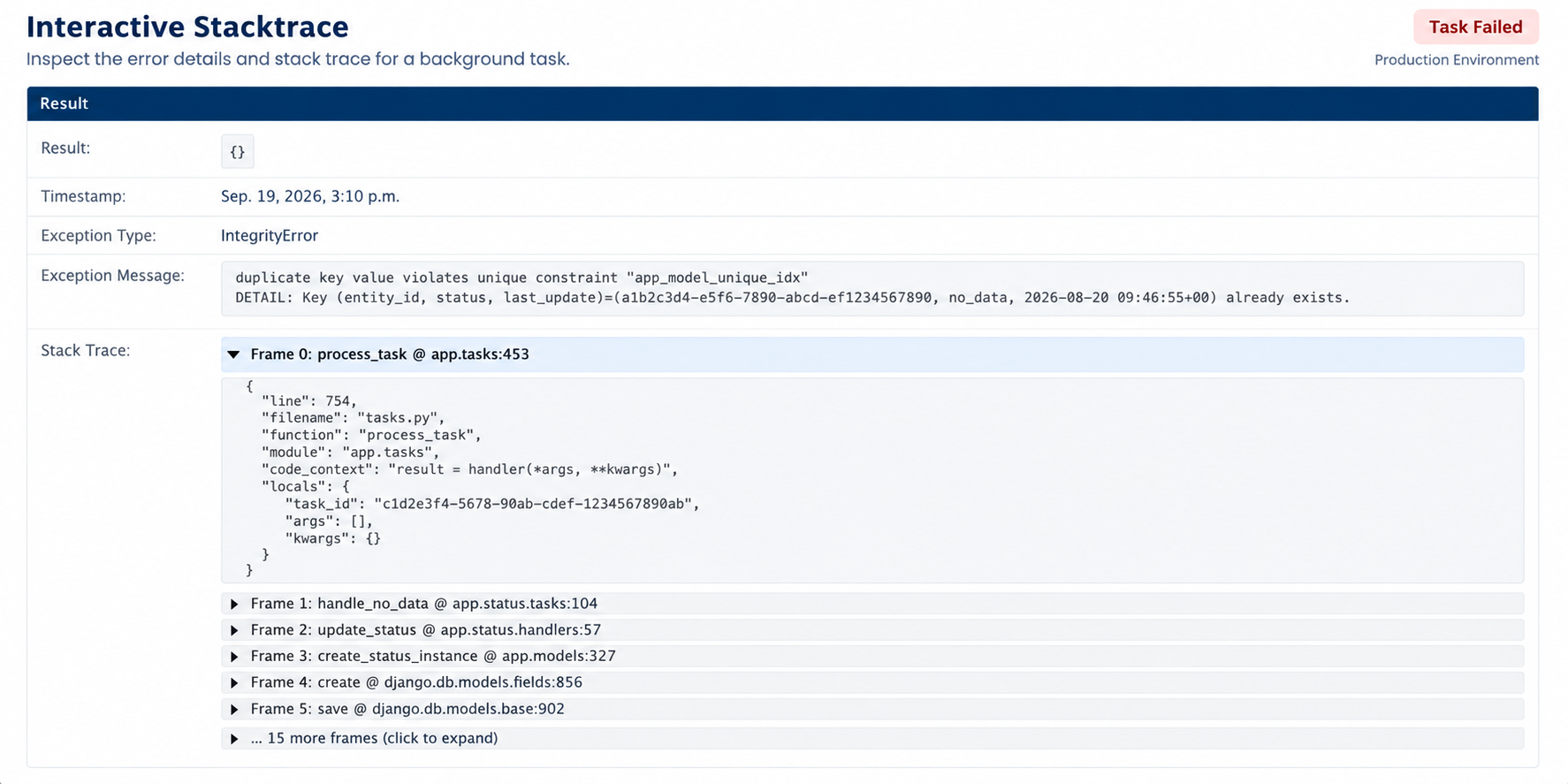
Captures rich failure tracebacks with frame-by-frame context and local variables to make debugging failed tasks faster.
Adds Django admin pages for log inspection and task re-run.
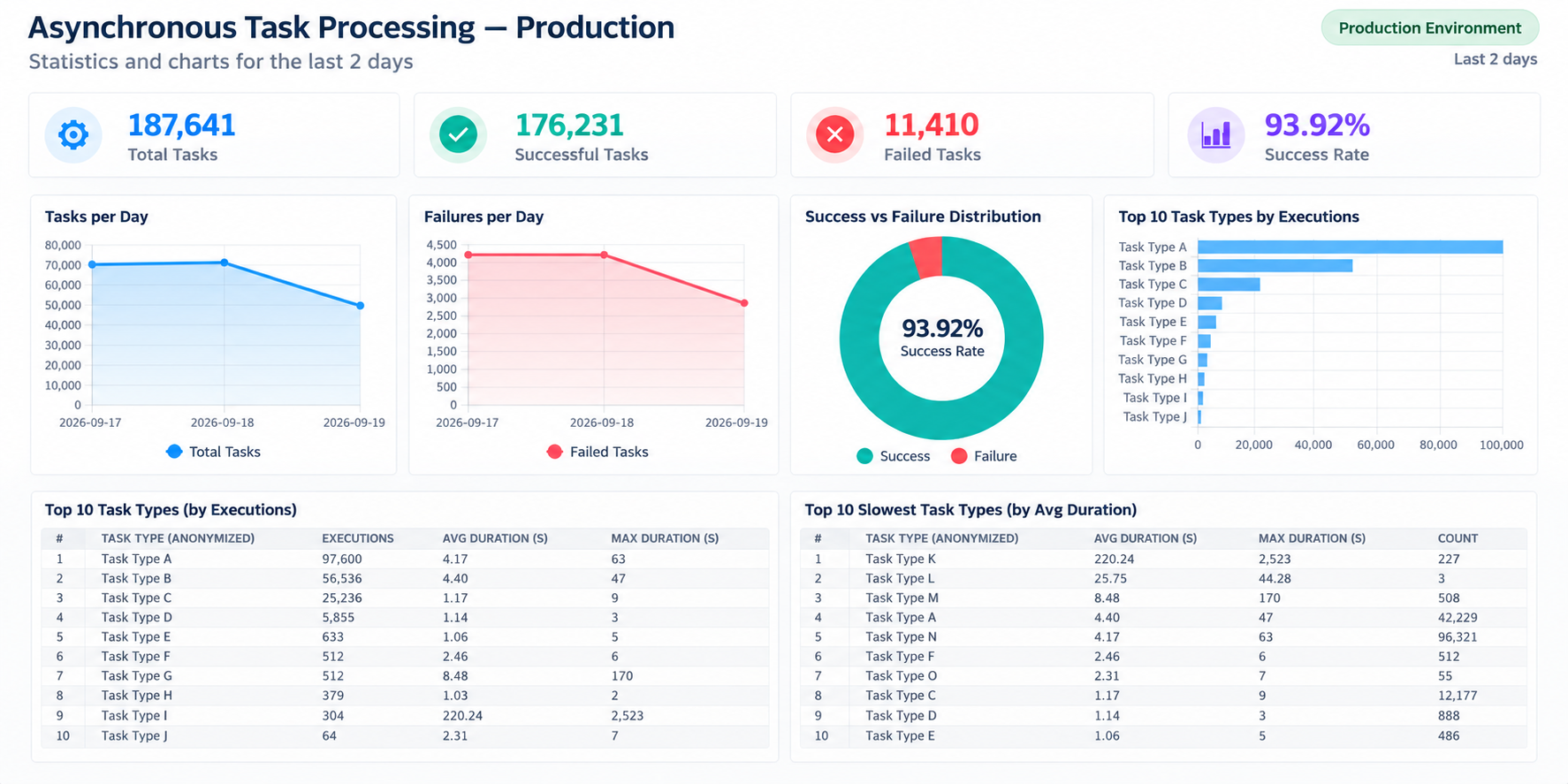
Adds an admin statistics module with charts and metrics for throughput, failures, queues, workers, periodic tasks, slow tasks, and common errors.
Adds auto-refresh and configurable pagination controls to the admin task log list for near real-time monitoring.
Includes a cleanup task named clear_celery_task_logs.
Includes acquire_lock_or_fail for cache-backed task de-duplication.
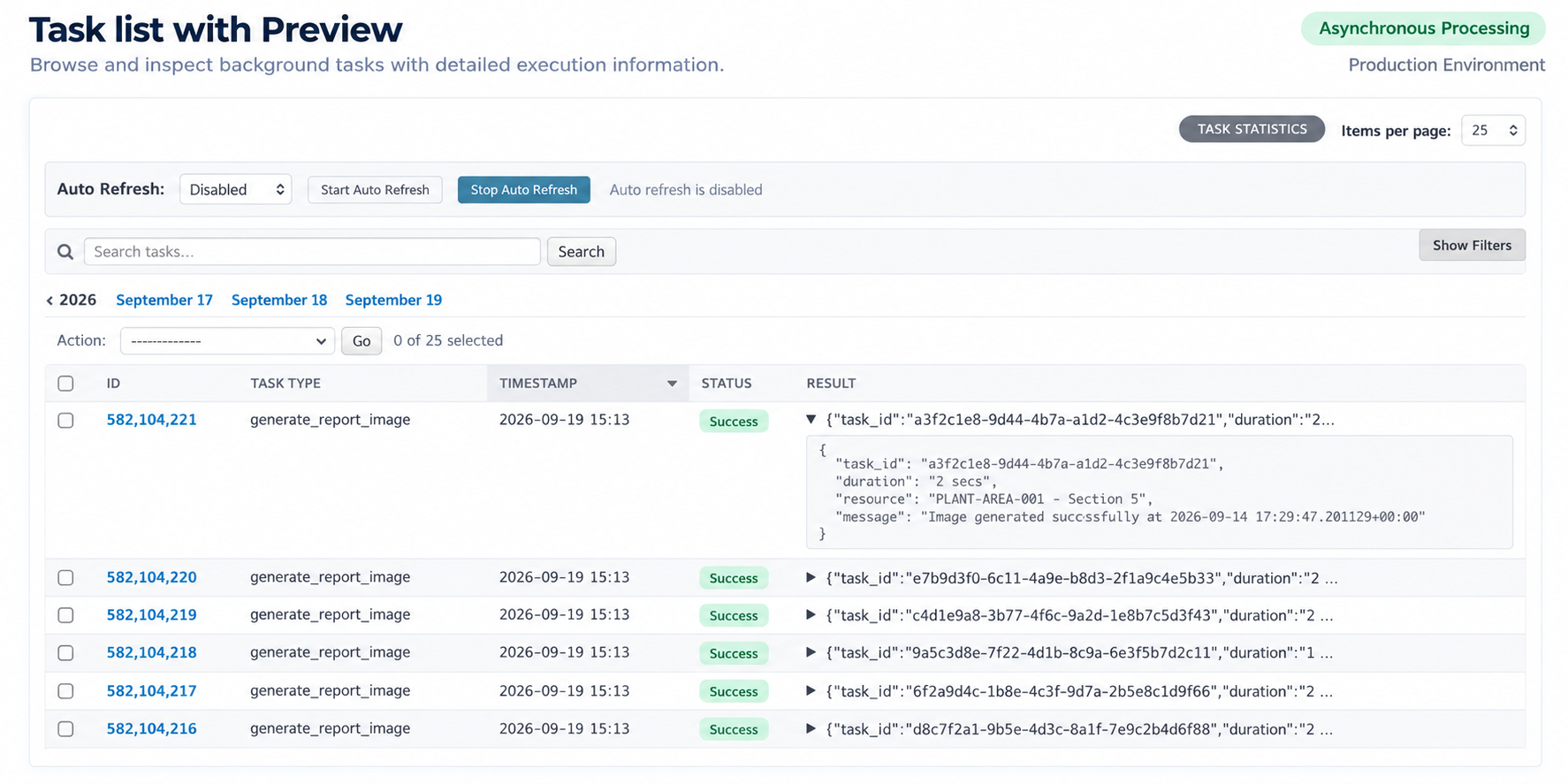
Task List
The task log list shows task metadata and a result preview directly in the table, so teams can scan recent executions without opening every task detail page. It also includes auto-refresh controls and collapsible filters, keeping more screen space available for the task list during operational monitoring.
Interactive Stacktrace
Failed task details include the full stacktrace and the sanitized context variables captured at the moment of the error, making production debugging much faster.
Statistics Dashboard
The statistics admin gives teams a quick operational view of Celery throughput, failures, queues, workers, slow tasks, periodic tasks, and common errors.
Installation
Install from PyPI:
pip install django-celery-logsIf you use uv:
uv pip install django-celery-logsInstall from source:
git clone git@github.com:rhenter/django-celery-logs.git
cd django-celery-logs
pip install .
If you use uv:
uv pip install .Settings
Celery result settings
Django Celery Logs is intended to replace Celery result-backend storage for task inspection. Configure Celery to ignore the default result backend and serialize task data as JSON:
CELERY_TASK_IGNORE_RESULT = True
CELERY_RESULT_SERIALIZER = "json"
Do not enable other Celery result apps in INSTALLED_APPS for the same purpose. For example, remove django_celery_results if it is installed. Only django_celery_logs should be added, as shown in the Django app section below.
If these settings exist, remove them unless another part of your project really depends on them:
CELERY_RESULT_BACKEND = "..."
CELERY_CACHE_BACKEND = "..."
Django app
Add the app to INSTALLED_APPS:
INSTALLED_APPS = [
    ...
    "django_celery_logs",
    ...
]
Run migrations:
python manage.py migrateOptionally configure how many days logs are retained by the cleanup task:
CELERY_TASK_LOGS_EXPIRES = 7Admin
The package includes Django admin templates and static assets for:
Task log list with auto-refresh, collapsible filters, configurable page size, JSON result preview, and a shortcut to statistics.
Task log detail with a re-run action.
Task statistics with cards, charts, top tasks, slowest tasks, queue/worker distribution, periodic task distribution, and top error messages.
Auto-refresh
The task log list includes an auto-refresh control for operational monitoring. You can keep the admin open while workers are processing tasks and refresh the list every 5, 10, 30, or 60 seconds. The selected interval is saved in the browser, so the page keeps the same refresh behavior after reloads.
Usage
Once Django loads the app, Celery’s task_success and task_failure signals create TaskLog records automatically.
To remove old logs, schedule the bundled task in Celery beat or call it directly:
from django_celery_logs.tasks import clear_celery_task_logs

clear_celery_task_logs.delay()
To avoid logging an intentionally skipped successful task, return a dictionary with ignore_task_log:
return {"status": "skipped", "ignore_task_log": True}Contributing
Pull requests are welcome.
Development
This project uses uv for local development commands. Install development dependencies with:
make depsRun the test suite:
make testRun Django’s system checks against the bundled test project:
make checkBuild the source distribution and wheel:
make buildUseful Makefile targets:
make deps installs the project and development dependencies with uv sync --extra dev.
make test runs uv run --extra dev pytest.
make check runs django check with the test project settings.
make lint runs pre-commit hooks.
make docs builds the Sphinx documentation.
make clean removes build, cache, coverage, and bytecode files.
make build creates sdist and wheel with uv build.
make release tags the current version and uploads dist/* with twine.
License
MIT
Changelog
All notable changes to this project will be documented in this file.
The project follows semantic versioning while the public API stabilizes.
0.2.1
Released on 2026-09-19.
Changed
Updated the PyPI long description with the latest README content, including GitHub Pages documentation links and Portuguese README guidance.
Improved README and documentation previews with Task List, Interactive Stacktrace, and Statistics Dashboard screenshots.
Updated bilingual documentation output and GitHub Pages publishing assets.
Testing
Added broader test coverage for admin helpers, Celery log cleanup, widgets, template filters, cache lock handling, and task log creation.
Added Codecov upload support to the GitHub Actions workflow.
0.2.0
Released on 2026-09-19.
Added
Added PyPI-ready package metadata, project URLs, classifiers, and package data configuration.
Added uv-based development workflow with Makefile targets for dependencies, tests, Django checks, documentation, builds, and releases.
Added Sphinx documentation source with installation, settings, admin, usage, development, release, changelog, and API pages.
Added documentation dependencies for local docs development: sphinx-autobuild, sphinx-intl, and sphinxjp.themes.basicstrap.
Added badges for PyPI, supported Python versions, license, GitHub Actions, coverage, documentation, and open-source status.
Added English and Portuguese README files.
Changed
Improved README guidance for installing with both pip and uv.
Clarified required Celery settings: CELERY_TASK_IGNORE_RESULT = True and CELERY_RESULT_SERIALIZER = "json".
Clarified that other Celery result apps, such as django_celery_results, should not be enabled together with this app.
Clarified that CELERY_RESULT_BACKEND and CELERY_CACHE_BACKEND should be removed unless another part of the project explicitly requires them.
Removed duplicated INSTALLED_APPS examples from the README and settings documentation.
Documented that Django automatically loads django_celery_logs.apps.CeleryLogsConfig when django_celery_logs is added to INSTALLED_APPS.
Packaging
Removed legacy requirements-file workflow in favor of pyproject.toml and uv.lock.
Kept runtime dependencies in package metadata so installs from PyPI include Django, Celery, and boltons automatically.
0.1.0
Released on 2026-09-19.
Added
Added reusable Django app for storing Celery task execution logs.
Added Celery signal handlers for successful and failed task executions.
Added TaskLog model with task id, task name, queue, worker, args, kwargs, result, error message, traceback, timestamp, duration, periodic task flag, and traceback context data.
Added TaskConfig model for configuring task rerun behavior from Django admin.
Added Django admin task log list with filters, search, pagination controls, auto-refresh, and task rerun action.
Added task detail page with formatted JSON and traceback context.
Added statistics admin page with charts for throughput, failures, queues, workers, periodic tasks, slow tasks, and common errors.
Added clear_celery_task_logs cleanup task.
Added acquire_lock_or_fail helper for cache-backed task de-duplication.
Added test project and initial pytest coverage.
1 maintainer

Release files for django-celery-logs 0.2.1
For a detailed explanation of source distributions (sdists) and built distributions (wheels), please see the package formats documentation.
Source distribution (sdist)
| File | Size | Uploaded | |
|---|---|---|---|
| django_celery_logs-0.2.1.tar.gz | 3.4 MB | Details |
Built distribution (wheel)
| File | Interpreter | ABI | Platform | Reset |
|---|---|---|---|---|
| django_celery_logs-0.2.1-py3-none-any.whl | Python 3 | none | any | Details |
Total release size: 3.4 MB
Release files / django_celery_logs-0.2.1.tar.gz
| Download URL | django_celery_logs-0.2.1.tar.gz |
|---|---|
| Size | 3.4 MB |
| Tags | Source |
|
SHA-256 checksum How to use checksums |
66be1461934fdee73504dd40fa221c84af8de0db7118936c4271f4635da86fd6
|
|
BLAKE2b-256 checksum How to use checksums |
e60f777118a5edf51ee5c0a36353e05a60ce12b81c26ff8f29069c3ce80482dd
|
| Upload date | |
|
Uploaded using Trusted Publishing? What is trusted publishing? |
No |
| Uploaded via |
twine/7.0.0 CPython/3.12.14
|
Release files / django_celery_logs-0.2.1-py3-none-any.whl
| Download URL | django_celery_logs-0.2.1-py3-none-any.whl |
|---|---|
| Size | 23.2 kB |
| Tags | Python 3 |
|
SHA-256 checksum How to use checksums |
7da1c87a452c823a43206379fc32af3a76ec057a8e6ea79da4f07d0ab2d6ae15
|
|
BLAKE2b-256 checksum How to use checksums |
d82e5fd100a6d4f4121a379a75a0e3db93dc6c7e68d0c667378147f54c81d5a1
|
| Upload date | |
|
Uploaded using Trusted Publishing? What is trusted publishing? |
No |
| Uploaded via |
twine/7.0.0 CPython/3.12.14
|














