
django-chat-ui
A reusable chat interface — WhatsApp, a chatbot, a company's internal chat, a "contact us" widget — that speaks Matrix, and a Django app that is a Matrix homeserver for it. Work in progress.
- Matrix, the open standard of chat: the components are Matrix clients, and the Django app serves the Client-Server API (without federation nor end-to-end encryption). A Matrix client or bot — tested with the Matrix project's matrix-js-sdk — can use your site; the components can use other homeservers. What a business chat needs and Matrix doesn't have — quick replies, cards, WhatsApp's templates and 24-hour window, AI answers shown as they're written, what each conversation allows — are extensions, in Matrix's way: namespaced, with a fallback any other client shows (their JSON Schema). Yours go the same way.
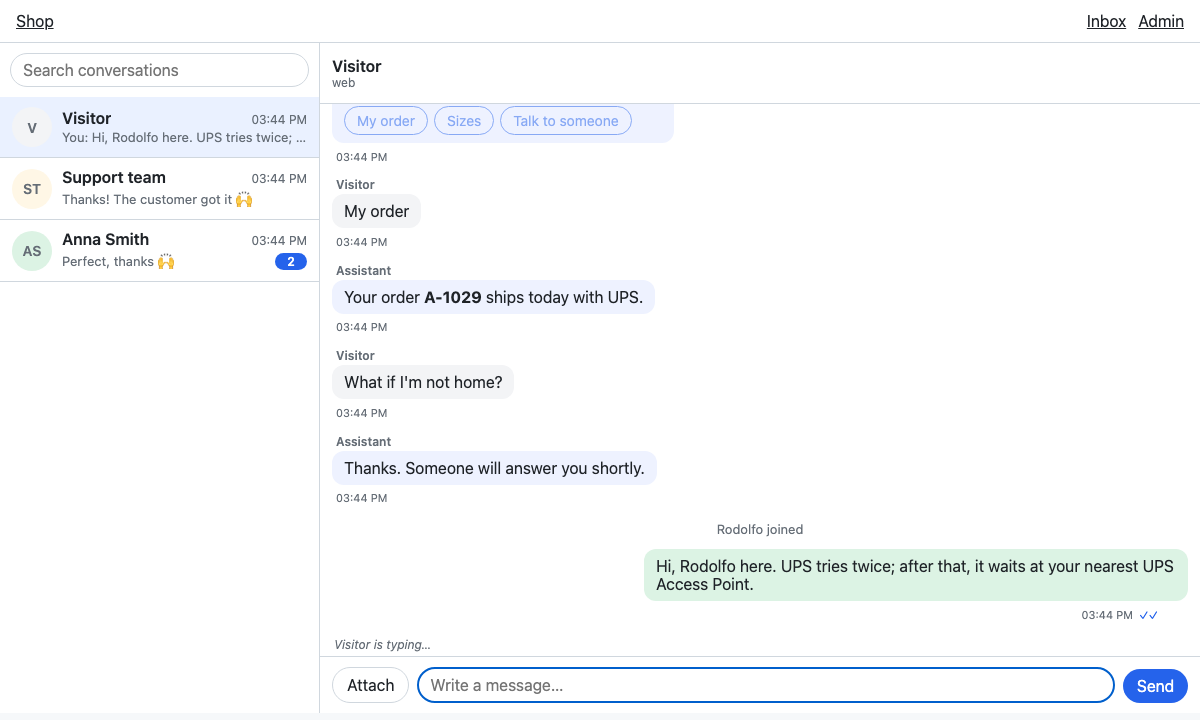
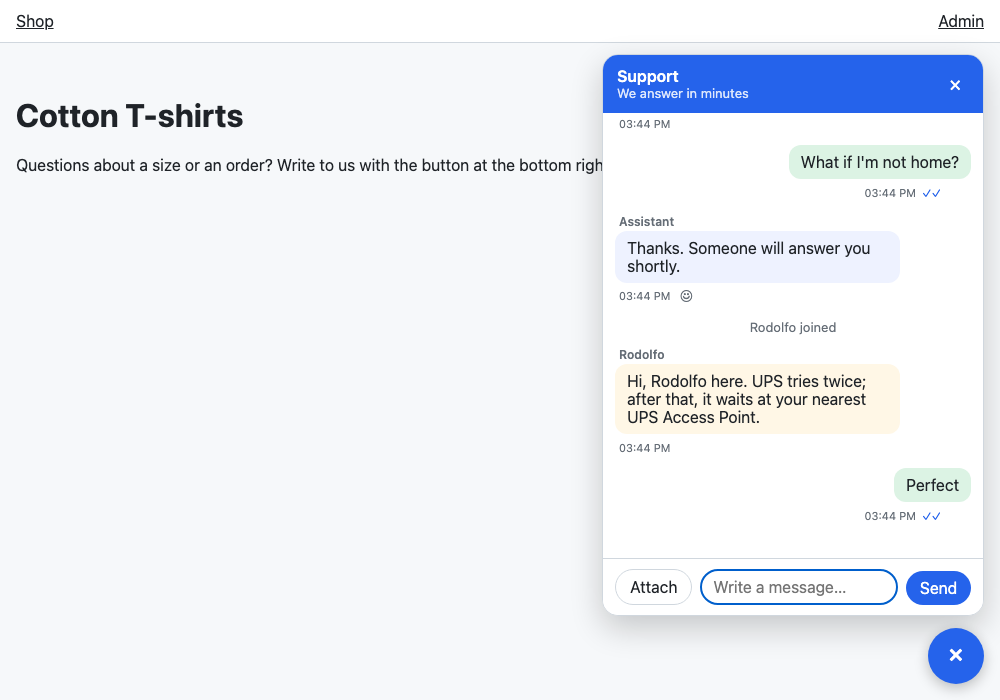
<chat-thread>: one conversation, its composer following the conversation's capabilities (free text, templates only, buttons only, closed). Vanilla JS, no build step, safe under a strict Content Security Policy.<chat-inbox>: the inbox of whoever answers — every conversation, the latest active first, with unread counts and a search, and the one selected; on a narrow screen, the list or the conversation.<chat-widget>: a site's floating "contact us" chat, which starts a conversation when opened (and can remember it, withstorage-key).- A Django app: the conversations in the database as Matrix rooms,
/syncwith long polling (under ASGI it holds no thread) or polling, media, a backend class to decide who chats and what happens, AI agents that speak AG-UI, and the texts translated (English and Spanish).
The same conversation, from the site's widget:
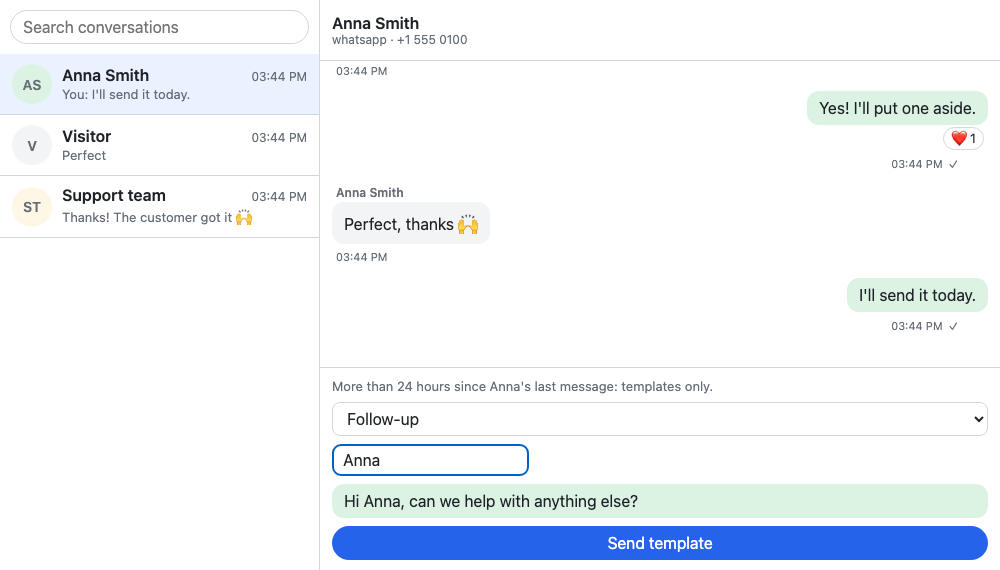
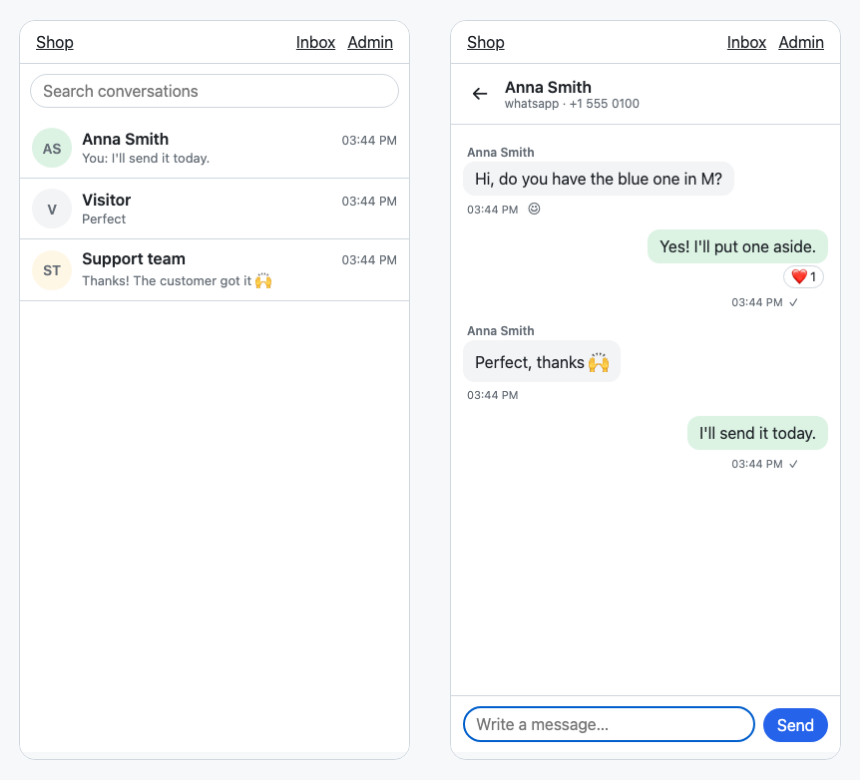
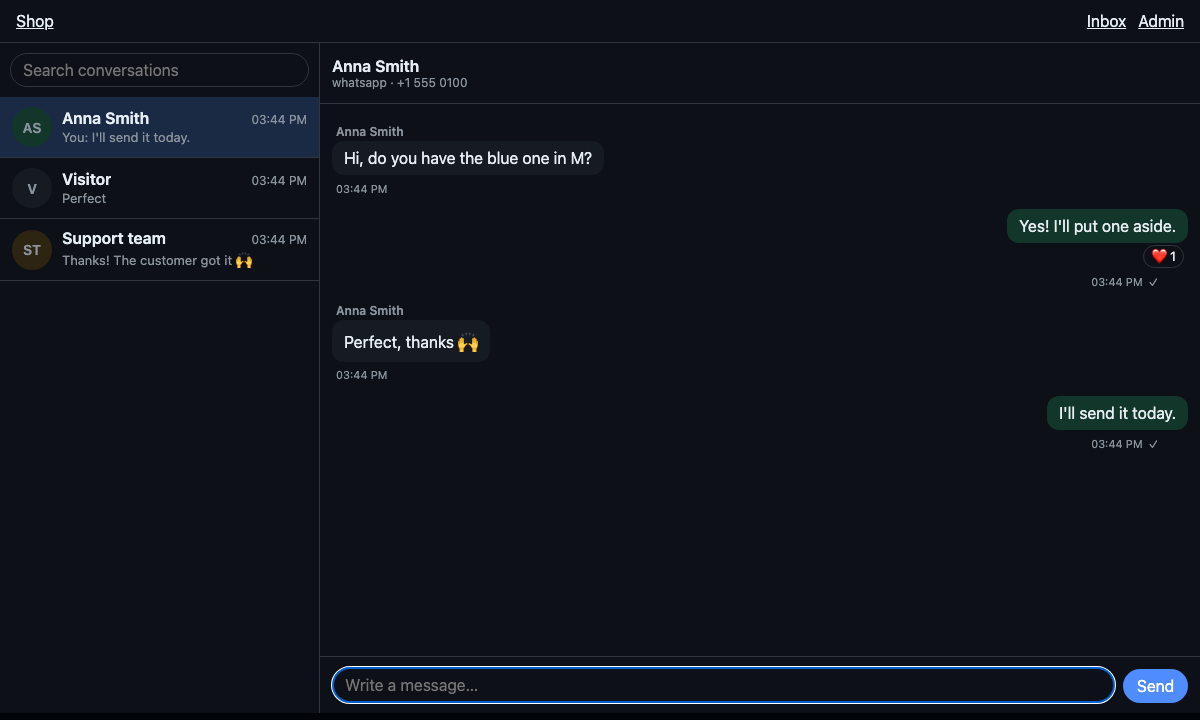
WhatsApp's 24-hour window closed, the composer offers only templates; on a phone, the inbox shows the list or the conversation; and it follows the page's dark theme (or the system's):
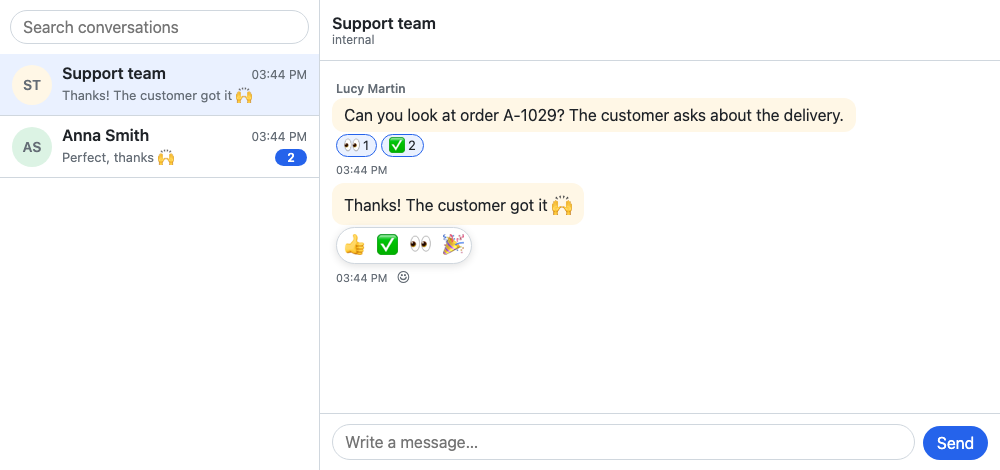
Reactions, where a conversation allows them (here, only some emojis):
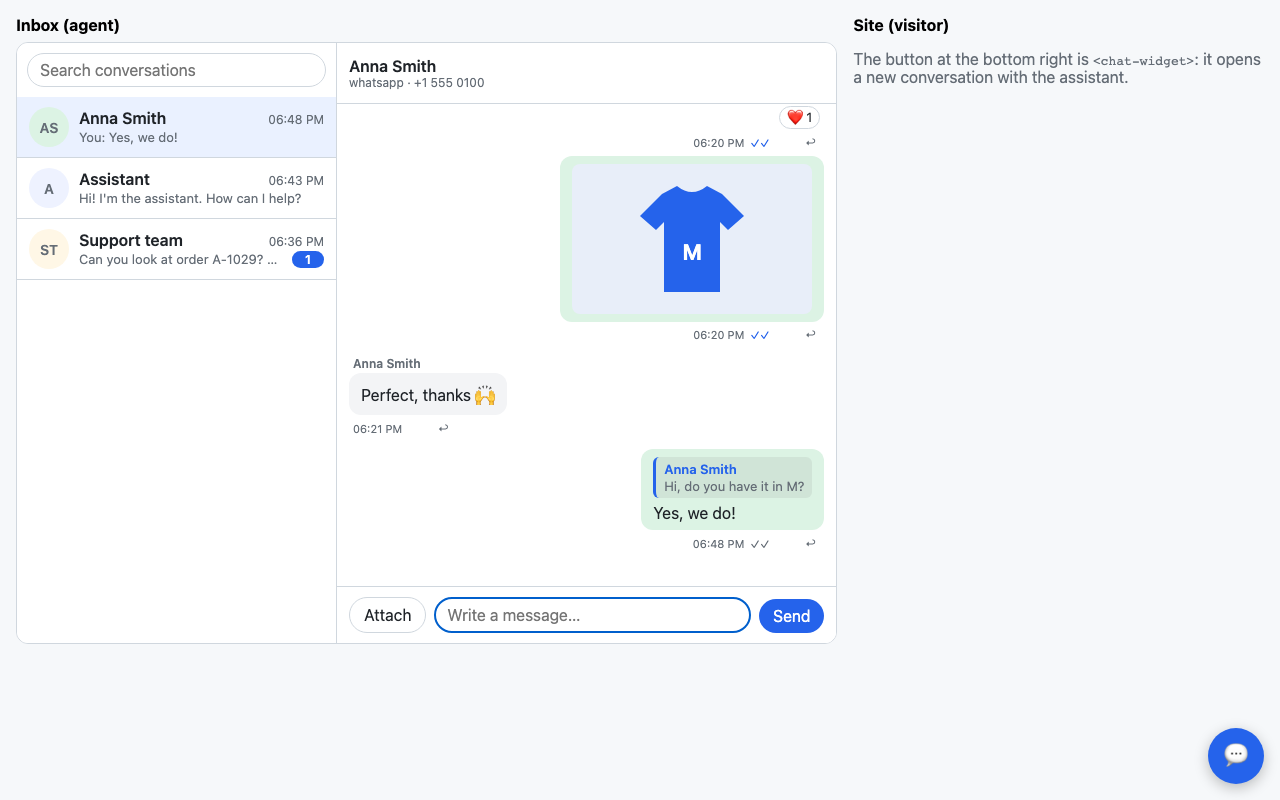
Replies, where a conversation allows them ("replies": True): "↩" on a
message answers it, and the answer quotes it (choosing the quote brings
the message into view):
With Django
pip install django-chat-ui
INSTALLED_APPS = [..., "django_chat_ui"]

urlpatterns = [..., path("chat/", include("django_chat_ui.urls"))]
python manage.py migrate
Then, in a template, {% chat_ui %} in the <head> and the components
wherever they go:
{% load chat_ui %}
<head>
  …
  {% chat_ui %}
</head>
<body>
  <chat-inbox></chat-inbox>          {# the staff's inbox #}
  <chat-widget heading="Support" subheading="We answer in minutes"
               storage-key="support"></chat-widget>   {# the visitors' #}
</body>
{% chat_ui %} writes the stylesheet, the configuration (the homeserver's
base URL, the CSRF token, the texts in the request's language) as a JSON
data block, and the module that connects every component of the page.
Nothing inline runs: it works under a strict Content Security Policy.
{% chat_ui poll=3000 %} polls every 3 seconds instead of long polling.
A Matrix client or bot can use the site too: its homeserver is
https://<site>/chat, and its users log in with their username and password
of the site. What it doesn't know of this package's, it shows as text. (The
tests run matrix-js-sdk against it; clients that require end-to-end
encryption, as Element does by default, aren't supported.)
Who chats, and what happens
Out of the box, logged-in users chat (staff as agents), each sees the
conversations they take part in, and a conversation started from the
widget goes to every active staff user, pending until one answers.
Everything else is a site's to decide, in a subclass of ChatBackend:
# myapp/chat.py
from django_chat_ui import services
from django_chat_ui.backend import ChatBackend


class Backend(ChatBackend):
    allow_anonymous = True  # visitors who aren't logged in
    hooks = "thread"  # on_message & co. after the command is answered

    def support_team(self, channel):
        return [self.participant_for_user(user) for user in on_duty()]

    def on_start(self, request, conversation, participant):
        services.system(conversation, "We'll be with you in a minute.")

    def before_send(self, request, conversation, participant, event_type, content):
        if participant.kind == "agent" and conversation.state == "pending":
            services.update_conversation(conversation, state="open")
            services.system(conversation, f"{participant.name} joined")

    def on_message(self, request, message):
        notify_whatsapp(message)  # a RoomEvent: message.body, message.content
CHAT_UI = {"BACKEND": "myapp.chat.Backend"}
Reactions are off unless a conversation's capabilities turn them on:
"reactions": True (any emoji; the interface offers a few), or
"reactions": {"emojis": ["👍", "✅", "👀"]} (only those). In
new_capabilities() for the conversations it starts, or for any one with
services.update_conversation(conversation, capabilities={"reactions": True}).
Its hooks: get_participant, login (Matrix clients' passwords),
conversations, can_start, start, support_team, new_capabilities,
before_send, on_start, on_message, on_action (a quick reply used:
its answer is in the thread already), on_event, validate_content,
serialize_conversation, serialize_participant, and event_types for
the events of your extensions.
on_start, on_message, on_action and on_event react to a request.
With hooks = "inline" (the default) they run inside it; with
hooks = "thread", in a thread of their own once it's committed, so a bot
that takes seconds doesn't hold the message that was sent. For a task
queue (Celery, django.tasks), override run_hook(hook, *args).
Your own models
Conversations and participants can be a site's own models, with its
fields: who a conversation is assigned to, its priority, the company of a
contact. Subclass the abstract ones, and name them in the settings
before the first migrate (like AUTH_USER_MODEL, they can't be
swapped afterwards without migrating the data by hand):
# helpdesk/models.py
from django_chat_ui.models import AbstractConversation, AbstractParticipant


class Ticket(AbstractConversation):
    priority = models.IntegerField(default=1)
    assignee = models.ForeignKey(User, null=True, on_delete=models.SET_NULL)


class Contact(AbstractParticipant):
    company = models.CharField(max_length=200, blank=True)
# settings.py
CHAT_UI_CONVERSATION_MODEL = "helpdesk.Ticket"
CHAT_UI_PARTICIPANT_MODEL = "helpdesk.Contact"
Both are optional (each defaults to the package's own). The events,
memberships and media stay the package's, pointing to them. In code,
get_conversation_model() and get_participant_model() (from
django_chat_ui.models) give the models in use;
services.create_conversation(..., priority=2) fills the fields of yours.
Register them in the admin with django_chat_ui.admin.ConversationAdmin
and ParticipantAdmin.
For the interface to get your fields, add them in the backend, under
ext with your namespace (they go in the room's state):
class Backend(ChatBackend):
    def serialize_conversation(self, conversation, data):
        data["ext"] = {"com.example.helpdesk": {"priority": conversation.priority}}
        return data
The example does all this (example/helpdesk). Fields that don't need a
column (an id of a CRM, a tag) fit in the ext JSON field every model
already has (and meta, which stays on the server); and a model of yours
with a OneToOneField to the conversation needs no setting at all.
Integrations: services
Bots, webhooks and assignment rules change conversations through
django_chat_ui.services, which also tells every open client; the contents
of messages come from django_chat_ui.content:
from django_chat_ui import content, services

message = services.send(
    conversation,
    bot,
    content.text("How can I help?", buttons=[{"id": "order", "label": "My order"}]),
)
services.delivered(message, customer)  # WhatsApp's two ticks
services.read(conversation, customer, message)
services.status(message, "failed", {"errcode": "131026", "error": "Undeliverable"})

services.update_conversation(
    conversation,
    capabilities={
        "composer": {
            "mode": "templates",
            "templates": [...],  # WhatsApp's window closed
        }
    },
)
content has text (with markdown=True, buttons=), notice, system,
image, video, audio, file, location, contact, link, card and
template. services also has create_conversation, add_participant,
remove_participant, system, edit, redact, react, unreact,
reactions, typing, and ephemeral and event for your extensions'.
docs/protocol.md maps WhatsApp's messages to them.
An AI that answers as it writes
Like ChatGPT's: the answer appears in its bubble as the model writes it.
services.stream_text() takes the chunks a model streams, shows the text
so far (every 0.1 s or 200 characters: a model's chunks are a few letters
each), and sends the message when they end, or when they fail (with what
came; the error goes on). Other Matrix clients see the bot typing, then its
message:
import anthropic

client = anthropic.Anthropic()


class Backend(ChatBackend):
    hooks = "thread"  # the visitor's message is sent at once; the answer, after

    def on_message(self, request, message):
        if message.sender is None or message.sender.kind == "bot":
            return
        with client.messages.stream(
            model="claude-opus-5-5",
            max_tokens=1024,
            system="You are the assistant of a shop…",
            messages=history(message.conversation),  # your mapping of the messages
        ) as stream:
            services.stream_text(message.conversation, bot, stream.text_stream)
buttons=[...] adds quick replies after the text, and markdown=False
sends it as plain text. For the words to flow rather than jump, read the
log more often: "POLL_INTERVAL": 0.1.
An agent of any framework that speaks AG-UI (LangGraph, CrewAI, Mastra, Pydantic AI, Agno…) answers the same way, with no code of its own:
from django_chat_ui.agui import AgUiAgent

agent = AgUiAgent("https://agents.example.com/shop", headers={"Authorization": "Bearer …"})


class Backend(ChatBackend):
    hooks = "thread"

    def on_message(self, request, message):
        if message.sender and message.sender.kind != "bot":
            agent.answer(message.conversation, bot)
The conversation goes to it as a run (RunAgentInput); each text message
it streams back is a message of bot. Override run_input() to give it
tools, context or state, and handle() for its other events (tool calls…).
Your own kinds of messages and events
Under your namespace, the way this package adds its own (see Extending it):
services.send(conversation, bot, {
    "msgtype": "com.acme.order",
    "body": "Order A-1029 · 2 items · €59.90",  # what any other client shows
    "com.acme.order": {"id": "A-1029", "total": "59.90"},
})


class Backend(ChatBackend):
    event_types = {"com.acme.order.cancel"}  # what clients may send, besides messages

    def validate_content(self, conversation, participant, event_type, content): ...

    def on_event(self, request, event): ...
import { registerMsgtype } from "…/django_chat_ui/content.js";

registerMsgtype("com.acme.order", (content, context) => {
    const card = document.createElement("div");
    card.textContent = `Order ${content["com.acme.order"].id}`;
    return card;
});
Settings
CHAT_UI = {
    "BACKEND": "django_chat_ui.backend.ChatBackend",
    "SERVER_NAME": "localhost",  # the domain of the Matrix IDs (@p3:<it>)
    "SYNC_TIMEOUT": 30,  # seconds a long poll of /sync waits, at most
    "POLL_INTERVAL": 0.5,  # seconds between reads of what's new
    "SETTLE": 1.0,  # seconds an entry missing in the log is waited for
}
Set SERVER_NAME before the first conversation: it's in every ID. Under
WSGI each long poll holds a worker for up to SYNC_TIMEOUT; under ASGI it
waits without a thread. What /sync reads is kept in the database for
clients to resume; python manage.py chat_ui_prune --days 7 deletes the old
entries (run it daily; the conversations stay).
A chat writes from several requests at once. On SQLite, let transactions take their lock when they start, or two at once fail with "database is locked" (Django 5.1+):
DATABASES = {"default": {..., "OPTIONS": {"transaction_mode": "IMMEDIATE"}}}
Without Django
The components are Matrix clients: any homeserver works (Synapse, Conduit…), with a Matrix login's access token. Conversations without this package's capabilities allow only plain texts.
<link rel="stylesheet" href="…/django_chat_ui/chat.css">
<chat-thread conversation="!room:example.org"></chat-thread>
<script type="module">
  import "…/django_chat_ui/chat-thread.js";
  import { ChatClient } from "…/django_chat_ui/client.js";

  const client = new ChatClient({ baseUrl: "https://matrix.example.org", accessToken });
  document.querySelector("chat-thread").client = client;
  await client.start();
</script>
Each takes its texts, to translate them: element.texts = { send: "Enviar" }.
Theme them with the --chat-* custom properties (on the inbox or the
widget, they reach its thread). Light or dark, they follow the page around
them: Django's admin's theme (data-theme on <html>), the dark class
of Unfold and Tailwind, or else the page's background — and only when the
page says nothing, the system's. A theme switch on the page switches them
too. data-theme="light"/"dark" on a component fixes its own.
Your own kinds of messages render with registerMsgtype("com.acme.order", render); any other client shows their body.
homeserver.js has a Matrix homeserver in memory, scriptable, for tests and
demos (new ChatClient({ fetch: server.fetch })).
Demos
The components alone, on an in-memory homeserver:
python -m http.server
# open http://localhost:8000/demo/
The Django example: a shop with the widget for its visitors (an assistant
greets them, streaming) and an inbox for its staff. With
ANTHROPIC_API_KEY set (and pip install anthropic), the assistant
answers what visitors write with Claude (ANTHROPIC_MODEL to choose
another model); without, it says someone will answer.
python example/manage.py migrate
python example/manage.py demo_chat     # conversations, and the users admin / demo
python example/manage.py runserver
# http://localhost:8000/ (visitor) and http://localhost:8000/inbox/ (staff)
# ?poll=3000 to poll; under ASGI, where a long poll holds no thread:
uvicorn --app-dir example example.asgi:application
Development
uv sync
uv run playwright install chromium
npm install                        # vitest, and matrix-js-sdk for a test
uv run pytest                      # Python, with the end-to-end tests
npm test                           # vitest
npx biome check .
1 maintainer

Metadata
1 maintainer
Release files for django-chat-ui 0.1.0
For a detailed explanation of source distributions (sdists) and built distributions (wheels), please see the package formats documentation.
Source distribution (sdist)
| File | Size | Uploaded | Provenance | Actions |
|---|---|---|---|---|
| django_chat_ui-0.1.0.tar.gz | 727.0 kB | With provenance | Details for django_chat_ui-0.1.0.tar.gz |
Built distribution (wheel)
| File | Interpreter | ABI | Platform | Actions Reset |
|---|---|---|---|---|
| django_chat_ui-0.1.0-py3-none-any.whl | Python 3 | none | any | Details for django_chat_ui-0.1.0-py3-none-any.whl |
Total release size: 828.7 kB
Release files / django_chat_ui-0.1.0.tar.gz
| Download URL | django_chat_ui-0.1.0.tar.gz |
|---|---|
| Size | 727.0 kB |
| Tags | Source |
|
SHA-256 checksum How to use checksums |
7a28b46f8e015e2547c8c0bea4ce4016c06fd7a48a9979987e97f8b917245bb4
|
|
BLAKE2b-256 checksum How to use checksums |
b5e87bbdca7ee9f11758b4708451d169fb867b13e55c18a14d5451b2c4106a4f
|
| Upload date | |
|
Uploaded using Trusted Publishing? What is trusted publishing? |
Yes |
| Uploaded via |
twine/7.0.0 CPython/3.13.16
|
Provenance
Provenance describes where a file came from. On PyPI, provenance is shared via attestations, which provide a verifiable record of the build or publishing details. View details, limitations and caveats.


PyPI Publish Attestation
PyPI verified that this artifact, at this checksum, originated from the publisher listed below.
Signed by GitHub Actions, verified by PyPI on Oct 24, 2026.
Transparency logRelease files / django_chat_ui-0.1.0-py3-none-any.whl
| Download URL | django_chat_ui-0.1.0-py3-none-any.whl |
|---|---|
| Size | 101.7 kB |
| Tags | Python 3 |
|
SHA-256 checksum How to use checksums |
32631f1e34b771ba17314185a814d26747fbdd2e4a47ec5af52df9d3137a166e
|
|
BLAKE2b-256 checksum How to use checksums |
581f1f1ddc4069896c9d65b404d3685dda61097ff0f47f5a17d80dfc6666bcf9
|
| Upload date | |
|
Uploaded using Trusted Publishing? What is trusted publishing? |
Yes |
| Uploaded via |
twine/7.0.0 CPython/3.13.16
|
Provenance
Provenance describes where a file came from. On PyPI, provenance is shared via attestations, which provide a verifiable record of the build or publishing details. View details, limitations and caveats.
PyPI Publish Attestation
PyPI verified that this artifact, at this checksum, originated from the publisher listed below.
Signed by GitHub Actions, verified by PyPI on Oct 24, 2026.
Transparency logSecurity for django-chat-ui 0.1.0
Provenance
Provenance describes where a file came from. On PyPI, provenance is shared via attestations, which provide a verifiable record of the build or publishing details. View details, limitations and caveats.
Full provenance
All 2 files in this release have been uploaded with provenance metadata.
Attestation for django_chat_ui-0.1.0.tar.gz
PyPI Publish Attestation
PyPI verified that this artifact, at this checksum, originated from the publisher listed below.
Signed by GitHub Actions, verified by PyPI on Oct 24, 2026.
Transparency logA note on package security
PyPI is a repository for distributing packages, not a service for auditing them. While third-party security researchers and our staff do their best to detect and remove malicious packages, PyPI cannot guarantee the quality, security or suitability of any given package.
To learn more about protecting yourself from malicious actors, visit our package security documentation.













