
Django middleware that shows you how fast your pages load, right in your browser.

Project description
django-chronos 
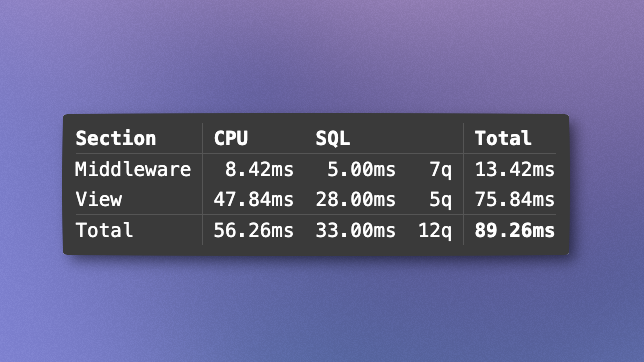
Django middleware that shows you how fast your pages load, right in your browser. Displays request timing and query counts for your views and middleware.
Installation
Install Django Chronos using pip:
pip install django-chronos
Quick Start
- Add to INSTALLED_APPS in your Django settings:
INSTALLED_APPS = [
    # ... your other apps
    'chronos',
]
- Add middleware to your Django settings (order matters):
MIDDLEWARE = [
    'chronos.middleware.ChronosStartMiddleware',  # Must be first
    # ... your other middleware
    'chronos.middleware.ChronosEndMiddleware',    # Must be last
]
- Run your Django application and visit any page. You'll see a stats overlayed in the bottom-left corner.
Configuration
CHRONOS_SHOW_IN_PRODUCTION (default: False)
Controls whether stats are shown in production mode (DEBUG=False). Stats are only shown to superusers in production. Stats always show in DEBUG mode.
CHRONOS_SHOW_IN_PRODUCTION = True
CHRONOS_SWAP_METHOD (default: 'prepend')
Controls how the stats are inserted into the response:
'prepend': Insert stats before the target'append': Insert stats after the target'replace': Replace the target with stats
CHRONOS_SWAP_METHOD = 'append'
CHRONOS_SWAP_TARGET (default: '</body>')
The string in the response where stats will be swapped in. Stats will not be displayed if this string does not exist in the response.
CHRONOS_SWAP_TARGET = '</body>'
Customizing the Stats Display
You can override the default stats display by creating your own chronos/chronos.html template in your Django project.
The template receives the following context variables:
middleware_cpu_time,middleware_sql_time,middleware_sql_count,middleware_total_timeview_cpu_time,view_sql_time,view_sql_count,view_total_timetotal_cpu_time,total_sql_time,total_sql_count,total_time
Note: In production mode, the *_sql_time and *_sql_count variable values will be zero (why?). You can wrap these variables in {% if debug %} blocks to stop them from displaying in production.
License
This project is open source and available under the MIT License.
Contributing
Contributions are welcome! Please feel free to submit a Pull Request.
Appreciation
Adam Hill for the inspiration via his Mastodon thread.
Release history Release notifications | RSS feed


Download files
Download the file for your platform. If you're not sure which to choose, learn more about installing packages.
Source Distribution
Built Distribution
Filter files by name, interpreter, ABI, and platform.
If you're not sure about the file name format, learn more about wheel file names.
Copy a direct link to the current filters
File details
Details for the file django_chronos-250807.1.tar.gz.
File metadata
- Download URL: django_chronos-250807.1.tar.gz
- Upload date:
- Size: 4.1 kB
- Tags: Source
- Uploaded using Trusted Publishing? No
- Uploaded via: uv/0.8.3
File hashes
| Algorithm | Hash digest | |
|---|---|---|
| SHA256 |
4791b802d11c19eb234506db32a2f492dc5c212c7bf987232fe5e21f17afd4ef
|
|
| MD5 |
ed366d9ab318c357c58baddf18e52e0b
|
|
| BLAKE2b-256 |
2e61913f8172d24021103c98e14f2daf553955c8043ad19598e5f3d2752aa307
|
File details
Details for the file django_chronos-250807.1-py3-none-any.whl.
File metadata
- Download URL: django_chronos-250807.1-py3-none-any.whl
- Upload date:
- Size: 5.9 kB
- Tags: Python 3
- Uploaded using Trusted Publishing? No
- Uploaded via: uv/0.8.3
File hashes
| Algorithm | Hash digest | |
|---|---|---|
| SHA256 |
32c6258622fa6265776169c169710c50ddefcae19b2e303f26e92a815b694052
|
|
| MD5 |
33eb85aaa23bda488b734330fcf635a4
|
|
| BLAKE2b-256 |
b927886e95ce2a245b5bea3dc753381d8dade23fb1588f59d3c65a490f64d55a
|






