
Interactive dependency map for Django projects — merges model FK relationships with import graph analysis
Verified details
These details have been verified by PyPIProject links
GitHub Statistics
Maintainers

Project description
django-dependency-map
Demo Video 🎥
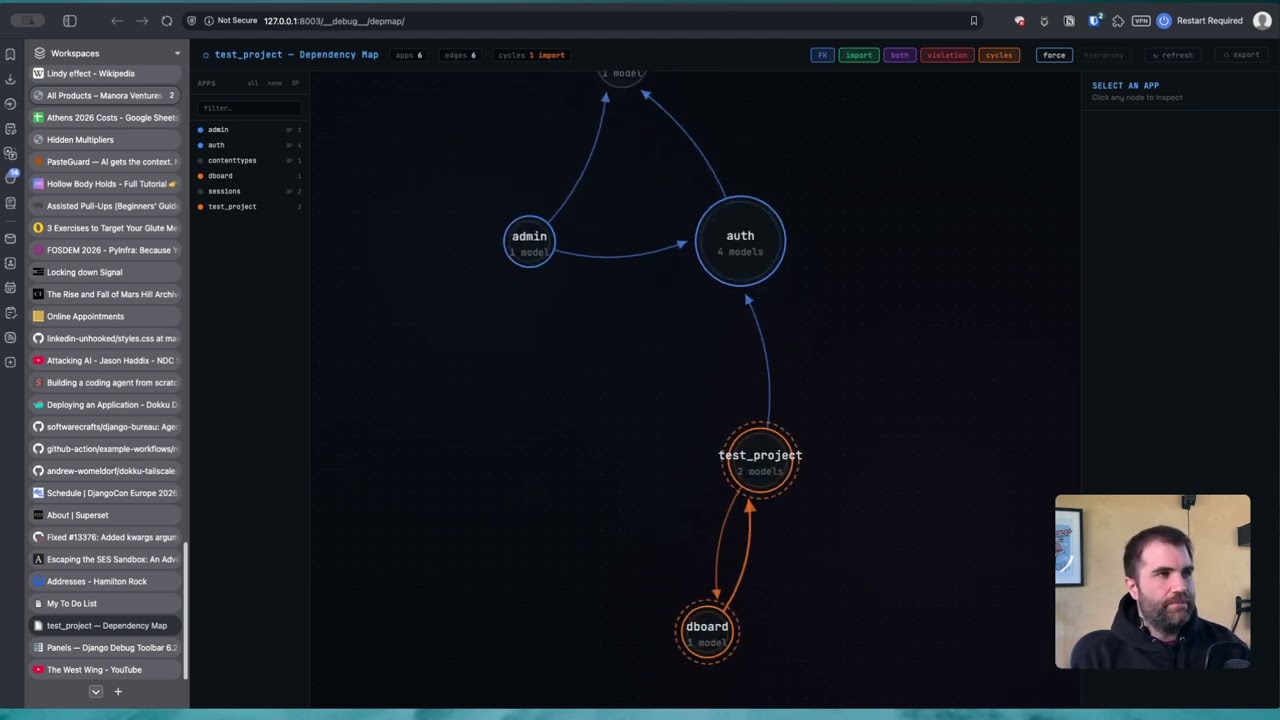
An interactive dependency map for Django projects. Merges two sources of structural information and renders them as a live, browsable graph:
graph_models(django-extensions) → model-level FK / M2M relationshipsgrimp→ actual Python import relationships between apps
Produces a self-contained HTML file, a live Django view, and an optional Django Debug Toolbar panel. Includes CI-friendly --check mode for detecting import cycles and violations in pipelines.
Contents
- Installation
- Quick start
- Management command
- Live Django view
- Django Debug Toolbar panel
- Reading the graph
- Scenario planning: show/hide apps
- Cycle detection
- import-linter integration
- CI integration
- Coupling metrics
- All settings
- File layout
Installation
pip install django-extensions grimp
For the Debug Toolbar panel (optional):
pip install django-debug-toolbar
Add to INSTALLED_APPS. django_extensions is required for model graph extraction; dependency_map itself has no models and needs no migrations:
INSTALLED_APPS = [
    ...
    "django_extensions",
    "dependency_map",
]
TEMPLATES must include APP_DIRS: True (or equivalent loaders config) so Django can find the panel template:
TEMPLATES = [
    {
        "BACKEND": "django.template.backends.django.DjangoTemplates",
        "APP_DIRS": True,
        ...
    }
]
Quick start
python manage.py dependency_map --open
This runs the full analysis and opens the result in your browser. On first run against a large project it may take 5–10 seconds; subsequent runs with the same code are fast because grimp caches the import graph.
Management command
# Full project — auto-detects root package from ROOT_URLCONF
python manage.py dependency_map --open

# Specific apps only
python manage.py dependency_map billing users core ledger

# Explicit root package (required when ROOT_URLCONF can't be used to infer it)
python manage.py dependency_map --root-package myproject

# Multiple root packages (monorepo / shared library pattern)
python manage.py dependency_map --root-package myproject --root-package shared

# Write to a specific path
python manage.py dependency_map --output docs/architecture/deps.html --open

# JSON output — pipe to jq or other tooling
python manage.py dependency_map --format json > depmap.json
python manage.py dependency_map --format json | jq '.stats'
python manage.py dependency_map --format json | jq '[.cycles[] | select(.kind == "import")]'

# CI mode — exits 1 if any violations or cycles are found
python manage.py dependency_map --check

# Disable auto-loading of .importlinter contracts
python manage.py dependency_map --no-importlinter

# Mark a specific import as a violation (stacks on top of .importlinter)
python manage.py dependency_map --violation billing:users --violation payments:core

# Custom page title
python manage.py dependency_map --title "Hamilton Rock — Architecture"
Root package detection
When --root-package is not specified, the command derives it from ROOT_URLCONF. For example, ROOT_URLCONF = "myproject.urls" gives myproject as the root package. For projects where apps live under a subdirectory (e.g. apps/billing/) set ROOT_URLCONF = "apps.urls" or pass --root-package apps explicitly.
If your app_label in each app's AppConfig includes the root package prefix (e.g. apps_billing for an app at apps/billing/), the analyzer normalises these automatically so that grimp and graph_models results map to the same app name.
Live Django view
Mounts the dependency map as a URL in your project so it can be visited in the browser and refreshed without re-running the management command.
1. Add to your URLconf:
# myproject/urls.py
from django.urls import include, path

urlpatterns = [
    ...
    path("__depmap__/", include("dependency_map.urls")),
]
2. Visit /__depmap__/ — staff-only by default (see settings below).
The page includes a ↻ refresh button that re-runs the full analysis without a page reload. The graph, filters, zoom level, and layout mode are all preserved across refreshes.
Endpoints
| URL | Description |
|---|---|
GET /__depmap__/ |
Full interactive HTML page |
GET /__depmap__/refresh/ |
JSON endpoint — returns fresh graph data, called by the refresh button |
Django Debug Toolbar panel
Adds the dependency map as a panel in the Django Debug Toolbar, accessible on any page during development. No URLconf changes are needed — the panel registers its own endpoints under DjDT's URL prefix.
1. Add the panel to DEBUG_TOOLBAR_PANELS:
DEBUG_TOOLBAR_PANELS = [
    "debug_toolbar.panels.history.HistoryPanel",
    "debug_toolbar.panels.versions.VersionsPanel",
    "debug_toolbar.panels.timer.TimerPanel",
    "debug_toolbar.panels.settings.SettingsPanel",
    "debug_toolbar.panels.headers.HeadersPanel",
    "debug_toolbar.panels.request.RequestPanel",
    "debug_toolbar.panels.sql.SQLPanel",
    "debug_toolbar.panels.staticfiles.StaticFilesPanel",
    "debug_toolbar.panels.templates.TemplatesPanel",
    "debug_toolbar.panels.alerts.AlertsPanel",
    "debug_toolbar.panels.cache.CachePanel",
    "debug_toolbar.panels.signals.SignalsPanel",
    "debug_toolbar.panels.redirects.RedirectsPanel",
    "debug_toolbar.panels.profiling.ProfilingPanel",
    "dependency_map.panels.DependencyMapPanel",   # ← add this
]
2. That's it. The panel will appear in the toolbar on every page. Click it to open the full dependency map in the panel's content area.
The nav subtitle shows a live summary (22 apps · 3 cycles) once the cache is warm.
How the panel works
The panel renders an iframe that loads the full dependency map from /__debug__/depmap/. This provides complete isolation from the host page's CSS and JavaScript — D3 and the dark-themed layout don't interfere with your app's styles.
Analysis results are cached in process memory (default: 60 seconds) so reopening the panel is instant. The ↻ refresh button inside the map always runs a fresh analysis and updates the cache.
Reading the graph
Edge colours
| Colour | Meaning |
|---|---|
| 🔵 Blue | FK / M2M relationship only (no code import) |
| 🟢 Green, dashed | Python import only (no data relationship) |
| 🟣 Purple | Both import + FK — the strongest coupling |
| 🔴 Red | import-linter violation |
| 🟠 Orange | Part of an import cycle |
| 🟡 Amber | Part of an FK cycle |
Node rings
The ring colour around each node reflects the app's dominant outgoing coupling type, using the same colours as the edges. Apps in import cycles show an orange dashed halo; apps in FK cycles show an amber dotted halo. When an app is in both, the halos stack.
Layout modes
Two layout modes are available via the toggle in the top bar:
Force — D3 force-directed simulation. Nodes cluster by coupling strength, good for exploring an unfamiliar codebase.
Hierarchy — Dagre top-to-bottom layered layout. Stable leaf apps (shared core, accounts) sit at the top; apps that depend on everything sit at the bottom. Dependencies flow upward. Best for understanding architectural layers.
Interacting with the graph
Click a node to highlight its connections and open the side panel. The side panel shows:
- Cycle membership, with an example path showing one real cycle route
- Direct mutual dependency pairs (the specific A↔B imports to fix first)
- Model list
- Afferent / efferent coupling counts and instability metric
- Full outgoing and incoming dependency list with coupling badges
Hover an edge for a tooltip showing the model-level FK field names and cycle/violation flags.
Filter buttons (top-right) toggle edge types on and off independently: FK, import, both, violation, cycles.
Scenario planning: show/hide apps
The app list on the left sidebar lets you show and hide individual apps. When you hide an app, the graph does not just remove the node — it recalculates the entire analysis for the visible subgraph:
- The force simulation or dagre layout reflows around the remaining nodes
- Cycle detection re-runs — if the hidden app was completing a cycle, the orange/amber halos disappear from the apps that are no longer mutually reachable
- Metrics update — afferent and efferent counts, instability, and direct pair lists all reflect only the visible apps
- Edge annotations update — edges that were part of a cycle through the now-hidden app lose their cycle colouring
This makes hide/show useful for diagnosing cycles: hide suspected load-bearing apps one at a time and watch whether the cycle indicator disappears from the remaining apps.
Sidebar controls
| Control | Action |
|---|---|
| Click an app name | Toggle that app's visibility |
| all button | Show all apps |
| none button | Hide all apps |
| 3P button | Toggle all third-party / Django built-in apps (allauth, django.contrib.*, etc.) |
| Search box | Filter the list by name |
Third-party apps are identified as apps that appear only as FK targets but are not found in your root_packages by grimp. They are marked with a small 3P badge in the sidebar.
Multiple hides are debounced — clicking several apps rapidly triggers one recalculation after the last click, not one per click.
Cycle detection
The analyzer runs two independent passes of Tarjan's strongly connected component (SCC) algorithm:
Import cycles — circular Python imports. These are a runtime risk: if module A imports module B which imports module A before A has finished initialising, you get ImportError or partially initialised module bugs.
FK cycles — circular foreign key chains. These are valid at the database level but require careful ordering during migrations (--fake, SeparateDatabaseAndState, or deferred constraints).
What is reported
Direct mutual pairs are the most actionable output. A direct pair A ↔ B means both A → B and B → A exist as direct edges, with no intermediate apps. These are where refactoring starts.
SCC label describes the full connected component — every app that can reach every other via some path. The label reads SCC of 14 apps: bank_account, business, ... and never uses → between members, because those arrows would imply direct edges that may not exist.
Example path is one real, verified shortest cycle through actual edges (found by BFS), labelled e.g. bank_account → cards → bank_account. This is clearly labelled as an example — not a complete description of the cycle.
--check output structure
✗ 22 direct mutual import(s) — fix these first:
  bank_account ↔ cards
  bank_account ↔ payment
  ...

✗ 1 import cycle group(s):
  SCC of 14 apps: bank_account, business, cards, ...
    e.g. bank_account → cards → bank_account

✗ 5 direct mutual FK(s) — migration ordering risk:
  bank_account ↔ cards
  feature_flags ↔ users
  ...
import-linter integration
If a .importlinter or setup.cfg file with [importlinter:*] sections is present in the project root, violation contracts are loaded automatically and applied to the graph. Pass --no-importlinter to skip this.
Three contract types are supported:
layers — top-to-bottom hierarchy; any upward import is a violation:
[importlinter]
root_package = myproject

[importlinter:contract:layers]
name = App layer hierarchy
type = layers
layers =
    webhooks | notifications
    billing | treasury | issuing
    ledger
    accounts
    core
Pipe-separated names on the same line are peers at the same layer and may import each other freely.
independence — listed modules must not import each other at all:
[importlinter:contract:independence]
name = Webhooks and notifications are independent
type = independence
modules =
    myproject.webhooks
    myproject.notifications
forbidden — explicit forbidden import pairs:
[importlinter:contract:forbidden]
name = Core is a leaf module
type = forbidden
source_modules =
    myproject.core
forbidden_modules =
    myproject.billing
    myproject.accounts
pyproject.toml with [tool.importlinter] is also supported on Python 3.11+ (uses tomllib) or when tomli is installed.
CI integration
# .github/workflows/ci.yml
- name: Check dependency violations and cycles
  run: python manage.py dependency_map --check
# Makefile
lint:
    python manage.py dependency_map --check
The command exits 0 when clean, 1 when violations or cycles are found. Stderr contains the structured report; stdout contains the summary counts.
Coupling metrics
The side panel shows three metrics for each app, calculated against the currently visible subgraph (i.e. they update when you hide apps):
| Metric | Formula | Interpretation |
|---|---|---|
| afferent coupling (Ca) | Apps that depend on this one | High = many dependents; risky to change |
| efferent coupling (Ce) | Apps this one depends on | High = many dependencies; fragile |
| instability | Ce / (Ca + Ce) | 0 = stable leaf, 1 = unstable top-level |
An app with high instability and high afferent coupling is the most dangerous to modify — it both depends on a lot and is depended upon by a lot. An app with low instability and no models is a candidate for extraction into a shared utilities package.
All settings
All settings are optional. Configure in settings.py:
# Root Python packages for grimp import analysis.
# Auto-detected from ROOT_URLCONF when not set.
# Required when apps live under a subdirectory (e.g. apps/billing/).
DEPENDENCY_MAP_ROOT_PACKAGES = ["apps"]

# Page title shown in the browser tab and the graph header.
# Defaults to "<project> — Dependency Map".
DEPENDENCY_MAP_TITLE = "Hamilton Rock — Dependency Map"

# Restrict the live view to staff users only (is_staff=True).
# Default: True. Set to False to allow any authenticated user.
# Take care in production — the analysis exposes your full project structure.
DEPENDENCY_MAP_STAFF_ONLY = True

# Seconds to cache analysis results in the Debug Toolbar panel.
# Default: 60. Set to 0 to re-analyse on every panel open.
DEPENDENCY_MAP_PANEL_CACHE_TTL = 60
File layout
dependency_map/
├── __init__.py
├── apps.py                         # AppConfig — registers templates
├── analyzer.py                     # Merges graph_models + grimp → graph dict
├── cycles.py                       # Tarjan SCC + BFS shortest cycle
├── importlinter.py                 # .importlinter / setup.cfg contract parser
├── panels.py                       # Django Debug Toolbar panel (optional)
├── renderer.py                     # Graph dict → self-contained HTML/D3/dagre
├── urls.py                         # URL patterns for the live view
├── views.py                        # DependencyMapView + DependencyMapRefreshView
├── templates/
│   └── dependency_map/
│       └── panel.html              # Debug Toolbar iframe wrapper
└── management/
    └── commands/
        └── dependency_map.py       # Management command entry point
Drop the dependency_map/ directory next to your manage.py and add "dependency_map" to INSTALLED_APPS. No migrations are required — the app has no models.
Project details
Verified details
These details have been verified by PyPIProject links
GitHub Statistics
Maintainers


Download files
Download the file for your platform. If you're not sure which to choose, learn more about installing packages.
Source Distribution
Built Distribution
Filter files by name, interpreter, ABI, and platform.
If you're not sure about the file name format, learn more about wheel file names.
Copy a direct link to the current filters
File details
Details for the file django_dependency_map-0.3.3.tar.gz.
File metadata
- Download URL: django_dependency_map-0.3.3.tar.gz
- Upload date:
- Size: 51.5 kB
- Tags: Source
- Uploaded using Trusted Publishing? Yes
- Uploaded via: twine/6.1.0 CPython/3.13.12
File hashes
| Algorithm | Hash digest | |
|---|---|---|
| SHA256 |
af4ddb295a1457964472500978d7060b4356778b90a2844495d20945660f3953
|
|
| MD5 |
2cd5927d7df409b6aa815e80903946e2
|
|
| BLAKE2b-256 |
551efda4bde1f0127b4715a4c739318e9c957a9317a3730a0b164aefc24ef7eb
|
Provenance
The following attestation bundles were made for django_dependency_map-0.3.3.tar.gz:
Publisher:
publish.yml on softwarecrafts/django-dependency-map
-
Statement:
-
Statement type:
https://in-toto.io/Statement/v1 -
Predicate type:
https://docs.pypi.org/attestations/publish/v1 -
Subject name:
django_dependency_map-0.3.3.tar.gz -
Subject digest:
af4ddb295a1457964472500978d7060b4356778b90a2844495d20945660f3953 - Sigstore transparency entry: 1288617201
- Sigstore integration time:
-
Permalink:
softwarecrafts/django-dependency-map@76624d4cbddc00b4dcf6e33959a9b03f1b68bc9f -
Branch / Tag:
refs/tags/v0.3.3 - Owner: https://github.com/softwarecrafts
-
Access:
public
-
Token Issuer:
https://token.actions.githubusercontent.com -
Runner Environment:
github-hosted -
Publication workflow:
publish.yml@76624d4cbddc00b4dcf6e33959a9b03f1b68bc9f -
Trigger Event:
push
-
Statement type:
File details
Details for the file django_dependency_map-0.3.3-py3-none-any.whl.
File metadata
- Download URL: django_dependency_map-0.3.3-py3-none-any.whl
- Upload date:
- Size: 54.1 kB
- Tags: Python 3
- Uploaded using Trusted Publishing? Yes
- Uploaded via: twine/6.1.0 CPython/3.13.12
File hashes
| Algorithm | Hash digest | |
|---|---|---|
| SHA256 |
82cc17739a8487219ce09cccde9024eee65539fc199be08d473768ac92657a99
|
|
| MD5 |
71ce27375d98a16f80fbf2699f9e5bf5
|
|
| BLAKE2b-256 |
f596b41c61ca260a972f34e74144792dc8fc844da4decccbd4aaf058d327f886
|
Provenance
The following attestation bundles were made for django_dependency_map-0.3.3-py3-none-any.whl:
Publisher:
publish.yml on softwarecrafts/django-dependency-map
-
Statement:
-
Statement type:
https://in-toto.io/Statement/v1 -
Predicate type:
https://docs.pypi.org/attestations/publish/v1 -
Subject name:
django_dependency_map-0.3.3-py3-none-any.whl -
Subject digest:
82cc17739a8487219ce09cccde9024eee65539fc199be08d473768ac92657a99 - Sigstore transparency entry: 1288617369
- Sigstore integration time:
-
Permalink:
softwarecrafts/django-dependency-map@76624d4cbddc00b4dcf6e33959a9b03f1b68bc9f -
Branch / Tag:
refs/tags/v0.3.3 - Owner: https://github.com/softwarecrafts
-
Access:
public
-
Token Issuer:
https://token.actions.githubusercontent.com -
Runner Environment:
github-hosted -
Publication workflow:
publish.yml@76624d4cbddc00b4dcf6e33959a9b03f1b68bc9f -
Trigger Event:
push
-
Statement type:






