
Lightweight performance devbar for Django
Verified details
These details have been verified by PyPIProject links
GitHub Statistics
Maintainers

Project description
django-devbar
[!WARNING] This package is experimental and may introduce breaking changes in minor versions.
Lightweight performance devbar for Django. Shows DB query count, query duration, application time, and detects similar and duplicate queries with visual severity indicators.
Showcase
Normal operation – showing query count, duration, and application time:

Similar and duplicate queries detected – severity indicators and details shown:

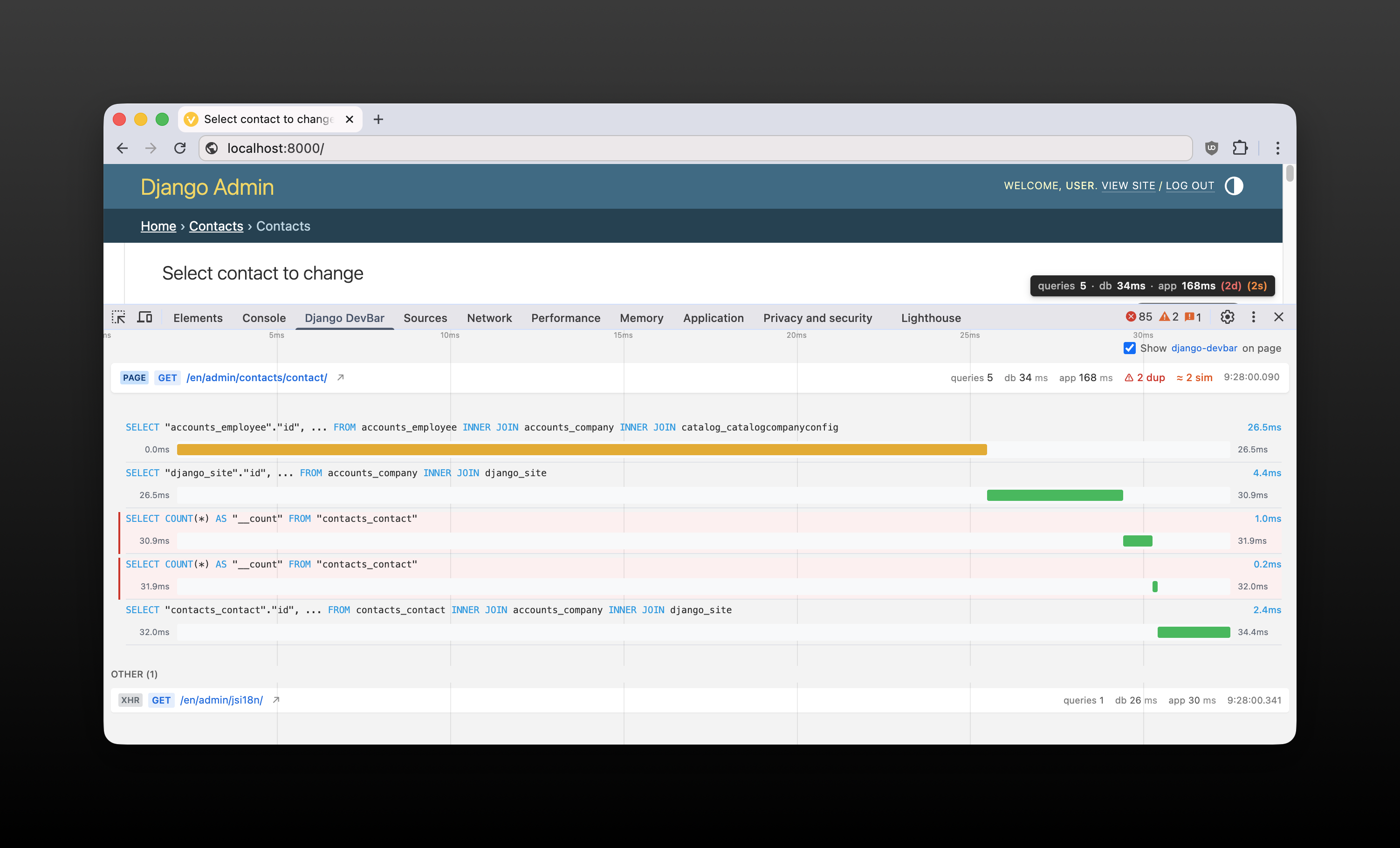
[optional] Chrome extension - showing detailed metrics in DevTools panel:
Motivation
While Django Debug Toolbar is a proven tool trusted by countless projects, django-devbar explores a different approach to development debugging:
- Minimal setup — just add middleware, nothing else required
- Browser DevTools integration — Chrome extension panel works with any response type, including JSON
- Zero extra dependencies — only requires Django
- Lower overhead — no extra requests to debug endpoints
- Non-intrusive — HTML bar is optional; works via headers and DevTools panel alone
Installation
# Using uv (recommended)
uv add --dev django-devbar

# Or using pip
pip install django-devbar
Add to your middleware early. For example:
MIDDLEWARE = [
    "django.middleware.security.SecurityMiddleware",
    # ...
]

if DEBUG:
    idx = MIDDLEWARE.index("django.middleware.security.SecurityMiddleware")
    MIDDLEWARE.insert(idx + 1, "django_devbar.DevBarMiddleware")
This keeps the middleware active only in development and avoids import errors if the package isn't installed in production.
Configuration
All settings are optional. Configure via a DEVBAR dict in your Django settings:
DEVBAR = {
    "POSITION": "bottom-right",  # bottom-right (default), bottom-left, top-right, top-left
    "SHOW_BAR": None,  # follows DEBUG; set True/False to override
    "ENABLE_DEVTOOLS_DATA": None,  # follows DEBUG; set True/False to override
}
Response Headers
Django DevBar adds HTTP response headers with performance metrics:
- Server-Timing (always present) – Standard HTTP header with database, application, and total time metrics. Visible in Chrome DevTools Network tab under Timing.
An additional header is included by default in DEBUG mode:
- DevBar-Data - JSON header with comprehensive metrics including similar and duplicate query details
This is useful for:
- API endpoints where the HTML overlay can't be displayed
- Automated testing to assert performance metrics (e.g., fail CI if query count exceeds a limit)
- Browser extensions that need detailed duplicate query information
Server-Timing format
Server-Timing: db;dur=87.50, app;dur=41.30, total;dur=128.80
Chrome Extension
View Django DevBar metrics directly in Chrome DevTools with the official extension.
See chrome-extension/README.md for more details.
Project details
Verified details
These details have been verified by PyPIProject links
GitHub Statistics
Maintainers
Release history Release notifications | RSS feed


Download files
Download the file for your platform. If you're not sure which to choose, learn more about installing packages.
Source Distribution
Built Distribution
Filter files by name, interpreter, ABI, and platform.
If you're not sure about the file name format, learn more about wheel file names.
Copy a direct link to the current filters
File details
Details for the file django_devbar-0.6.1.tar.gz.
File metadata
- Download URL: django_devbar-0.6.1.tar.gz
- Upload date:
- Size: 8.7 kB
- Tags: Source
- Uploaded using Trusted Publishing? Yes
- Uploaded via: twine/6.1.0 CPython/3.13.7
File hashes
| Algorithm | Hash digest | |
|---|---|---|
| SHA256 |
c757a57031e2101653dd6d3069f5144d2145bc562d35fb9e9e45cf02f860bd1f
|
|
| MD5 |
a7dee2b185411a0c5e7e455578e908d6
|
|
| BLAKE2b-256 |
7bc7a2beb4e9f7624217a0193aa7a470891c30301f026aabe4fdeac9e0b61b2b
|
Provenance
The following attestation bundles were made for django_devbar-0.6.1.tar.gz:
Publisher:
release.yml on amureki/django-devbar
-
Statement:
-
Statement type:
https://in-toto.io/Statement/v1 -
Predicate type:
https://docs.pypi.org/attestations/publish/v1 -
Subject name:
django_devbar-0.6.1.tar.gz -
Subject digest:
c757a57031e2101653dd6d3069f5144d2145bc562d35fb9e9e45cf02f860bd1f - Sigstore transparency entry: 820944802
- Sigstore integration time:
-
Permalink:
amureki/django-devbar@ab4d3467bee6c070f010fd176ad9658244e95fb6 -
Branch / Tag:
refs/tags/v0.6.1 - Owner: https://github.com/amureki
-
Access:
public
-
Token Issuer:
https://token.actions.githubusercontent.com -
Runner Environment:
github-hosted -
Publication workflow:
release.yml@ab4d3467bee6c070f010fd176ad9658244e95fb6 -
Trigger Event:
release
-
Statement type:
File details
Details for the file django_devbar-0.6.1-py3-none-any.whl.
File metadata
- Download URL: django_devbar-0.6.1-py3-none-any.whl
- Upload date:
- Size: 11.0 kB
- Tags: Python 3
- Uploaded using Trusted Publishing? Yes
- Uploaded via: twine/6.1.0 CPython/3.13.7
File hashes
| Algorithm | Hash digest | |
|---|---|---|
| SHA256 |
cdecb0aed367c3c41ba60551be0eeccd9de3cfd74d20bad6d366a470740f340d
|
|
| MD5 |
f6cfde08c94e29916da8f46386d0e3f5
|
|
| BLAKE2b-256 |
4f0476f0c1478c6c054b03efaa1141d82147a314fe4c3dcc4d12c34ba5c497c8
|
Provenance
The following attestation bundles were made for django_devbar-0.6.1-py3-none-any.whl:
Publisher:
release.yml on amureki/django-devbar
-
Statement:
-
Statement type:
https://in-toto.io/Statement/v1 -
Predicate type:
https://docs.pypi.org/attestations/publish/v1 -
Subject name:
django_devbar-0.6.1-py3-none-any.whl -
Subject digest:
cdecb0aed367c3c41ba60551be0eeccd9de3cfd74d20bad6d366a470740f340d - Sigstore transparency entry: 820944810
- Sigstore integration time:
-
Permalink:
amureki/django-devbar@ab4d3467bee6c070f010fd176ad9658244e95fb6 -
Branch / Tag:
refs/tags/v0.6.1 - Owner: https://github.com/amureki
-
Access:
public
-
Token Issuer:
https://token.actions.githubusercontent.com -
Runner Environment:
github-hosted -
Publication workflow:
release.yml@ab4d3467bee6c070f010fd176ad9658244e95fb6 -
Trigger Event:
release
-
Statement type:






