
Django Dump & Die







Django-Dump-Die is a Django app that
provides a couple of debug tools, in the form of built-in methods
dump and dd. These allow sending details about a variable to the
browser for inspection.
Dumped variables are presented in an easy-to-read and fully expandable/collapsible tree. You can easily understand complex objects and the results of Django queries with a simple call to either method.
When dump and/or dd are called, dump die will intercept the page
response and replace the contents of the response with detailed information
about the corresponding variables passed for inspection.
The entire concept is heavily based on the dump die functionality that comes with PHP's Laravel and Symfony frameworks.
Full documentation on ReadTheDocs.
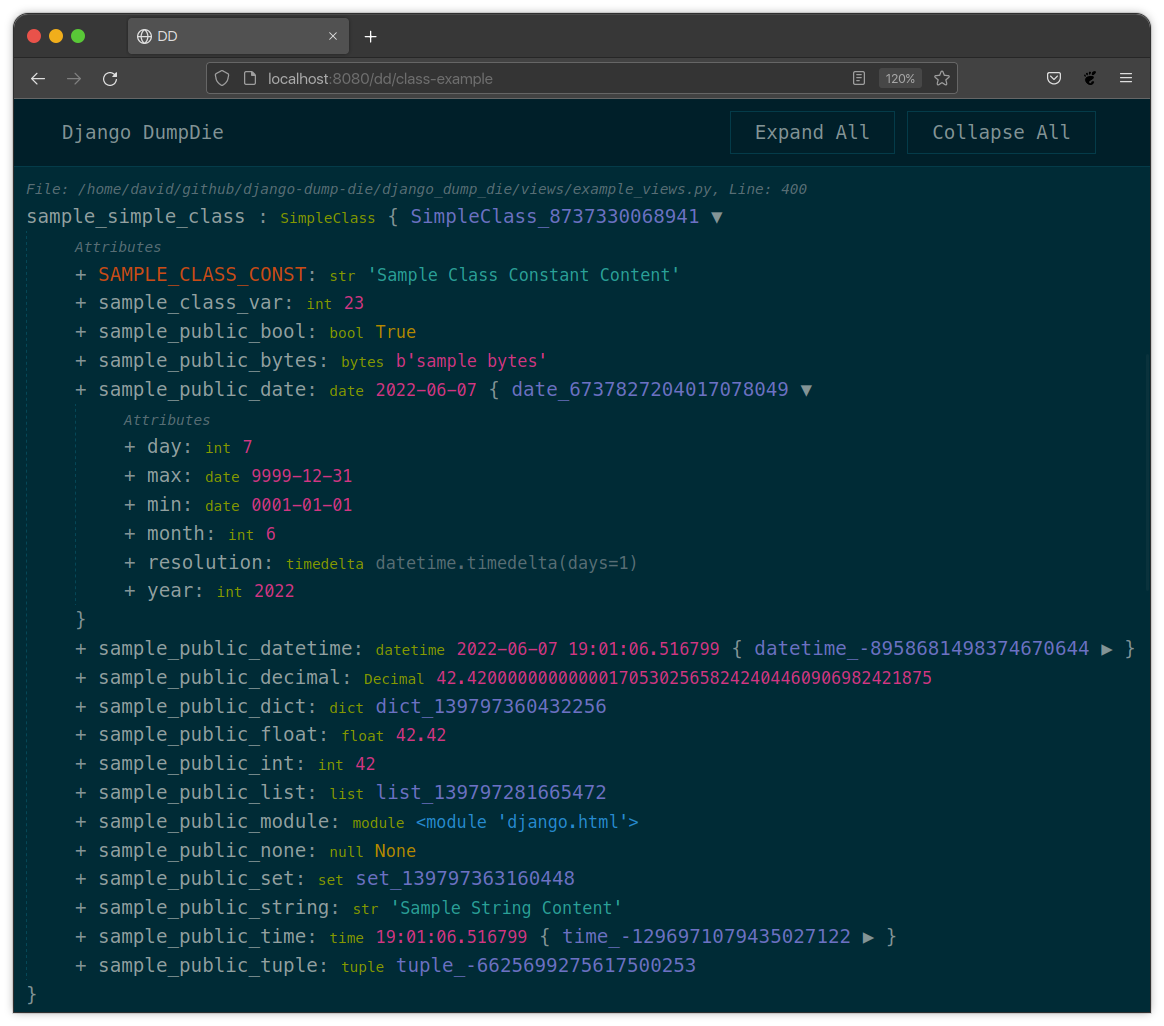
Quickstart
- Install the Django App via Pypi.
python -m pip install django-dump-die
- Add the corresponding app to your Django
settings.pyfile:INSTALLED_APPS = [ 'django_dump_die', ... ]
-
Add the corresponding middleware to your Django
settings.pyfile:MIDDLEWARE = [ 'django_dump_die.middleware.DumpAndDieMiddleware', ... ]
-
Ensure that you have DEBUG set to
Truein your Djangosettings.pyfile:DEBUG = True
ℹ️ NOTE Neither the
dumpcommand nor theddcommand will do anything if DEBUG is not set toTrue. With that said, this is a tool for debugging. You should not include this package in production nor should you ever have DEBUG set toTruein production.
-
From a file that is part of the request-response cycle such as a Django View in
views.py, make a call toddpassing it a variable to inspect.views.py
def my_awesome_view(request):
    dd(request)
Usage
The middleware is where most of this package's heavy lifting happens.
By having the middleware installed, you can run dump(<variable>) and/or
dd(<variable>) in any file that is part of the request-response cycle,
and it will run the dump logic. No importing or extra logic is required.
Each dump(<variable>) command will add the passed object to an internal
list that will be dumped either when a dd(<variable>) is used, or if the
entirety of the request finishes. You can have as many dump(<variable>)
statements as you want leading up to an optional dd(<variable>).
If you make a call to dd(<variable>), execution will immediately stop
and all dumped objects (including the one sent to dd) will be output.
If you do not make a call to dd(<variable>) and only use
dump(<variable>) statements, the request will continue processing until
it is time to return the response. At this point, Django-Dump-Die will
intercept and replace the response with the data that has been dumped thus
far.
ℹ️ NOTE
Because dump die uses middleware to internally handle keeping track of
what to dump and then actually dumping the data to the browser, any
call to dump or dd must be done in a file that will be processed
during the request-response cycle. Most commonly this will be a
views.py file, but could also be utils called from a view.
Attempting to dump or dd from a console command will not work.
Example:
# Sample classes for output.
class EmptyClass:
    """Empty Class."""
    pass


class SomeClass:
    """Some Class."""
    SAMPLE_CONST = 41

    def __init__(self, *args, **kwargs):
        self.my_number = 32
        self.my_string = 'A super cool string'
        self.works = True
        self.nothing = None
        self.bytes = bytes('My Bytes', 'utf-8')
        self.list_o_stuff = ['A', 'B', 'C']
        self.sample_set = {'A', 'B', 'C'}
        self.sample_tuple = ('A', 12, True)
        self.empty_class = EmptyClass()
        self.empty_class_dup = self.empty_class

    def do_work(self):
        """Do some work"""
        return True


# Example Usage
empty_class = EmptyClass()
some_class = SomeClass()

dump('Simple String')
dump(empty_class)
dd(some_class)
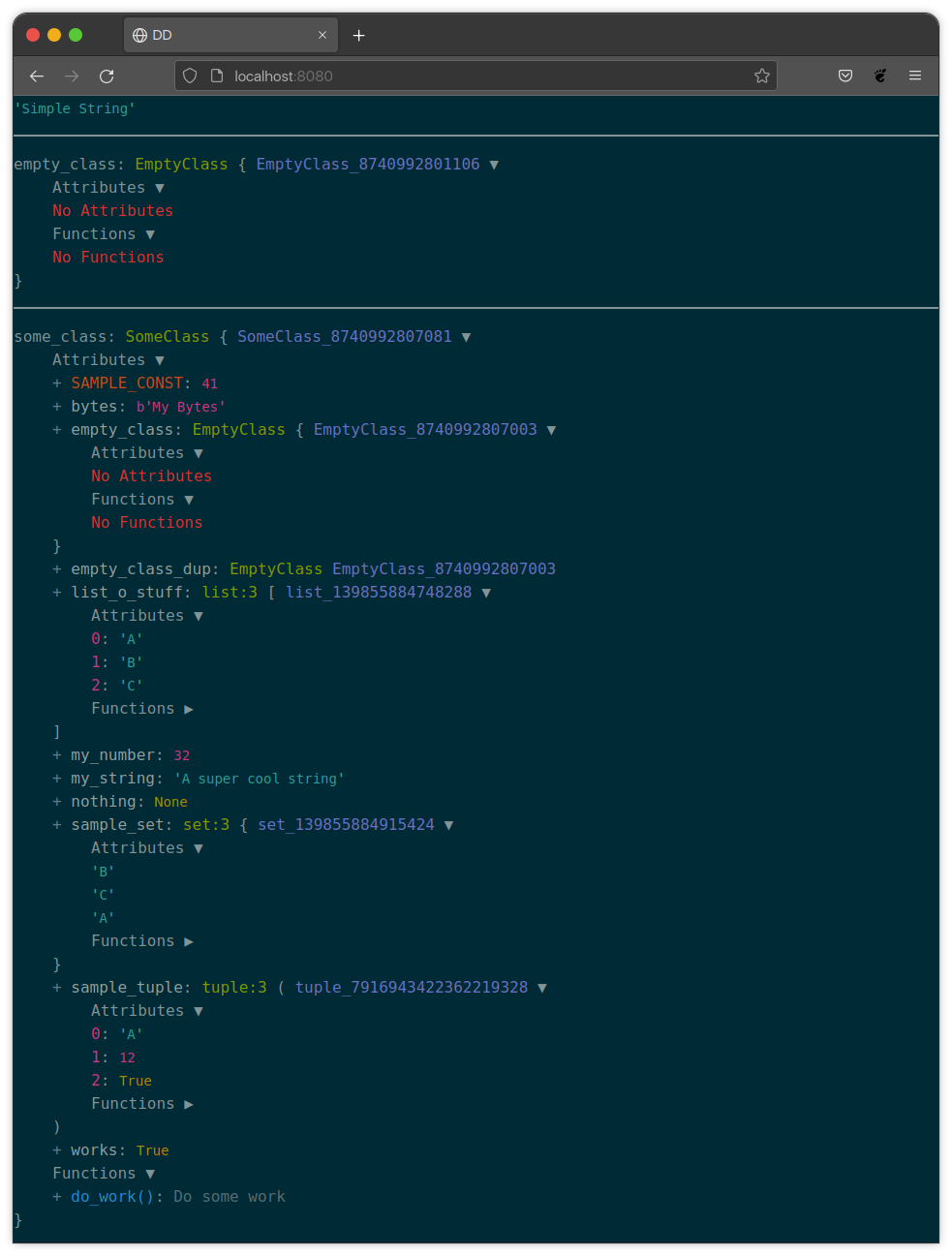
ℹ️ NOTE Most editors will give a red error squiggle for the dd command. This is intentional, and the command will still run. This is because this command is meant to be used for debugging, and is not meant to stay long-term. The red squiggle helps identify it as something that should be removed before any actual commits.
Usage & Parameters
For further documentation on usage and parameters, see ReadTheDocs/Usage
Configuration
The package has a few available configuration options and settings, which are documented at ReadTheDocs/Configuration
1 maintainer

Metadata
1 maintainer
Release files for django-dump-die 0.2.0
For a detailed explanation of source distributions (sdists) and built distributions (wheels), please see the package formats documentation.
Source distribution (sdist)
| File | Size | Uploaded | Provenance | Actions |
|---|---|---|---|---|
| django_dump_die-0.2.0.tar.gz | 58.7 kB | With provenance | Details for django_dump_die-0.2.0.tar.gz |
Built distribution (wheel)
| File | Interpreter | ABI | Platform | Actions Reset |
|---|---|---|---|---|
| django_dump_die-0.2.0-py3-none-any.whl | Python 3 | none | any | Details for django_dump_die-0.2.0-py3-none-any.whl |
Total release size: 124.4 kB
Release files / django_dump_die-0.2.0.tar.gz
| Download URL | django_dump_die-0.2.0.tar.gz |
|---|---|
| Size | 58.7 kB |
| Tags | Source |
|
SHA-256 checksum How to use checksums |
9e798dd12a32fc4f5c5eadcaa43643dab75ec09a790d91bd3d303116fa2882ad
|
|
BLAKE2b-256 checksum How to use checksums |
60a1753666bd2249424ef233cffe8f7c642ef21c22e7aa626678afe703407c4c
|
| Upload date | |
|
Uploaded using Trusted Publishing? What is trusted publishing? |
Yes |
| Uploaded via |
twine/7.0.0 CPython/3.13.16
|
Provenance
Provenance describes where a file came from. On PyPI, provenance is shared via attestations, which provide a verifiable record of the build or publishing details. View details, limitations and caveats.


PyPI Publish Attestation
PyPI verified that this artifact, at this checksum, originated from the publisher listed below.
Signed by GitHub Actions, verified by PyPI on Nov 9, 2026.
Transparency logRelease files / django_dump_die-0.2.0-py3-none-any.whl
| Download URL | django_dump_die-0.2.0-py3-none-any.whl |
|---|---|
| Size | 65.6 kB |
| Tags | Python 3 |
|
SHA-256 checksum How to use checksums |
68047fee7ba82d90361177df48cd2c0a8b6ef09e1c16ebe4511be10f44cf9f99
|
|
BLAKE2b-256 checksum How to use checksums |
f6b6ebe411c79234de62a18536a7c8e7d2fdda6b5cb477dbed054bf58e242b7b
|
| Upload date | |
|
Uploaded using Trusted Publishing? What is trusted publishing? |
Yes |
| Uploaded via |
twine/7.0.0 CPython/3.13.16
|
Provenance
Provenance describes where a file came from. On PyPI, provenance is shared via attestations, which provide a verifiable record of the build or publishing details. View details, limitations and caveats.
PyPI Publish Attestation
PyPI verified that this artifact, at this checksum, originated from the publisher listed below.
Signed by GitHub Actions, verified by PyPI on Nov 9, 2026.
Transparency logSecurity for django-dump-die 0.2.0
Provenance
Provenance describes where a file came from. On PyPI, provenance is shared via attestations, which provide a verifiable record of the build or publishing details. View details, limitations and caveats.
Full provenance
Both files in this release have been uploaded with provenance metadata.
Attestation for django_dump_die-0.2.0.tar.gz
PyPI Publish Attestation
PyPI verified that this artifact, at this checksum, originated from the publisher listed below.
Signed by GitHub Actions, verified by PyPI on Nov 9, 2026.
Transparency logA note on package security
PyPI is a repository for distributing packages, not a service for auditing them. While third-party security researchers and our staff do their best to detect and remove malicious packages, PyPI cannot guarantee the quality, security or suitability of any given package.
To learn more about protecting yourself from malicious actors, visit our package security documentation.














