
allow to change the logging configuration for running production website from the admin interface.
all you need to do is :
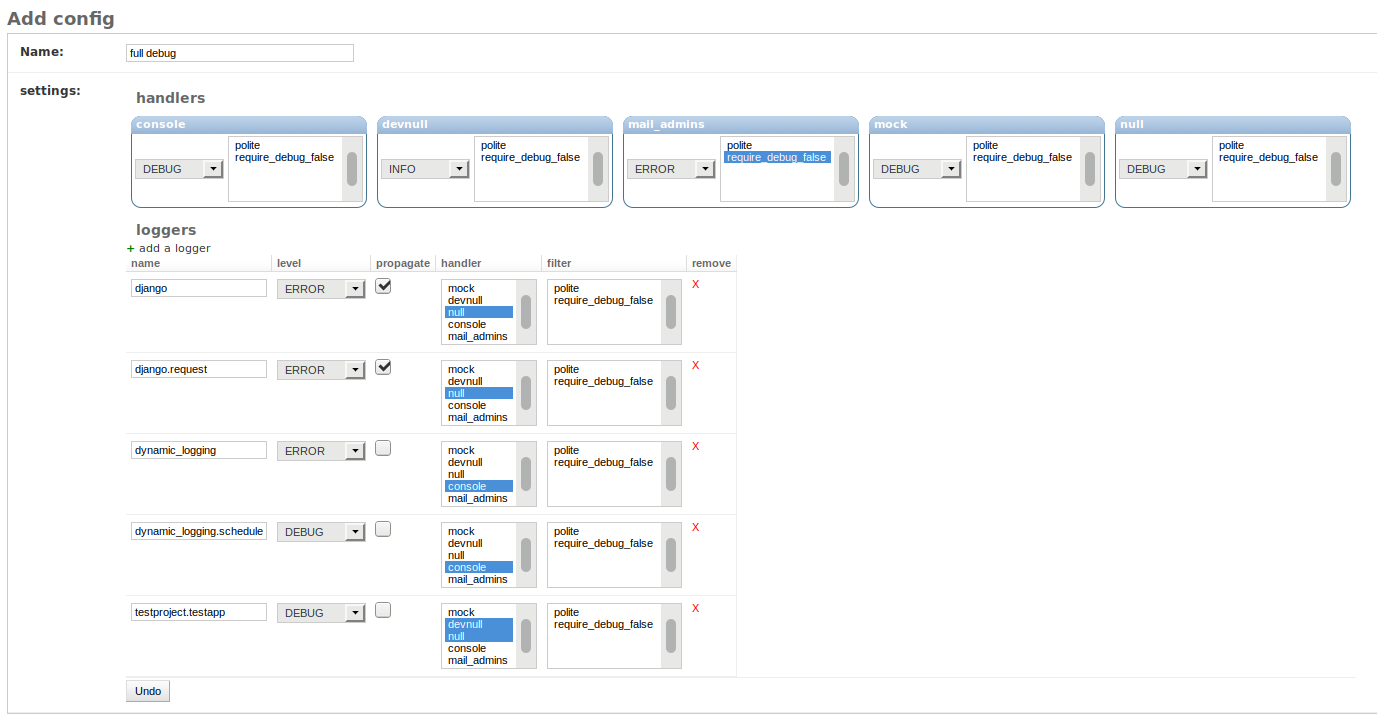
create a logging config [Config model] from a use friendly form
create a timelaps [Trigger model] in which your config is valid (from start_date to end_date, or forever)
enjoy your logging, since you saved the trigger, the app will do the stuff to run it now if it’s already valide, or at the date/time you enabled it
stable branche





development status



the old way was :
you found a bug, and the current stacktrace is not enough ? first, you should change the settings LOGGING to make it more verbose (with something like LEVEL: ‘DEBUG’)
but, the bad thing, is that you must: 1. connect to your production server 2. change the settings in live 3. make sure no synthax error 4. restart the service (with downtime) 5. do not forget to rollback after some time to prevent performance issues.
Overview
with django-dynamic-logging, you can update at runtime the logging configuration, including :
update handlers levels and filter, but nothing else (for security purpose)
create/delete/update loggers. this include the level, handlers, filters and propagate flag.
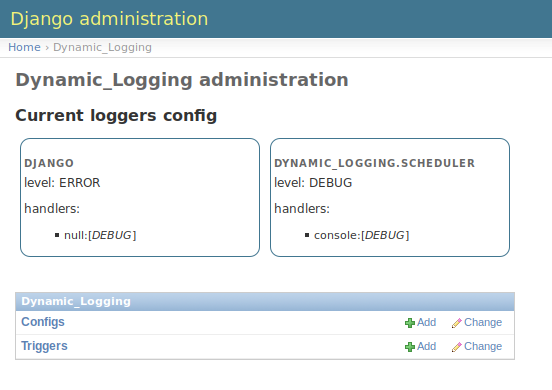
may logging configuration can exists in the database, but only one can be active. the leatest trigger (start_date) take precedence and will activate his config.
ie: you want to set the app «myproject.import» in debug mode to for this night: you set the trigger, and it will enable the debug only for this night. at day, the default logging config will run
screenshots
Installation
Install using pip:
pip install django-dynamic-logging
Alternatively, you can install download or clone this repo and call
pip install -e ..
requirements
the supported versions is the same as current django
python 2.7, 3.4, 3.5
django 1.8, 1.9, 1.10
configuration in sources
add dynamic_logging to your INSTALLED_APPS
and that’s all
configuration for running system
go to your admin, and create a Config
create the Trigger that will enable it whenever you want.
propagation of new config
each time a config or trigger is updated/deleted/created, the dynamic_logging system must recalculate the new config. but to work, it must be aware of the fact the something was updated. to make it available, there is 3 possibility. in mono-processing, where the logging config is global to all thread, it’s not a issues, but in multi-process (like with gunicorn setup) or even multi-server, we must propagate the info that one running instance has just changed something in the config.
for doing this, there is 4 Propagator shiped with dynamic_logging:
ThreadSignalPropagator: the default one, it work in real-time in a mono-server, mono-process setup. it may not be possible in real production to have this setup.
DummyPropagator: nothing happen whene a config is updated. all the triggers and next trigger application is computed only at startup time
TimerPropagator: it check a modification in the config each interval seconds. this work, but is ineficient.
AmqpPropagator: the best choice for production, but it require a running Amqp message queue broker (tested upon RabbitMQ). it take in config the url of the server, and will connect each running instance to it. each time an instance update the config, all instance will be triggered and will reload theire config in near realtime.
the on_error config can be used to raise if the propagator fail tu setup or pass``[default] but log an error in ``dynamic_logging.apps
to change the propagator, you can use the folowing settings:
DYNAMIC_LOGGING = {
    "upgrade_propagator": {'class': "dynamic_logging.propagator.AmqpPropagator",
                           'config': {'url': 'amqp://guest:guest@localhost:5672/%2F'},
                           'on_error': 'raise',  # or by default : 'pass'
                           }
}
specials cases
django-dynamic-logging handle some specials cases for you by default.
if you update a config or a trigger it will compute the current config and the next one on all running instance of your website (see propagation)
if you enable the DEBUG (or lesser) level on django.db.backends, it will change the settings of your databases connection to make sure the CursorDebugWrapper is used and will call the debug for all query. if not, you will not see any query by default.
you can override or add some special cases by adding your own special cases in dynamic_logging.signals.AutoSignalsHandler.extra_signals.
settings
you can add into your settings a DYNAMIC_LOGGING dict with the folowing key to customise the dynamic logger behavior
signals_auto: the list of special logging handlers. currently only db_debug is enabled
config_upgrade_propagator: the class that is charged to trigger a scheduler reload for all running instances of the website. see propagation
what’s next ?
some of the next feature can be:
live logging browser (via websocket)
push/pull configuration from/to othes servers (via amqp)
1 maintainer

Release files for django-dynamic-logging 2.0.0
For a detailed explanation of source distributions (sdists) and built distributions (wheels), please see the package formats documentation.
Source distribution (sdist)
| File | Size | Uploaded | |
|---|---|---|---|
| django-dynamic-logging-2.0.0.tar.gz | 143.1 kB | Details |
Built distribution (wheel)
| File | Interpreter | ABI | Platform | Reset |
|---|---|---|---|---|
| django_dynamic_logging-2.0.0-py2.py3-none-any.whl | Python 2, Python 3 | none | any | Details |
Total release size: 288.6 kB
Release files / django-dynamic-logging-2.0.0.tar.gz
| Download URL | django-dynamic-logging-2.0.0.tar.gz |
|---|---|
| Size | 143.1 kB |
| Tags | Source |
|
SHA-256 checksum How to use checksums |
de5625145e73d0de0323178d358e76e4256bf81526b17f2ff952ebbc4f4aa14a
|
|
BLAKE2b-256 checksum How to use checksums |
4f684ecab14ce2361e94e6832f22a6204ae641daf908d7f9bf05c81ec156530c
|
| Upload date | |
|
Uploaded using Trusted Publishing? What is trusted publishing? |
No |
| Uploaded via |
twine/3.1.1 pkginfo/1.5.0.1 requests/2.23.0 setuptools/45.2.0 requests-toolbelt/0.9.1 tqdm/4.43.0 CPython/3.6.7
|
Release files / django_dynamic_logging-2.0.0-py2.py3-none-any.whl
| Download URL | django_dynamic_logging-2.0.0-py2.py3-none-any.whl |
|---|---|
| Size | 145.5 kB |
| Tags | Python 2 Python 3 |
|
SHA-256 checksum How to use checksums |
e85a379bd8d5e2a916fde6e9184dc35fb20756a06d0176a49838345e1317a0cf
|
|
BLAKE2b-256 checksum How to use checksums |
cb9610c79301650fc3ac2975301197fe32eb0dc95c463561ec91b240dbca6b2b
|
| Upload date | |
|
Uploaded using Trusted Publishing? What is trusted publishing? |
No |
| Uploaded via |
twine/3.1.1 pkginfo/1.5.0.1 requests/2.23.0 setuptools/45.2.0 requests-toolbelt/0.9.1 tqdm/4.43.0 CPython/3.6.7
|














