
django-edne-cep



Enables CEP (Código de Endereçamento Postal, Brazilian postal code) lookups in your Django app backed by a local database. Uses edne-correios-loader to populate the database from Correios eDNE data, eliminating any dependency on external APIs.
- Local database lookups, no external API calls, no network latency
- Cache with stampede protection (sentinel-based, caches not-found results too)
- Form field with CEP format validation and automatic address lookup
- Django admin integration (opt-in)
- Configurable table names, database alias, and cache backend
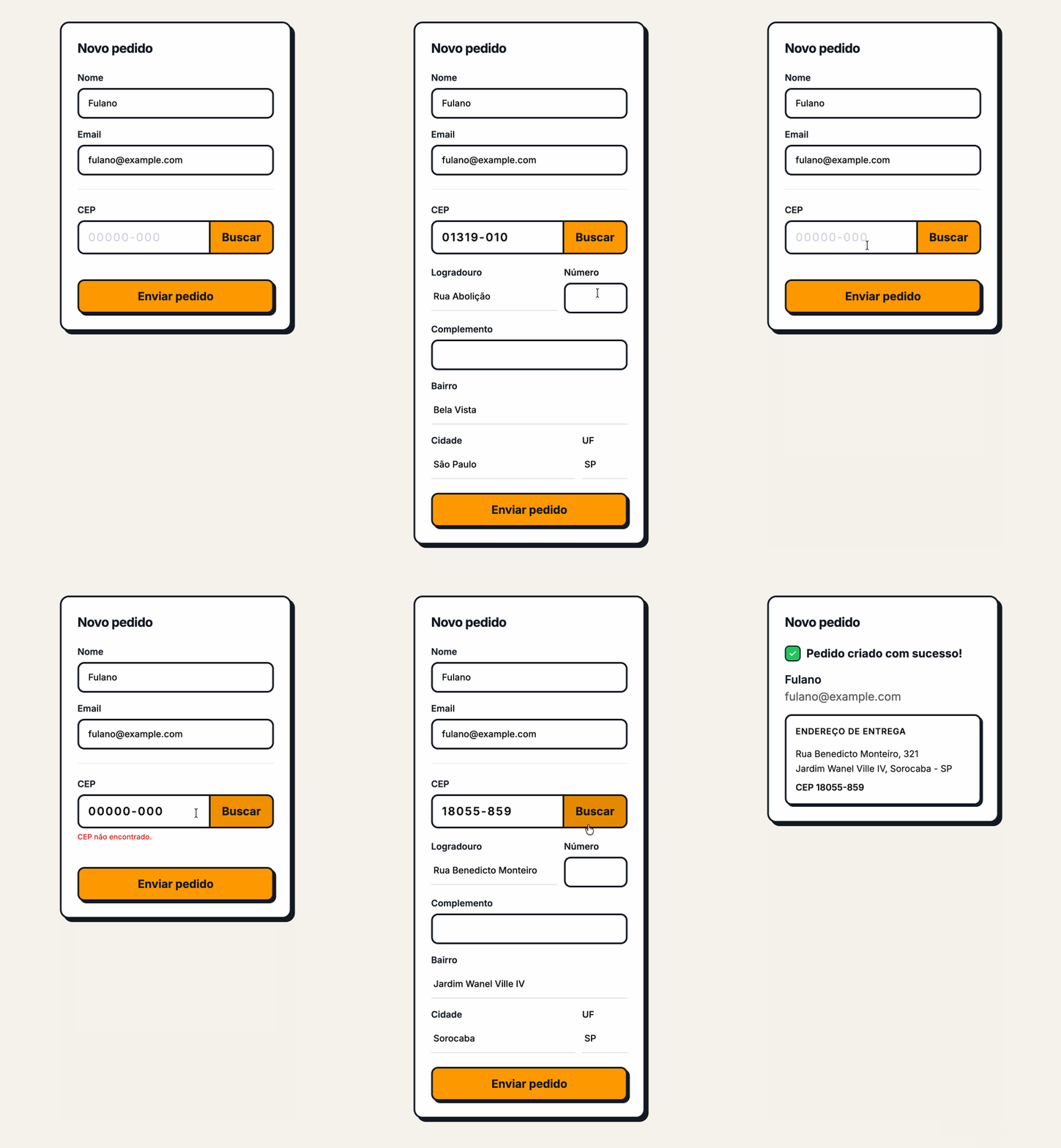
HTMX-powered CEP lookup in the example app
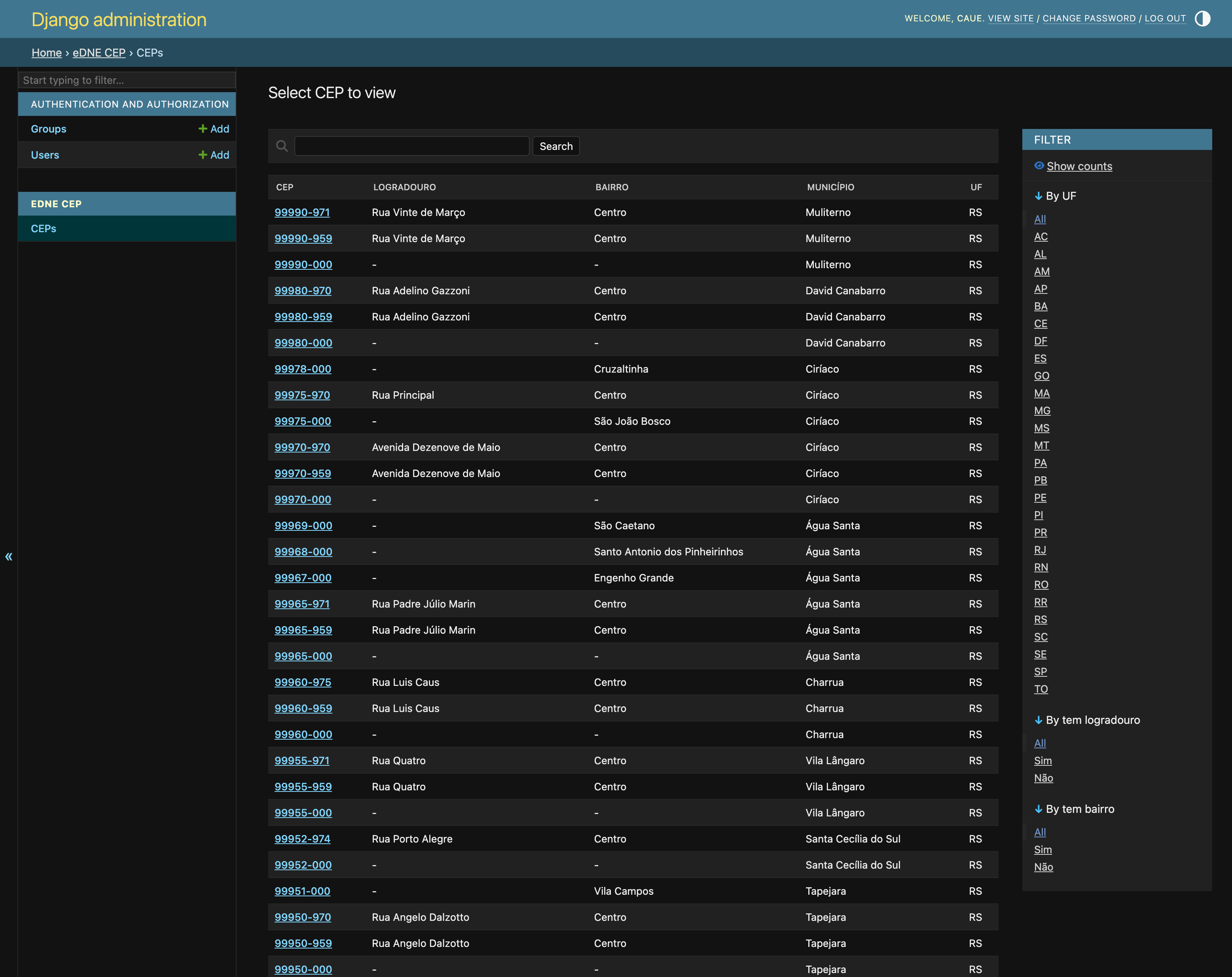
Django admin showing CEP data
Quick Start
Step 1: Install
pip install django-edne-cep
Step 2: Add to INSTALLED_APPS
INSTALLED_APPS = [
    ...
    "django_edne_cep",
]
Step 3: Load CEP data
python manage.py load_edne_cep --auto-download
This downloads the eDNE dataset from Correios (~350 MB) and populates the local database. Subsequent runs reuse the cached file.
Use it:
from django_edne_cep import lookup_cep

cep = lookup_cep("01310-100")
if cep:
    print(f"{cep.logradouro}, {cep.municipio}/{cep.uf}")
    # "Avenida Paulista, São Paulo/SP"
API Reference
def lookup_cep(cep_str: str) -> Cep | None
Look up a CEP in the local database. Accepts both "01310-100" and "01310100" formats.
- Raises
ValidationErrorfor malformed input (not a valid CEP format). - Returns
Nonewhen the CEP is not found in the database (valid format, not in eDNE data). - Results are cached using the configured cache backend.
from django_edne_cep import lookup_cep
from django.core.exceptions import ValidationError

cep = lookup_cep("01310-100")   # accepts "01310-100" or "01310100"
if cep:
    print(f"{cep.logradouro}, {cep.municipio}/{cep.uf}")

try:
    lookup_cep("ABC")           # raises ValidationError for malformed input
except ValidationError:
    pass
The returned Cep instance has the following fields:
cep.cep                # "01310100"  (8 digits, no hyphen)
cep.cep_formatado      # "01310-100" (property)
cep.logradouro         # str | None
cep.complemento        # str | None
cep.bairro             # str | None
cep.municipio          # str
cep.municipio_cod_ibge # int
cep.uf                 # str (2 chars, e.g. "SP")
cep.nome               # str | None
cep.as_dict()          # dict with all fields above
CepFormField
A CharField subclass that validates CEP format and returns a Cep instance from clean().
- Accepts
"00000000"or"00000-000"input formats. - Raises
ValidationErrorwith code"cep_not_found"when the CEP is not in the database. form.cleaned_data["cep"]is aCepinstance, not a string.
from django import forms
from django_edne_cep import CepFormField

class EnderecoForm(forms.Form):
    cep = CepFormField()
    logradouro = forms.CharField(required=False)
    municipio = forms.CharField(required=False)

# In a view:
form = EnderecoForm(request.POST)
if form.is_valid():
    cep_obj = form.cleaned_data["cep"]  # Cep instance
    print(cep_obj.logradouro, cep_obj.municipio, cep_obj.uf)
validate_cep_format
A Django RegexValidator that accepts "00000000" and "00000-000" formats. Raises ValidationError with code "invalid_cep_format" on failure.
from django_edne_cep import validate_cep_format

validate_cep_format("01310-100")   # passes silently
validate_cep_format("01310100")    # passes silently
validate_cep_format("ABC")         # raises ValidationError
Use it directly on any CharField or Field that should accept CEP values without triggering a database lookup.
register_admin(site: AdminSite | None = None) -> None
Registers the Cep model with a read-only CepAdmin in the given admin site. The standard use case requires no manual call. Set EDNE_CEP["ADMIN_ENABLED"] = True in Django settings instead.
register_admin() is called automatically when django_edne_cep.admin is imported with ADMIN_ENABLED=True. The explicit call is only needed for a custom AdminSite.
# Standard usage, set in Django settings:
EDNE_CEP = {
    "ADMIN_ENABLED": True,
}

# Custom AdminSite usage only:
from django_edne_cep import register_admin
register_admin(site=my_custom_site)
Configuration
All settings go in the EDNE_CEP dict in your Django settings file:
EDNE_CEP = {
    "CACHE_TIMEOUT": 7200,
    "ADMIN_ENABLED": True,
}
| Setting | Type | Default | Description |
|---|---|---|---|
TABLE_NAMES |
dict |
see below | Override individual eDNE table names |
TABLE_SET |
str | None |
None |
Load only a subset of tables (e.g. "cep") |
EDNE_SOURCE |
str | None |
None |
Path or URL to eDNE zip file; None prompts download |
DATABASE_ALIAS |
str |
"default" |
Django database alias for CEP tables |
DATABASE_URL |
str | None |
None |
Direct database URL (overrides DATABASE_ALIAS) |
CACHE_TIMEOUT |
int |
3600 |
Cache TTL in seconds; 0 disables cache |
CACHE_ALIAS |
str |
"default" |
Django cache alias for CEP lookups |
ADMIN_ENABLED |
bool |
False |
Register CEP models in Django admin |
Default TABLE_NAMES:
TABLE_NAMES = {
    "cep_unificado": "edne_cep",
    "log_localidade": "edne_localidade",
    "log_bairro": "edne_bairro",
    "log_cpc": "edne_caixa_postal",
    "log_logradouro": "edne_logradouro",
    "log_grande_usuario": "edne_grande_usuario",
    "log_unid_oper": "edne_unidade_operacional",
}
Override individual entries to map eDNE table names to your own table names.
Admin
Enable the read-only Django admin for CEP data:
# settings.py
EDNE_CEP = {
    "ADMIN_ENABLED": True,
}
The CepAdmin registers automatically when django_edne_cep.admin is imported. It supports full-text search by CEP, street name, neighborhood, and municipality, plus filters by state (UF) and field presence.
For a custom AdminSite, call register_admin(site=my_site) explicitly after setting ADMIN_ENABLED = True.
Example App
The example/ directory contains a standalone Django project with an HTMX-powered CEP autofill form: type a CEP and the address fields fill in automatically without a page reload.
See example/README.md for full instructions on running it locally.
License
1 maintainer

Metadata
1 maintainer
Release files for django-edne-cep 0.1.0
For a detailed explanation of source distributions (sdists) and built distributions (wheels), please see the package formats documentation.
Source distribution (sdist)
| File | Size | Uploaded | |
|---|---|---|---|
| django_edne_cep-0.1.0.tar.gz | 12.3 kB | Details |
Built distribution (wheel)
| File | Interpreter | ABI | Platform | Reset |
|---|---|---|---|---|
| django_edne_cep-0.1.0-py3-none-any.whl | Python 3 | none | any | Details |
Total release size: 29.1 kB
Release files / django_edne_cep-0.1.0.tar.gz
| Download URL | django_edne_cep-0.1.0.tar.gz |
|---|---|
| Size | 12.3 kB |
| Tags | Source |
|
SHA-256 checksum How to use checksums |
fadf09b7beeea745c5b9650b8f41484f658d3cde22170803529608a2da646250
|
|
BLAKE2b-256 checksum How to use checksums |
b4ab27b09e9fd7aa330b9044ff0f59f8eb27b2a36995efdb35017eafe9b3daa4
|
| Upload date | |
|
Uploaded using Trusted Publishing? What is trusted publishing? |
Yes |
| Uploaded via |
uv/0.10.11 {"installer":{"name":"uv","version":"0.10.11","subcommand":["publish"]},"python":null,"implementation":{"name":null,"version":null},"distro":{"name":"Ubuntu","version":"24.04","id":"noble","libc":null},"system":{"name":null,"release":null},"cpu":null,"openssl_version":null,"setuptools_version":null,"rustc_version":null,"ci":true}
|
Release files / django_edne_cep-0.1.0-py3-none-any.whl
| Download URL | django_edne_cep-0.1.0-py3-none-any.whl |
|---|---|
| Size | 16.8 kB |
| Tags | Python 3 |
|
SHA-256 checksum How to use checksums |
17b9a98844050bb8d803775b7f2057e71d6828c3b1d6992e7da91006bc4e974b
|
|
BLAKE2b-256 checksum How to use checksums |
c0617cd999dab341007965eaf632784eba58cc14663b6fcddd1b05f3f01fa292
|
| Upload date | |
|
Uploaded using Trusted Publishing? What is trusted publishing? |
Yes |
| Uploaded via |
uv/0.10.11 {"installer":{"name":"uv","version":"0.10.11","subcommand":["publish"]},"python":null,"implementation":{"name":null,"version":null},"distro":{"name":"Ubuntu","version":"24.04","id":"noble","libc":null},"system":{"name":null,"release":null},"cpu":null,"openssl_version":null,"setuptools_version":null,"rustc_version":null,"ci":true}
|













