

Django ERD Generator is a comprehensive command-line tool designed to generate Entity-Relationship Diagrams (ERDs) and data dictionaries from Django models. It supports multiple output formats, making it easy to visualise database relationships in different diagramming tools and create detailed documentation. The generator extracts model definitions, fields, and relationships, converting them into structured representations suitable for use with Mermaid.js, PlantUML, and dbdiagram.io, as well as comprehensive Markdown documentation.
Key Features:
- ERD Generation: Create visual database diagrams in multiple formats
- Data Dictionary: Generate comprehensive model documentation in Markdown
- Multiple Dialects: Support for Mermaid.js, PlantUML, and dbdiagram.io
- Flexible Output: Console output or file export
- App Filtering: Include specific Django apps or all apps
- Rich Documentation: Field types, constraints, relationships, and help text
Supported ERD Dialects:
- Mermaid.js
- PlantUML
- dbdiagram.io
Feature Overview
| Feature | ERD Generation | Data Dictionary |
|---|---|---|
| Output Format | Visual diagrams (Mermaid, PlantUML, dbdiagram) | Structured Markdown documentation |
| Primary Use | Visual database schema representation | Comprehensive model documentation |
| Content | Models, fields, relationships | Detailed field properties, constraints, help text |
| Integration | Diagramming tools, documentation sites | Documentation sites, wikis, repositories |
| Best For | Schema visualization, design reviews | Technical documentation, API docs, onboarding |
Installation
Install using pip...
pip install django-erd-generator
Add 'django_erd_generator' to your INSTALLED_APPS setting.
INSTALLED_APPS = [
    # ...
    "django_erd_generator",
]
Quickstart
To generate an Entity-Relationship Diagram (ERD) in the desired syntax, use the generate_erd command:
python manage.py generate_erd [-h] [-a APPS] [-d DIALECT] [-o OUTPUT]
Options
| Option | Description |
|---|---|
-h, --help |
Show the help message and exit. |
-a APPS, --apps APPS |
Specify the apps to include in the ERD, separated by commas (e.g., "shopping,polls"). If omitted, all apps will be included. |
-d DIALECT, --dialect DIALECT |
Set the output format. Supported dialects: mermaid, plantuml, dbdiagram. |
-o OUTPUT, --output OUTPUT |
Define the output file path. If omitted, the output is printed to the console. |
Examples
Generate an ERD for all apps in Mermaid format and print to console:
python manage.py generate_erd -d mermaid
Generate an ERD for shopping and polls apps in PlantUML format and save to erd.puml:
python manage.py generate_erd -a shopping,polls -d plantuml -o erd.puml
Example Output
from django.db import models


class Customer(models.Model):
    first_name = models.TextField()
    last_name = models.TextField()
    date_of_birth = models.DateField()


class Product(models.Model):
    sku = models.TextField()
    product_name = models.TextField()
    product_code = models.TextField()
    quantity = models.IntegerField()
    price = models.DecimalField(max_digits=16, decimal_places=2)
    regions = models.ManyToManyField("Region")


class Order(models.Model):
    customer = models.ForeignKey(Customer, on_delete=models.CASCADE)
    product = models.ForeignKey(Product, on_delete=models.CASCADE)
    quantity = models.IntegerField()
    order_total = models.DecimalField(max_digits=16, decimal_places=2)


class Region(models.Model):
    name = models.TextField()
    label = models.TextField()
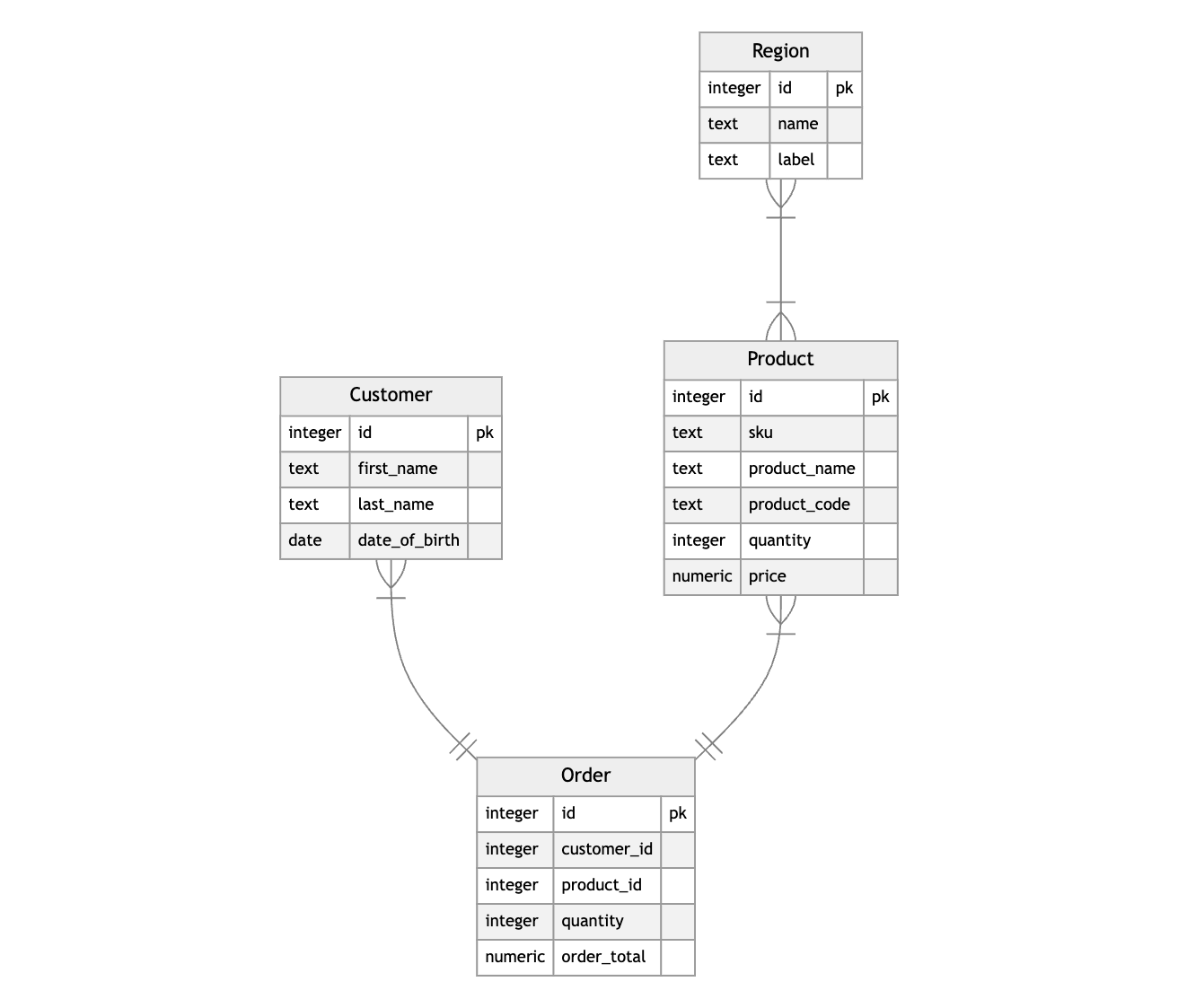
Mermaid.js
Code Output
erDiagram
Customer {
  integer id pk
  text first_name
  text last_name
}
Product {
  integer id pk
  text sku
  text product_name
  text product_code
  integer quantity
  decimal price
}
Order {
  integer id pk
  integer customer_id
  integer product_id
  integer quantity
  decimal order_total
}
Region {
  integer id pk
  text name
  text label
}
Product }|--|{ Region: ""
Order }|--|| Customer: ""
Order }|--|| Product: ""
Rendered Example
PlantUML
Code Output
@startuml

entity Customer {
  *id: integer
  first_name: text
  last_name: text
}
entity Product {
  *id: integer
  sku: text
  product_name: text
  product_code: text
  quantity: integer
  price: decimal
}
entity Order {
  *id: integer
  customer_id: integer
  product_id: integer
  quantity: integer
  order_total: decimal
}
entity Region {
  *id: integer
  name: text
  label: text
}
Product }|--|{ Region
Order }|--|| Customer
Order }|--|| Product

@enduml
Rendered Example

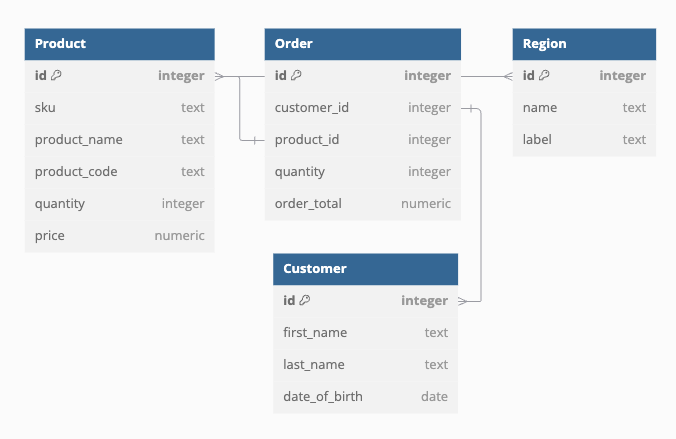
dbdiagram.io
Code Output
Table Customer {
  id "integer" [primary key]
  first_name "text"
  last_name "text"
}
Table Product {
  id "integer" [primary key]
  sku "text"
  product_name "text"
  product_code "text"
  quantity "integer"
  price "decimal"
}
Table Order {
  id "integer" [primary key]
  customer_id "integer"
  product_id "integer"
  quantity "integer"
  order_total "decimal"
}
Table Region {
  id "integer" [primary key]
  name "text"
  label "text"
}
Ref: Product.regions <> Region.id
Ref: Order.customer_id > Customer.id
Ref: Order.product_id > Product.id
Rendered Example
Data Dictionary Generation
The Data Dictionary feature generates comprehensive, structured documentation of your Django models in Markdown format. This feature is perfect for creating technical documentation, onboarding new team members, and maintaining up-to-date schema documentation that stays in sync with your codebase.
Key Benefits
- Auto-Generated Documentation: Automatically extracts model information without manual maintenance
- Structured Format: Organized by Django app with consistent formatting
- Rich Metadata: Includes field types, constraints, relationships, help text, and more
- Navigation-Friendly: Table of contents with anchor links for easy browsing
- Version Tracking: Includes git commit hash for version correlation
- Comprehensive Coverage: Documents all field properties including nullable, unique, choices, etc.
Usage
python manage.py generate_data_dictionary [options]
Options
| Option | Description |
|---|---|
-a, --apps |
Specify which Django apps to include. Use comma-separated values (e.g., "shopping,polls"). If omitted, all apps are included. |
-o, --output |
Define the output file path for the Markdown file. If omitted, content is printed to stdout. |
Examples
Generate documentation for all apps and display in console:
python manage.py generate_data_dictionary
Generate documentation for specific apps:
python manage.py generate_data_dictionary --apps auth,contenttypes,myapp
Save documentation to a file:
python manage.py generate_data_dictionary --output docs/schema_documentation.md
Combine app filtering and file output:
python manage.py generate_data_dictionary --apps myapp,billing --output docs/core_models.md
Generated Documentation Structure
The data dictionary includes:
-
Header Section
- Project name (automatically detected from Django settings)
- Git commit hash for version tracking
- Generation timestamp
-
Table of Contents
- Hierarchical navigation with clickable anchor links
- Organized by app, then by model
- Quick access to any model documentation
-
Model Documentation
- Model signature: Shows the model constructor with all fields
- Docstring: Model-level documentation from your code
- Field table: Comprehensive field information including:
- Primary key indicators
- Field names and data types
- Related model links (clickable within the document)
- Field descriptions and help text
- Constraint information (nullable, unique, choices)
- Database-specific properties (max_length, db_index)
Field Information Captured
For each model field, the data dictionary captures:
- Field Type: The Django field type (CharField, IntegerField, etc.)
- Data Type: The underlying database data type
- Primary Key: Whether the field is a primary key
- Related Models: Links to related models (ForeignKey, ManyToMany)
- Constraints: Nullable, unique, choices
- Validation: Max length, database indexing
- Documentation: Help text and field descriptions
Integration with Documentation Workflows
The data dictionary integrates well with various documentation workflows:
- CI/CD Integration: Generate updated documentation on each deployment
- Documentation Sites: Include generated files in Sphinx, MkDocs, or similar tools
- Version Control: Track documentation changes alongside code changes
- Team Collaboration: Share comprehensive schema information with stakeholders
Rendered Example
# tests - Data Dictionary

Commit `d3e45c95a2895dc3fe6c1c3629a5753d0e0a58d2`

---

## Table of Contents [#](#toc)

- [Table of Contents](#toc)
- [Modules](#modules)
  - [tests](#tests)
    - [Customer](#Customer)
    - [Product](#Product)
    - [Order](#Order)
    - [Region](#Region)

---

## Modules [#](#modules)

### tests

#### Customer[#](#Customer)

`Customer(id, first_name, last_name)`

| pk | field_name | data_type | related_model | description | nullable | unique | choices | max_length | db_index |
| --- | --- | --- | --- | --- | --- | --- | --- | --- | --- |
| ✓ | id | `integer` |  |  |  | ✓ |  |  |  |
|  | first_name | `text` |  |  |  |  |  |  |  |
|  | last_name | `text` |  |  |  |  |  |  |  |

#### Product[#](#Product)

`Product(id, sku, product_name, product_code, quantity, price, regions)`

| pk | field_name | data_type | related_model | description | nullable | unique | choices | max_length | db_index |
| --- | --- | --- | --- | --- | --- | --- | --- | --- | --- |
| ✓ | id | `integer` |  |  |  | ✓ |  |  |  |
|  | sku | `text` |  |  |  |  |  |  |  |
|  | product_name | `text` |  |  |  |  |  |  |  |
|  | product_code | `text` |  |  |  |  |  |  |  |
|  | quantity | `integer` |  |  |  |  |  |  |  |
|  | price | `decimal` |  |  |  |  |  |  |  |

#### Order[#](#Order)

`Order(id, customer, product, quantity, order_total)`

| pk | field_name | data_type | related_model | description | nullable | unique | choices | max_length | db_index |
| --- | --- | --- | --- | --- | --- | --- | --- | --- | --- |
| ✓ | id | `integer` |  |  |  |  |  |  |  |
|  | customer_id | `integer` | [Customer](#Customer) |  |  |  |  |  | ✓ |
|  | product_id | `integer` | [Product](#Product) |  |  |  |  |  | ✓ |
|  | quantity | `integer` |  |  |  |  |  |  |  |
|  | order_total | `decimal` |  |  |  |  |  |  |  |

#### Region[#](#Region)

`Region(id, name, label)`

| pk | field_name | data_type | related_model | description | nullable | unique | choices | max_length | db_index |
| --- | --- | --- | --- | --- | --- | --- | --- | --- | --- |
| ✓ | id | `integer` |  |  |  |  |  |  |  |
|  | name | `text` |  |  |  |  |  |  |  |
|  | label | `text` |  |  |  |  |  |  |  |
Use Cases & Workflows
Documentation Automation
Problem: Keeping database documentation up-to-date is time-consuming and error-prone. Solution: Integrate ERD and data dictionary generation into your CI/CD pipeline.
# Example GitHub Actions workflow
- name: Generate Documentation
  run: |
    python manage.py generate_erd --output docs/database_schema.mermaid
    python manage.py generate_data_dictionary --output docs/data_dictionary.md
Team Onboarding
Problem: New developers need to understand complex database relationships quickly. Solution: Generate visual ERDs and comprehensive data dictionaries as part of onboarding materials.
# Generate complete documentation package
python manage.py generate_erd -d mermaid --output onboarding/schema_diagram.mermaid
python manage.py generate_erd -d plantuml --output onboarding/schema_diagram.puml
python manage.py generate_data_dictionary --output onboarding/model_reference.md
Database Design Reviews
Problem: Reviewing database changes requires understanding current and proposed schemas. Solution: Generate ERDs before and after changes for visual comparison.
# Before changes
python manage.py generate_erd -d dbdiagram --output reviews/before_changes.dbml

# After implementing changes
python manage.py generate_erd -d dbdiagram --output reviews/after_changes.dbml
API Documentation Enhancement
Problem: API documentation lacks detailed schema information. Solution: Include generated data dictionaries in API documentation.
# Generate focused documentation for API-related models
python manage.py generate_data_dictionary --apps api,core,billing --output api_docs/models.md
Stakeholder Communication
Problem: Non-technical stakeholders need to understand data structures. Solution: Use visual ERDs to communicate database design decisions.
# Generate clean visual representation
python manage.py generate_erd -d mermaid --apps core --output stakeholder_review.mermaid
Best Practices
1. Selective App Documentation
Don't overwhelm documentation with unnecessary apps:
# Focus on business-critical apps
python manage.py generate_data_dictionary --apps core,billing,inventory
2. Regular Updates
Keep documentation current with automated generation:
# Add to your deployment script
python manage.py generate_data_dictionary --output docs/schema.md
git add docs/schema.md
3. Format Selection
Choose the right ERD format for your audience:
- Mermaid: Great for GitHub/GitLab integration
- PlantUML: Best for detailed technical documentation
- dbdiagram.io: Perfect for visual database design discussions
4. Version Control Integration
Track documentation changes alongside code:
# Generate and commit documentation updates
python manage.py generate_data_dictionary --output SCHEMA.md
git add SCHEMA.md && git commit -m "Update schema documentation"
Supported Versions
This project is tested against the following versions:
- Python:
3.8, 3.9, 3.10, 3.11, 3.12 - Django: Latest compatible version based on
toxdependencies
Ensure you have one of the supported Python versions installed before running tests. You can check your Python version with:
python --version
For testing, tox will automatically create isolated environments for each supported Python version.
1 maintainer

Metadata
1 maintainer
Release files for django-erd-generator 0.1.7
For a detailed explanation of source distributions (sdists) and built distributions (wheels), please see the package formats documentation.
Source distribution (sdist)
| File | Size | Uploaded | Provenance | |
|---|---|---|---|---|
| django_erd_generator-0.1.7.tar.gz | 202.5 kB | Without provenance | Details |
Built distribution (wheel)
| File | Interpreter | ABI | Platform | Reset |
|---|---|---|---|---|
| django_erd_generator-0.1.7-py3-none-any.whl | Python 3 | none | any | Details |
Total release size: 228.8 kB
Release files / django_erd_generator-0.1.7.tar.gz
| Download URL | django_erd_generator-0.1.7.tar.gz |
|---|---|
| Size | 202.5 kB |
| Tags | Source |
|
SHA-256 checksum How to use checksums |
6344783ebeb92475e073c80daad1be146c62c57c35ff8bc83421e45e2e37a99a
|
|
BLAKE2b-256 checksum How to use checksums |
8939c3f6810153c78c402a9453d394169448bf0f8e8127b4deb6e02401abbcb5
|
| Upload date | |
|
Uploaded using Trusted Publishing? What is trusted publishing? |
No |
| Uploaded via |
uv/0.10.4 {"installer":{"name":"uv","version":"0.10.4","subcommand":["publish"]},"python":null,"implementation":{"name":null,"version":null},"distro":{"name":"macOS","version":null,"id":null,"libc":null},"system":{"name":null,"release":null},"cpu":null,"openssl_version":null,"setuptools_version":null,"rustc_version":null,"ci":null}
|
Release files / django_erd_generator-0.1.7-py3-none-any.whl
| Download URL | django_erd_generator-0.1.7-py3-none-any.whl |
|---|---|
| Size | 26.4 kB |
| Tags | Python 3 |
|
SHA-256 checksum How to use checksums |
a83d534fd9e0e1520cabbb333be1d72bfe159055f3adec1c4d92b586c353770f
|
|
BLAKE2b-256 checksum How to use checksums |
8f519348efdf226271f261abac101c4c165eaa708fb1b00cbecbad69d8b916b9
|
| Upload date | |
|
Uploaded using Trusted Publishing? What is trusted publishing? |
No |
| Uploaded via |
uv/0.10.4 {"installer":{"name":"uv","version":"0.10.4","subcommand":["publish"]},"python":null,"implementation":{"name":null,"version":null},"distro":{"name":"macOS","version":null,"id":null,"libc":null},"system":{"name":null,"release":null},"cpu":null,"openssl_version":null,"setuptools_version":null,"rustc_version":null,"ci":null}
|
Security for django-erd-generator 0.1.7
Provenance
Provenance describes where a file came from. On PyPI, provenance is shared via attestations, which provide a verifiable record of the build or publishing details. View details, limitations and caveats.
No provenance found
None of the files in this release were uploaded with provenance metadata.
A note on package security
PyPI is a repository for distributing packages, not a service for auditing them. While third-party security researchers and our staff do their best to detect and remove malicious packages, PyPI cannot guarantee the quality, security or suitability of any given package.
To learn more about protecting yourself from malicious actors, visit our package security documentation.














