
Drop-in replacement for default Django history

Project description


django-extended-history
django-extended-history is (IMHO) the simplest way to record all changes made in admin-screens.
Requirements
Django >=4.2
Features
Drop-in extension for Django history (Log entries). No changes in any model, hence no migrations.
Records all changes in JSON format, extending what Django stores by default.
Adds a view ‘Log entries’ under ‘Administration’, showing all content types for which a user has permissions.
Safe to remove. Django will ignore all extra recorded information and revert to it’s default history. So give it a spin!
Installation
pip install django-extended-historySetup
Add django_extended_history to INSTALLED_APPS setting like this:
INSTALLED_APPS = [
...,
'django_extended_history',
]
Done!
Usage
Apply the DjangoExtendedHistory mixin to all applicable admin-views:
from django.contrib import admin
from .models import MyModel
from django_extended_history.admin import DjangoExtendedHistory

@admin.register(MyModel)
class MyModelAdmin(DjangoExtendedHistory, admin.ModelAdmin):
    ...
Example Log Entry
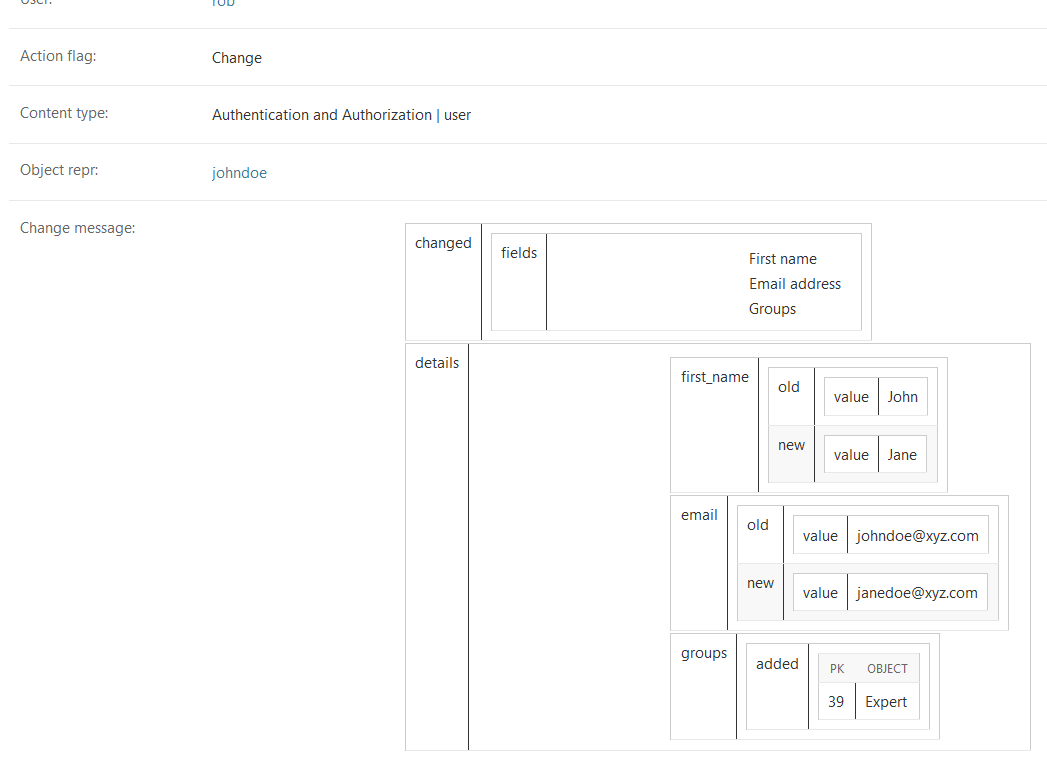
Below an example Log Entry where the first name of a user was changed from ‘John’ to ‘Jane’, the email address was changed accordingly and the user was added to a group ‘Expert’ at the same time.
Settings
DJANGO_EXTENDED_HISTORY_LANGUAGE
By default, log entries are written in the language active during the request. Set this to a language code to write all log entries in a fixed language regardless of the user’s locale:
DJANGO_EXTENDED_HISTORY_LANGUAGE = 'en'This is useful when you want consistent, searchable log entries across a multilingual site.
Misc
Django extended history is released under the BSD-3 license, like Django. If you like it, please consider contributing.
Release history Release notifications | RSS feed


Download files
Download the file for your platform. If you're not sure which to choose, learn more about installing packages.
Source Distribution
Built Distribution
Filter files by name, interpreter, ABI, and platform.
If you're not sure about the file name format, learn more about wheel file names.
Copy a direct link to the current filters
File details
Details for the file django_extended_history-1.10.0.tar.gz.
File metadata
- Download URL: django_extended_history-1.10.0.tar.gz
- Upload date:
- Size: 16.0 kB
- Tags: Source
- Uploaded using Trusted Publishing? No
- Uploaded via: twine/6.2.0 CPython/3.13.7
File hashes
| Algorithm | Hash digest | |
|---|---|---|
| SHA256 |
557c29ad35e6c16208d57e023911a9e8d85568e625a1ada6bf8bca63adf5f1e2
|
|
| MD5 |
3c366c21b5e61309bb624b331ba43cb0
|
|
| BLAKE2b-256 |
3c5ca1fafb3b13db5a7717c8edf0bdfe7e58e76cc0b345dc911d54898c2ceb3f
|
File details
Details for the file django_extended_history-1.10.0-py3-none-any.whl.
File metadata
- Download URL: django_extended_history-1.10.0-py3-none-any.whl
- Upload date:
- Size: 16.0 kB
- Tags: Python 3
- Uploaded using Trusted Publishing? No
- Uploaded via: twine/6.2.0 CPython/3.13.7
File hashes
| Algorithm | Hash digest | |
|---|---|---|
| SHA256 |
2533326b82d0dd27917d37da904e315791c524b6e64e1c145f87d5b3ae86c872
|
|
| MD5 |
ad5a53ddce85a2e7bae410bbe2a64cbd
|
|
| BLAKE2b-256 |
38ef74c6cd0f4d760d3bdbf1b93b34728da14fc6aa91890f697acf87d4050d88
|






