
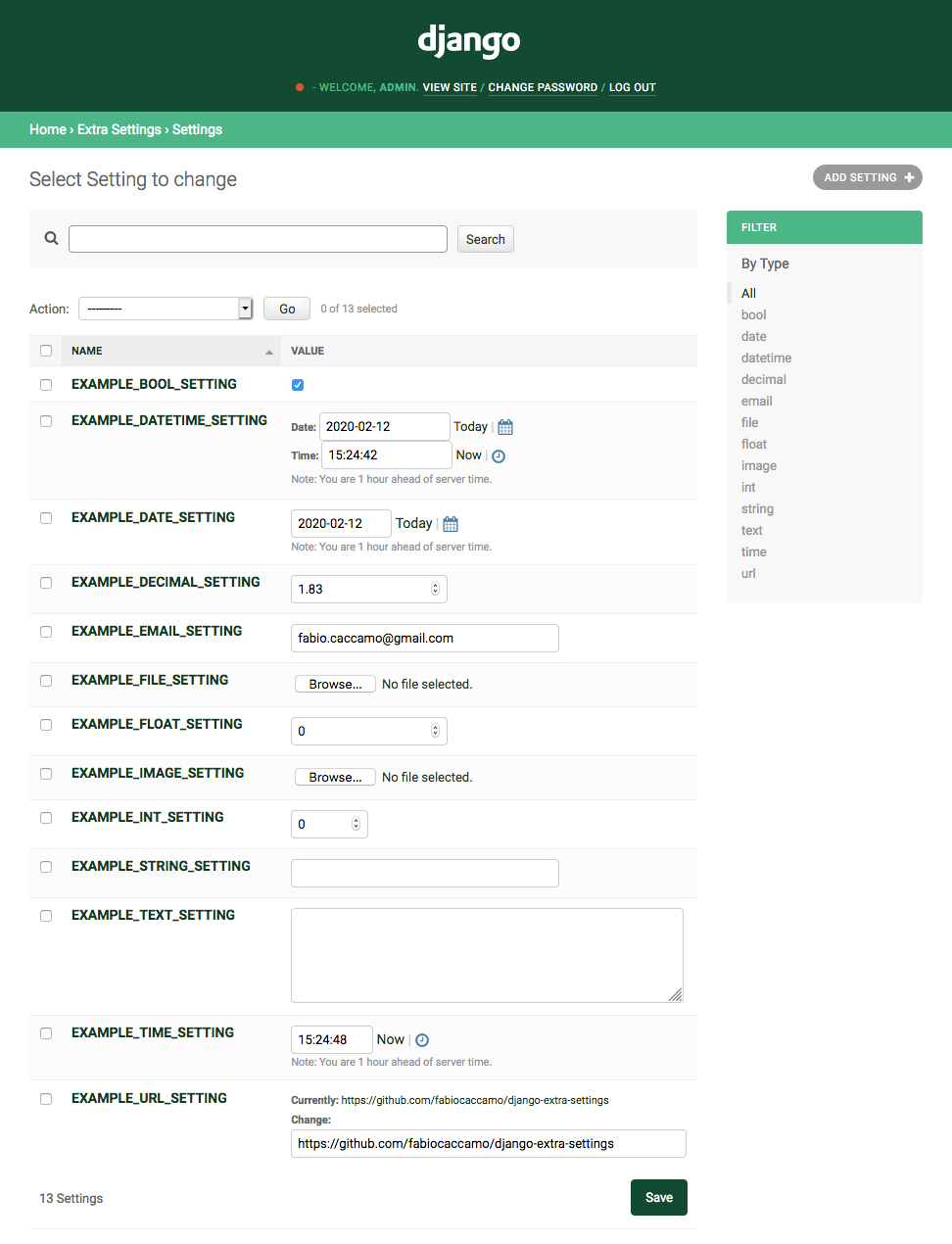
easily manage typed extra settings using the django admin.

Project description












django-extra-settings
config and manage typed extra settings using just the django admin.
Installation
- Run
pip install django-extra-settings - Add
extra_settingstosettings.INSTALLED_APPS - Run
python manage.py migrate - Run
python manage.py collectstatic - Restart your application server
Usage
Admin
Just go to the admin where you can:
- Create a new setting
- Update an existing setting
- Delete an existing setting
Settings
All these settings are optional, if not defined in settings.py the default values (listed below) will be used.
# the name of the cache to use, if not found the "default" cache will be used.
EXTRA_SETTINGS_CACHE_NAME = "extra_settings"
# a list of settings that will be available by default, each item must contain "name", "type" and "value".
# check the #types section to see all the supported settings types.
EXTRA_SETTINGS_DEFAULTS = [
    {
        "name": "SETTING_NAME",
        "type": "string",
        "value": "Hello World",
    },
    # ...
]
# if True, settings names will be forced to honor the standard django settings format
EXTRA_SETTINGS_ENFORCE_UPPERCASE_SETTINGS = True
# if True, the template tag will fallback to django.conf.settings,
# very useful to retrieve conf settings such as DEBUG.
EXTRA_SETTINGS_FALLBACK_TO_CONF_SETTINGS = True
# the upload_to path value of settings of type 'file'
EXTRA_SETTINGS_FILE_UPLOAD_TO = "files"
# the upload_to path value of settings of type 'image'
EXTRA_SETTINGS_IMAGE_UPLOAD_TO = "images"
# if True, settings name prefix list filter will be shown in the admin changelist
EXTRA_SETTINGS_SHOW_NAME_PREFIX_LIST_FILTER = False
# if True, settings type list filter will be shown in the admin changelist
EXTRA_SETTINGS_SHOW_TYPE_LIST_FILTER = False
# the package name displayed in the admin
EXTRA_SETTINGS_VERBOSE_NAME = "Settings"
Caching
You can customise the app caching options using settings.CACHES["extra_settings"] setting, otherwise the "default" cache will be used:
CACHES = {
    # ...
    "extra_settings": {
        "BACKEND": "django.core.cache.backends.locmem.LocMemCache",
        "TIMEOUT": 60,
    },
    # ...
}
By default the "extra_settings" cache is used, if you want to use another cache you can set it using the EXTRA_SETTINGS_CACHE_NAME setting.
Python
You can create, read, update and delete settings programmatically:
Types
This is the list of the currently supported setting types you may need to use:
Setting.TYPE_BOOLSetting.TYPE_DATESetting.TYPE_DATETIMESetting.TYPE_DECIMALSetting.TYPE_DURATIONSetting.TYPE_EMAILSetting.TYPE_FILESetting.TYPE_FLOATSetting.TYPE_IMAGESetting.TYPE_INTSetting.TYPE_JSONSetting.TYPE_STRINGSetting.TYPE_TEXTSetting.TYPE_TIMESetting.TYPE_URL
Create
from extra_settings.models import Setting

setting_obj = Setting(
    name="SETTING_NAME",
    value_type=Setting.TYPE_STRING,
    value="django-extra-settings",
)
setting_obj.save()
Read
from extra_settings.models import Setting

value = Setting.get("SETTING_NAME", default="django-extra-settings")
Update
from extra_settings.models import Setting

setting_obj = Setting(
    name="SETTING_NAME",
    value_type=Setting.TYPE_BOOL,
    value=True,
)
setting_obj.value = False
setting_obj.save()
Delete
from extra_settings.models import Setting

Setting.objects.filter(name="SETTING_NAME").delete()
Validators
You can define a custom validator for each setting:
- Validators must be defined using full python path, eg.
myapp.mymodule.my_validator. - Validators are called passing a single argument (the value of the setting) and if the value is valid, they should return
True, otherwise returningFalseorNoneaValidationErroris raised.
Templates
You can retrieve settings in templates:
{% load extra_settings %}

{% get_setting 'SETTING_NAME' default='django-extra-settings' %}
Tests
You can override specific settings during tests using extra_settings.test.override_settings.
It can be used both as decorator and as context-manager:
from extra_settings.test import override_settings

# decorator
@override_settings(SETTING_NAME_1="value for testing 1", SETTING_NAME_2="value for testing 2")
def test_with_custom_settings(self):
    pass

# context manager
def test_with_custom_settings(self):
    with override_settings(SETTING_NAME_1="value for testing 1", SETTING_NAME_2="value for testing 2"):
        pass
Testing
# clone repository
git clone https://github.com/fabiocaccamo/django-extra-settings.git && cd django-extra-settings

# create virtualenv and activate it
python -m venv venv && . venv/bin/activate

# upgrade pip
python -m pip install --upgrade pip

# install requirements
pip install -r requirements.txt -r requirements-test.txt

# run tests
tox
# or
python runtests.py
# or
python -m django test --settings "tests.settings"
License
Released under MIT License.
Supporting
- :star: Star this project on GitHub
- :octocat: Follow me on GitHub
- :blue_heart: Follow me on Twitter
- :moneybag: Sponsor me on Github
See also
-
django-admin-interface- the default admin interface made customizable by the admin itself. popup windows replaced by modals. 🧙 ⚡ -
django-colorfield- simple color field for models with a nice color-picker in the admin. 🎨 -
django-maintenance-mode- shows a 503 error page when maintenance-mode is on. 🚧 🛠️ -
django-redirects- redirects with full control. ↪️ -
django-treenode- probably the best abstract model / admin for your tree based stuff. 🌳 -
python-benedict- dict subclass with keylist/keypath support, I/O shortcuts (base64, csv, json, pickle, plist, query-string, toml, xml, yaml) and many utilities. 📘 -
python-codicefiscale- encode/decode Italian fiscal codes - codifica/decodifica del Codice Fiscale. 🇮🇹 💳 -
python-fontbro- friendly font operations. 🧢 -
python-fsutil- file-system utilities for lazy devs. 🧟♂️
Release history Release notifications | RSS feed


Download files
Download the file for your platform. If you're not sure which to choose, learn more about installing packages.
Source Distribution
Built Distribution
Filter files by name, interpreter, ABI, and platform.
If you're not sure about the file name format, learn more about wheel file names.
Copy a direct link to the current filters
File details
Details for the file django-extra-settings-0.7.0.tar.gz.
File metadata
- Download URL: django-extra-settings-0.7.0.tar.gz
- Upload date:
- Size: 14.2 kB
- Tags: Source
- Uploaded using Trusted Publishing? No
- Uploaded via: twine/4.0.1 CPython/3.11.1
File hashes
| Algorithm | Hash digest | |
|---|---|---|
| SHA256 |
65b4f29612b3f6a9a35c6ae61a00d9cc7a9aa0c046d1d60af8d0cff2387f1448
|
|
| MD5 |
d1f69c9d5e2c01cf347d1400ab0fae9d
|
|
| BLAKE2b-256 |
8e179af7630cdd071661da05294d0c278a3d0e78db5daf409f4d60b41161f25d
|
File details
Details for the file django_extra_settings-0.7.0-py3-none-any.whl.
File metadata
- Download URL: django_extra_settings-0.7.0-py3-none-any.whl
- Upload date:
- Size: 20.2 kB
- Tags: Python 3
- Uploaded using Trusted Publishing? No
- Uploaded via: twine/4.0.1 CPython/3.11.1
File hashes
| Algorithm | Hash digest | |
|---|---|---|
| SHA256 |
b3e4afd071a6d88b6df91e27aa5cb751b864fcb0ea30290d2f90ef4dcd970ef1
|
|
| MD5 |
94a355cf7e5c90751ff6c561c4835cfc
|
|
| BLAKE2b-256 |
3110baaff0e2bf5eba7a147fd22031c82800bba43dfdcf53dbbdbcd87f20ce1b
|






