
django-fancy-formset
This is a plain JavaScript library to let users add and remove forms in a Django inline formset. It can be installed from PyPI as a Django app, from NPM as a JavaScript module, or linked to directly from your HTML.



Features:
- No dependencies, just 5kB of plain JavaScript
- Apply to formsets manually, or automatically via a
data-attribute - Optional Django app to simplify usage
- Raises events to allow for customisation
- Class based and designed to be extended
- Default styling available
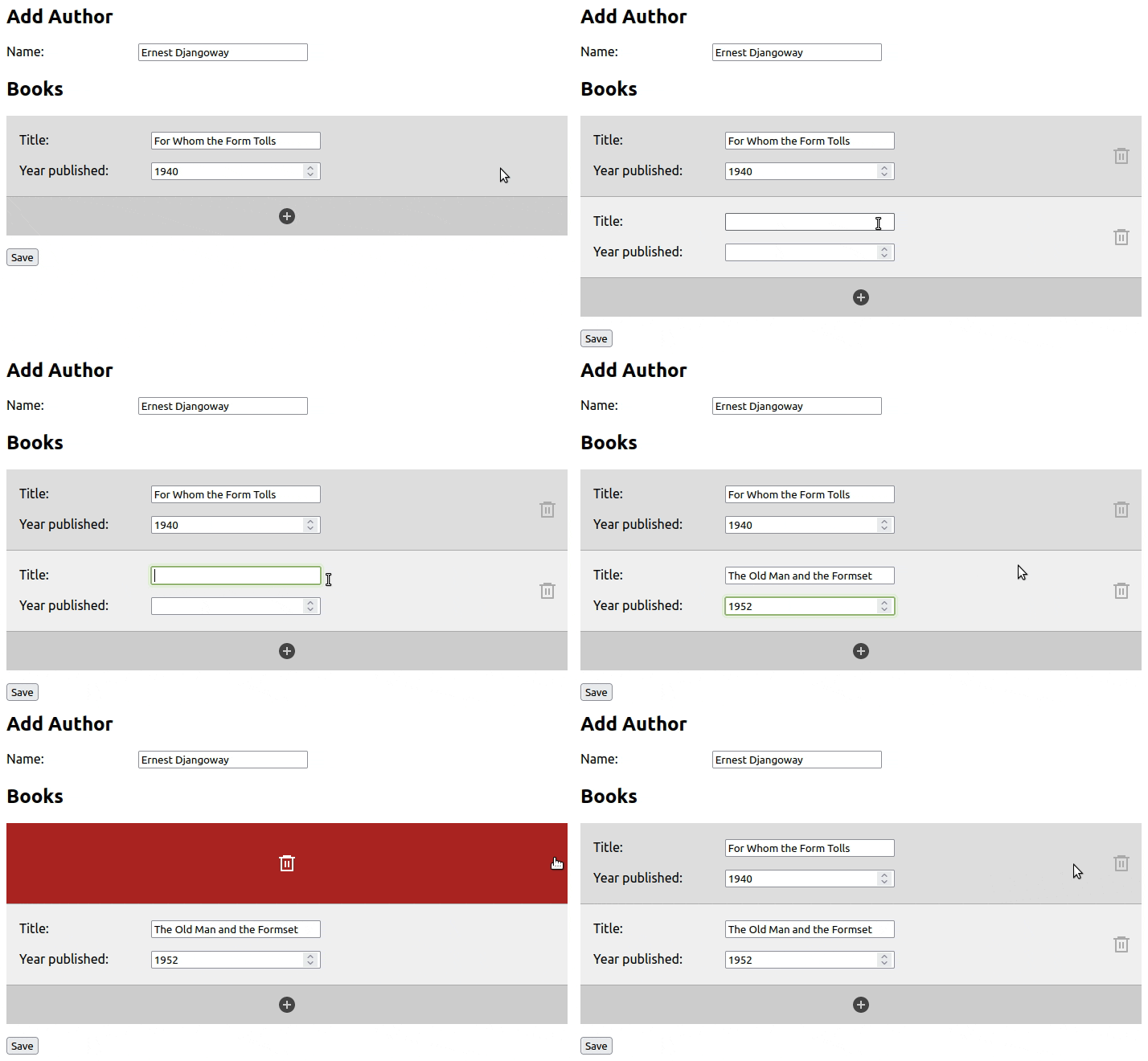
Quickstart using Python
Install with:
pip install django-fancy-formset
Add to your INSTALLED_APPS, then create your formsets using the provided
fancy formset classes:
from fancy_formset import FancyInlineFormSet

BookInlineFormSet = forms.inlineformset_factory(
    Author, Book, formset=InlineFancyFormSet,
)
then leave it to Django to render your formset:
{{ formset.media }}
<form method="post">
  {% csrf_token %}
  {{ form.as_p }}
  {{ formset.as_p }}
  <button type="submit">Save</button>
</form>
See the Django installation documentation for more details
Quickstart using JavaScript
The Python package is a thin wrapper around the JavaScript package. For more control, you can integrate it yourself.
Add to your page directly using unpkg:
<html>
  <head>
    <!-- Optional styles -->
    <link rel="stylesheet" href="https://unpkg.com/django-fancy-formset@^1/dist/formset.min.css">
  </head>
  <body>
    <!-- Django formset goes here -->
    <script src="https://unpkg.com/django-fancy-formset@^1"></script>
    <script>formset.init();</script>
  </body>
</html>
You can also use it in your bundler or browser as module - see the JavaScript-only installation documentation for more details
Render your formset in your Django template. The template structure which will work with the default configuration is:
<form method="post">
  {% csrf_token %}
  {{ form.as_p }}

  <h2>Formset</h2>
  <div data-formset="{{ formset.prefix }}">   {# Formset container to target #}
    {{ formset.management_form }}             {# Add the management form #}
    <fieldset style="display: none">          {# Add and hide the empty form #}
      {{ formset.empty_form.as_p }}
    </fieldset>
    {% for form in formset %}
      <fieldset>                              {# Each formset form has a container #}
      {{ form.as_p }}                         {# Actual form layout doesn't matter #}
      </fieldset>
    {% endfor %}
  </div>

  <button type="submit">Save</button>
</form>
This can all be customised with options passed as formset.init(options) - see the
configuration documentation
for details.
Find out more
For full installation and usage instructions, as well as information on events, the API and customisation, see the documentation.
1 maintainer

Metadata
1 maintainer
Release files for django-fancy-formset 1.0.0
For a detailed explanation of source distributions (sdists) and built distributions (wheels), please see the package formats documentation.
Source distribution (sdist)
| File | Size | Uploaded | |
|---|---|---|---|
| django-fancy-formset-1.0.0.tar.gz | 10.0 kB | Details |
Built distribution (wheel)
| File | Interpreter | ABI | Platform | Reset |
|---|---|---|---|---|
| django_fancy_formset-1.0.0-py3-none-any.whl | Python 3 | none | any | Details |
Total release size: 23.8 kB
Release files / django-fancy-formset-1.0.0.tar.gz
| Download URL | django-fancy-formset-1.0.0.tar.gz |
|---|---|
| Size | 10.0 kB |
| Tags | Source |
|
SHA-256 checksum How to use checksums |
9c39071d5e29cae9170132c3ffb3274f8a0272dc0555cf6c52f2fde083424241
|
|
BLAKE2b-256 checksum How to use checksums |
662ed6f2a782d07dc3c51460a8f948dda4d296677a2c7a98d8d7e15a4d5e929c
|
| Upload date | |
|
Uploaded using Trusted Publishing? What is trusted publishing? |
Yes |
| Uploaded via |
twine/4.0.2 CPython/3.11.4
|
Release files / django_fancy_formset-1.0.0-py3-none-any.whl
| Download URL | django_fancy_formset-1.0.0-py3-none-any.whl |
|---|---|
| Size | 13.8 kB |
| Tags | Python 3 |
|
SHA-256 checksum How to use checksums |
c2454d63d115a5c20d337149f7b9e0a9e2d6b6c65db44ee0aba2f2e4a44212f6
|
|
BLAKE2b-256 checksum How to use checksums |
623580a46baa9c09761127fe5844f71ddd9c75ef31254be60db8da4f55d5402d
|
| Upload date | |
|
Uploaded using Trusted Publishing? What is trusted publishing? |
Yes |
| Uploaded via |
twine/4.0.2 CPython/3.11.4
|














