
No project description provided

Project description
Django Hierarchical Permissions



Introduction to models
The system is built upon several core models: OrganizationalUnit, UserGroup, Group (Django’s default
Group model, in document it'll be described as Permission Group to avoid confusion with User Group), and User
(Django’s default User model).
These models are interconnected through well-defined relationships, providing the foundation for the system’s
functionality and enabling flexible, granular access control.
Organizational units
Organizational Unit is a model that represents a logical container for other objects within the system.
It supports hierarchical structuring through a self-referential parent field, allowing one organizational unit to be
nested within another.
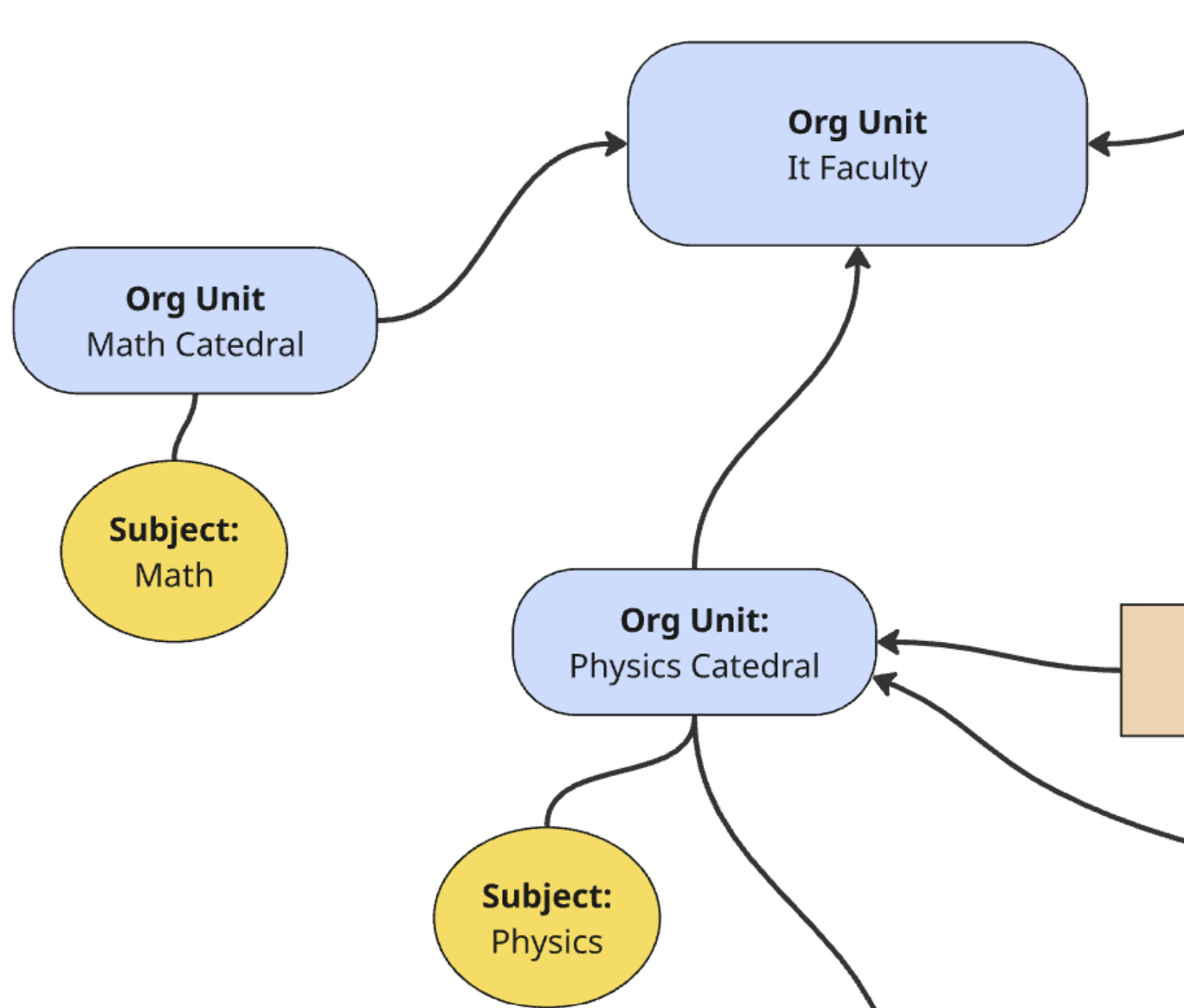
Example – Organizational Units Hierarchy
The diagram above illustrates a sample hierarchy of organizational units.
- At the top of the structure, we have the IT Faculty, representing a higher-level organizational unit.
- Beneath it, there are two child units:
- Math Cathedral, which is the parent of the subject Math
- Physics Cathedral, which is the parent of the subject Physics
This structure reflects the hierarchical organization of academic units and subjects.
Each subject is linked to a specific department (Cathedral), which in turn belongs to a higher-level unit (
Faculty).
Such a setup enables permission inheritance and logical access scoping within the system.
User groups
User Group acts as a connector between the OrganizationalUnit, User, and Permissions Group models.
It defines many-to-many relationships with all of these, serving as a flexible way to associate users with specific
units and permission groups.
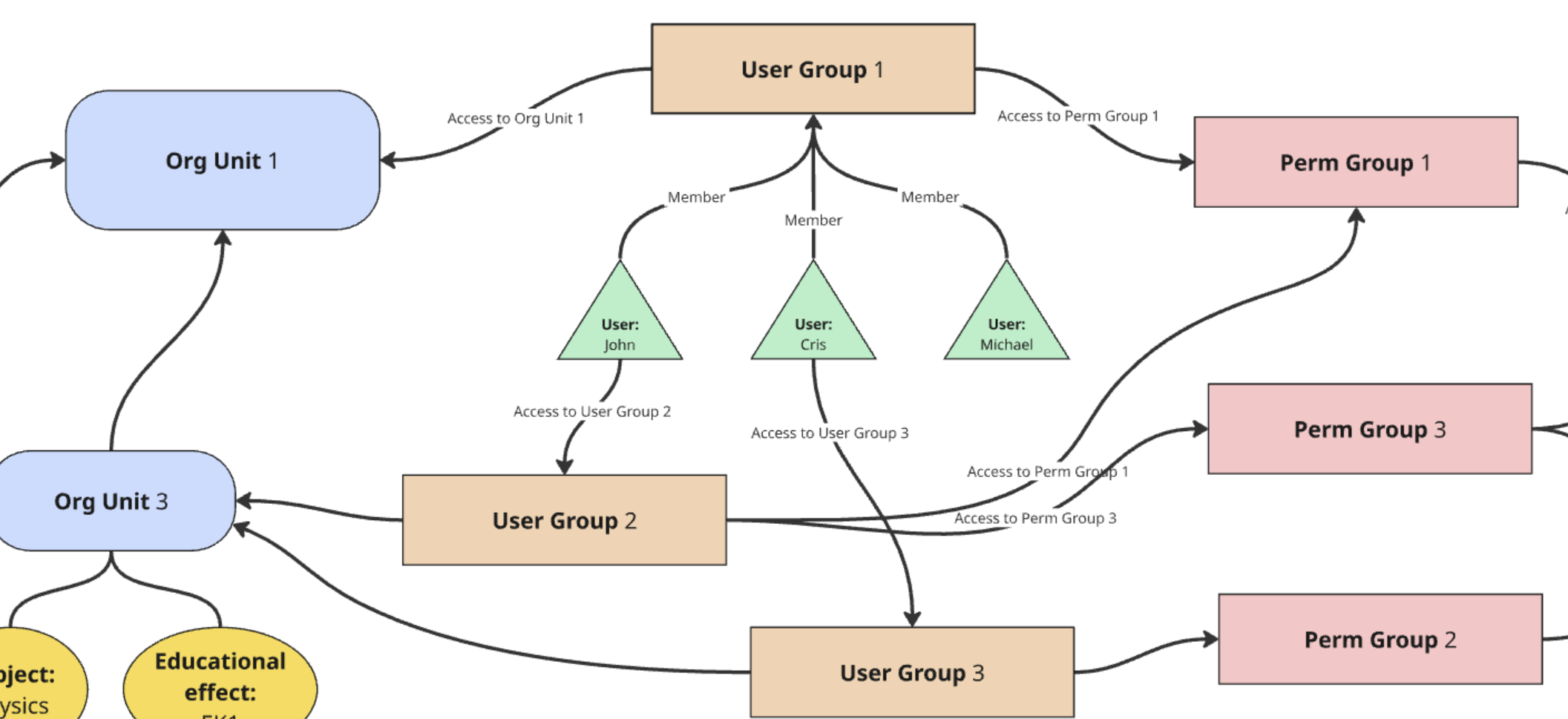
Example – User Groups Structure
The diagram above illustrates how User Groups serve as a central connector between users, organizational units, and permission groups.
- Users such as John, Cris, and Michael are shown as members of one or more User Groups.
- Each User Group is linked to specific Organizational Units, defining the organizational context (scope) in which the group operates.
- User Groups are also connected to one or more Permission Groups, which define what actions members of the group
are allowed to perform (e.g.,
view,change,delete).
For example:
- John belongs to User Group 2, which grants him access to Org Unit 3 and permissions defined in Permission Group 3.
- Cris is a member of User Group 1 and User Group 3, inheriting access to both Org Unit 1 and **Org Unit 3 **, as well as permissions from Permission Groups 1 and 3.
- Michael is connected to User Group 1, gaining access to Org Unit 1 and Permission Group 1.
This model provides a clear and scalable structure for role-based access control, where permissions are not assigned directly to users, but rather inherited through
Permission Group
Permission Group defines a set of specific access rights tied to particular models or model instances.
It enables fine-grained control over which users (through user groups) are allowed to perform specific actions on
various parts of the system.
Examples of permission groups include:
- Teachers
- Lead Instructors
- Curriculum Administrators
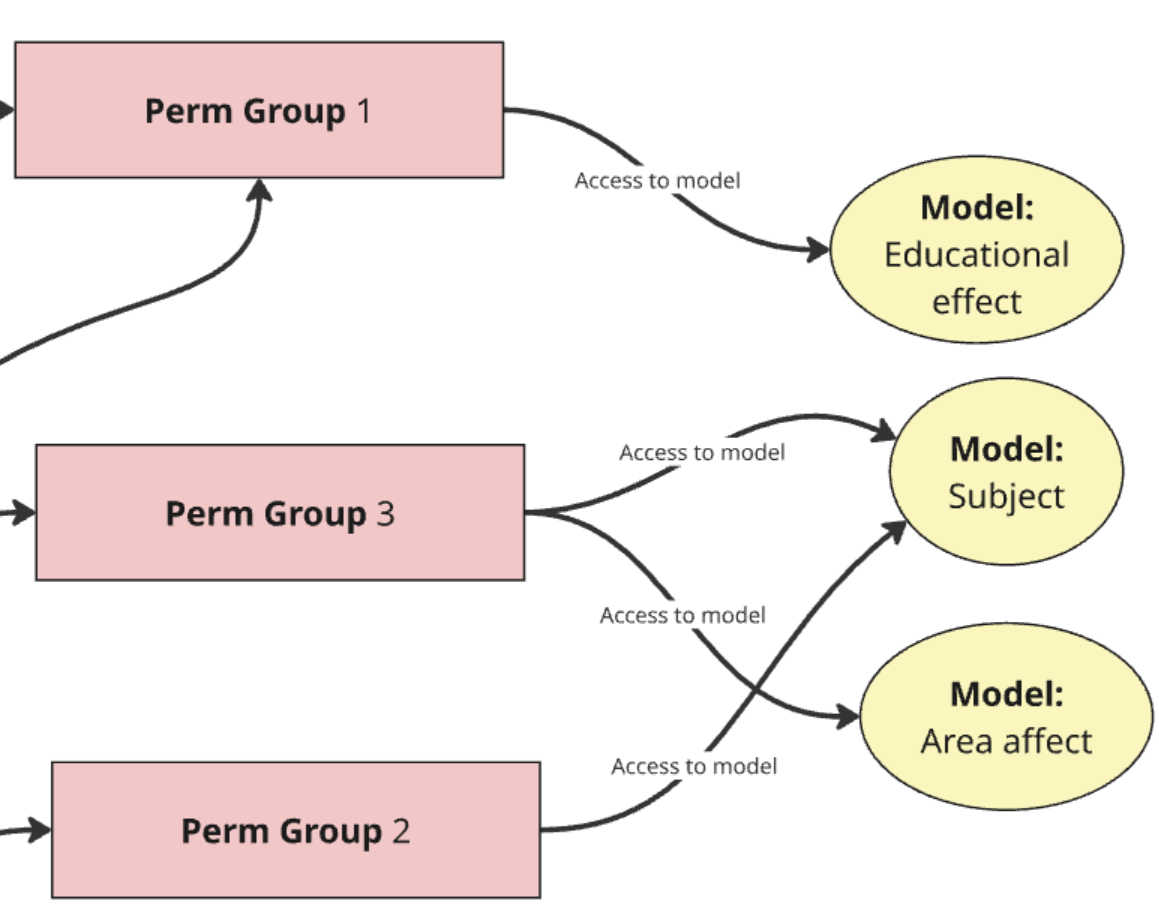
Example – Permission Groups and Model-Level Access
The diagram above shows how Permission Groups define access to specific models in the system and determine what actions can be performed on them.
In the example:
- Permission Group 1 grants access to the model Educational Effect
- Permission Group 2 is linked to the model Area Affect
- Permission Group 3 provides access to both the Subject and Area Affect models
These permission groups are not assigned directly to users, but to User Groups, which users belong to.
This structure allows users to inherit access rights based on their role and group membership.
User
User defines user of the system. When is_staff value True then user has got access to admin panel.
When is_superuser value True then user has got access to everything in the admin panel.
Other concepts in permission system
Permission codenames
Permission codename is string value representing specific permission. Codename is stored in database in
Permissions table. Permission codenames have their own syntax. Two variants are foreseen:
AppLabel.PermissionType_Action_Model
and
AppLabel.Action_Model
Where PermissionType and Action are defined in hierarchical_permissions.defaults and can be extended
by configuration in settings.py. First variant is used in more complex cases.
Can be created using PermissionCreationService. Rules could be assign in app where model is defined in
apps.py file. Second variant is created by default and in present form doesn't allow assigning rules to codenames.
Permission constants
PERMISSION_DIVIDER_BY_STRATEGY
There are three main strategies of permissions.
MODEL- permissions which operates only on codenames. If user has it, and object is in scope of organizational unit permission is granted.OBJECT- permissions which operates on codenames and rules. If user has it, and object is in scope of organizational unit, rule assigned to olp permission is checked. If rule is fulfilled then permission is granted.HARDCODED- permissions which operates only on rules. They are not stored in database. If rule is fulfilled then permission is granted.
PermissionType
PermissionType is enum with propositions of permissions needed in the project. Can be used in
PERMISSION_TYPES_LABELS or in PermissionCreationService.
PERMISSION_TYPES_LABELS
PERMISSION_TYPES_LABELS is dictionary which contains lambda functions to override names of permissions. We are using
it
in PermissionCreationService.
Action
Action is enum with propositions of actions needed in the project. Right now Action enum contains default actions like add, delete, change, view
Flow
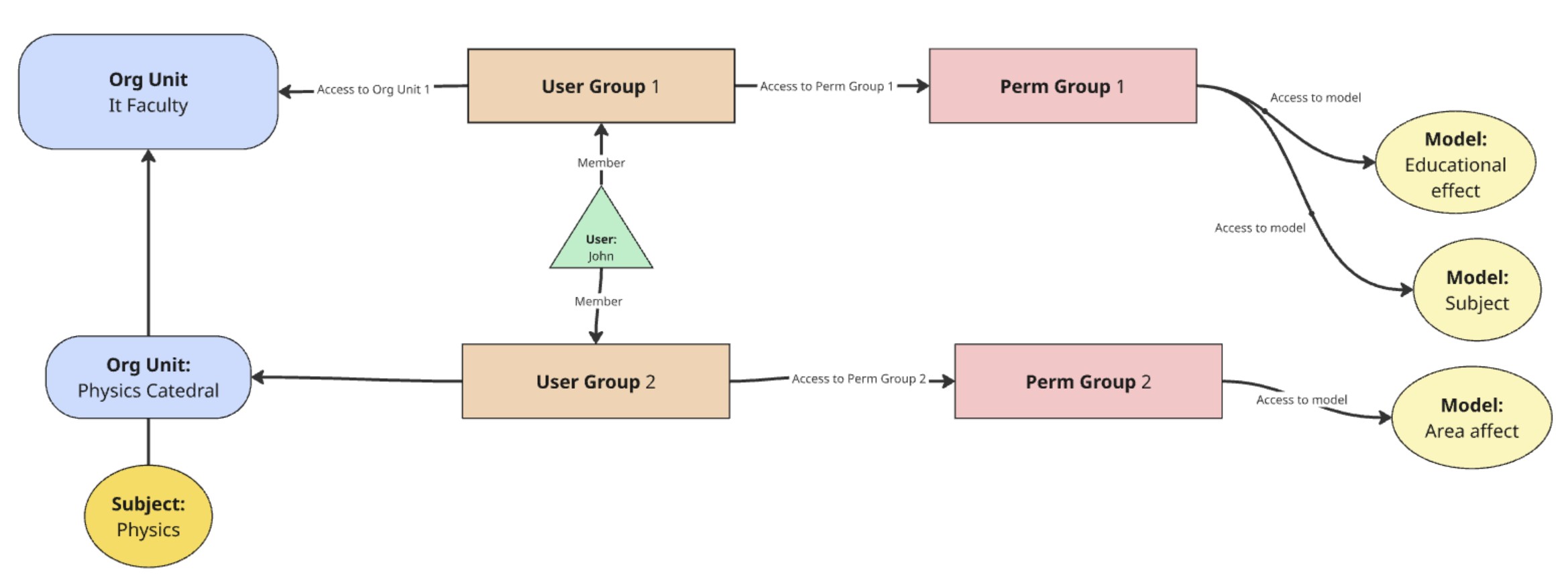
Permission-checking process:
-
The user John attempts to access details of the Physics subject (e.g., its course card).
-
The system identifies which organizational unit the subject is associated with. In this case, the Physics subject is directly linked to the Department of Physics (i.e., it is a child of that unit).
-
The system retrieves all User Groups associated with the Department of Physics.
-
It checks whether the user belongs to any of those user groups.
-
If the user is a member of at least one group, the system proceeds to the related Permission Groups and checks:
- Whether the user has specific permissions for the given model.
- What type of permissions are assigned: view, change, delete, edit, etc.
-
If a relevant permission is found (e.g., view), the user is granted access to the resource (e.g., to read a field, element, or module).
-
If no valid permissions are found, the system moves one level up in the organizational hierarchy — for example, from the Department of Physics to the Faculty of Physics.
-
Steps 3–6 are repeated until:
- a matching permission is found, or
- the highest level in the hierarchy is reached (e.g., the university) without success.
Installation and configuration
TO DO
Bibliography
Link: Django permissions
Link: Rules
Authors
- Jakub Jakacki
- Marek Turkowicz
Last changed
Date: 25.01.2026r.
Release history Release notifications | RSS feed


Download files
Download the file for your platform. If you're not sure which to choose, learn more about installing packages.
Source Distribution
Built Distribution
Filter files by name, interpreter, ABI, and platform.
If you're not sure about the file name format, learn more about wheel file names.
Copy a direct link to the current filters
File details
Details for the file django_hierarchical_permissions-0.0.2.tar.gz.
File metadata
- Download URL: django_hierarchical_permissions-0.0.2.tar.gz
- Upload date:
- Size: 15.0 kB
- Tags: Source
- Uploaded using Trusted Publishing? No
- Uploaded via: poetry/2.1.2 CPython/3.12.3 Linux/6.8.0-90-generic
File hashes
| Algorithm | Hash digest | |
|---|---|---|
| SHA256 |
42600e1613fb7f3c8384c1b02f3aa8d34b51486d01d11e4d9c20dd0943fb72d7
|
|
| MD5 |
65a46a564d97cb816ac0a6951da96bf9
|
|
| BLAKE2b-256 |
1884a3772d0663cc772f7a81349e3cc6d28b77f071efa1db24a860cd6d2042fe
|
File details
Details for the file django_hierarchical_permissions-0.0.2-py3-none-any.whl.
File metadata
- Download URL: django_hierarchical_permissions-0.0.2-py3-none-any.whl
- Upload date:
- Size: 15.8 kB
- Tags: Python 3
- Uploaded using Trusted Publishing? No
- Uploaded via: poetry/2.1.2 CPython/3.12.3 Linux/6.8.0-90-generic
File hashes
| Algorithm | Hash digest | |
|---|---|---|
| SHA256 |
a4c6761d77ecc560e8ece88ff29eba4b7f7fa3ca6dde4292fd578eb65da045b7
|
|
| MD5 |
3efa0f27185681a0c0b9ce1436cfbf1d
|
|
| BLAKE2b-256 |
64d4459ae3e0c9d36d9b6d1fa53431fdb5eb7ce95227d808223189ee586be472
|






