
This release is a pre-release and may not be stable for production use.
django-data-table
Render a data table with Django and htmx.









!! This Django app is currently in development and not yet ready for production use !!
Contents
Features
- Fundamentals
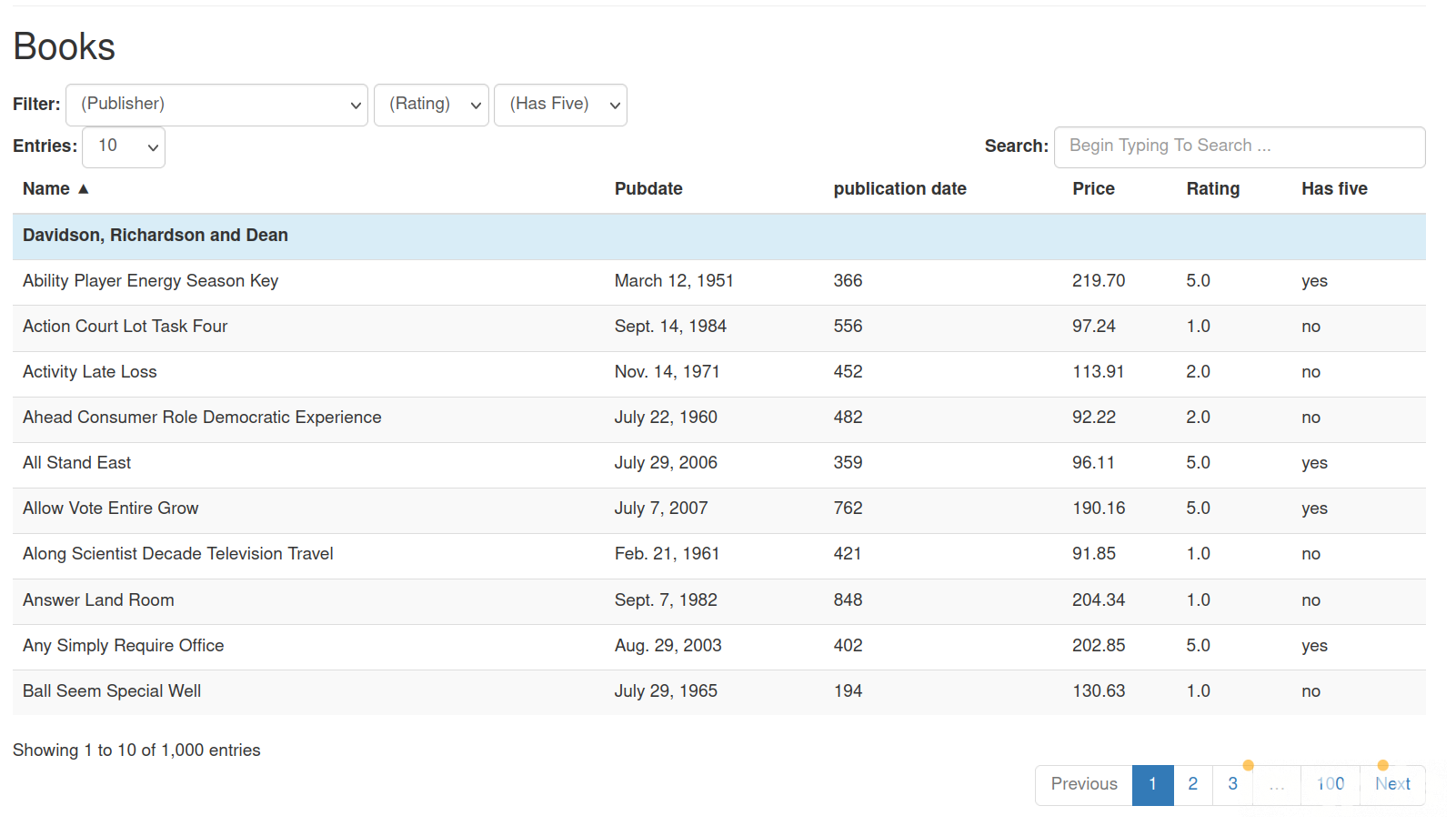
- Renders a data table widget on a webpage
- The widget is updated by user actions (e.g. next page) without page reloads
- All data is processed server side
- UI
- User can navigate pages
- User can order by columns
- User can change how many entries are shown
- User can do an active text search
- User can apply filters to the entries.
- Developer features
- Can show data from model field, a calculated DB field or calculated by Python function
- Custom header labels
- Custom formatter can be applies for each column (e.g. numeric)
- Optional generated totals footer
- Supports CSS styling of table via stable HTML table ID
- Styled using Bootstrap 3 & Font Awesome 5
Screenshots
Here is an example:
Comparison with DataTables JS
This component aims to be a replacement for the popular DataTables JS:
- Fast rendering of large tables compared to DataTables with server side processing
- Easier implementation (e.g. not requiring any additional JavaScript code)
- Provides most of same basic features (e.g. Paging, Selectable page size, search, ...)
How to use
Here is a simple example for creating a data table for users of a Django site:
settings.py
Add this Django app to your site:
  INSTALLED_APPS = [
    ...
    "htmx_datatables",
    ...
  ]
views.py
Create a view:
from htmx_datatables.views import HtmxDataTableView

class MyDataTable(HtmxDataTableView):
    model = User
    columns = ["username", "date_joined", "is_superuser"]
    paginate_by = 10
For more information about features and configuration please see the source code for HtmxDataTableView.
urls.py
Add the new view to your urls:
  from .views import MyDataTable

  ...

  urlpatterns = [
    ...
    path("users_data_table/", MyDataTable.as_view(), name="users_data_table"),
    ...
  ]
index.html
Finally, include the new data table in your Django template:
  {% load htmx_datatables %}
  {# ... #}
  {% render_htmx_datatable url="my_app:users_data_table" %}
  {# ... #}
  {% enable_htmx_js %}
The render_htmx_datatable template tag creates the widget.
The enable_htmx_jstemplate tag loads and enables htmx for this particular Django page (incl. error handling).
Live example
To see how this widget works in practice you can check out out live example here: Live example website.
The code for the live example can be found on the repo in the folder example-app.
1 maintainer

Metadata
1 maintainer
Release files for django-htmx-datatables 0.1.0a1
For a detailed explanation of source distributions (sdists) and built distributions (wheels), please see the package formats documentation.
Source distribution (sdist)
| File | Size | Uploaded | |
|---|---|---|---|
| django_htmx_datatables-0.1.0a1.tar.gz | 94.8 kB | Details |
Built distribution (wheel)
| File | Interpreter | ABI | Platform | Reset |
|---|---|---|---|---|
| django_htmx_datatables-0.1.0a1-py3-none-any.whl | Python 3 | none | any | Details |
Total release size: 181.9 kB
Release files / django_htmx_datatables-0.1.0a1.tar.gz
| Download URL | django_htmx_datatables-0.1.0a1.tar.gz |
|---|---|
| Size | 94.8 kB |
| Tags | Source |
|
SHA-256 checksum How to use checksums |
7d5a54da826a9628e5445e5773216ff44d6b048c3b6684de6fb613d313d81a42
|
|
BLAKE2b-256 checksum How to use checksums |
769953fb2c782267a2c6bb712bdefdbb8c82d1b6f1408f44c5a152156282281a
|
| Upload date | |
|
Uploaded using Trusted Publishing? What is trusted publishing? |
No |
| Uploaded via |
python-requests/2.31.0
|
Release files / django_htmx_datatables-0.1.0a1-py3-none-any.whl
| Download URL | django_htmx_datatables-0.1.0a1-py3-none-any.whl |
|---|---|
| Size | 87.2 kB |
| Tags | Python 3 |
|
SHA-256 checksum How to use checksums |
d4221dafa73c62e2f6e023ec5df693b5dd466c6263b3b8f63f6324a064cffc05
|
|
BLAKE2b-256 checksum How to use checksums |
8620902270d1fbc288e7d56808385a6b220a289bbc95995a760f34afee85507c
|
| Upload date | |
|
Uploaded using Trusted Publishing? What is trusted publishing? |
No |
| Uploaded via |
python-requests/2.31.0
|













