
Django based tool for monitoring huey task queue: https://github.com/coleifer/huey


Project description
django-huey-monitor
Django based tool for monitoring huey task queue
Current implementation will just store all Huey task signals into the database and display them in the Django admin.





Quickstart
pip install django-huey-monitor
INSTALLED_APPS = [
    #...
    'bx_django_utils', # https://github.com/boxine/bx_django_utils
    'huey_monitor',
    #...
]
Note: You must normally not change your Huey tasks.
Collect main-/sub-tasks
Huey monitor model can store information about task hierarchy. But this information can't be collected automatically. You have to store these information in your Task code.
e.g.:
@task(context=True)
def sub_task(task, parent_task_id, chunk_data):
    # Save the task hierarchy by:
    TaskModel.objects.set_parent_task(
        main_task_id=parent_task_id,
        sub_task_id=task.id,
    )
    # ... do something with e.g.: chunk_data ...


@task(context=True)
def main_task(task):
    for chunk_data in something:
        sub_task(parent_task_id=task.id, chunk_data=chunk_data)
Working example can be found in the test app here: huey_monitor_tests/test_app/tasks.py
Collect progress information
Running task can store progress information in a similar way as tqdm. So it's possible to see the progress in admin.
Minimal example:
@task(context=True)
def foobar_task(task, list_to_process):
    process_info = ProcessInfo(
        task,
        desc='A description of this Job',
        total=len(list_to_process)
    )

    for item in list_to_process:
        # ...to something with the {item}...
        process_info.update(n=1) # add the information that one item was processed
It is also possible to divide the work to several tasks and collect information about the processing of main-/sub-tasks.
Working example can be found in the test app here: huey_monitor_tests/test_app/tasks.py
settings
override list filter (optional)
It is possible to override list_filter of SignalInfoModelAdmin and TaskModelAdmin via settings.
e.g.:
HUEY_MONITOR_SIGNAL_INFO_MODEL_LIST_FILTER = ('task__name', 'signal_name')
HUEY_MONITOR_TASK_MODEL_LIST_FILTER = ('name', 'state__signal_name')
Note: This both settings are optional. In this example is the "hostname" filter not present ;)
run test project
Note: You can quickly test Huey Monitor with the test project, e.g:
~/django-huey-monitor$ ./manage.sh run_testserver
or in an isolated Docker container:
~/django-huey-monitor$ make up
More info see below.
Screenshots
(More Screenshots here: boxine.github.io/django-huey-monitor/)
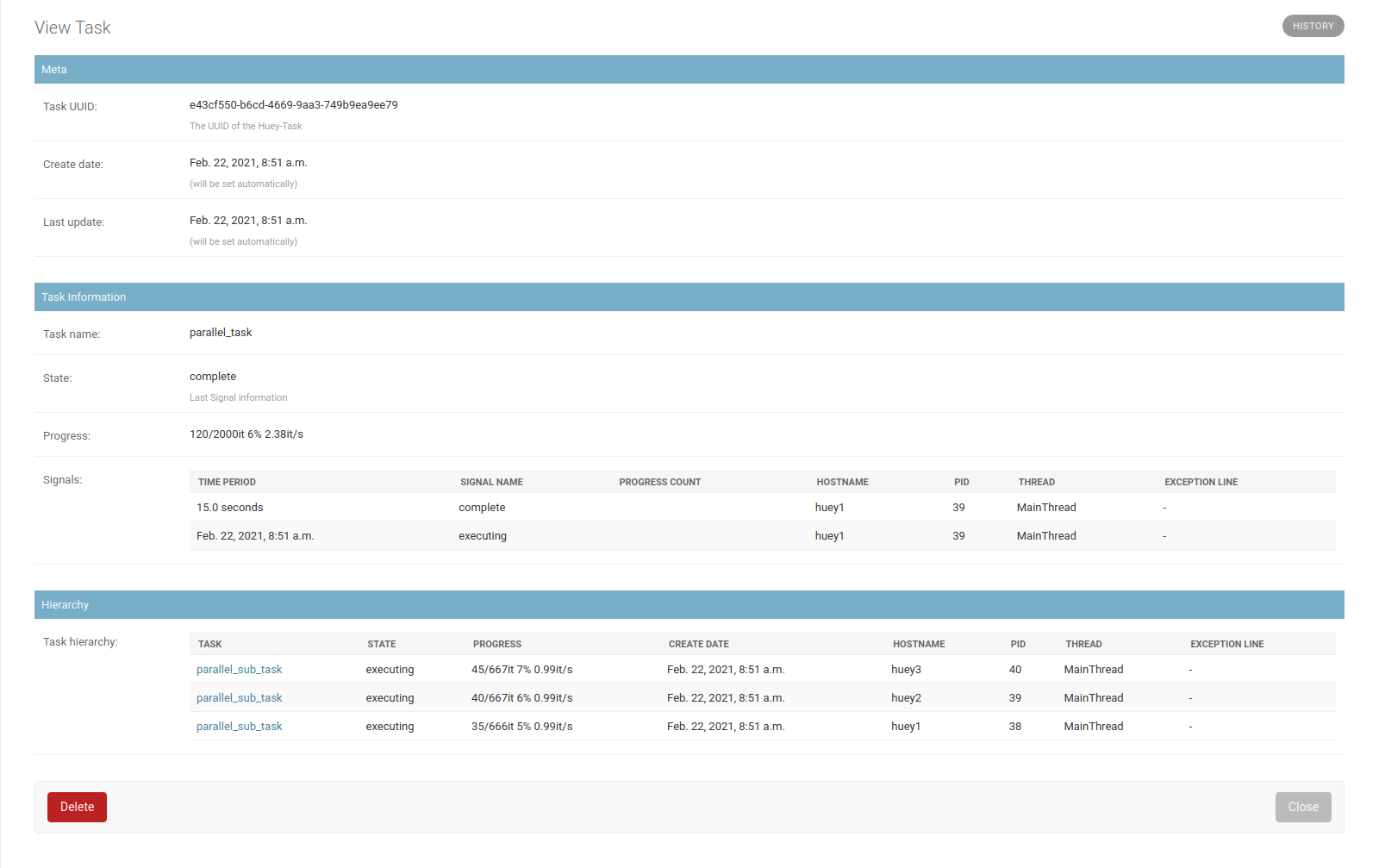
2021-02-22-v030-task-details.png
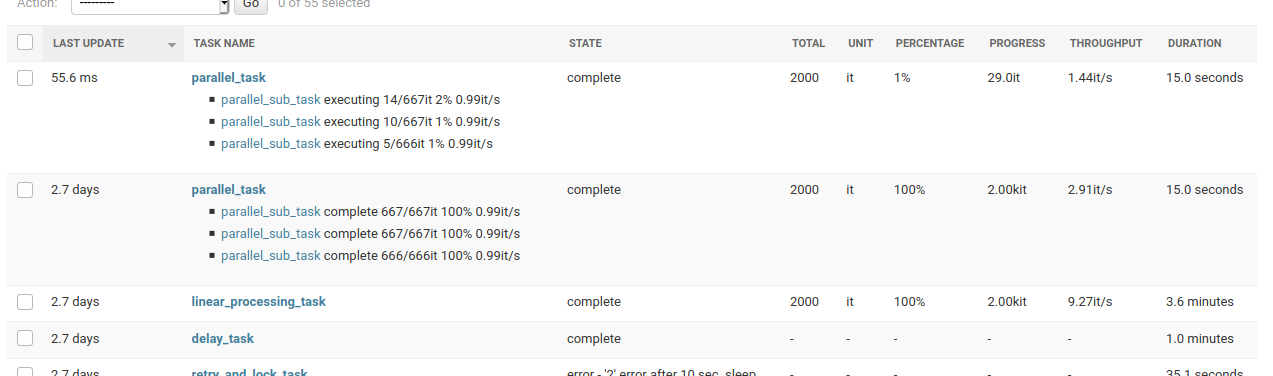
2021-02-22-v030-progress-info1.png
developing
- install docker
- clone the project
- start the container
To start developing e.g.:
~$ git clone https://github.com/boxine/django-huey-monitor.git
~$ cd django-huey-monitor
~/django-huey-monitor$ ./manage.py
~/django-huey-monitor$ make help
~/django-huey-monitor$ make up
Point our browser to: http://localhost:8000/
Our Makefile contains the following targets:
help                           List all commands
install                        install huey monitor package
update                         Update the dependencies as according to the pyproject.toml file
run-dev-server                 Run Django's developer server
test                           Run unittests
nox                            Run unittests via nox
makemessages                   Make and compile locales message files
clean                          Remove created files from the test project (e.g.: SQlite, static files)
build                          Update/Build docker services
up                             Start docker containers
down                           Stop all containers
shell-django                   go into a interactive bash shell in Django container
run-shell-django               Build and start the Django container and go into shell
shell-huey1                    go into a interactive bash shell in Huey worker container 1
shell-huey2                    go into a interactive bash shell in Huey worker container 2
shell-huey3                    go into a interactive bash shell in Huey worker container 3
shell-redis                    go into a interactive bash shell in Redis container
logs                           Display and follow docker logs
logs-django                    Display and follow docker logs only from "django" container
reload-django                  Reload the Django dev server
reload-huey                    Reload the Huey worker
restart                        Restart the containers
fire-test-tasks                Call "fire-test-tasks" manage command to create some Huey Tasks
fire-many-test-tasks           Call "fire-test-tasks" with --count 10000 to create many task entries ;)
fire-parallel-processing-task  Just fire "parallel processing" Huey Task
delete-all-tasks-data          Delete all Task/Signal database enties
It's also possible to run the test setup with SQLite and Huey immediate setup without docker:
~$ git clone https://github.com/boxine/django-huey-monitor.git
~$ cd django-huey-monitor
~/django-huey-monitor$ ./manage.py run_dev_server
Backwards-incompatible changes
Version compatibility
| Huey Monitor | Django | Python |
|---|---|---|
| >0.10.0 | v4.2, v5.0, v5.1 | v3.11, v3.12 |
| >v0.7.0 | v3.2, v4.1, v4.2 | v3.9, v3.10, v3.11 |
| >v0.6.0 | v3.2, v4.0, v4.1 | v3.9, v3.10, v3.11 |
| >v0.5.0 | v2.2, v3.1, v3.2 | v3.7, v3.8, v3.9 |
| <=v0.4.0 | v2.2, v3.0, v3.1 | v3.7, v3.8, v3.9 |
v0.10.0
Set min. Python to v3.11. Remove Django 3.2.x and add Django v5.1.x to text matrix.
v0.6.0
We refactor the project setup: Developer must reinit the repository.
v0.5.0
Change CI and remove tests against Django 3.0, but add test run with Django v3.2
v0.3.0 -> v0.4.0 - Outsourcing Django stuff
bx_py_utils was split and Django related stuff moved into: bx_django_utils
You must change your Django settings and replace the app name:
 INSTALLED_APPS = [
     #...
-     'bx_py_utils',
+     'bx_django_utils',
     'huey_monitor',
     #...
 ]
History
- dev
- tbc
- v0.9.1 - 26.01.2024
- Fix
DisallowedModelAdminLookupinSignalInfoModelAdmin, too.
- Fix
- v0.9.0 - 22.12.2023
- Fix #135
DisallowedModelAdminLookupinTaskModelAdmin - Add "thread" name as change list filter.
- Enhance test project setup
- Apply manageprojects updates
- Remove Python v3.9 support
- Add Django v5.0 to test matrix and remove Django 4.1
- Enable local AUTOLOGIN as default
- Use unittest "load_tests Protocol" and deny any requests in tests
- Add https://github.com/PyCQA/flake8-bugbear
- Update requirements
- Fix #135
- v0.8.1 - 20.11.2023
- Bugfix
ZeroDivisionErrorin admin
- Bugfix
- v0.8.0 - 20.11.2023
- Make is possible to override
list_filterofSignalInfoModelAdminandTaskModelAdminvia settings - Update local docker dev setup
- Make is possible to override
- v0.7.1 - 18.08.2023
- Fix #127: Catch error getting HUEY counts
- v0.7.0 - 09.08.2023
- New: Display Huey pending/scheduled/result task counts in admin
- Switch to git
mainbranch - Switch from
pytestto normalunittests - Switch from
poetrytopip-tools - Use https://github.com/jedie/manage_django_project for developing
- Expand test matrix by remove Django 4.0 and add 4.2
- Enhance tox config
- v0.6.0 - 09.01.2023
- Test against Django v3.2, v4.0, v4.1 and Python v3.9 - v3.11
- Optimize Admin change list (contributed by henribru)
- Order sub-tasks chronologically in admin (contributed by Skrattoune)
- displaying progression for parent_tasks (contributed by Skrattoune)
- Delegating set_parent_task to
ProcessInfo.__init__(contributed by Skrattoune) - Fix #27 auto crop overlong process info description
- NEW #102 Unlock all tasks via change list object tool link
- Fix #81 Expand
TaskModel.descmax. length and makeSignalInfoModel.exception_lineoptional - Update docker test setup
- v0.5.0 - 10.02.2022
- Refactor models: Remove
TaskProgressModeland store progress information intoTaskModel
- Refactor models: Remove
- v0.4.6 - 03.02.2022
- Display task desc or name in TaskAdmin (contributed by Skrattoune)
- update requirements
- use Darker as code formatter
- Check linting via PyTest plugins
- v0.4.5 - 28.01.2022
- Fix #46 by increment existing TaskProgressModel instances (based on contribution by Skrattoune)
- v0.4.4 - 07.01.2022
- Add missing
huey_monitor.cssfile
- Add missing
- v0.4.3 - 07.01.2022
- Add temporary
cumulate2parentsflag toProcessInfo(contributed by formacube)
- Add temporary
- v0.4.2 - 25.08.2020
- suppress the default_app_config attribute in Django 3.2+ (contributed by Jonas Svarvaa)
- v0.4.1 - 02.06.2020
- Bugfix
ProcessInfo.__str__() - #27 Check 'desc' length in
ProcessInfo - Remove test against Django 3.0 and add tests with Django 3.2
- Bugfix local
toxruns and use different Python versions
- Bugfix
- v0.4.0 - 21.05.2020
- bx_py_utils was split and Django related stuff moved into: https://github.com/boxine/bx_django_utils
- v0.3.0 - 22.02.2020
- v0.2.0 - 17.02.2020
- Store "parent_task" information for main-/sub-tasks
- v0.1.0 - 21.12.2020
- Work-a-round if a Huey worker died
- Fix missing translations from bx_py_utils in test project
- Simulate a cluster of Huey worker via docker and the test project
- v0.0.1 - 15.12.2021
- initial release
License
GPL. Patches welcome!
Links
Release history Release notifications | RSS feed


Download files
Download the file for your platform. If you're not sure which to choose, learn more about installing packages.
Source Distribution
Built Distribution
Filter files by name, interpreter, ABI, and platform.
If you're not sure about the file name format, learn more about wheel file names.
Copy a direct link to the current filters
File details
Details for the file django_huey_monitor-0.10.1.tar.gz.
File metadata
- Download URL: django_huey_monitor-0.10.1.tar.gz
- Upload date:
- Size: 139.3 kB
- Tags: Source
- Uploaded using Trusted Publishing? No
- Uploaded via: twine/6.1.0 CPython/3.12.3
File hashes
| Algorithm | Hash digest | |
|---|---|---|
| SHA256 |
8a2870400252cc0cb7c28f57436dd4559e946450940dd313e762e2e57e3a31a1
|
|
| MD5 |
2422faa92ebade0c985213b78d583ebb
|
|
| BLAKE2b-256 |
cb65b9f61b9047c5ccdf65b96dc1eff64129ea551b0c9b06869decf4a688d123
|
File details
Details for the file django_huey_monitor-0.10.1-py3-none-any.whl.
File metadata
- Download URL: django_huey_monitor-0.10.1-py3-none-any.whl
- Upload date:
- Size: 69.0 kB
- Tags: Python 3
- Uploaded using Trusted Publishing? No
- Uploaded via: twine/6.1.0 CPython/3.12.3
File hashes
| Algorithm | Hash digest | |
|---|---|---|
| SHA256 |
e73614393c5cc1254adc1d45848530fff0980f46b3d738b313b15a05963360a3
|
|
| MD5 |
cfefa4e2da72bba355ae0be463fb8c07
|
|
| BLAKE2b-256 |
bdfd1a5e0cd136d94e9df9eb870e9f6a04d512e00d0347f0d2aa9d546e8ae7f5
|






