





django-jalali-date
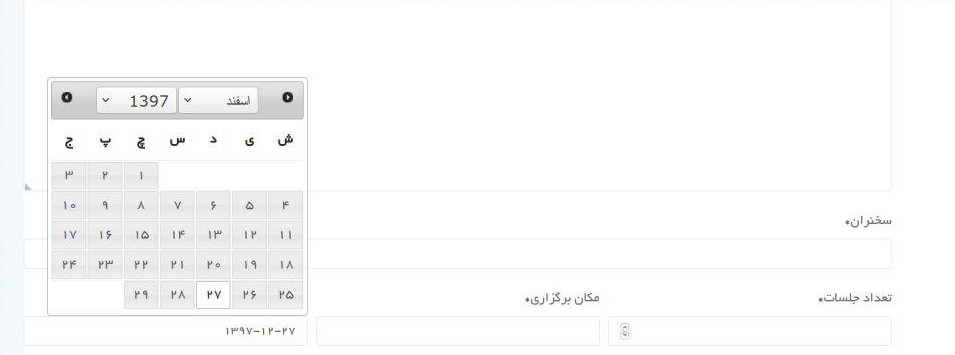
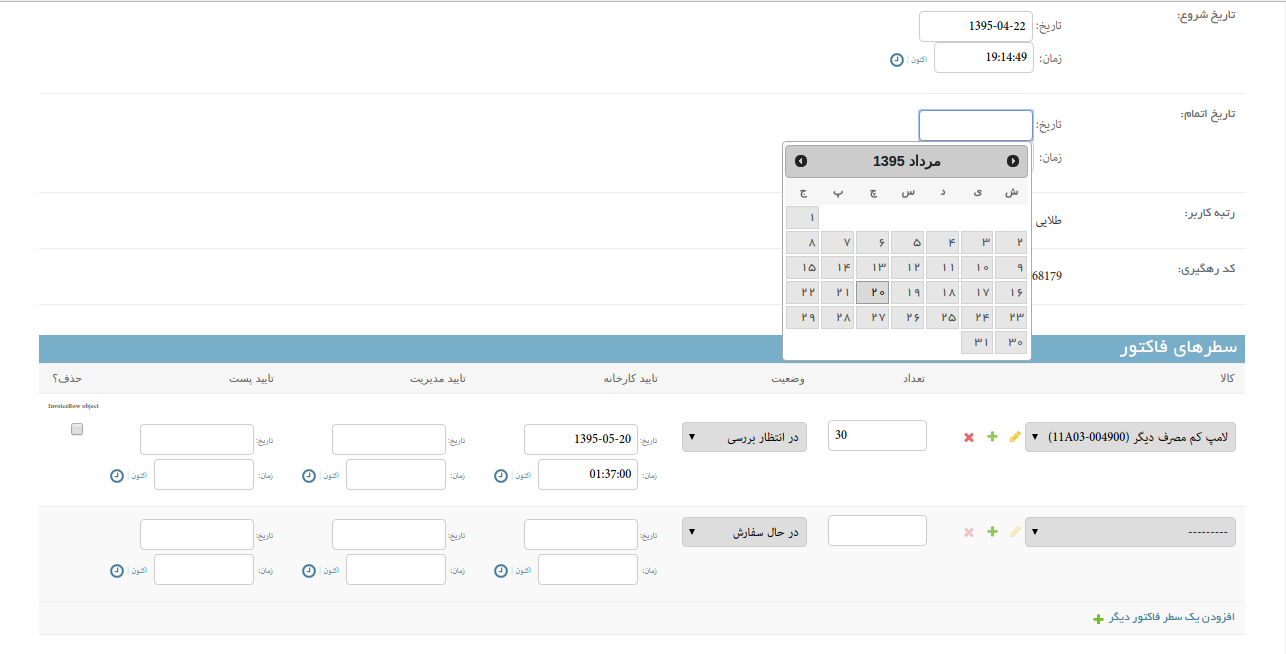
Jalali Date support for user interface. Easy conversion of DateTimeField to JalaliDateTimeField within the admin site, view and templates.
Dependency
To use this module you need to install jdatetime(and of course you need django) and pytz module which you can install it with easy_install or pip
Version Compatibility
Python
- python 3.8 and below is compatible with 0.3.2 and below
- python 3.X and above is compatible with 1.0.0 and above
Django
I tested the latest version on some Django versions on python 3.8
- django == 4.2
- django == 3.2.8
- django == 2.2.24
I think it will work properly on other versions as well.
If you plan to use it in Django 1.X, install version 0.3.2
Install
pip install django-jalali-date
Usage
settings.py
- don't forget to make sure you've also added
jalali_dateto yourINSTALLED_APPS. - any global settings for a Django Jalali Date are kept in a single configuration dictionary named
JALALI_DATE_DEFAULTS- you can change the default display of dates by override
Strftime - you can use your own date picker by override
Static
- you can change the default display of dates by override
INSTALLED_APPS = [
	'django_apps',

	'jalali_date',

	'my_apps',
]

# default settings (optional)
JALALI_DATE_DEFAULTS = {
   # if change it to true then all dates of the list_display will convert to the Jalali.
   'LIST_DISPLAY_AUTO_CONVERT': False,
   'Strftime': {
        'date': '%y/%m/%d',
        'datetime': '%H:%M:%S _ %y/%m/%d',
    },
    'Static': {
        'js': [
            # loading datepicker
            'admin/js/django_jalali.min.js',
            # OR
            # 'admin/jquery.ui.datepicker.jalali/scripts/jquery.ui.core.js',
            # 'admin/jquery.ui.datepicker.jalali/scripts/calendar.js',
            # 'admin/jquery.ui.datepicker.jalali/scripts/jquery.ui.datepicker-cc.js',
            # 'admin/jquery.ui.datepicker.jalali/scripts/jquery.ui.datepicker-cc-fa.js',
            # 'admin/js/main.js',
        ],
        'css': {
            'all': [
                'admin/jquery.ui.datepicker.jalali/themes/base/jquery-ui.min.css',
            ]
        }
    },
}
(Optional) If you want the names of the dates to be displayed in Farsi, please add the following command to the settings.
If you are on windows:
LANGUAGE_CODE = 'fa'

import locale
locale.setlocale(locale.LC_ALL, "Persian_Iran.UTF-8")
If you are on other operating systems:
LANGUAGE_CODE = 'fa'

import locale
locale.setlocale(locale.LC_ALL, "fa_IR.UTF-8")
views.py
from jalali_date import datetime2jalali, date2jalali

def my_view(request):
	jalali_join = datetime2jalali(request.user.date_joined).strftime('%y/%m/%d _ %H:%M:%S')
forms.py
from django import forms
from jalali_date.fields import JalaliDateField, SplitJalaliDateTimeField
from jalali_date.widgets import AdminJalaliDateWidget, AdminSplitJalaliDateTime


class TestForm(forms.ModelForm):
    class Meta:
        model = TestModel
        fields = ('name', 'date', 'date_time')

    def __init__(self, *args, **kwargs):
        super(TestForm, self).__init__(*args, **kwargs)
        self.fields['date'] = JalaliDateField(label=_('date'), # date format is  "yyyy-mm-dd"
            widget=AdminJalaliDateWidget # optional, to use default datepicker
        )

        # you can added a "class" to this field for use your datepicker!
        # self.fields['date'].widget.attrs.update({'class': 'jalali_date-date'})

        self.fields['date_time'] = SplitJalaliDateTimeField(label=_('date time'),
            widget=AdminSplitJalaliDateTime # required, for decompress DatetimeField to JalaliDateField and JalaliTimeField
        )
template.html
{% load jalali_tags %}

<p>{{ request.user.date_joined|to_jalali:'%y/%m/%d _ %H:%M:%S' }}</p>

<form method="post">{% csrf_token %}
    {{ form.as_p }}
    <input type="submit">
</form>

<!-- By default, Datepicker using jQuery, you need to set your script after loading jQuery! -->
	<!-- loading directly -->
		<link rel="stylesheet" href="{% static 'admin/jquery.ui.datepicker.jalali/themes/base/jquery-ui.min.css' %}">
		<script src="{% static 'admin/js/django_jalali.min.js' %}"></script>
	<!-- OR -->
	<!-- loading by form (if used AdminJalaliDateWidget) -->
		{{ form.media }}
admin.py
from django.contrib import admin
from jalali_date import datetime2jalali, date2jalali
from jalali_date.admin import ModelAdminJalaliMixin, StackedInlineJalaliMixin, TabularInlineJalaliMixin

class MyInlines1(TabularInlineJalaliMixin, admin.TabularInline):
	model = SecendModel

class MyInlines2(StackedInlineJalaliMixin, admin.StackedInline):
	model = ThirdModel

@admin.register(FirstModel)
class FirstModelAdmin(ModelAdminJalaliMixin, admin.ModelAdmin):
	#for showing the Jalali date on the list_display, please change the LIST_DISPLAY_AUTO_CONVERT to true or create custom methods. for example:
    list_display = ['some_fields', 'get_created_jalali']

	inlines = (MyInlines1, MyInlines2, )
	raw_id_fields = ('some_fields', )
	readonly_fields = ('some_fields', 'date_field',)
	# you can override formfield, for example:
	formfield_overrides = {
	    JSONField: {'widget': JSONEditor},
	}

	@admin.display(description='تاریخ ایجاد', ordering='created')
	def get_created_jalali(self, obj):
		return datetime2jalali(obj.created).strftime('%a, %d %b %Y %H:%M:%S')

1 maintainer

Metadata
1 maintainer
Release files for django-jalali-date-modern 1.0.0
For a detailed explanation of source distributions (sdists) and built distributions (wheels), please see the package formats documentation.
Source distribution (sdist)
| File | Size | Uploaded | Provenance | |
|---|---|---|---|---|
| django_jalali_date_modern-1.0.0.tar.gz | 301.0 kB | Without provenance | Details |
Built distribution (wheel)
| File | Interpreter | ABI | Platform | Reset |
|---|---|---|---|---|
| django_jalali_date_modern-1.0.0-py3-none-any.whl | Python 3 | none | any | Details |
Total release size: 621.8 kB
Release files / django_jalali_date_modern-1.0.0.tar.gz
| Download URL | django_jalali_date_modern-1.0.0.tar.gz |
|---|---|
| Size | 301.0 kB |
| Tags | Source |
|
SHA-256 checksum How to use checksums |
68c3b9da60c9746809252bdde47afd9ac02f46bbce90b858d73d47146b54c4ba
|
|
BLAKE2b-256 checksum How to use checksums |
969edc56c39fd0ecf7433f1a70dd017662498ff2c6cfc6aff8df6dfedf01a0e5
|
| Upload date | |
|
Uploaded using Trusted Publishing? What is trusted publishing? |
No |
| Uploaded via |
twine/6.1.0 CPython/3.13.0
|
Release files / django_jalali_date_modern-1.0.0-py3-none-any.whl
| Download URL | django_jalali_date_modern-1.0.0-py3-none-any.whl |
|---|---|
| Size | 320.8 kB |
| Tags | Python 3 |
|
SHA-256 checksum How to use checksums |
d02a1e52128940982d90c6a3f18dff8c20babb7d71d8bd23f961aa4ab04d8c88
|
|
BLAKE2b-256 checksum How to use checksums |
14cf7f838d57b6e3a0dd39f324234dc4a4eeb7f8491cf06dc7605c4bd19dc998
|
| Upload date | |
|
Uploaded using Trusted Publishing? What is trusted publishing? |
No |
| Uploaded via |
twine/6.1.0 CPython/3.13.0
|
Security for django-jalali-date-modern 1.0.0
Provenance
Provenance describes where a file came from. On PyPI, provenance is shared via attestations, which provide a verifiable record of the build or publishing details. View details, limitations and caveats.
No provenance found
None of the files in this release were uploaded with provenance metadata.
A note on package security
PyPI is a repository for distributing packages, not a service for auditing them. While third-party security researchers and our staff do their best to detect and remove malicious packages, PyPI cannot guarantee the quality, security or suitability of any given package.













