
django-keyclock-oidc
This project depends on mozilla-django-oidc and map keycloak roles and groups to django user permissions and groups.
Features
- Automatic mapping of Keycloak roles and groups to Django user permissions and groups
- Django admin login integration with Keycloak
- OIDC authentication with Keycloak
Installation
- You can install the package via your python package manager, example:
pip install mozilla-django-oidc
pip install django-keycloak-oidc
# or
poetry add mozilla-django-oidc
poetry add django-keycloak-oidc
# or
uv add mozilla-django-oidc
uv add django-keycloak-oidc
- Add
django_keycloak_oidcandmozilla_django_oidcto yourINSTALLED_APPSinsettings.py:
INSTALLED_APPS = [
    "django_keycloak_oidc",  # top of admin app
    "django.contrib.admin",
    "django.contrib.auth",
    "mozilla_django_oidc",  # bottom of auth app
    ...
]
- Add the authentication backend to your
AUTHENTICATION_BACKENDSinsettings.py:
AUTHENTICATION_BACKENDS = [
    "django_keycloak_oidc.auth.KeyCloakAuthenticationBackend",  # here
    "django.contrib.auth.backends.ModelBackend",  # django default (need it too)
    ...,  # and other
]
- Add
mozilla_django_oidcurls to yoururls.py:
urlpatterns = [
    ...,
    path("oidc/", include("mozilla_django_oidc.urls")),
    ...,
]
Important Note: If you changed your admin root path, make sure that the oidc/ and admin/ paths are in same root.
for example:
urlpatterns = [
    ...,
    path(
        "root/",  # your root (if you did it)
        include(
            [
                ...,
                path("admin/", admin.site.urls),
                path("oidc/", include("mozilla_django_oidc.urls")),
                ...,
            ]
        )
    ),
    ...,
]
- Add the settings_context to your context_processors in
settings.py:
TEMPLATES = [
    {
        ...,
        "OPTIONS": {
            "context_processors": [
                ...,
                "django_keycloak_oidc.context_processor.settings_context",  # here
            ],
        },
    },
]
- Run migrations (Done):
python manage.py migrate
Configuration
You can see configuration of the original project here.
-
Keycloak setup:
- You need to add
Group MembershipandUser Realm Rolefrom Client scopes -> profile -> Mappers -> Add mapper -> By configuration:- User Realm Role:
- Mapper Type:
User Realm Role - Name:
roles - Token Claim Name:
roles - Add to ID token, Add to access token, Add to userinfo, Add to token introspection:
on
- Mapper Type:
- Group Membership:
- Mapper Type:
Group Membership - Name:
groups - Token Claim Name:
groups - Full group path:
off. if its on, you must enter group name in django admin with full path. - Add to ID token, Add to access token, Add to userinfo, Add to token introspection:
on
- Mapper Type:
- User Realm Role:
- And create you
rolesandgroupsin your Keycloak console.
- You need to add
-
My Django sample configuration(
settings.py) is as below:
OIDC_RP_CLIENT_ID = "<client-id>"
OIDC_RP_CLIENT_SECRET = "<client-secret>"
OIDC_RP_SIGN_ALGO = "RS256"

OIDC_VERIFY_SSL = False

OIDC_OP_AUTHORIZATION_ENDPOINT = "http://<keycloak-host>/realms/<realm>/protocol/openid-connect/auth"
OIDC_OP_TOKEN_ENDPOINT = "http://<keycloak-host>/realms/<realm>/protocol/openid-connect/token"
OIDC_OP_USER_ENDPOINT = "http://<keycloak-host>/realms/<realm>/protocol/openid-connect/userinfo"
OIDC_OP_JWKS_ENDPOINT = "http://<keycloak-host>/realms/<realm>/protocol/openid-connect/certs"

LOGIN_URL = "/oidc/authenticate/"
LOGIN_REDIRECT_URL = "/leasing/admin/"
LOGIN_REDIRECT_URL_FAILURE = "/leasing/admin/"
LOGOUT_REDIRECT_URL = "/leasing/admin/login/"

# (django-keycloak-oidc) settings for customizing the login button in django admin login page(make sure you did step 5 in installation):
KEYCLOAK_DJANGO_ADMIN_LOGIN_VISIBLE = True
KEYCLOAK_DJANGO_ADMIN_LOGIN_DIRECTION = "rtl"
KEYCLOAK_DJANGO_ADMIN_LOGIN_TEXT = "Login with"
KEYCLOAK_DJANGO_ADMIN_LOGIN_LOGO = "https://karnameh.com/assets/logos/karnameh-logo.svg"
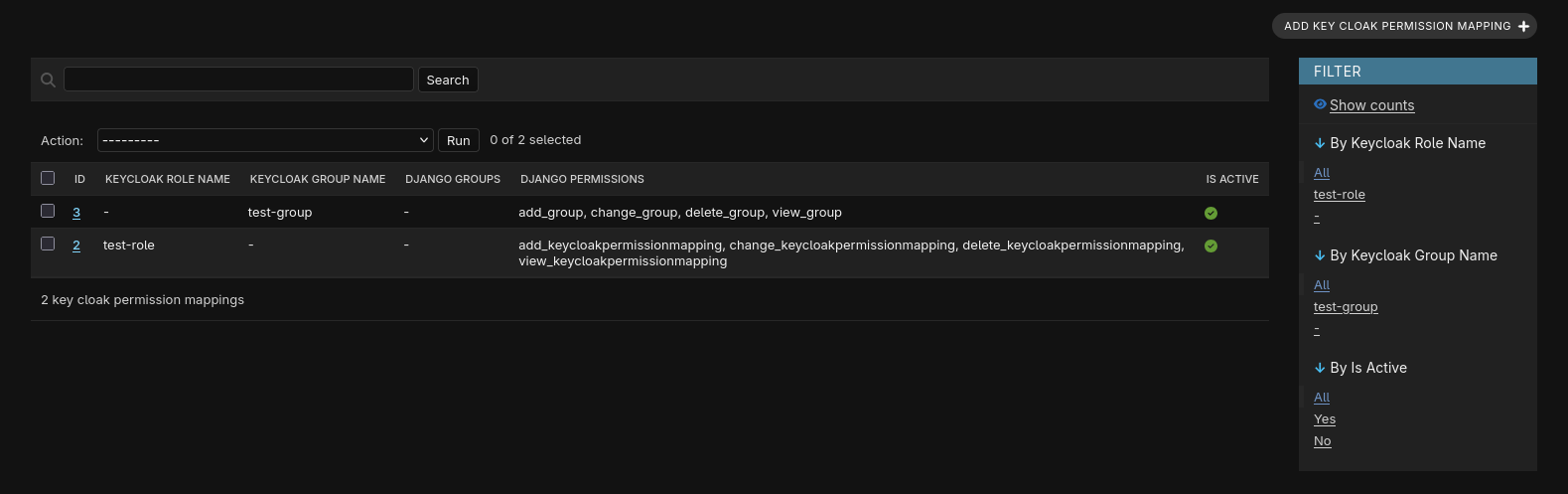
- Go to your Django admin and start mapping:
1 maintainer

Metadata
1 maintainer
Release files for django-keycloak-oidc 0.3.255
For a detailed explanation of source distributions (sdists) and built distributions (wheels), please see the package formats documentation.
Source distribution (sdist)
| File | Size | Uploaded | |
|---|---|---|---|
| django_keycloak_oidc-0.3.255.tar.gz | 9.5 kB | Details |
Built distribution (wheel)
| File | Interpreter | ABI | Platform | Reset |
|---|---|---|---|---|
| django_keycloak_oidc-0.3.255-py3-none-any.whl | Python 3 | none | any | Details |
Total release size: 19.7 kB
Release files / django_keycloak_oidc-0.3.255.tar.gz
| Download URL | django_keycloak_oidc-0.3.255.tar.gz |
|---|---|
| Size | 9.5 kB |
| Tags | Source |
|
SHA-256 checksum How to use checksums |
bf91183cac74aada4067064ef9a4649d6ed516f92c5b118b7536a1de2591d1b7
|
|
BLAKE2b-256 checksum How to use checksums |
ddc7074cd049ae4ed7a9728e44c0e39453042de95773e3f44a89be9438c7db58
|
| Upload date | |
|
Uploaded using Trusted Publishing? What is trusted publishing? |
Yes |
| Uploaded via |
twine/6.1.0 CPython/3.13.7
|
Provenance
Provenance describes where a file came from. On PyPI, provenance is shared via attestations, which provide a verifiable record of the build or publishing details. View details, limitations and caveats.


PyPI Publish Attestation
PyPI verified that this artifact, at this checksum, originated from the publisher listed below.
Signed by GitHub Actions, verified by PyPI on Jan 5, 2026.
Transparency logRelease files / django_keycloak_oidc-0.3.255-py3-none-any.whl
| Download URL | django_keycloak_oidc-0.3.255-py3-none-any.whl |
|---|---|
| Size | 10.2 kB |
| Tags | Python 3 |
|
SHA-256 checksum How to use checksums |
937888c896be1cb1b6c3ad92373c64b9e182a1ae175ab3236b6c199e192dbad6
|
|
BLAKE2b-256 checksum How to use checksums |
d98500d422ca98ab89eb5b7e69abc756179444d61bf0039b325160810e41df33
|
| Upload date | |
|
Uploaded using Trusted Publishing? What is trusted publishing? |
Yes |
| Uploaded via |
twine/6.1.0 CPython/3.13.7
|
Provenance
Provenance describes where a file came from. On PyPI, provenance is shared via attestations, which provide a verifiable record of the build or publishing details. View details, limitations and caveats.
PyPI Publish Attestation
PyPI verified that this artifact, at this checksum, originated from the publisher listed below.
Signed by GitHub Actions, verified by PyPI on Jan 5, 2026.
Transparency log













