
Django Linear
Readonly access to Linear issues for users without a Linear account.
This app is designed to enable 'readonly' user access to Linear issues via the Django admin site.
Motivation
We replaced our use of Jira with Linear a while back, and haven't looked back. However, one thing that would improve it for our use case (small dev / design team, with many engaged internal stakeholders) would be the ability to share the status of issues more widely through the company.
This doesn't need to be sophisticated, we don't need to accept edits / comments - it's just a status update - for any issue, who is working on it, what its status is, which cycle / project it is part of.
Why bother?
The existing Google Sheets integration is almost good enough - but having the data in Django means we can build additional functionality on top (custom notifications, alerts, reporting, etc.)
That said - this project is mainly an excuse to explore the GraphQL API.
Approach
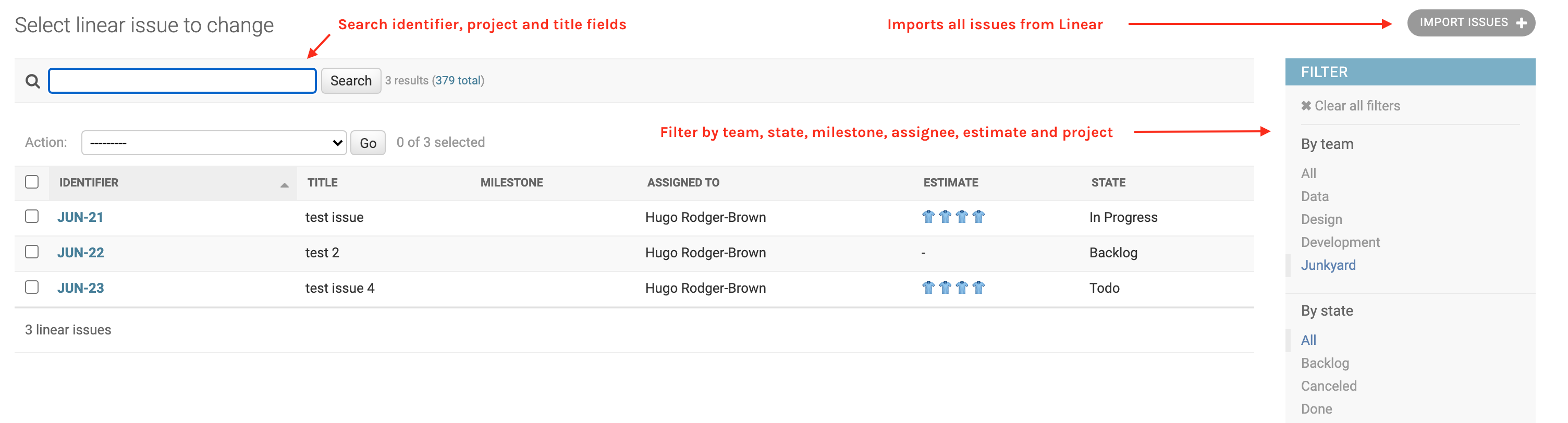
We have a large "backoffice" project written in Django, and all our internal staff have accounts set up, and know their way around the Django admin site. Linear has a GraphQL API. Putting these two together, it ought to be simple to sync Linear updates to a Django model, and to surface those via the admin site.
Principles
- Access is managed via existing Django authentication
- Data is readonly - if someone needs to edit an issue they should use Linear
- Users who require access to Linear should have a full ($) account
NB this is not a tool to bypass Linear fees. Please respect their hard work.
How it works
The integration between Linear and the app occurs in two ways - via bulk import, and via webhook. The data is readonly, so the principal is that all issues are imported once from Linear, and then maintained via the webhook whenever they are updated. The webhook handler will pick up new Issues created after the import.
The integration doesn't go too deep into the data - we store the basics only - this is only intended for use as simple dashboard for people who don't have / need access to Linear itself.
You can import the issues via the admin site itself (there is no "Add Linear issue" button), or if
you wish you can run the import_issues management command. If you don't have too many issues you
could even run the import on a schedule - start afresh each day.
Configuration
It's a standard Django app, so add it to INSTALLED_APPS as you would any other. The webhook URL is
/webook/, so the recommended configuration is to add it to your main urls.py like this, making
the full url /linear/webhook/:
urlpatterns = [
    path("linear/", include("linear.urls")),
]
You should use this URL (with your fully-qualified domain name) when adding the webhook to Linear.
Settings
The following Django settings are available:
LINEAR_API_KEY
The only setting that is required is a valid API key, which is available from the Linear app, under "Workspace settings" > "API" > "Personal API keys".
LINEAR_API_PAGE_SIZE
The page size to use when importing issues - defaults to 100, the max allowed by the API is 250.
LINEAR_WORKSPACE_NAME
Your workspace name is optional, but it is used in the admin site to provide a link from the object page to Linear - overriding the Django "View on site" link.
Deployment to Heroku
This project also contains everything it needs to be deployed directly to Heroku.

Metadata
Release files for django-linear 0.2.0
For a detailed explanation of source distributions (sdists) and built distributions (wheels), please see the package formats documentation.
Source distribution (sdist)
| File | Size | Uploaded | |
|---|---|---|---|
| django-linear-0.2.0.tar.gz | 11.9 kB | Details |
Built distribution (wheel)
| File | Interpreter | ABI | Platform | Reset |
|---|---|---|---|---|
| django_linear-0.2.0-py3-none-any.whl | Python 3 | none | any | Details |
Total release size: 24.6 kB
Release files / django-linear-0.2.0.tar.gz
| Download URL | django-linear-0.2.0.tar.gz |
|---|---|
| Size | 11.9 kB |
| Tags | Source |
|
SHA-256 checksum How to use checksums |
e20681018e0db1b1fe5cb9554106846d414a7386781ae1a50b71260131323ffd
|
|
BLAKE2b-256 checksum How to use checksums |
49ebf4f7808558f710a84fbc1ad2a2aa75446638aee0f44d56c6e92dcbda8929
|
| Upload date | |
|
Uploaded using Trusted Publishing? What is trusted publishing? |
No |
| Uploaded via |
poetry/1.0.2 CPython/3.8.1 Darwin/20.2.0
|
Release files / django_linear-0.2.0-py3-none-any.whl
| Download URL | django_linear-0.2.0-py3-none-any.whl |
|---|---|
| Size | 12.6 kB |
| Tags | Python 3 |
|
SHA-256 checksum How to use checksums |
23d3b2e0023d04ec9d13d21f27171d0e97920e467d1d8172ff3dced32436af2b
|
|
BLAKE2b-256 checksum How to use checksums |
78ce038a671ae670b64ed6e58c3e7d70d1dc5a092e63ef32d9a81bf10bf036a8
|
| Upload date | |
|
Uploaded using Trusted Publishing? What is trusted publishing? |
No |
| Uploaded via |
poetry/1.0.2 CPython/3.8.1 Darwin/20.2.0
|














