
django-llm-ledger
Know what your LLM features cost, keep them working when a provider goes down, and catch prompt regressions in CI.
Most teams that "added AI to the product" find out three things later: nobody knows what it costs per feature, it breaks when the API has a bad day, and nobody can tell whether yesterday's prompt tweak made answers worse. django-llm-ledger is a small Django app that handles all three without changing how you write your feature.
from llm_ledger import llm

answer = llm.complete(
    "Summarize this order for the customer: ...",
    feature="order_summary",   # cost is tracked per feature
    user=request.user,          # ...and per user
)
print(answer.text, answer.cost_usd, answer.latency_ms)

What you get
- A ledger of every call: provider, model, tokens, cost, latency, status, feature and user. Prompts are not stored unless you opt in, since they often carry personal data.
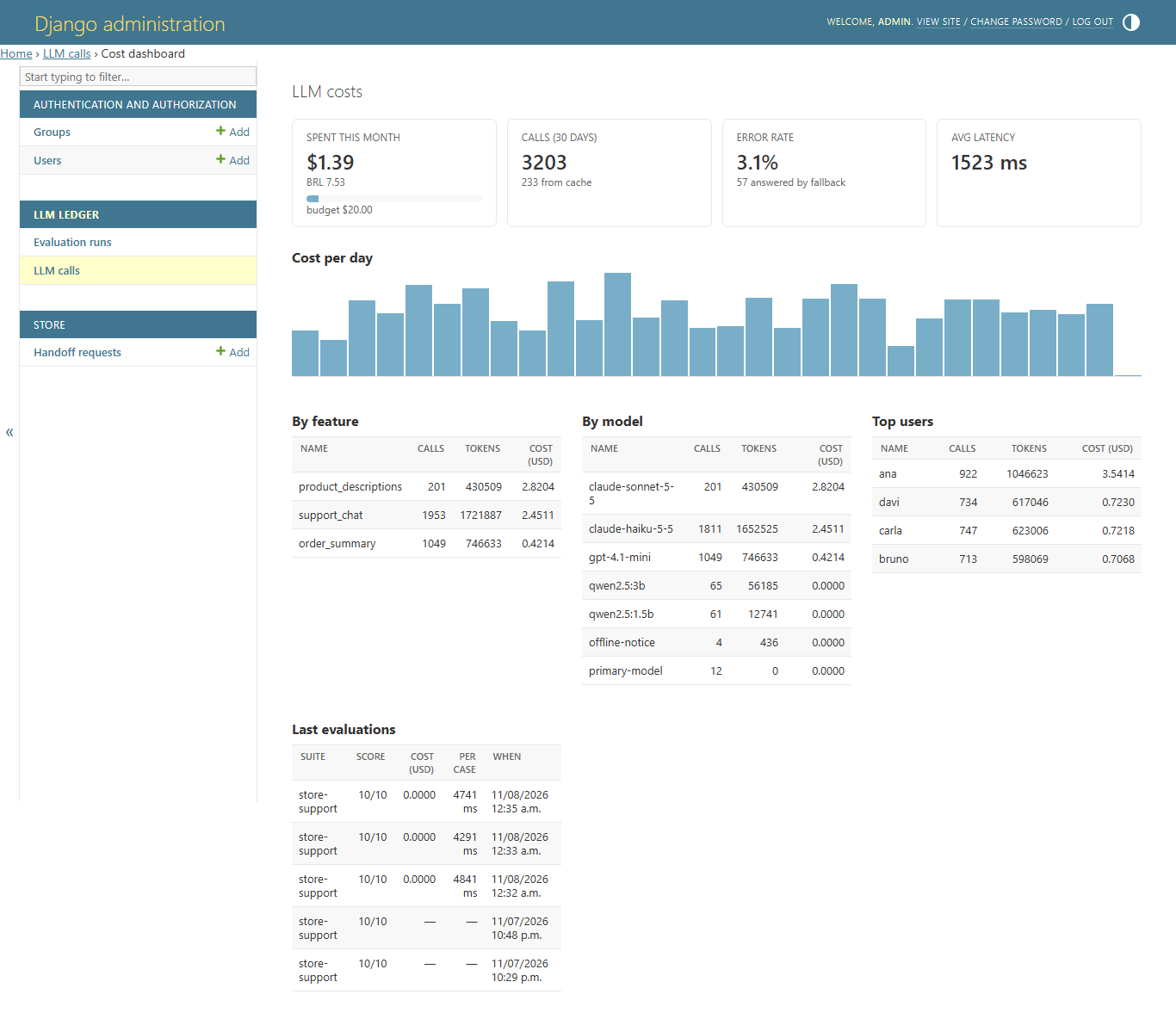
- A cost dashboard in the Django admin: spend this month vs. budget, cost per day, top features, models and users, error rate, fallback count.
- Retries and fallback: retryable errors (timeouts, 429, 5xx) are retried with exponential backoff; then the next provider in the chain takes over. Put a local model last and your feature keeps answering even when the paid API is down.
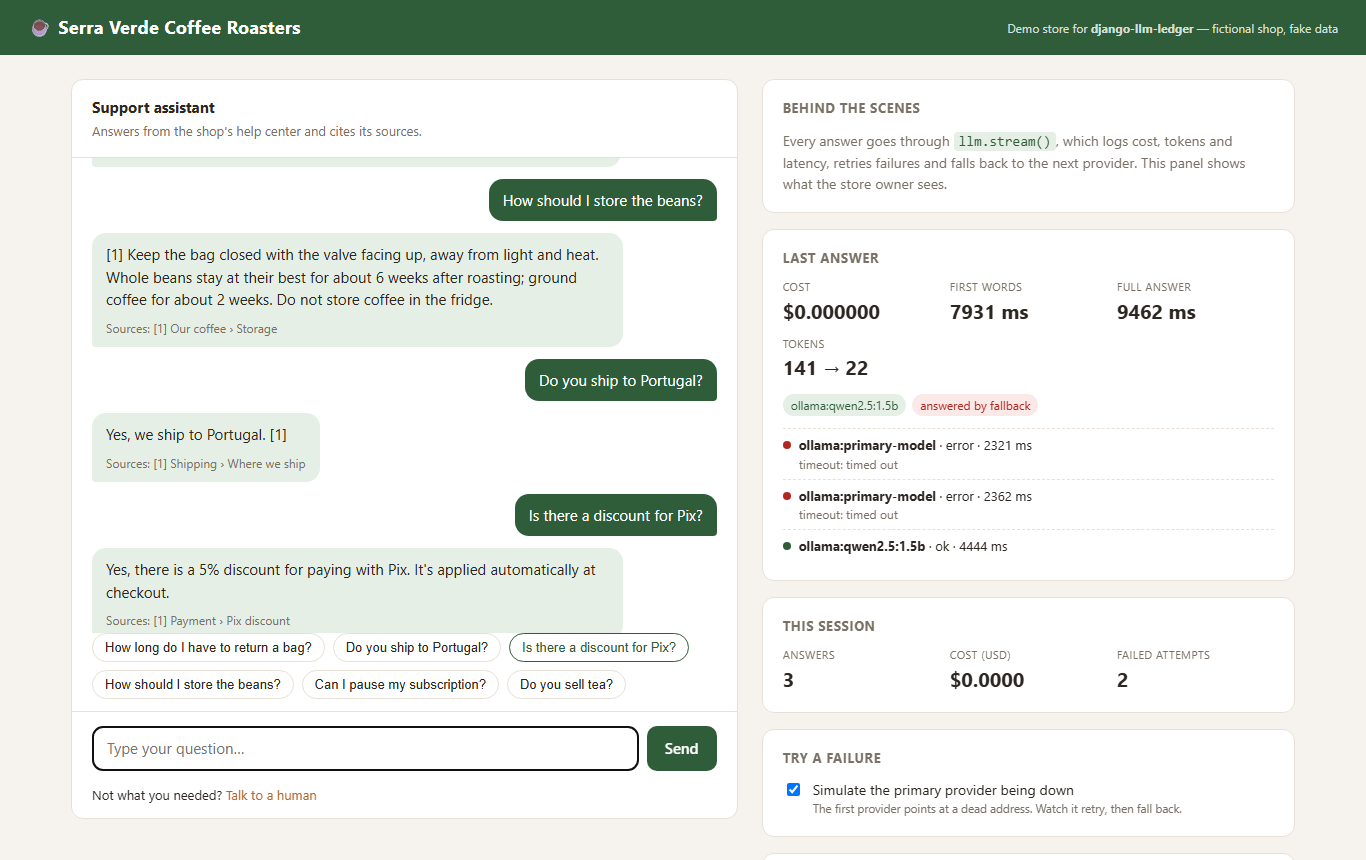
- Streaming:
llm.stream()yields the answer as it is written, with the same ledger, cache, retries and fallback. - Async views:
await llm.acomplete()andawait llm.astream(). - Cache: identical requests are served from Django's cache and cost nothing.
- Budget guard: a monthly budget for the whole app and, optionally, one per feature. A
budget_exceededsignal when one is reached, and optional hard blocking that only stops the feature over its limit. - Evaluation suites: a file of questions plus what a good answer must (not) contain.
manage.py llm_evaluatescores them and fails your CI when the score drops. - No vendor SDKs: Ollama, OpenAI-compatible servers (OpenAI, LM Studio, vLLM, Groq...) and Anthropic over plain HTTP. Only dependency besides Django is
httpx.
Install
pip install django-llm-ledger # add [yaml] for YAML suites
INSTALLED_APPS = [..., "llm_ledger"]

LLM_LEDGER = {
    # Tried in order. The first one that answers wins.
    "PROVIDERS": [
        {"name": "anthropic", "model": "claude-sonnet-5-5"},          # key from ANTHROPIC_API_KEY
        {"name": "openai", "model": "gpt-4.1-mini"},                   # key from OPENAI_API_KEY
        {"name": "ollama", "model": "llama3.2"},                       # local, free, last resort
    ],
    # USD per 1M tokens. Not shipped on purpose: prices change, and stale prices lie quietly.
    "PRICES": {
        "claude-sonnet-5-5": {"input": 3.0, "output": 15.0},
        "gpt-4.1-mini": {"input": 0.4, "output": 1.6},
    },
    "MONTHLY_BUDGET_USD": 50,
    "LOCAL_CURRENCY": {"code": "BRL", "rate": 5.4},   # optional second currency in the dashboard
}
python manage.py migrate
The dashboard lives at Admin → LLM calls → Cost dashboard.
The prices above are placeholders for the example. Check your provider's pricing page.
Settings
| Key | Default | |
|---|---|---|
PROVIDERS |
[{"name": "ollama", "model": "llama3.2"}] |
Fallback chain. name is ollama, openai, anthropic, fake or a dotted path to your own Provider subclass. Extra keys (base_url, api_key, api_key_env, price, timeout) go to the provider. |
PRICES |
{} |
USD per 1M tokens, per model. Paid calls without a price are recorded with cost_usd=None and flagged in the dashboard. |
MAX_RETRIES |
2 |
Retries per provider for retryable errors. |
RETRY_BACKOFF |
0.5 |
Base delay in seconds; doubles on each retry. |
TIMEOUT |
60 |
HTTP timeout in seconds. |
CACHE_TTL |
3600 |
Seconds to cache identical requests. 0 disables. |
CACHE_ALIAS |
"default" |
Which Django cache to use. |
MONTHLY_BUDGET_USD |
None |
Sends budget_exceeded when reached. |
FEATURE_BUDGETS_USD |
{} |
Monthly limit per feature, e.g. {"support_chat": 20}. Shown in the dashboard; a bar turns amber at 80%. |
BUDGET_CHECK_TTL |
60 |
Seconds to reuse the month's spend when checking budgets, so a busy site does not sum the ledger on every call. A spent budget can take this long to be noticed; 0 checks every call. |
BLOCK_OVER_BUDGET |
False |
Raise BudgetExceeded instead of just signalling. With feature budgets, only the feature over its limit is blocked. |
RETENTION_DAYS |
None |
Default for llm_ledger_prune: delete calls older than this. |
TEXT_RETENTION_DAYS |
None |
Default for llm_ledger_prune: blank prompts and responses older than this; costs stay. |
LOCAL_CURRENCY |
None |
{"code": "BRL", "rate": 5.4} to show a second currency. |
STORE_PROMPTS |
False |
Store prompt and response text in the ledger. |
Evaluation suites
# evals/support.yaml
name: support
system: "You answer for ACME Store. Returns are accepted within 30 days."
cases:
  - id: return-window
    input: "How long do I have to return an item?"
    must_contain: ["30 days"]
  - id: no-made-up-promises
    input: "Can I return a used mattress after a year?"
    must_not_contain: ["yes, of course"]
  - id: shipping
    input: "Do you ship to Brazil?"
    any_of: ["yes", "we ship"]
To test your real feature (retrieval, tools, post-processing) instead of a raw prompt, point the suite at a function:
target: shop.ai.answer_customer # called as answer_customer(input) -> str
python manage.py llm_evaluate evals/ --min-score 0.9
store-support  (evals/store-support.yaml)
  PASS  return-window
  ...
  score 10/10 = 100%
  cost $0.0042, 3120 tokens, 4120 ms per case
To compare models, pin each run to one of them (no fallback) and get a table at the end:
python manage.py llm_evaluate evals/ --models ollama:qwen2.5:1.5b,ollama:qwen2.5:0.5b
Comparison
  model                suite          score  cost (USD)  tokens  ms/case
  -------------------  -------------  -----  ----------  ------  -------
  ollama:qwen2.5:1.5b  store-support  11/11     $0.0000    2093     7244
  ollama:qwen2.5:0.5b  store-support  10/11     $0.0000    2178     6070
That is a real run on the demo store: the smaller model was only 16% faster, and it answered
"Yes, we do sell green tea", for a coffee shop that sells no tea. Pinned runs reuse the settings of
the configured provider with the same name (API key, base_url, model_options), and target
functions are pinned too. Evaluations never use the cache: they measure the model as it answers now.
Each run also adds up what it cost, reading the ledger rows written while each case ran, so it
works for target functions that make several calls. Runs are stored and show up in the dashboard
with score, cost and time side by side: swap a model, rerun the suite, compare.
Conversations
Pass the conversation instead of a single string. The system prompt stays in system=:
answer = llm.complete(
    [
        {"role": "user", "content": "How much is shipping?"},
        {"role": "assistant", "content": "R$ 19.90, free above R$ 150."},
        {"role": "user", "content": "And to Portugal?"},
    ],
    system="You answer for ACME Store.",
    feature="support",
)
It works the same with stream, acomplete and astream. The ledger stores the conversation as a
readable transcript (when STORE_PROMPTS is on), and the cache tells conversations apart. In an
evaluation suite, a case's input can be a conversation too, which is how you test follow-ups.
Streaming
from django.http import StreamingHttpResponse
from llm_ledger import llm

def ask(request):
    stream = llm.stream(request.POST["question"], feature="support", user=request.user)

    def body():
        with stream:          # if the browser leaves, the call is still recorded
            yield from stream
        # stream.result has cost, tokens, latency and first_chunk_ms once it ends

    return StreamingHttpResponse(body(), content_type="text/plain")
Retries and fallback only happen before the first chunk. Once words have reached the reader,
switching models would glue two different answers together, so a failure after that raises
LLMError and the partial text stays in stream.text. Budget and cache are checked when you call
llm.stream(), so BudgetExceeded is raised there, before you start the response. A cache hit
comes back as a single chunk.
Ollama, OpenAI-compatible servers and Anthropic stream natively. A custom provider without a
stream() method still works: it yields the whole answer at once.
The demo store streams its chat as newline-delimited JSON (example/store/views.py).
Async views
from django.http import JsonResponse, StreamingHttpResponse
from llm_ledger import llm

async def summary(request):
    result = await llm.acomplete(prompt, feature="summary", user=request.user)
    return JsonResponse({"text": result.text})

async def chat(request):
    stream = await llm.astream(question, feature="chat")   # budget and cache checked here

    async def body():
        async with stream:
            async for chunk in stream:
                yield chunk

    return StreamingHttpResponse(body(), content_type="text/plain")
The async methods run the same code as the sync ones through Django's sync_to_async: the ledger
is written with the ORM, which is synchronous, and one code path means the two APIs cannot drift
apart. While a provider answers, the event loop stays free and other requests are served. The
test suite checks both: a coroutine keeps running during a slow call, and two concurrent requests
take about as long as one.
Keeping the ledger small (and LGPD/GDPR-friendly)
The ledger keeps every call until you say otherwise. Prune it from a daily cron job:
python manage.py llm_ledger_prune --texts-older-than 30 --days 365
python manage.py llm_ledger_prune --dry-run --days 365     # only count
--texts-older-than blanks the prompt and response but keeps the row, so the dashboard and cost
history stay intact while personal data does not linger. Set TEXT_RETENTION_DAYS and
RETENTION_DAYS in LLM_LEDGER and the command needs no arguments. Rows are processed in batches,
so a large table is not locked at once.
Handling failures in your code
from llm_ledger import LLMError, BudgetExceeded, llm

try:
    answer = llm.complete(question, feature="support")
except BudgetExceeded as exc:
    ...  # e.g. show "the assistant is resting, talk to a human"
         # exc.feature is "support" if it was that feature's budget, None for the global one
except LLMError as exc:
    logger.error("every provider failed: %s", exc.errors)
Listen to the budget signal to notify someone:
from django.dispatch import receiver
from llm_ledger.signals import budget_exceeded

@receiver(budget_exceeded)
def warn_team(sender, spent, budget, feature=None, **kwargs):
    ...  # feature is None for the global budget
Demo store
example/ is a fictional coffee shop with a support chat built on the library. The chat finds the relevant help sections with embeddings from a small local model, answers from them and cites its sources. A side panel shows what each answer cost, which provider served it and every retry. A switch simulates the main provider going down, so you can watch the fallback happen live.
ollama pull qwen2.5:1.5b            # free local model (~1 GB); set ANTHROPIC_API_KEY to put Claude first
ollama pull all-minilm              # embeddings for the help-center search (46 MB)
cd example
uv run --project .. python manage.py migrate
uv run --project .. python manage.py seed_demo          # 30 days of synthetic history for the dashboard
uv run --project .. python manage.py createsuperuser
uv run --project .. python manage.py runserver
uv run --project .. python manage.py llm_evaluate evals/ --min-score 0.8
Development
uv sync
uv run pytest
License
MIT
1 maintainer

Metadata
1 maintainer
Release files for django-llm-ledger 0.2.0
For a detailed explanation of source distributions (sdists) and built distributions (wheels), please see the package formats documentation.
Source distribution (sdist)
| File | Size | Uploaded | Provenance | Actions |
|---|---|---|---|---|
| django_llm_ledger-0.2.0.tar.gz | 39.3 kB | With provenance | Details for django_llm_ledger-0.2.0.tar.gz |
Built distribution (wheel)
| File | Interpreter | ABI | Platform | Actions Reset |
|---|---|---|---|---|
| django_llm_ledger-0.2.0-py3-none-any.whl | Python 3 | none | any | Details for django_llm_ledger-0.2.0-py3-none-any.whl |
Total release size: 75.1 kB
Release files / django_llm_ledger-0.2.0.tar.gz
| Download URL | django_llm_ledger-0.2.0.tar.gz |
|---|---|
| Size | 39.3 kB |
| Tags | Source |
|
SHA-256 checksum How to use checksums |
c9dc1e613ff1951f7e623890841d040cf2aa659a38c81970b83810209005a9de
|
|
BLAKE2b-256 checksum How to use checksums |
02cb76044ed3f325e74a3630e98db2c0ae70c5d486df8b2a6790f549d78fcb7b
|
| Upload date | |
|
Uploaded using Trusted Publishing? What is trusted publishing? |
Yes |
| Uploaded via |
twine/7.0.0 CPython/3.13.16
|
Provenance
Provenance describes where a file came from. On PyPI, provenance is shared via attestations, which provide a verifiable record of the build or publishing details. View details, limitations and caveats.


PyPI Publish Attestation
PyPI verified that this artifact, at this checksum, originated from the publisher listed below.
Signed by GitHub Actions, verified by PyPI on Nov 8, 2026.
Transparency logRelease files / django_llm_ledger-0.2.0-py3-none-any.whl
| Download URL | django_llm_ledger-0.2.0-py3-none-any.whl |
|---|---|
| Size | 35.8 kB |
| Tags | Python 3 |
|
SHA-256 checksum How to use checksums |
ebbab54d3087fc9943a7b24463941a4cdbc20c6da684b87f9c472cd6fa00a5b1
|
|
BLAKE2b-256 checksum How to use checksums |
039b991b72cf724e8f9b3b89ee4effaa71c10201f0977063c8a9dedd2f80f6a7
|
| Upload date | |
|
Uploaded using Trusted Publishing? What is trusted publishing? |
Yes |
| Uploaded via |
twine/7.0.0 CPython/3.13.16
|
Provenance
Provenance describes where a file came from. On PyPI, provenance is shared via attestations, which provide a verifiable record of the build or publishing details. View details, limitations and caveats.
PyPI Publish Attestation
PyPI verified that this artifact, at this checksum, originated from the publisher listed below.
Signed by GitHub Actions, verified by PyPI on Nov 8, 2026.
Transparency logSecurity for django-llm-ledger 0.2.0
Provenance
Provenance describes where a file came from. On PyPI, provenance is shared via attestations, which provide a verifiable record of the build or publishing details. View details, limitations and caveats.
Full provenance
Both files in this release have been uploaded with provenance metadata.
Attestation for django_llm_ledger-0.2.0.tar.gz
PyPI Publish Attestation
PyPI verified that this artifact, at this checksum, originated from the publisher listed below.
Signed by GitHub Actions, verified by PyPI on Nov 8, 2026.
Transparency logA note on package security
PyPI is a repository for distributing packages, not a service for auditing them. While third-party security researchers and our staff do their best to detect and remove malicious packages, PyPI cannot guarantee the quality, security or suitability of any given package.
To learn more about protecting yourself from malicious actors, visit our package security documentation.














