
django-loginout-panel
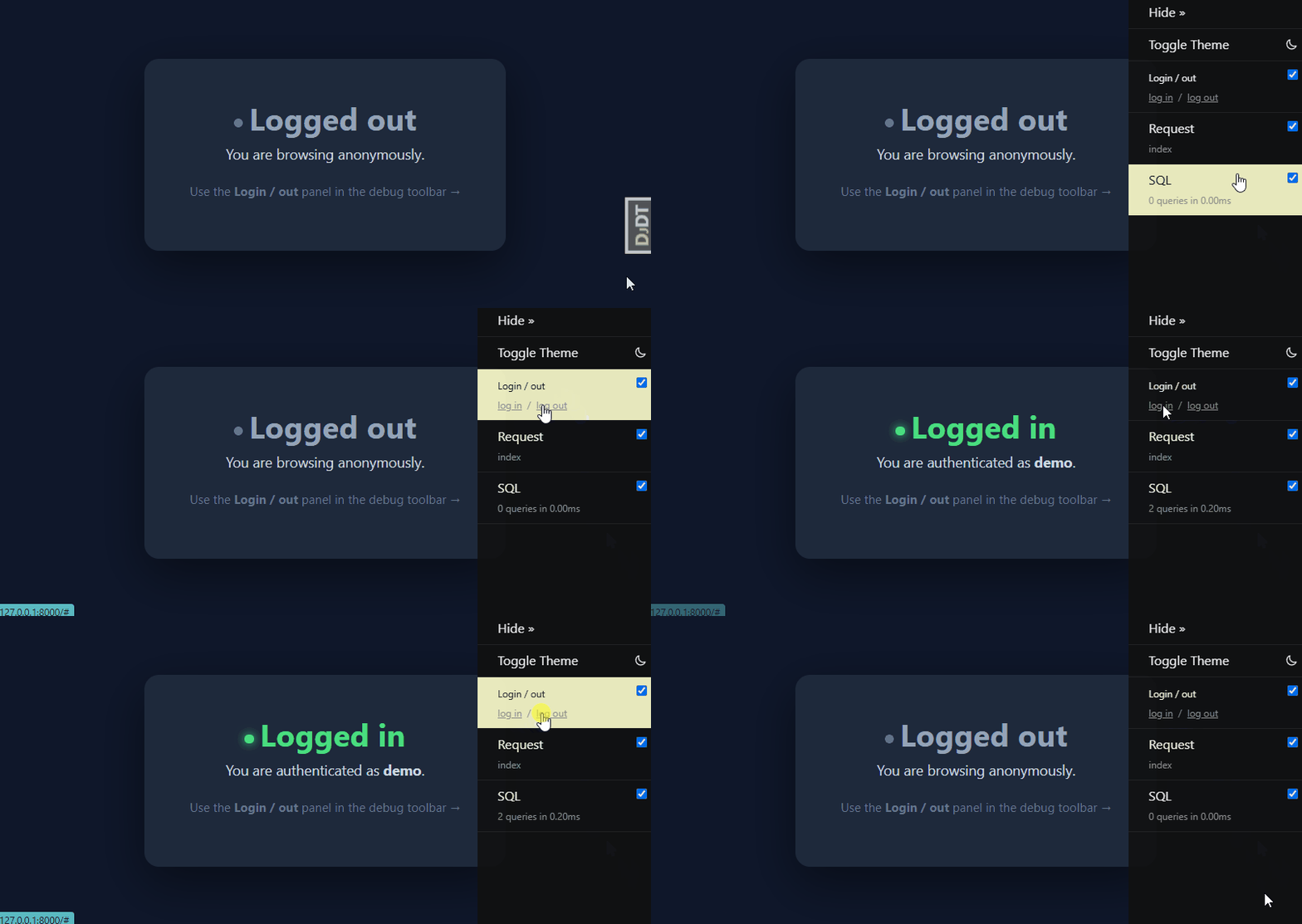
A Django Debug Toolbar panel that logs a configured user in or out with one click – handy during local development when you constantly need to jump between an authenticated and an anonymous session.
The panel adds a small log in / log out control to the toolbar sidebar. Each
click hits a tiny JSON endpoint that calls Django's login() / logout() for a
username you configure, then reloads the page.
Try it (no install)
With uv you can run a self-contained demo straight
from GitHub – no clone, no virtualenv, no pip install:
uv run https://raw.githubusercontent.com/andytwoods/django-loginout-panel/master/demo/app.py
uv provisions a matching Python and all dependencies in a throwaway environment,
then serves the demo at http://127.0.0.1:8000/. See demo/ for a
conventional multi-file version and more detail.
Requirements
- Python 3.12+
- Django 5.2+
- django-debug-toolbar 6.0+
Installation
pip install django-loginout-panel
Or straight from a git checkout:
pip install git+https://github.com/andytwoods/django-loginout-panel.git
Setup
This is a development-only tool. Add it alongside your existing debug
toolbar configuration – typically in a local.py / dev.py settings module,
never in production.
# settings/local.py

INSTALLED_APPS += [
    "debug_toolbar",
    "loginout_panel",
]

DEBUG_TOOLBAR_PANELS = [
    "loginout_panel.LoginOutPanel",
    # ... your other panels ...
    "debug_toolbar.panels.headers.HeadersPanel",
    "debug_toolbar.panels.sql.SQLPanel",
]

# The user to log in as when you click "log in".
LOGINOUT_USERNAME = "me@example.com"

# Optional: only allow the panel's endpoints from this client IP.
# Leave unset to rely on the toolbar's own SHOW_TOOLBAR_CALLBACK / DEBUG gate.
LOGINOUT_SERVER = "127.0.0.1"

# Optional: trust the X-Forwarded-For header when matching LOGINOUT_SERVER.
# Only enable this behind a reverse proxy that overwrites the header; otherwise
# a client can spoof the allowed IP. Defaults to False (REMOTE_ADDR is used).
LOGINOUT_TRUST_XFF = False
Make sure debug_toolbar is otherwise wired up as usual (middleware +
urls.py), per the
debug toolbar install docs.
Settings reference
| Setting | Required | Purpose |
|---|---|---|
LOGINOUT_USERNAME |
yes | Username (matched against your user model's USERNAME_FIELD) to log in as. Only active users are eligible. |
LOGINOUT_SERVER |
no | If set, only requests from this client IP may use the login/logout endpoints; all others get a 404. |
LOGINOUT_TRUST_XFF |
no | Trust X-Forwarded-For when resolving the client IP for LOGINOUT_SERVER. Enable only behind a trusted reverse proxy. Defaults to False. |
The login view authenticates using settings.AUTHENTICATION_BACKENDS[0] (falling
back to Django's ModelBackend when the setting is unset), so make sure your
first backend is the one you want.
Usage
- Run your dev server and open any page with the debug toolbar visible.
- Find the Login / out panel in the toolbar.
- Click log in to become
LOGINOUT_USERNAME, or log out to drop to an anonymous session. The page reloads automatically.
Clicking the panel itself opens a body showing the current auth status and the configured username.
How it works
LoginOutPanelsubclassesdebug_toolbar.panels.Paneland registers two URLs under the toolbar'sdjdtnamespace:loginout_loginandloginout_logout.- The endpoints return JSON and are POST-only, CSRF-protected, and layered
behind the toolbar's own
SHOW_TOOLBAR_CALLBACK, an explicitsettings.DEBUGcheck, and the optionalon_local_server(LOGINOUT_SERVER) IP guard. Any of those failing yields a404(or405/403for wrong method / missing token). - No models, no migrations – it only reads settings and calls the standard auth functions.
Security note
Never enable this in production. It provides an unauthenticated way to log in as an arbitrary account. It is defended in depth so an accidental production deploy still fails closed:
- POST + CSRF only. The endpoints reject
GETand require a CSRF token, so a stray<img src>/link cannot silently log a browser in. DEBUGgate. They404wheneversettings.DEBUGis off – independent of the toolbar's callback, which a project might loosen to show the toolbar to staff in production.- Toolbar callback. They also honour
SHOW_TOOLBAR_CALLBACK, so they are only reachable where the toolbar itself is. - Active users only, first backend. Only active accounts can be logged in,
via
AUTHENTICATION_BACKENDS[0]. LOGINOUT_SERVERis an extra belt-and-braces IP check.X-Forwarded-Foris ignored unless you explicitly opt in withLOGINOUT_TRUST_XFFbehind a trusted proxy, so the allowlist cannot be spoofed by default.
Still: keep it in a dev-only settings module and never ship it enabled.
License
MIT – see LICENSE.
1 maintainer

Metadata
1 maintainer
Release files for django-loginout-panel 0.1.0
For a detailed explanation of source distributions (sdists) and built distributions (wheels), please see the package formats documentation.
Source distribution (sdist)
| File | Size | Uploaded | |
|---|---|---|---|
| django_loginout_panel-0.1.0.tar.gz | 9.6 kB | Details |
Built distribution (wheel)
| File | Interpreter | ABI | Platform | Reset |
|---|---|---|---|---|
| django_loginout_panel-0.1.0-py3-none-any.whl | Python 3 | none | any | Details |
Total release size: 20.5 kB
Release files / django_loginout_panel-0.1.0.tar.gz
| Download URL | django_loginout_panel-0.1.0.tar.gz |
|---|---|
| Size | 9.6 kB |
| Tags | Source |
|
SHA-256 checksum How to use checksums |
e96db332fbd466a69324f38aff6f785d091ee6a39bdfe4784cb72d01f6f32f00
|
|
BLAKE2b-256 checksum How to use checksums |
d0a5c531c22f60a0cbd42a569c5a1cd658df71fc9879589de703f4c413a7a664
|
| Upload date | |
|
Uploaded using Trusted Publishing? What is trusted publishing? |
Yes |
| Uploaded via |
twine/6.1.0 CPython/3.13.12
|
Provenance
Provenance describes where a file came from. On PyPI, provenance is shared via attestations, which provide a verifiable record of the build or publishing details. View details, limitations and caveats.


PyPI Publish Attestation
PyPI verified that this artifact, at this checksum, originated from the publisher listed below.
Signed by GitHub Actions, verified by PyPI on Jul 3, 2026.
Transparency logRelease files / django_loginout_panel-0.1.0-py3-none-any.whl
| Download URL | django_loginout_panel-0.1.0-py3-none-any.whl |
|---|---|
| Size | 11.0 kB |
| Tags | Python 3 |
|
SHA-256 checksum How to use checksums |
7ead4652b55230c75f5dd73f98d42a090a9cc1d666dc75a007e18e186cbc3060
|
|
BLAKE2b-256 checksum How to use checksums |
8a58a7d3beb89923a8b12c78f94901b8d476a4e9b9bd509d9813e1052f04890f
|
| Upload date | |
|
Uploaded using Trusted Publishing? What is trusted publishing? |
Yes |
| Uploaded via |
twine/6.1.0 CPython/3.13.12
|
Provenance
Provenance describes where a file came from. On PyPI, provenance is shared via attestations, which provide a verifiable record of the build or publishing details. View details, limitations and caveats.
PyPI Publish Attestation
PyPI verified that this artifact, at this checksum, originated from the publisher listed below.
Signed by GitHub Actions, verified by PyPI on Jul 3, 2026.
Transparency log












