
Django Debug Toolbar - Mail Panel

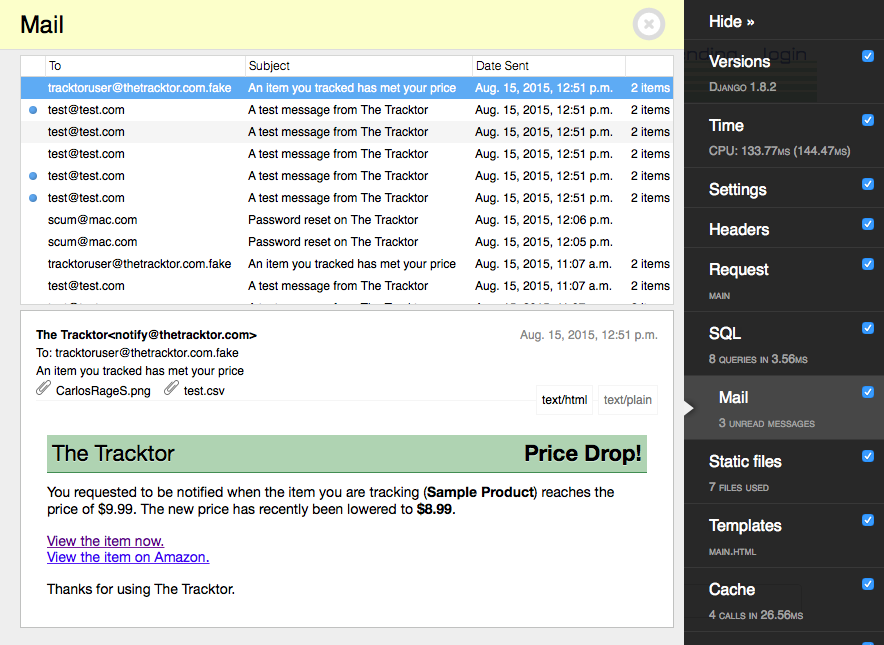
Testing and debugging e-mail while developing a Django app has never been pleasant. Sending e-mail to a file-based backend requires a user to click through obtusely-named files and does not provide a way to preview rendered HTML. Sending e-mail to a valid mailbox incurs a delay as the message is processed though a mail server, and clutters a developer's inbox.
The mail panel attempts to address these problems by providing a way to preview emails within the browser using django-debug-toolbar.
This mail panel is released under the Apache license. If you like it, please consider contributing!
Special thanks to @ShawnMilo for the code review.
Installation
To install the mail panel, first install this package with pip install django-mail-panel. Then add the mail_panel app after debug_toolbarto the INSTALLED_APPS setting:
INSTALLED_APPS = (
    ...
    'debug_toolbar',
    'mail_panel',
)
and add the panel DEBUG_TOOLBAR_PANELS:
DEBUG_TOOLBAR_PANELS = (
    ...
    'mail_panel.panels.MailToolbarPanel',
)
Collect static and you'll be good to go.
./manage.py collectstatic
Configuration
After installation, you now need to redirect mail to the mail toolbar. Change your email backend to the following:
EMAIL_BACKEND = 'mail_panel.backend.MailToolbarBackend'
Important: This plugin uses Django's cache backend to store messages. If you are using DummyCache, the mail panel will use a local memory cache, and will reset messages when the server is restarted.
[Optional] By default, mail toolbar stores messages for one day before removing them from cache. You can change this with the following setting:
MAIL_TOOLBAR_TTL = 86400 # 1 Day
[Optional]
If you use the DEBUG_TOOLBAR_PANELS to custom order your panels:
    DEBUG_TOOLBAR_PANELS = [
        'debug_toolbar.panels.versions.VersionsPanel',
        'debug_toolbar.panels.timer.TimerPanel',
        'debug_toolbar.panels.settings.SettingsPanel',
        'debug_toolbar.panels.headers.HeadersPanel',
        'debug_toolbar.panels.request.RequestPanel',
        'debug_toolbar.panels.sql.SQLPanel',
        'debug_toolbar.panels.staticfiles.StaticFilesPanel',
        'debug_toolbar.panels.templates.TemplatesPanel',
        'debug_toolbar.panels.cache.CachePanel',
        'debug_toolbar.panels.signals.SignalsPanel',
        'debug_toolbar.panels.logging.LoggingPanel',
        'debug_toolbar.panels.redirects.RedirectsPanel',
        'mail_panel.panels.MailToolbarPanel',
    ]
Testing
To preview emails sent from your test suite, add the email backend override to your tests with the following:
from django.test.utils import override_settings

@override_settings(EMAIL_BACKEND='mail_panel.backend.MailToolbarBackend')
def test_send_email(self):
    # your code here
The backend works similarly to the standard email backend and code should not need to be reworked when using the MailToolbarBackend.
from django.core import mail

original_outbox = len(mail.outbox)
# Send mail ...
assert(len(mail.outbox) == original_outbox + 1)
Shameless Plugs
Like Django Mail Panel? Be sure to check out and support these other tools for Mac that will improve your workflow:
Kubermagic - Automate, and script away tedious kubectl commands with Kubermagic; a UI for developers, QA teams, and those starting to learn the ins-and-outs of Kubernetes.
Red - A visual and interactive Redis client, featuring live updating keys, an interactive console, pub/sub, lua script support and much more.
1 maintainer

Metadata
1 maintainer
Release files for django-mail-panel 3.2.6
For a detailed explanation of source distributions (sdists) and built distributions (wheels), please see the package formats documentation.
Source distribution (sdist)
| File | Size | Uploaded | Provenance | Actions |
|---|---|---|---|---|
| django-mail-panel-3.2.6.tar.gz | 15.7 kB | Without provenance | Details for django-mail-panel-3.2.6.tar.gz |
Built distribution (wheel)
| File | Interpreter | ABI | Platform | Actions Reset |
|---|---|---|---|---|
| django_mail_panel-3.2.6-py3-none-any.whl | Python 3 | none | any | Details for django_mail_panel-3.2.6-py3-none-any.whl |
Total release size: 32.7 kB
Release files / django-mail-panel-3.2.6.tar.gz
| Download URL | django-mail-panel-3.2.6.tar.gz |
|---|---|
| Size | 15.7 kB |
| Tags | Source |
|
SHA-256 checksum How to use checksums |
f5265339f26ab0d1fa86a9c5e48688b5cc3c18099e6bab2183cb522e8022dda8
|
|
BLAKE2b-256 checksum How to use checksums |
81798e47a2b9750b6c665b1f3e5d7f82275c8b4265bc0d96b925dbc448a843fb
|
| Upload date | |
|
Uploaded using Trusted Publishing? What is trusted publishing? |
No |
| Uploaded via |
poetry/1.1.4 CPython/3.9.1 Darwin/20.3.0
|
Release files / django_mail_panel-3.2.6-py3-none-any.whl
| Download URL | django_mail_panel-3.2.6-py3-none-any.whl |
|---|---|
| Size | 17.0 kB |
| Tags | Python 3 |
|
SHA-256 checksum How to use checksums |
b2d0823e500c881f185b423166c62c40e5d48a23d8cf05c2c541f3b45cfbe85a
|
|
BLAKE2b-256 checksum How to use checksums |
53fe3c188f8f8b973ef1b7b1251746c6ee6cd73c1b24ac44f0c1afb17a189377
|
| Upload date | |
|
Uploaded using Trusted Publishing? What is trusted publishing? |
No |
| Uploaded via |
poetry/1.1.4 CPython/3.9.1 Darwin/20.3.0
|
Security for django-mail-panel 3.2.6
Provenance
Provenance describes where a file came from. On PyPI, provenance is shared via attestations, which provide a verifiable record of the build or publishing details. View details, limitations and caveats.
No provenance found
None of the files in this release were uploaded with provenance metadata.
A note on package security
PyPI is a repository for distributing packages, not a service for auditing them. While third-party security researchers and our staff do their best to detect and remove malicious packages, PyPI cannot guarantee the quality, security or suitability of any given package.
To learn more about protecting yourself from malicious actors, visit our package security documentation.














