
A panel for django-debug-toolbar that allows for viewing of recently sent email.

Project description
Django Debug Toolbar - Mail Panel

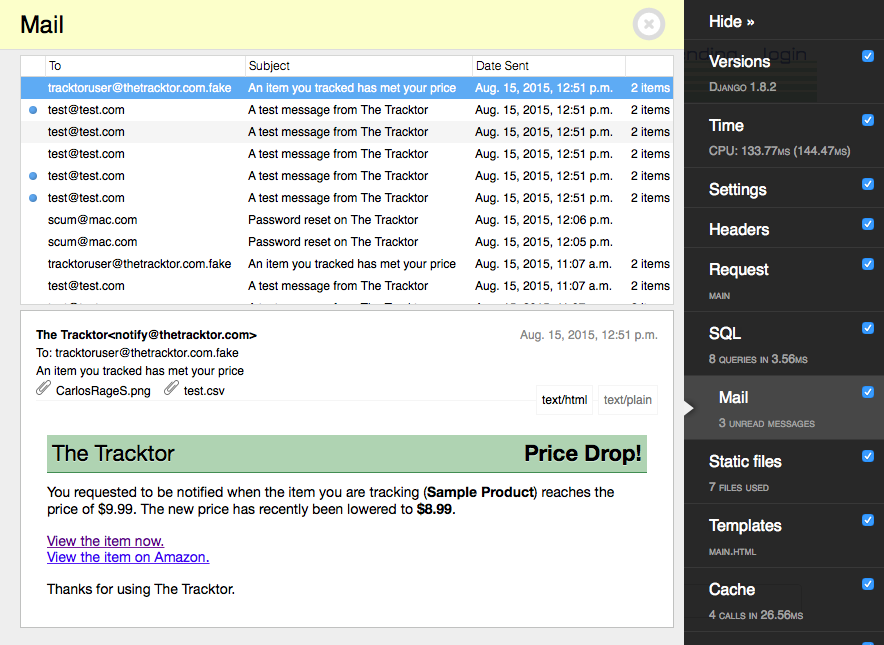
Testing and debugging e-mail while developing a Django app has never been pleasant. Sending e-mail to a file-based backend requires a user to click through obtusely-named files and does not provide a way to preview rendered HTML. Sending e-mail to a valid mailbox incurs a delay as the message is processed though a mail server, and clutters a developer's inbox.
The mail panel attempts to address these problems by providing a way to preview emails within the browser using django-debug-toolbar.
This mail panel is released under the Apache license. If you like it, please consider contributing!
Special thanks to @ShawnMilo for the code review.
Installation
To install the mail panel, first install this package with pip install django-mail-panel. Then add the mail_panel app after debug_toolbarto the INSTALLED_APPS setting:
INSTALLED_APPS = (
    ...
    'debug_toolbar',
    'mail_panel',
)
and add the panel DEBUG_TOOLBAR_PANELS:
DEBUG_TOOLBAR_PANELS = (
    ...
    'mail_panel.panels.MailToolbarPanel',
)
Collect static and you'll be good to go.
./manage.py collectstatic
Configuration
After installation, you now need to redirect mail to the mail toolbar. Change your email backend to the following:
EMAIL_BACKEND = 'mail_panel.backend.MailToolbarBackend'
Important: This plugin uses Django's cache backend to store messages. If you are using DummyCache, the mail panel will use a local memory cache, and will reset messages when the server is restarted.
[Optional] By default, mail toolbar stores messages for one day before removing them from cache. You can change this with the following setting:
MAIL_TOOLBAR_TTL = 86400 # 1 Day
[Optional]
If you use the DEBUG_TOOLBAR_PANELS to custom order your panels:
    DEBUG_TOOLBAR_PANELS = [
        "debug_toolbar.panels.history.HistoryPanel",
        "debug_toolbar.panels.versions.VersionsPanel",
        "debug_toolbar.panels.timer.TimerPanel",
        "debug_toolbar.panels.settings.SettingsPanel",
        "debug_toolbar.panels.headers.HeadersPanel",
        "debug_toolbar.panels.request.RequestPanel",
        "debug_toolbar.panels.sql.SQLPanel",
        "debug_toolbar.panels.staticfiles.StaticFilesPanel",
        "debug_toolbar.panels.templates.TemplatesPanel",
        "debug_toolbar.panels.cache.CachePanel",
        "debug_toolbar.panels.signals.SignalsPanel",
        "debug_toolbar.panels.logging.LoggingPanel",
        "debug_toolbar.panels.redirects.RedirectsPanel",
        "debug_toolbar.panels.profiling.ProfilingPanel",
        "mail_panel.panels.MailToolbarPanel",  # reposition to desired location
    ]
Testing
To preview emails sent from your test suite, add the email backend override to your tests with the following:
from django.test.utils import override_settings

@override_settings(EMAIL_BACKEND='mail_panel.backend.MailToolbarBackend')
def test_send_email(self):
    # your code here
The backend works similarly to the standard email backend and code should not need to be reworked when using the MailToolbarBackend.
from django.core import mail

original_outbox = len(mail.outbox)
# Send mail ...
assert(len(mail.outbox) == original_outbox + 1)
Contributing
Install the development dependencies:
poetry install --with dev
Run the tests on your current python:
pytest .
Shameless Plugs
Like Django Mail Panel? Be sure to check out and support this other tool for Mac that will improve your workflow:
Red - A visual and interactive Redis client, featuring live updating keys, an interactive console, pub/sub, lua script support and much more.
Release history Release notifications | RSS feed


Download files
Download the file for your platform. If you're not sure which to choose, learn more about installing packages.
Source Distribution
Built Distribution
Filter files by name, interpreter, ABI, and platform.
If you're not sure about the file name format, learn more about wheel file names.
Copy a direct link to the current filters
File details
Details for the file django_mail_panel-4.1.1.tar.gz.
File metadata
- Download URL: django_mail_panel-4.1.1.tar.gz
- Upload date:
- Size: 15.8 kB
- Tags: Source
- Uploaded using Trusted Publishing? No
- Uploaded via: poetry/2.1.3 CPython/3.11.1 Darwin/24.2.0
File hashes
| Algorithm | Hash digest | |
|---|---|---|
| SHA256 |
8766e8954c515f51d969537d5375e4d5094ef831a25307b67b1cfc8f19f71bd4
|
|
| MD5 |
d8f1a0bab9b62c8678c9e6184f896716
|
|
| BLAKE2b-256 |
f0484b3a628e0a0797e79d4ce67559a7ce286c5dd7c19528c84ea7862357147e
|
File details
Details for the file django_mail_panel-4.1.1-py3-none-any.whl.
File metadata
- Download URL: django_mail_panel-4.1.1-py3-none-any.whl
- Upload date:
- Size: 17.8 kB
- Tags: Python 3
- Uploaded using Trusted Publishing? No
- Uploaded via: poetry/2.1.3 CPython/3.11.1 Darwin/24.2.0
File hashes
| Algorithm | Hash digest | |
|---|---|---|
| SHA256 |
640090dfc5721bcb138e11a77a43f17b7c3664b73ba055a332713fdd5e5814df
|
|
| MD5 |
fc595fb6d42990fcf3547f4ee86d80db
|
|
| BLAKE2b-256 |
77e0547437c9ec7d31cf43b38a0e9405f1f9daa3be36cba639f3557c7ab3822f
|






