
django-markdown-widget
A GitHub-style markdown editor widget for Django forms and admin.






Documentation | PyPI | GitHub
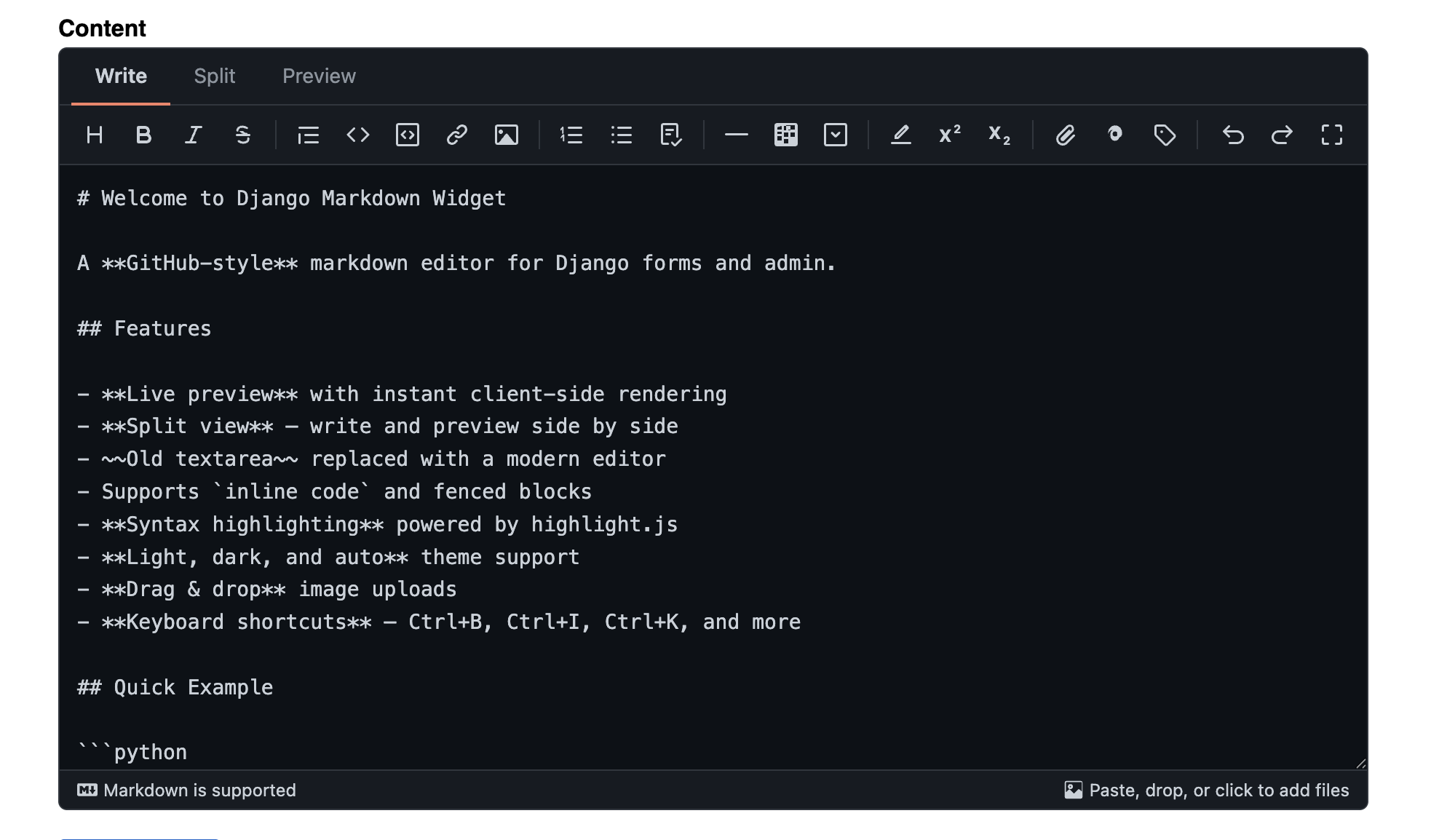
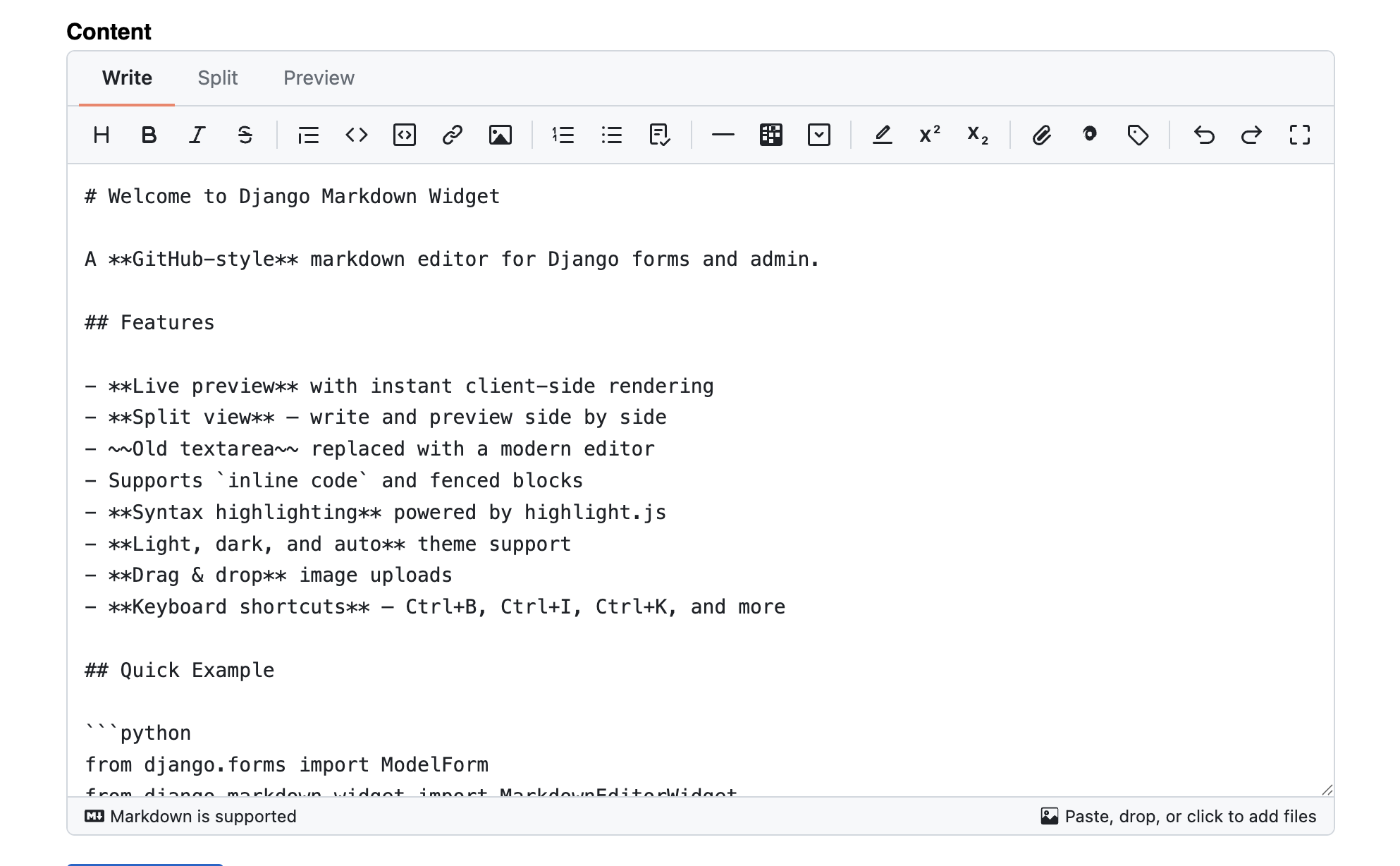
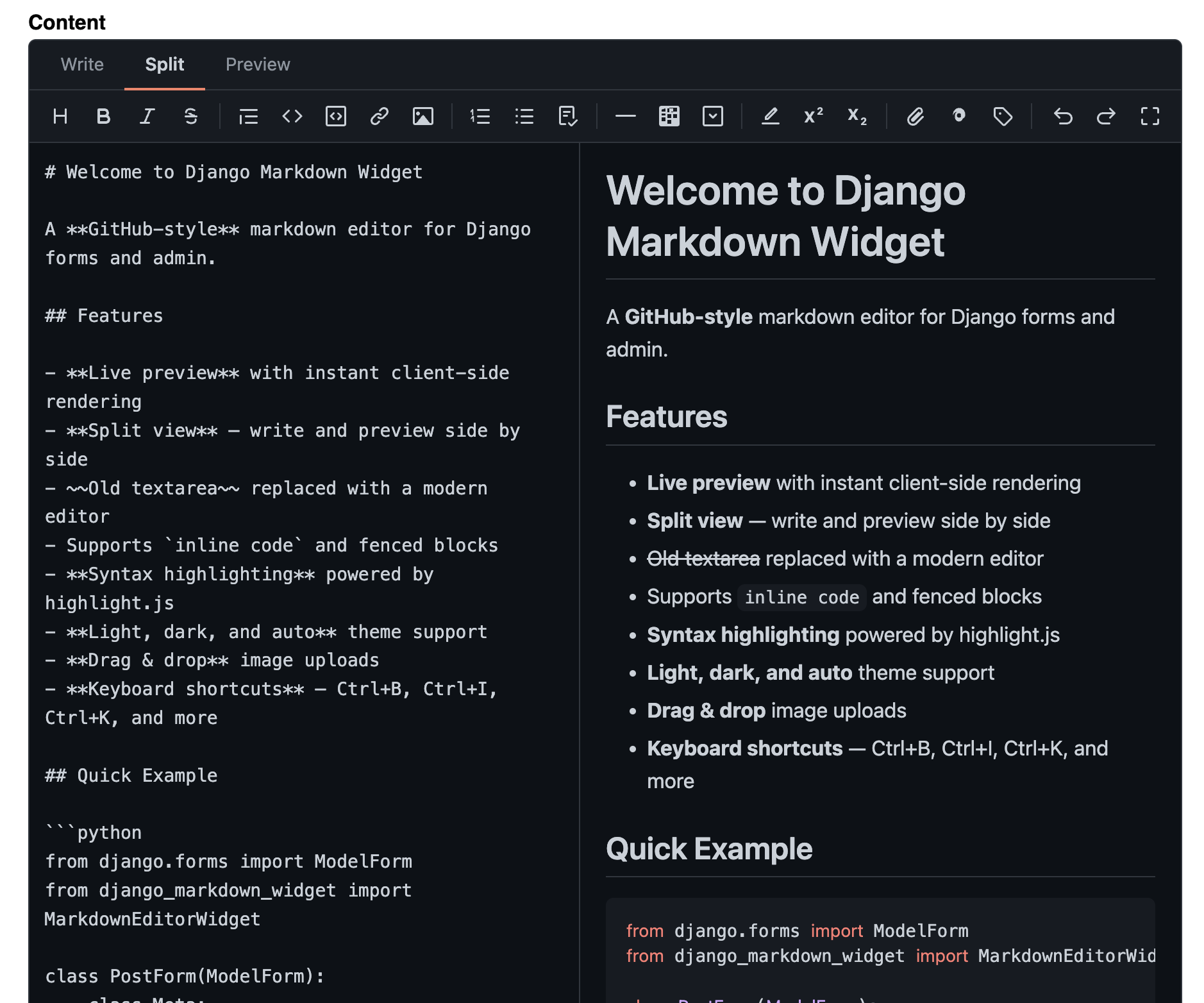
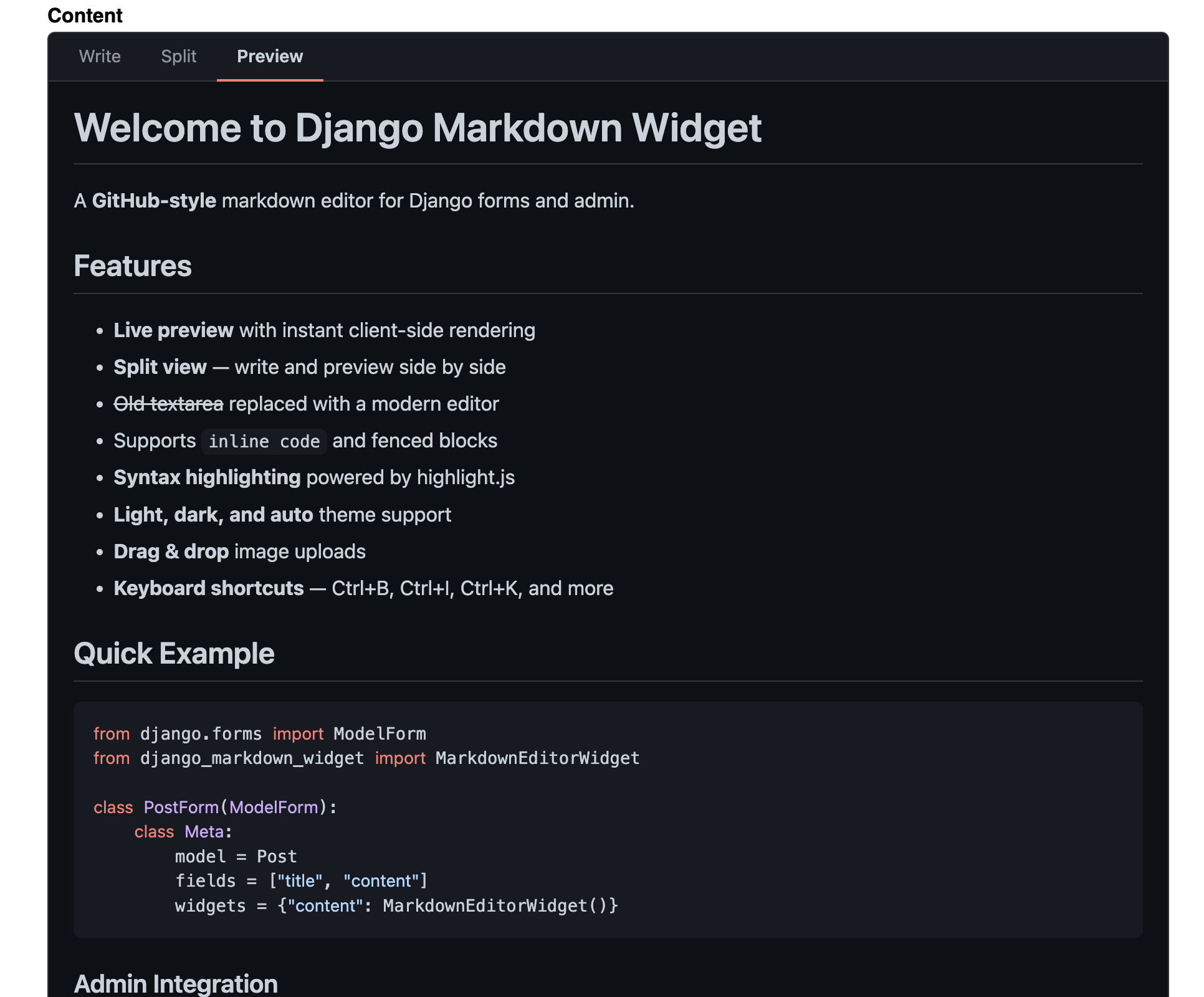
Screenshots
| Dark (default) | Light |
|---|---|
 |
 |
| Split View | Preview |
|---|---|
 |
 |
Features
- Three view modes -- Write, Split (side-by-side live preview), Preview
- Syntax highlighting for code blocks via highlight.js (GitHub themes)
- Rich toolbar -- text formatting, headings, lists, code, tables, media, embeds
- Image, video, and document uploads with drag & drop support
- Embed support -- paste YouTube, Vimeo, CodePen URLs or raw
<iframe>code - Autosave -- drafts saved to browser localStorage, survives page reloads
- Draggable split divider -- resize editor/preview panels
- Temp upload system -- files upload to temp storage, finalize on form submit
- Light, dark, and auto theme support
- Django admin integration via one-line mixin
- Template tag and filter for server-side markdown rendering
- Pluggable renderer and upload handler architecture
- Media cleanup -- automatic orphaned file deletion + management command
- Custom undo/redo history stack (100 states)
- HTML sanitization on both client and server side
- Keyboard shortcuts -- Ctrl+B, Ctrl+I, Ctrl+K, Ctrl+Z, etc.
- Zero hard dependencies beyond Django
Installation
pip install django-markdown-widget
Add to your INSTALLED_APPS and include the URLs:
# settings.py
INSTALLED_APPS = [
    ...
    "django_markdown_widget",
]

# urls.py
from django.urls import include, path

urlpatterns = [
    ...
    path("md-editor/", include("django_markdown_widget.urls")),
]
For server-side rendering (template tag/filter), install a markdown library:
pip install markdown
Quick Start
Form Widget
from django.forms import ModelForm
from django_markdown_widget import MarkdownEditorWidget

class PostForm(ModelForm):
    class Meta:
        model = Post
        fields = ["title", "content"]
        widgets = {
            "content": MarkdownEditorWidget(),
        }
Django Admin
from django.contrib import admin
from django_markdown_widget import MarkdownEditorAdminMixin

@admin.register(Post)
class PostAdmin(MarkdownEditorAdminMixin, admin.ModelAdmin):
    list_display = ["title", "created_at"]
    markdown_fields = ["content"]  # omit to apply to all TextFields
Template Rendering
{% load markdown_widget %}

{# As a filter (recommended) #}
{{ post.content|markdown }}

{# As a tag #}
{% markdown post.content %}
Media Cleanup
from django_markdown_widget import MarkdownCleanupMixin

class Post(MarkdownCleanupMixin, models.Model):
    content = models.TextField()
    # markdown_cleanup_fields = ["content"]  # optional: limit to specific fields
Enable in settings:
MD_EDITOR = {
    "CLEANUP_MEDIA": True,
}
Bulk cleanup via management command:
python manage.py cleanup_markdown_media --dry-run
python manage.py cleanup_markdown_media
Toolbar
Default toolbar layout, grouped by purpose:
| Group | Buttons |
|---|---|
| Text formatting | Bold, Italic, Strikethrough, Highlight |
| Structure | Heading, Quote, Horizontal rule |
| Code | Inline code, Code block |
| Lists | Bullet, Numbered, Task list |
| Links & media | Link, Image, Video, Document |
| Rich blocks | Table, Collapsible section, Embed |
| Extras | Superscript, Subscript |
| Actions | Undo, Redo |
Fullscreen toggle and autosave switch are in the top-right tabs bar.
Configuration
All settings are optional and go under MD_EDITOR in your Django settings:
MD_EDITOR = {
    # Pluggable backend classes
    "RENDERER_CLASS": "django_markdown_widget.renderers.DefaultRenderer",
    "UPLOAD_HANDLER_CLASS": "django_markdown_widget.uploads.DefaultUploadHandler",

    # Toolbar buttons (grouped by purpose)
    "TOOLBAR": [
        "bold", "italic", "strikethrough", "highlight", "separator",
        "heading", "quote", "horizontal-rule", "separator",
        "code", "code-block", "separator",
        "unordered-list", "ordered-list", "task-list", "separator",
        "link", "image", "video", "document", "separator",
        "table", "details", "embed", "separator",
        "superscript", "subscript", "separator",
        "undo", "redo",
    ],

    # Upload settings
    "ALLOWED_UPLOAD_TYPES": [
        "image/png", "image/jpeg", "image/gif", "image/webp",
        "video/mp4", "video/webm", "video/ogg",
        "application/pdf", "application/zip", "text/plain", "text/csv",
        "application/json",
        "application/vnd.openxmlformats-officedocument.wordprocessingml.document",
        "application/vnd.openxmlformats-officedocument.spreadsheetml.sheet",
        "application/vnd.openxmlformats-officedocument.presentationml.presentation",
    ],
    "MAX_UPLOAD_SIZE": 50 * 1024 * 1024,  # 50 MB
    "UPLOAD_PATH": "md-editor/uploads/%Y/%m/",
    "TEMP_UPLOAD_PATH": "md-editor/tmp/",
    "TEMP_MAX_AGE": 86400,  # 24 hours

    # Editor defaults
    "DEFAULT_HEIGHT": "300px",
    "PLACEHOLDER": "Add your comment here...",
    "THEME": "auto",  # "light", "dark", or "auto"

    # Security
    "REQUIRE_AUTH": True,

    # Media cleanup
    "CLEANUP_MEDIA": False,
}
Custom Renderer
from django_markdown_widget import BaseRenderer

class MyRenderer(BaseRenderer):
    def render(self, markdown_text: str) -> str:
        import markdown_it
        md = markdown_it.MarkdownIt()
        return md.render(markdown_text)
MD_EDITOR = {
    "RENDERER_CLASS": "myapp.renderers.MyRenderer",
}
Custom Upload Handler
from django_markdown_widget import BaseUploadHandler

class S3UploadHandler(BaseUploadHandler):
    def validate(self, file):
        # your validation logic
        pass

    def save(self, file) -> str:
        # save to S3 and return the URL
        return url
MD_EDITOR = {
    "UPLOAD_HANDLER_CLASS": "myapp.uploads.S3UploadHandler",
}
Development
git clone https://github.com/ganiyevuz/django-md-editor.git
cd django-md-editor
uv sync --group dev
make test
make lint
Run the example app:
cd example
python manage.py migrate
python manage.py createsuperuser
python manage.py runserver
License
MIT License. See LICENSE for details.
1 maintainer

Metadata
1 maintainer
Release files for django-markdown-widget 2.0.1
For a detailed explanation of source distributions (sdists) and built distributions (wheels), please see the package formats documentation.
Source distribution (sdist)
| File | Size | Uploaded | Provenance | Actions |
|---|---|---|---|---|
| django_markdown_widget-2.0.1.tar.gz | 1.2 MB | Without provenance | Details for django_markdown_widget-2.0.1.tar.gz |
Built distribution (wheel)
| File | Interpreter | ABI | Platform | Actions Reset |
|---|---|---|---|---|
| django_markdown_widget-2.0.1-py3-none-any.whl | Python 3 | none | any | Details for django_markdown_widget-2.0.1-py3-none-any.whl |
Total release size: 1.4 MB
Release files / django_markdown_widget-2.0.1.tar.gz
| Download URL | django_markdown_widget-2.0.1.tar.gz |
|---|---|
| Size | 1.2 MB |
| Tags | Source |
|
SHA-256 checksum How to use checksums |
8c97d7739504320180360f2b26d8abb746741d8e2fc466a8760bdc860cb3c311
|
|
BLAKE2b-256 checksum How to use checksums |
abb9160416a55795f52b3162e9e259e505ed194dd33328c17948c06e4ca1a85d
|
| Upload date | |
|
Uploaded using Trusted Publishing? What is trusted publishing? |
Yes |
| Uploaded via |
uv/0.11.2 {"installer":{"name":"uv","version":"0.11.2","subcommand":["publish"]},"python":null,"implementation":{"name":null,"version":null},"distro":{"name":"Ubuntu","version":"24.04","id":"noble","libc":null},"system":{"name":null,"release":null},"cpu":null,"openssl_version":null,"setuptools_version":null,"rustc_version":null,"ci":true}
|
Release files / django_markdown_widget-2.0.1-py3-none-any.whl
| Download URL | django_markdown_widget-2.0.1-py3-none-any.whl |
|---|---|
| Size | 126.8 kB |
| Tags | Python 3 |
|
SHA-256 checksum How to use checksums |
debd92d23604d8da5f20e62a5969d59a59d8b08cd672979847aa1898c345b891
|
|
BLAKE2b-256 checksum How to use checksums |
263164719fd3d31f5e143765dd3973bfbd189f3d3c618e9bf2feab76501b07f5
|
| Upload date | |
|
Uploaded using Trusted Publishing? What is trusted publishing? |
Yes |
| Uploaded via |
uv/0.11.2 {"installer":{"name":"uv","version":"0.11.2","subcommand":["publish"]},"python":null,"implementation":{"name":null,"version":null},"distro":{"name":"Ubuntu","version":"24.04","id":"noble","libc":null},"system":{"name":null,"release":null},"cpu":null,"openssl_version":null,"setuptools_version":null,"rustc_version":null,"ci":true}
|
Security for django-markdown-widget 2.0.1
Provenance
Provenance describes where a file came from. On PyPI, provenance is shared via attestations, which provide a verifiable record of the build or publishing details. View details, limitations and caveats.
No provenance found
None of the files in this release were uploaded with provenance metadata.
A note on package security
PyPI is a repository for distributing packages, not a service for auditing them. While third-party security researchers and our staff do their best to detect and remove malicious packages, PyPI cannot guarantee the quality, security or suitability of any given package.
To learn more about protecting yourself from malicious actors, visit our package security documentation.














