
A simple custom field for Django that can safely render Markdown and store it in the database.
Verified details
These details have been verified by PyPIProject links
GitHub Statistics
Maintainers

Project description
django-markdownfield 
A simple custom field for Django that can safely render Markdown and store it in the database.
Your text is stored in a MarkdownField. When the model is saved, django-markdownfield will
parse the Markdown, render it, sanitise it with nh3, and store
the result in a RenderedMarkdownField for display to end users.
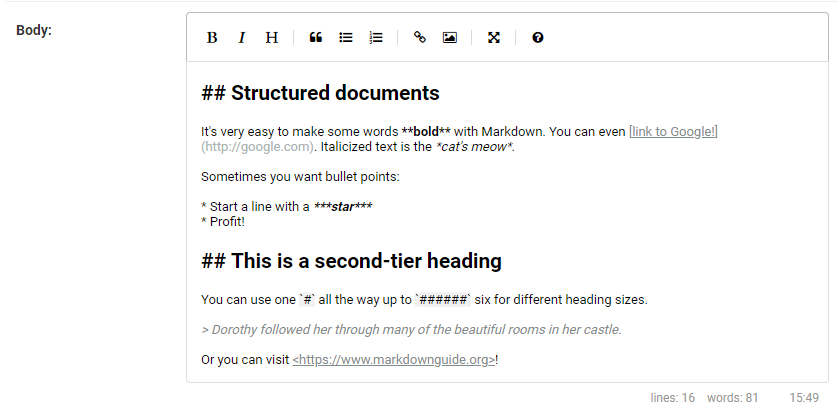
django-markdownfield also bundles a minified version of the EasyMDE editor (v2.20.0) for use in admin and frontend forms.
Installation
django-markdownfield can be installed from PyPI:
pip install django-markdownfield
After installation, you need to add markdownfield to INSTALLED_APPS of your Django project's settings.
INSTALLED_APPS = [
    "markdownfield",
    ...
    "django.contrib.staticfiles",
]
To enable the admin preview endpoint, add the URL configuration:
urlpatterns = [
    path('markdownfield/', include('markdownfield.urls')),
    ...
]
Usage
Add a MarkdownField and a paired RenderedMarkdownField to your model:
from django.db import models

from markdownfield.models import MarkdownField, RenderedMarkdownField
from markdownfield.validators import VALIDATOR_STANDARD

class Page(models.Model):
    text = MarkdownField(rendered_field='text_rendered', validator=VALIDATOR_STANDARD)
    text_rendered = RenderedMarkdownField()
Whenever your model is saved, the RenderedMarkdownField will be updated automatically.
Displaying content
To display the rendered markdown in your template, just display the RenderedMarkdownField like any other field.
{{ post.text_rendered }}
Using the template filter
If you don't want to use a RenderedMarkdownField, use the template filter to render Markdown in your templates directly:
{% load markdownfield %}

{{ post.raw_text|render_markdown }}
{{ post.raw_text|render_markdown:"classy" }}
The argument is a validator name (standard, classy, basic, null). Defaults to standard.
Using render_markdown() directly
from markdownfield.rendering import render_markdown
from markdownfield.validators import VALIDATOR_STANDARD

html = render_markdown('**bold**', VALIDATOR_STANDARD)
Editor
The bundled EasyMDE editor is available in both admin and frontend forms.
Admin
The EasyMDE editor is enabled automatically in the Django admin. To disable it:
text = MarkdownField(rendered_field='text_rendered', use_admin_editor=False)
Frontend forms
The editor widget is also included automatically in frontend ModelForms. You must include the
form's media in your template or the editor's JavaScript and CSS will not load:
<head>
    {{ form.media.css }}
</head>
<body>
    <form method="post">
        {% csrf_token %}
        {{ form }}
        <button type="submit">Save</button>
    </form>
    {{ form.media.js }}
</body>
To disable the editor in frontend forms:
text = MarkdownField(rendered_field='text_rendered', use_editor=False)
To customise the EasyMDE options, override the widget in your form. Any
EasyMDE configuration option can be
passed via the options dict:
from django import forms
from markdownfield.widgets import MDEWidget

class PostForm(forms.ModelForm):
    class Meta:
        model = Post
        fields = ['text']
        widgets = {
            'text': MDEWidget(options={'toolbar': ['bold', 'italic', 'link']}),
        }
Configuration
All settings are optional.
| Setting | Default | Description |
|---|---|---|
SITE_URL |
None |
Your site's base URL (e.g. "https://example.com"). Used to distinguish internal from external links. Without it, all links are treated as external. |
MARKDOWN_EXTENSIONS |
['fenced_code'] |
List of Python-Markdown extensions to enable. |
MARKDOWN_EXTENSION_CONFIGS |
{} |
Configuration for Markdown extensions. |
MARKDOWN_LINK_BLACKLIST |
[] |
List of domains whose <a> links should be stripped from output (e.g. ['spam.example.com']). The link text is preserved; only the link itself is removed. |
MARKDOWN_MARK_EXTERNAL_LINKS |
True |
When True, external links receive target="_blank" and class="external". Set to False to disable. |
Validators
django-markdownfield comes with a number of validators, which are used to process and clean the output of the Markdown engine.
VALIDATOR_STANDARD
from markdownfield.validators import VALIDATOR_STANDARD
This validator strips any tags not used by standard Markdown.
VALIDATOR_CLASSY
from markdownfield.validators import VALIDATOR_CLASSY
Like VALIDATOR_STANDARD, but also allows class on links and images, and permits data-*
attributes. Useful for creating styled buttons and enhanced links.
VALIDATOR_BASIC
from markdownfield.validators import VALIDATOR_BASIC
Allows only inline formatting: bold, italic, strikethrough, inline code, and links.
VALIDATOR_NULL
from markdownfield.validators import VALIDATOR_NULL
Skips sanitization entirely. Not safe for user input. Allows arbitrary HTML in Markdown input.
Creating Custom Validators
To create a custom validator, create an instance of the markdownfield.validators.Validator dataclass:
from markdownfield.validators import Validator

# allows only bold and italic text
VALIDATOR_COMMENTS = Validator(
    allowed_tags={'b', 'i', 'strong', 'em'},
    allowed_attrs={},
)
You can also extend the built-in tag and attribute sets:
from markdownfield.validators import Validator, MARKDOWN_TAGS, MARKDOWN_ATTRS

VALIDATOR_CUSTOM = Validator(
    allowed_tags=MARKDOWN_TAGS,
    allowed_attrs={
        **MARKDOWN_ATTRS,
        'img': {'src', 'alt', 'title', 'class'},
        'a': {'href', 'alt', 'title', 'name', 'class'},
    },
    generic_attribute_prefixes={'data-'},
)
To allow inline CSS but restrict which properties are permitted:
VALIDATOR_STYLED = Validator(
    allowed_tags=MARKDOWN_TAGS,
    allowed_attrs={
        **MARKDOWN_ATTRS,
        '*': {'id', 'style'},
    },
    filter_style_properties={'color', 'font-weight', 'text-align'},
)
Note: filter_style_properties has no effect unless style is included in allowed_attrs. If style is allowed but filter_style_properties is not set, all CSS properties are permitted.
To restrict permitted URL schemes (e.g. block javascript: or custom schemes):
VALIDATOR_STRICT = Validator(
    allowed_tags=MARKDOWN_TAGS,
    allowed_attrs=MARKDOWN_ATTRS,
    url_schemes={'http', 'https', 'mailto'},
)
Management commands
rerender_markdown
Re-renders all MarkdownField values into their paired RenderedMarkdownFields. Useful after changing validators, markdown extensions, or upgrading django-markdownfield.
python manage.py rerender_markdown
python manage.py rerender_markdown --dry-run
Migrations
If you need to migrate from TextField or CharField to MarkdownField, add a RunPython step to your migration that calls save() on every existing instance so the rendered field is populated:
from django.db import migrations
import markdownfield.models


def save_text_rendered(apps, schema_editor):
    ExampleModel = apps.get_model('yourapp', 'ExampleModel')
    for examplemodel in ExampleModel.objects.all():
        examplemodel.save()


class Migration(migrations.Migration):

    dependencies = [
        ('yourapp', '000X_migrate_to_markdownfield'),
    ]

    operations = [
        migrations.AddField(
            model_name='yourapp',
            name='text_rendered',
            field=markdownfield.models.RenderedMarkdownField(default=''),
            preserve_default=False,
        ),
        migrations.AlterField(
            model_name='ExampleModel',
            name='text',
            field=markdownfield.models.MarkdownField(rendered_field='text_rendered'),
        ),
        migrations.RunPython(save_text_rendered),
    ]
License
This software is released under the MIT license.
Copyright (c) 2019-2026 Luke Rogers

Permission is hereby granted, free of charge, to any person obtaining a copy
of this software and associated documentation files (the "Software"), to deal
in the Software without restriction, including without limitation the rights
to use, copy, modify, merge, publish, distribute, sublicense, and/or sell
copies of the Software, and to permit persons to whom the Software is
furnished to do so, subject to the following conditions:

The above copyright notice and this permission notice shall be included in all
copies or substantial portions of the Software.

THE SOFTWARE IS PROVIDED "AS IS", WITHOUT WARRANTY OF ANY KIND, EXPRESS OR
IMPLIED, INCLUDING BUT NOT LIMITED TO THE WARRANTIES OF MERCHANTABILITY,
FITNESS FOR A PARTICULAR PURPOSE AND NONINFRINGEMENT. IN NO EVENT SHALL THE
AUTHORS OR COPYRIGHT HOLDERS BE LIABLE FOR ANY CLAIM, DAMAGES OR OTHER
LIABILITY, WHETHER IN AN ACTION OF CONTRACT, TORT OR OTHERWISE, ARISING FROM,
OUT OF OR IN CONNECTION WITH THE SOFTWARE OR THE USE OR OTHER DEALINGS IN THE
SOFTWARE.
Project details
Verified details
These details have been verified by PyPIProject links
GitHub Statistics
Maintainers
Release history Release notifications | RSS feed


Download files
Download the file for your platform. If you're not sure which to choose, learn more about installing packages.
Source Distribution
Built Distribution
Filter files by name, interpreter, ABI, and platform.
If you're not sure about the file name format, learn more about wheel file names.
Copy a direct link to the current filters
File details
Details for the file django_markdownfield-0.17.4.tar.gz.
File metadata
- Download URL: django_markdownfield-0.17.4.tar.gz
- Upload date:
- Size: 806.5 kB
- Tags: Source
- Uploaded using Trusted Publishing? Yes
- Uploaded via: twine/6.1.0 CPython/3.13.7
File hashes
| Algorithm | Hash digest | |
|---|---|---|
| SHA256 |
60a4232d1fa8383039f437d116aea87552746fa46c39638167913d69ba9e0549
|
|
| MD5 |
b67959362bcdf6250882e6666ac6f6ce
|
|
| BLAKE2b-256 |
9fe84d8d200960c4700249df721c7e1946468c7fead30aa8dcec3d9978efcf20
|
Provenance
The following attestation bundles were made for django_markdownfield-0.17.4.tar.gz:
Publisher:
release.yml on dmptrluke/django-markdownfield
-
Statement:
-
Statement type:
https://in-toto.io/Statement/v1 -
Predicate type:
https://docs.pypi.org/attestations/publish/v1 -
Subject name:
django_markdownfield-0.17.4.tar.gz -
Subject digest:
60a4232d1fa8383039f437d116aea87552746fa46c39638167913d69ba9e0549 - Sigstore transparency entry: 1202909885
- Sigstore integration time:
-
Permalink:
dmptrluke/django-markdownfield@7ebb161d85a617ff2110984d0d788b8b585a6238 -
Branch / Tag:
refs/tags/v0.17.4 - Owner: https://github.com/dmptrluke
-
Access:
public
-
Token Issuer:
https://token.actions.githubusercontent.com -
Runner Environment:
github-hosted -
Publication workflow:
release.yml@7ebb161d85a617ff2110984d0d788b8b585a6238 -
Trigger Event:
push
-
Statement type:
File details
Details for the file django_markdownfield-0.17.4-py3-none-any.whl.
File metadata
- Download URL: django_markdownfield-0.17.4-py3-none-any.whl
- Upload date:
- Size: 765.0 kB
- Tags: Python 3
- Uploaded using Trusted Publishing? Yes
- Uploaded via: twine/6.1.0 CPython/3.13.7
File hashes
| Algorithm | Hash digest | |
|---|---|---|
| SHA256 |
458384dc10ca381fde23a6389169211b1d667e5bd9fc260504179b7cfe32c7f7
|
|
| MD5 |
82ce08bd1a98e6d712f1a0d3f42a537e
|
|
| BLAKE2b-256 |
5b9581a6d22e83b16f4c53a299e0a15ef55ea005315db8dcea230c933fc7025b
|
Provenance
The following attestation bundles were made for django_markdownfield-0.17.4-py3-none-any.whl:
Publisher:
release.yml on dmptrluke/django-markdownfield
-
Statement:
-
Statement type:
https://in-toto.io/Statement/v1 -
Predicate type:
https://docs.pypi.org/attestations/publish/v1 -
Subject name:
django_markdownfield-0.17.4-py3-none-any.whl -
Subject digest:
458384dc10ca381fde23a6389169211b1d667e5bd9fc260504179b7cfe32c7f7 - Sigstore transparency entry: 1202909928
- Sigstore integration time:
-
Permalink:
dmptrluke/django-markdownfield@7ebb161d85a617ff2110984d0d788b8b585a6238 -
Branch / Tag:
refs/tags/v0.17.4 - Owner: https://github.com/dmptrluke
-
Access:
public
-
Token Issuer:
https://token.actions.githubusercontent.com -
Runner Environment:
github-hosted -
Publication workflow:
release.yml@7ebb161d85a617ff2110984d0d788b8b585a6238 -
Trigger Event:
push
-
Statement type:






