


IMPORTANT NOTICE
This is a fork of https://github.com/tatterdemalion/django-nece which is not maintained anymore.
The package name has been changed from nece to django-nece.
nece?
Introduction
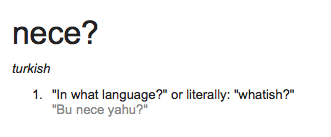
A “Content Translation Framework” using Postgresql’s jsonb field. It simply sets and gets translations from a jsonb field called translations.
Why?
You might ask why you should use django-nece since there are other, and more mature content translation frameworks like django-hvad and django-modeltranslation. Both of them are good in some ways, worst in others.
For instance, it is very hard for django-hvad users to get default language if there is no corresponding translation for an object. And it holds translated values in a different table, so every translation query results in another hit to the database.
On the other hand django-modeltranslation adds multiple additional fields for multiple languages. The number of fields inceases by the number of languages you need to support. At the end it becomes a huge chunk of an object if you need to add more than 20 languages.
nece? more or less works like the latter one with an important difference. It uses Postgresql’s new JSONB field to hold translation information. And overrides the original one on query.
Dependencies
postgresql >= 9.4.5
Django >= 2.2
psycopg2 >= 2.5.4
Installation
via pypi:
pip install django-nece
Usage
Lets say we have a model called Fruit:
from nece.models import TranslationModel

class Fruit(TranslationModel):
    name = CharField(max_length=255)

    def __str__(self):
        return self.name

    class Meta:
        translatable_fields = ('name',)
TranslationModel adds a jsonb field to this table and sets translations in a notation like the one below:
{u'de_de': {u'name': u'Apfel'},
 u'tr_tr': {u'name': u'elma'}}
When we need the German translation we can simply choose the language and get the attribute as usual:
>> f = Fruit.objects.get(name='apple')
>> print(f.name)
apple
>> f.language('de_de')
>> print(f.name)
Apfel
You can also filter out the ones containing any language translation:
>> Fruit.objects.all()
[<Fruit: apple>, <Fruit: pear>, <Fruit: banana>]
>> Fruit.objects.language('tr_tr')
[<Fruit: elma>, <Fruit: armut>]  # there is no translation for banana
>> Fruit.objects.language_or_default('tr_tr')
[<Fruit: elma>, <Fruit: armut>, <Fruit: banana>]
>> Fruit.objects.language('tr_tr').filter(name='elma')
[<Fruit: elma>]
>> Fruit.objects.language('tr_tr').get(name='elma')
<Fruit: elma>
Updating translations
>> fruit._language_code
tr_tr
>> fruit.name
elma
>> fruit.translate(name='armut').save()
>> fruit.name
armut
>> fruit.language('en')
>> fruit.translate('it_it', name='pera')
>> fruit.language('it_it')
>> fruit.name
pera
Settings
TRANSLATIONS_DEFAULT
Default language code. Default value: `en_us`
TRANSLATIONS_MAP
Shortcuts for `languagecode_countrycode` notation.
Example:
TRANSLATIONS_MAP = {
    "en": "en_us",
    "tr": "tr_tr",
    "ar": "ar_sy",
    "bg": "bg_bg",
    "cs": "cs_cz",
    "da": "da_dk",
    ...
}
Default:
{'en': 'en_us'}
TRANSLATIONS_FALLBACK
Fallback language would be used if a translation is missing.
Example:
TRANSLATIONS_FALLBACK = {
    'fr_ca': ['fr_fr'],
    'en_us': ['en_gb'],
}
Admin panel
Use TranslatableModelAdmin for pretty JSON editor (powered by django-admin-json-editor).
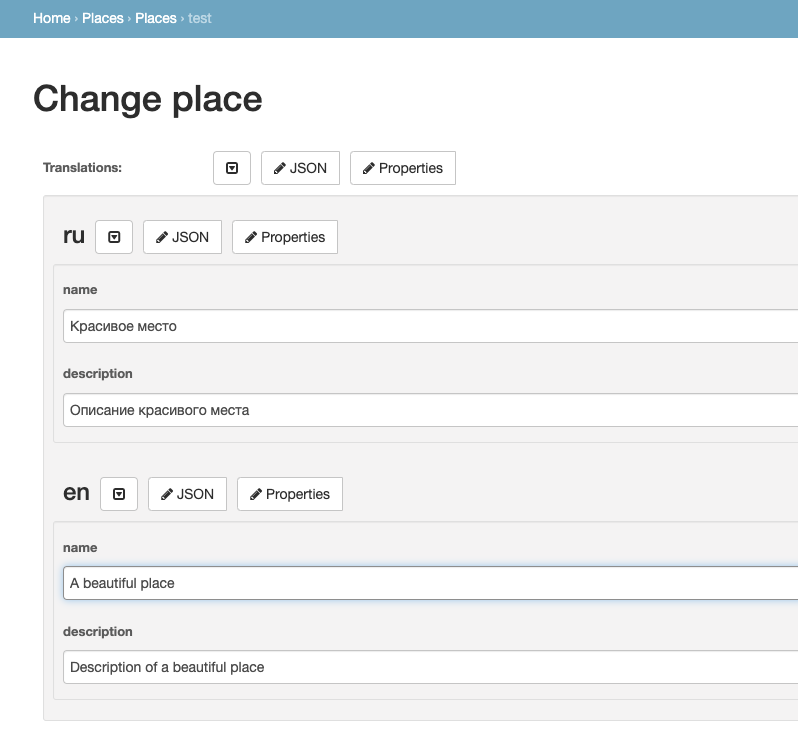
Example:
# settings.py
INSTALLED_APPS = [
    ...
    'django_admin_json_editor',
    ...
]

# admin.py
from nece.admin import TranslatableModelAdmin

class PlaceAdmin(TranslatableModelAdmin):
    list_display = ('...')
Contributors & Thanks
3 maintainers


Release files for django-nece 0.11
For a detailed explanation of source distributions (sdists) and built distributions (wheels), please see the package formats documentation.
Source distribution (sdist)
| File | Size | Uploaded | |
|---|---|---|---|
| django-nece-0.11.tar.gz | 7.6 kB | Details |
Built distribution (wheel)
| File | Interpreter | ABI | Platform | Reset |
|---|---|---|---|---|
| django_nece-0.11-py3-none-any.whl | Python 3 | none | any | Details |
Total release size: 16.3 kB
Release files / django-nece-0.11.tar.gz
| Download URL | django-nece-0.11.tar.gz |
|---|---|
| Size | 7.6 kB |
| Tags | Source |
|
SHA-256 checksum How to use checksums |
4dda90fcad0c63b2f51c6c58dd94f0b9799adb5b52f6e6ab4c822ab74b1c6bf3
|
|
BLAKE2b-256 checksum How to use checksums |
8e837df210b808fb03bc7b646d9cef9299e722516cdf7b11de23ce948bc0e7d0
|
| Upload date | |
|
Uploaded using Trusted Publishing? What is trusted publishing? |
No |
| Uploaded via |
twine/3.3.0 pkginfo/1.6.1 requests/2.25.1 setuptools/51.0.0 requests-toolbelt/0.9.1 tqdm/4.56.0 CPython/3.9.4
|
Release files / django_nece-0.11-py3-none-any.whl
| Download URL | django_nece-0.11-py3-none-any.whl |
|---|---|
| Size | 8.7 kB |
| Tags | Python 3 |
|
SHA-256 checksum How to use checksums |
497d7267e08d193ff8e63d0eadcd20141691bacd0dade693e0d2b183e825ee9a
|
|
BLAKE2b-256 checksum How to use checksums |
5f6e1b19926da9cd65eba07efd3868a51dd924e21fa74fac2b537174b489c39f
|
| Upload date | |
|
Uploaded using Trusted Publishing? What is trusted publishing? |
No |
| Uploaded via |
twine/3.3.0 pkginfo/1.6.1 requests/2.25.1 setuptools/51.0.0 requests-toolbelt/0.9.1 tqdm/4.56.0 CPython/3.9.4
|














