

nestingdolls
Django's ordinary form fields are good for flat data, but fall flat (hah!) as soon as you might want any nesting, forcing instead toward separate formset configuration and orchestration. It'd be nicer if it were simpler, and more declarative...
You know that thing where a form has collected an address, an order, or a schedule, then hands you a flat dictionary and says, good luck with that? It works, but the awkward part is that your application has to put the related keys back together.
django-nestingdolls does that bit for you. DictField renders and cleans a
child Django Form, then returns its cleaned values as one dict. ListField
renders formset-shaped rows for one child Django Field, then returns their
cleaned values as one list. The outer form gets the value it was describing
in the first place.
The child forms and fields still do the grown-up work: widgets, type conversion, validation, file uploads, and errors. These fields just make sure the bits that belong together don't wander off and become loose keys.
A micro example
Here's a small snapshot of how simple it is, with a form which allows for multiple subforms:
# normal Django form!
class LineItemForm(forms.Form):
    description = forms.CharField()
    quantity = forms.IntegerField(min_value=1)


class ListOfMappingsForm(forms.Form):
    # normal Django field
    delivery_method = forms.ChoiceField(choices=[("standard", "Standard"), ("express", "Express")])
    # normal Django field
    contact_email = forms.EmailField()
    # here's our special magic new fields!
    items = nestingdolls.ListField(nestingdolls.DictField(LineItemForm), min_length=1, max_length=5)
and that small definition gives us:
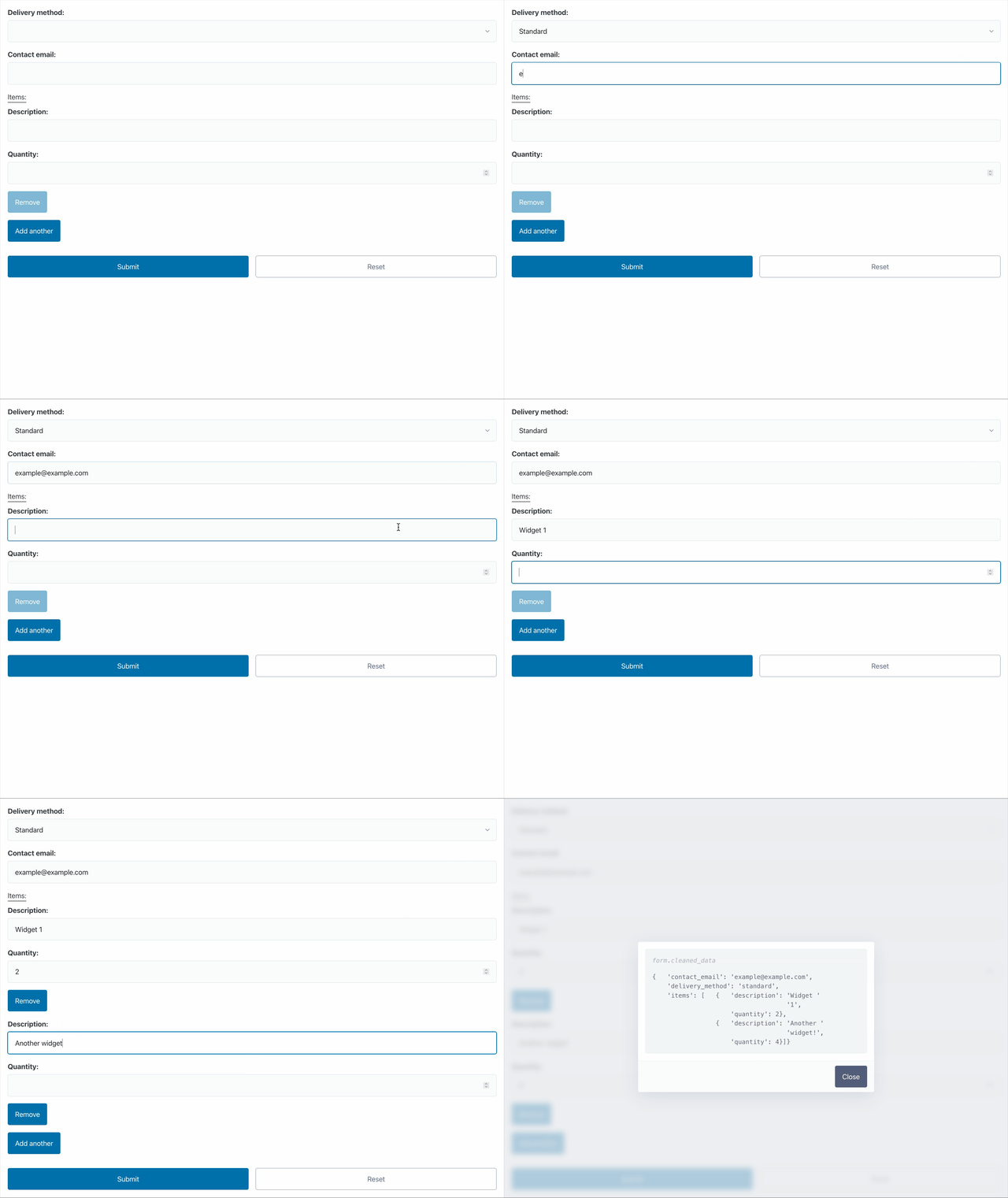
(this example is taken from the git repository's demo.py)
Install
django-nestingdolls expects Python 3.12+ and Django 5.2+.
python -m pip install django-nestingdolls
or add it to your pyproject and uv sync or whatever, poetry? pdm? you
do you.
Setup
Then add the app to your Django settings module:
INSTALLED_APPS = [
    # ...
    'nestingdolls',
]
That's the whole thing, hopefully. Django's normal DTL form renderer finds
the package templates and the matching composite wrappers for the as_div(),
as_p(), as_table(), and as_ul() form helpers.
The app setup also makes composite wrappers follow Django's form-helper layout. Why that needs a patch.
A quick tutorial
Let's make a CheckoutForm. The browser will send ordinary Django input
names; the finished form will hand us one nested order dictionary with
integer product IDs and quantities. Nice and tidy.
Describe the order
Start small: a line item has two named values. An order has a customer ID and as many of those items as it needs. Put the forms together like this:
from django import forms

import nestingdolls


class LineItemForm(forms.Form):
    product_id = forms.IntegerField(min_value=1)
    quantity = forms.IntegerField(min_value=1)


class OrderFieldsForm(forms.Form):
    customer_id = forms.IntegerField(min_value=1) # Obviously not really :)
    items = nestingdolls.ListField(
        nestingdolls.DictField(LineItemForm),
        min_length=1,
    )


class CheckoutForm(forms.Form):
    order = nestingdolls.DictField(OrderFieldsForm)
LineItemForm checks products and quantities. OrderFieldsForm checks the
customer and item list. CheckoutForm gets one order value back, not a
scavenger hunt through keys that merely look like they are related.
Bind browser data
Browsers only send strings, and nested child fields get prefixed names. Sequence rows bring Django's usual formset management values along too. Here is what a complete two-item submission looks like:
from django.http import QueryDict

# This is the data the user submitted for their order form from the
# previous section above.
submission = QueryDict(
    'order-customer_id=17&'
    'order-items-TOTAL_FORMS=2&'
    'order-items-INITIAL_FORMS=0&'
    'order-items-MIN_NUM_FORMS=0&'
    'order-items-MAX_NUM_FORMS=1000&'
    'order-items-0-product_id=42&'
    'order-items-0-quantity=2&'
    'order-items-1-product_id=73&'
    'order-items-1-quantity=1'
)

form = CheckoutForm(submission)

assert form.is_valid()
assert form.cleaned_data == {
    'order': {
        'customer_id': 17,  # example only :D
        'items': [
            {'product_id': 42, 'quantity': 2},
            {'product_id': 73, 'quantity': 1},
        ],
    }
}
See the hand-off? IntegerField turns order-items-0-quantity from a request
string into an integer. CheckoutForm then returns one order value ready for
order code. No reconstruction helper, properly nested into conceptual
namespaces, less hunting around hopefully.
Render it
Render it with Django's normal form helpers:
<form method='post'>
  {% csrf_token %}
  {{ form.media }}
  {{ form.as_div }}
  <button type='submit'>Place order</button>
</form>
form.media loads nestingdolls/sequence.js, so people can add and remove
item rows without a reload. Kinda like in the Django admin inlines. Django
still names the controls, builds the rows, and does all the validation on
submitted values.
Show a saved order again
Give initial the nested Python value you saved, not prefixed browser names:
saved_order = {
    'customer_id': 17,
    'items': [
        {'product_id': 42, 'quantity': 2},
        {'product_id': 73, 'quantity': 1},
    ],
}

form = CheckoutForm(initial={'order': saved_order})
order-items-0-product_id is an HTTP submission name. It only exists after
Django has rendered and named real controls. initial wants ordinary Python
data, from before that whole naming circus starts.
More ways to use the fields
The checkout example follows the full browser path. The same fields should also provide value at other boundaries: an API, an import job, or a background worker.
Bind decoded application data
Got data from an API client or worker? Hand over the saved order directly.
Unlike initial, this is a submission, so Django validates it and puts it in
cleaned_data with everything else.
form = CheckoutForm({'order': saved_order})

assert form.is_valid()
assert form.cleaned_data['order'] == saved_order
Validate an imported JSON, YAML, or CSV list
Decode the import to normal Python data first. Then let the child field do its thing: convert and validate every value.
import csv
import json

import yaml


class ProductImportForm(forms.Form):
    product_ids = nestingdolls.ListField(forms.IntegerField(min_value=1))


json_form = ProductImportForm(json.loads('{"product_ids": [42, 73]}'))
yaml_form = ProductImportForm(
    yaml.safe_load('product_ids:\n  - 42\n  - 73')
)
# The list could come from a csv.DictReader row etc. too.
csv_form = ProductImportForm({'product_ids': next(csv.reader(['42,73']))})

for form in (json_form, yaml_form, csv_form):
    assert form.is_valid()
    assert form.cleaned_data['product_ids'] == [42, 73]
Use yaml.safe_load, not yaml.load.
Constrain a repeated field
Use min_length and max_length when a list needs a useful range, not just
any number of rows.
class TeamForm(forms.Form):
    member_ids = nestingdolls.ListField(
        forms.IntegerField(min_value=1),
        min_length=1,
        max_length=10,
    )
A submitted list of one through ten valid IDs cleans normally. More than ten gets a validation error.
Return a frozenset or another domain value
You don't have to settle for a mutable list or dict for your cleaned
value.
Use FrozenSetField when repeated values should be unique and stay immutable.
TupleField, DataclassField, and NamedTupleField make the other return
shapes in this example; see the field reference for
their parameters.
from dataclasses import dataclass
from typing import NamedTuple


@dataclass
class Dimensions:
    width: int
    height: int


class Limits(NamedTuple):
    low: int
    high: int


class DimensionsForm(forms.Form):
    width = forms.IntegerField(min_value=1)
    height = forms.IntegerField(min_value=1)


class LimitsForm(forms.Form):
    low = forms.IntegerField()
    high = forms.IntegerField()


class PreferencesForm(forms.Form):
    pinned_product_ids = nestingdolls.FrozenSetField(forms.IntegerField())
    dimensions = nestingdolls.DataclassField(DimensionsForm, output=Dimensions)
    limits = nestingdolls.NamedTupleField(LimitsForm, output=Limits)


form = PreferencesForm(
    {
        'pinned_product_ids': [42, '73', 42],
        'dimensions': {'width': '10', 'height': 20},
        'limits': {'low': 1, 'high': '5'},
    }
)

assert form.is_valid()
assert form.cleaned_data['pinned_product_ids'] == frozenset({42, 73})
assert form.cleaned_data['dimensions'] == Dimensions(width=10, height=20)
assert form.cleaned_data['limits'] == Limits(low=1, high=5)
Keep uploads with their row
When a repeated row has ordinary values and an upload, make that row a child form. Then bind it the normal multipart way:
class AttachmentForm(forms.Form):
    description = forms.CharField()
    document = forms.FileField()


class EvidenceForm(forms.Form):
    attachments = nestingdolls.ListField(
        nestingdolls.DictField(AttachmentForm),
        min_length=1,
    )


form = EvidenceForm(request.POST, request.FILES)
Render it with enctype='multipart/form-data'. FileField handles the
upload; the list field keeps every file beside its description. They arrived
together, so they can leave together.
The fields included
As mentioned at the beginning, high level, the 2 basic building blocks are
DictField (for nested key/value shaped data) and
ListField (for "up to N of this field" data) and everything
else is a variant of those.
DictField
Renders and cleans a child Form, returning its cleaned values as a dict
by default.
Should you prefer, you can also use FormField or Subform or MappingField
(they're all aliases for the same thing).
| Parameter | What it does |
|---|---|
form_class |
The child Django Form class that supplies the named fields. |
output |
A callable that turns the cleaned child values into the returned value; defaults to dict. |
NamedTupleField
A subclass of the DictField which returns a NamedTuple instance instead.
| Parameter | What it does |
|---|---|
form_class |
The child Django Form class that supplies the named fields. |
output |
The NamedTuple class used to build the returned value. |
DataclassField
Like the NamedTupleField above, it's a subclass of the DictField but
it returns a dataclass instance. Shocking, I'm sure.
| Parameter | What it does |
|---|---|
form_class |
The child Django Form class that supplies the named fields. |
output |
The dataclass used to build the returned value. |
ListField
Renders and cleans any number of one child field, returning the cleaned rows as a list. Basically the approximate equivalent of a formset, but without the ceremony of handling it separately.
Also available as SequenceField.
| Parameter | What it does |
|---|---|
child_field |
The Django field repeated for every row. |
min_length |
The fewest cleaned rows allowed. |
max_length |
The most cleaned rows allowed. |
absolute_max |
The hard cap on submitted rows, including rows Django must reject before cleaning. |
TupleField (FrozenSequenceField)
Your standard ListField, but returns an immutable tuple.
| Parameter | What it does |
|---|---|
child_field |
The Django field repeated for every row. |
min_length |
The fewest cleaned rows allowed. |
max_length |
The most cleaned rows allowed. |
absolute_max |
The hard cap on submitted rows, including rows Django must reject before cleaning. |
SetField
A SequenceField which returns a set and keeps each cleaned value once.
| Parameter | What it does |
|---|---|
child_field |
The Django field repeated for every row. |
min_length |
The fewest cleaned values allowed after duplicates are removed. |
max_length |
The most cleaned values allowed after duplicates are removed. |
absolute_max |
The hard cap on submitted rows, including rows Django must reject before cleaning. |
FrozenSetField
It's the same as SetField, but giving back an immutable frozenset instead.
| Parameter | What it does |
|---|---|
child_field |
The Django field repeated for every row. |
min_length |
The fewest cleaned values allowed after duplicates are removed. |
max_length |
The most cleaned values allowed after duplicates are removed. |
absolute_max |
The hard cap on submitted rows, including rows Django must reject before cleaning. |
Design notes
The render patch
Django knows whether form.as_p() or form.as_table() is rendering a form,
but it does not tell the widget. The app installs a small wrapper around
BaseForm.render, __str__, and __html__ so composite wrappers can choose
the matching layout. Custom form templates go straight through Django's usual
rendering path.
On set behaviour...
SetField and FrozenSetField turn cleaned rows into a set before checking
the length. Two 42s are one value, not two. They also compare membership
without caring about row order: the same set in a different order is still the
same set.
JavaScript helpers for SequenceField
It emits bubbling
nestingdolls:sequence-ready, cancelable nestingdolls:sequence-add and
nestingdolls:sequence-remove, and after-the-fact
nestingdolls:sequence-change events. You should listen for those and make
something happen that that fits your page, maybe it's a toast or counter or
something? I dunno!
preventDefault() stops an add or removal.
If your page replaces sequence markup after it loads, dispatch
new Event("nestingdolls:sequence-enhance") on document after insertion.
The helpers rescan the document and enhance the new sequence widgets.
1 maintainer

Metadata
1 maintainer
Release files for django-nestingdolls 1.0.0
For a detailed explanation of source distributions (sdists) and built distributions (wheels), please see the package formats documentation.
Source distribution (sdist)
| File | Size | Uploaded | |
|---|---|---|---|
| django_nestingdolls-1.0.0.tar.gz | 62.5 kB | Details |
Built distribution (wheel)
| File | Interpreter | ABI | Platform | Reset |
|---|---|---|---|---|
| django_nestingdolls-1.0.0-py3-none-any.whl | Python 3 | none | any | Details |
Total release size: 124.0 kB
Release files / django_nestingdolls-1.0.0.tar.gz
| Download URL | django_nestingdolls-1.0.0.tar.gz |
|---|---|
| Size | 62.5 kB |
| Tags | Source |
|
SHA-256 checksum How to use checksums |
00f95a53c968fb0f096d7d7976602bd6d53f57a1a09792d8753ff349ecd50d7d
|
|
BLAKE2b-256 checksum How to use checksums |
8e559c624c9f6ad6fd4ff21bc1c2ba15d4317a878121b4337f25a31589c3e866
|
| Upload date | |
|
Uploaded using Trusted Publishing? What is trusted publishing? |
No |
| Uploaded via |
twine/7.0.0 CPython/3.12.12
|
Release files / django_nestingdolls-1.0.0-py3-none-any.whl
| Download URL | django_nestingdolls-1.0.0-py3-none-any.whl |
|---|---|
| Size | 61.4 kB |
| Tags | Python 3 |
|
SHA-256 checksum How to use checksums |
89657989c8e8b38ad34da9a78569b18479fe848e6c848f0c235c7f5714c3e652
|
|
BLAKE2b-256 checksum How to use checksums |
565d64fa697bf1783c2769a3bd1726cd4911205332ef1998fa8af6b3fefe1b91
|
| Upload date | |
|
Uploaded using Trusted Publishing? What is trusted publishing? |
No |
| Uploaded via |
twine/7.0.0 CPython/3.12.12
|













