

Async CRUD framework for Django Ninja
Automatic schema generation · Filtering · Pagination · Auth · M2M management







Documentation · PyPI · Framework Comparison · Performance Benchmarks · Example Project · Issues
Features
| Feature | Description | |
|---|---|---|
| 🔒 Type Safety | Generic classes | Full IDE autocomplete and type checking with generic ModelUtil, Serializer, and APIViewSet |
| Meta-driven Serializer | Dynamic schemas | Generate CRUD schemas for existing Django models without changing base classes |
| Async CRUD ViewSets | Full operations | Create, list, retrieve, update, delete — all async |
| Auto Schemas | Pydantic generation | Automatic read/create/update schemas from ModelSerializer |
| Dynamic Query Params | Runtime schemas | Built with pydantic.create_model for flexible filtering |
| Per-method Auth | Granular control | auth, get_auth, post_auth, etc. |
| Async Pagination | Customizable | PageNumberPagination, CursorPagination, or custom — DB-level slicing |
| M2M Relations | Add/remove/list | Endpoints via M2MRelationSchema with filtering support |
| Reverse Relations | Nested serialization | Automatic handling of reverse FK and M2M |
| Nested Writes | Atomic creation | Create a parent and owned reverse-FK children in one request |
| Auto Admin Relations | Inlines and widgets | Generate FK/O2O inlines and standard M2M dual-list widgets |
| Bulk Operations | Create/update/delete | Opt-in bulk endpoints with partial success semantics and configurable response fields |
| Custom Actions | @action decorator |
Detail and list actions with auth inheritance, custom decorators, and auto URL generation |
| Lifecycle Hooks | Extensible | before_save, after_save, custom_actions, on_delete, and more |
| Schema Validators | Pydantic validators | @field_validator and @model_validator on serializer classes |
| ORJSON Renderer | Performance | Built-in fast JSON rendering via NinjaAIO |
| AI Agent Integration | MCP tools | Expose ViewSets as MCP tools for any MCP client |
See It In Action
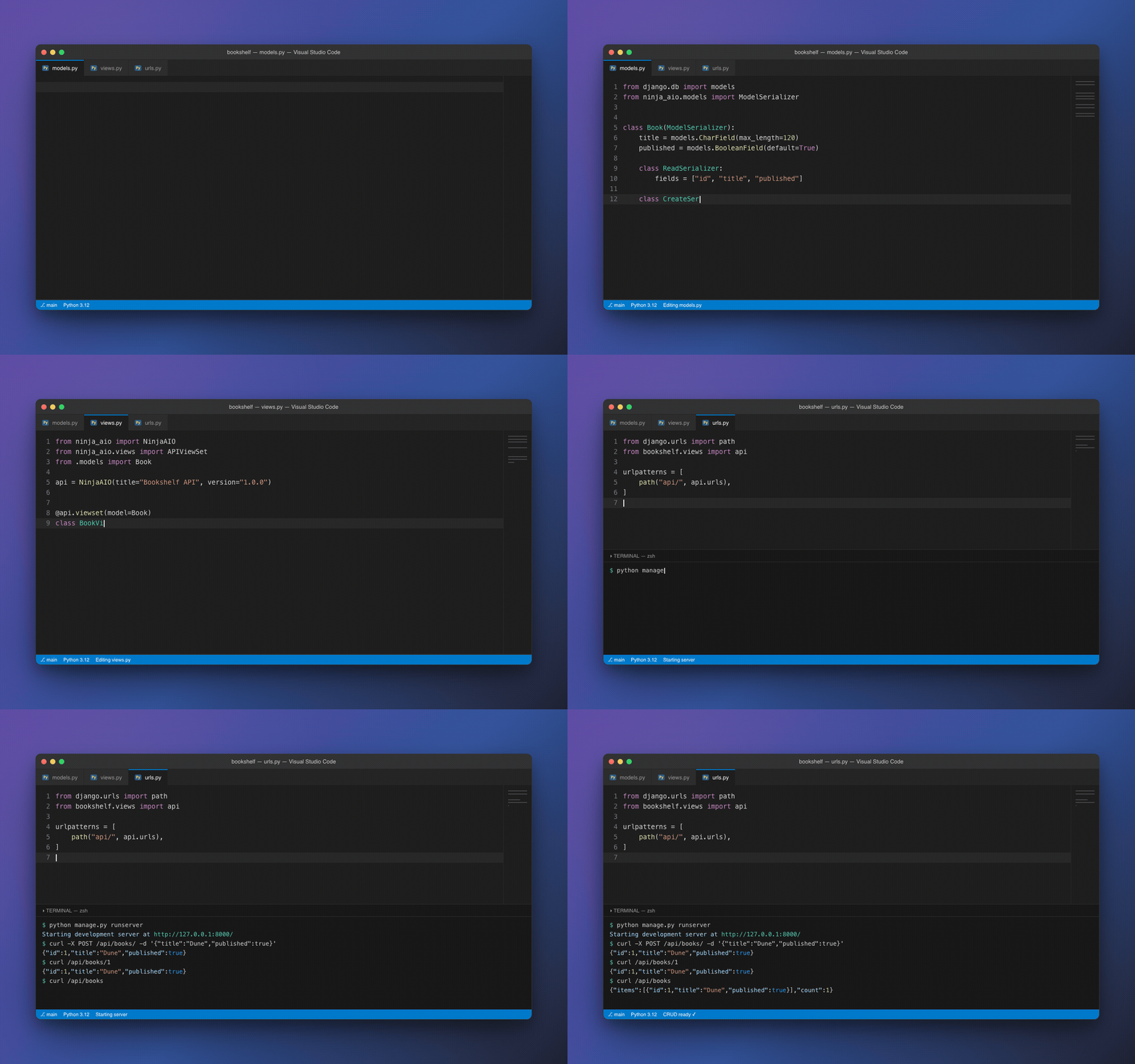
A ModelSerializer-based model, wired to a viewset, serving full CRUD in a few lines — no manual schemas or endpoint wiring. See the docs for the full walkthrough.
Quick Start
Option A: Meta-driven Serializer (existing models)
Use this if you already have Django models and don't want to change their base class.
from ninja_aio.models import serializers
from ninja_aio.views import APIViewSet
from ninja_aio import NinjaAIO
from . import models

class BookSerializer(serializers.Serializer):
    class Meta:
        model = models.Book
        schema_in = serializers.SchemaModelConfig(fields=["title", "published"])
        schema_out = serializers.SchemaModelConfig(fields=["id", "title", "published"])
        schema_update = serializers.SchemaModelConfig(
            optionals=[("title", str), ("published", bool)]
        )

api = NinjaAIO()

@api.viewset(models.Book)
class BookViewSet(APIViewSet):
    serializer_class = BookSerializer
Option B: ModelSerializer (new projects)
Define models with built-in serialization for minimal boilerplate.
models.py
from django.db import models
from ninja_aio.models import ModelSerializer

class Book(ModelSerializer):
    title = models.CharField(max_length=120)
    published = models.BooleanField(default=True)

    class ReadSerializer:
        fields = ["id", "title", "published"]

    class CreateSerializer:
        fields = ["title", "published"]

    class UpdateSerializer:
        optionals = [("title", str), ("published", bool)]
views.py
from ninja_aio import NinjaAIO
from ninja_aio.views import APIViewSet
from .models import Book

api = NinjaAIO()

@api.viewset(Book)
class BookViewSet(APIViewSet):
    pass
Visit
/docs— CRUD endpoints ready.
Query Filtering
@api.viewset(Book)
class BookViewSet(APIViewSet):
    query_params = {"published": (bool, None), "title": (str, None)}

    async def query_params_handler(self, queryset, filters):
        if filters.get("published") is not None:
            queryset = queryset.filter(published=filters["published"])
        if filters.get("title"):
            queryset = queryset.filter(title__icontains=filters["title"])
        return queryset
GET /book/?published=true&title=python
Many-to-Many Relations
from ninja_aio.schemas import M2MRelationSchema

class Tag(ModelSerializer):
    name = models.CharField(max_length=50)
    class ReadSerializer:
        fields = ["id", "name"]

class Article(ModelSerializer):
    title = models.CharField(max_length=120)
    tags = models.ManyToManyField(Tag, related_name="articles")
    class ReadSerializer:
        fields = ["id", "title", "tags"]

@api.viewset(Article)
class ArticleViewSet(APIViewSet):
    m2m_relations = [
        M2MRelationSchema(
            model=Tag,
            related_name="tags",
            filters={"name": (str, "")}
        )
    ]

    async def tags_query_params_handler(self, queryset, filters):
        n = filters.get("name")
        if n:
            queryset = queryset.filter(name__icontains=n)
        return queryset
Endpoints:
GET  /article/{pk}/tag?name=dev
POST /article/{pk}/tag/    body: {"add": [1, 2], "remove": [3]}
Nested Creation
Declare owned child relations on the parent's create config:
class Order(ModelSerializer):
    name = models.CharField(max_length=120)

    class CreateSerializer:
        fields = ["name"]
        nested = {"items": OrderItem}
OrderItem must be a ModelSerializer with a foreign key to Order and
related_name="items". Its parent FK is excluded from the nested input and
injected automatically. One request creates the order and its items, rolling
back the whole graph if a child fails. Nested writes are currently create-only.
See Nested Writes and Auto Admin Relations.
Authentication (JWT)
from ninja_aio.auth import AsyncJwtBearer
from joserfc import jwk

class JWTAuth(AsyncJwtBearer):
    jwt_public = jwk.RSAKey.import_key("-----BEGIN PUBLIC KEY----- ...")
    jwt_alg = "RS256"
    claims = {"sub": {"essential": True}}

    async def auth_handler(self, request):
        book_id = self.dcd.claims.get("sub")
        return await Book.objects.aget(id=book_id)

@api.viewset(Book)
class SecureBookViewSet(APIViewSet):
    auth = [JWTAuth()]
    get_auth = None  # list/retrieve remain public
Lifecycle Hooks
Available on every save/delete cycle:
| Hook | When |
|---|---|
on_create_before_save |
Before first save |
on_create_after_save |
After first save |
before_save |
Before any save |
after_save |
After any save |
on_delete |
After deletion |
custom_actions(payload) |
Create/update custom field logic |
post_create() |
After create commit |
Custom Endpoints
Option A: @action Decorator (recommended)
from ninja import Schema, Status
from ninja_aio.decorators import action

class StatsSchema(Schema):
    total: int

@api.viewset(Book)
class BookViewSet(APIViewSet):
    @action(detail=False, methods=["get"], url_path="stats", response=StatsSchema)
    async def stats(self, request):
        total = await Book.objects.acount()
        return {"total": total}

    @action(detail=True, methods=["post"], url_path="publish")
    async def publish(self, request, pk):
        book = await self.model_util.get_object(request, pk)
        book.published = True
        await book.asave()
        return Status(200, {"message": "published"})
GET  /book/stats/       → {"total": 42}
POST /book/{pk}/publish/ → {"message": "published"}
Option B: operations Decorators
from ninja_aio.decorators import api_get

@api.viewset(Book)
class BookViewSet(APIViewSet):
    @api_get("/stats/")
    async def stats(self, request):
        total = await Book.objects.acount()
        return {"total": total}
AI Agent Integration (MCP)
Expose every registered APIViewSet — CRUD, bulk operations, and custom @action/@on endpoints — as well as any custom APIView, as MCP tools any MCP client can call directly.
pip install "django-ninja-aio-crud[mcp]"
Option A: manage.py mcp_server (recommended)
Add "ninja_aio" to INSTALLED_APPS to pick up the bundled management command:
INSTALLED_APPS = [
    ...,
    "ninja_aio",
]
python manage.py mcp_server myproject.api.api
Or set a default so you can drop the argument:
# settings.py
NINJA_AIO_MCP_API = "myproject.api.api"
{
  "mcpServers": {
    "myproject": {
      "type": "stdio",
      "command": "python",
      "args": ["manage.py", "mcp_server"]
    }
  }
}
Option B: standalone script
# mcp_server.py
import asyncio
import django
django.setup()

from myproject.api import api  # your NinjaAIO() instance with @api.viewset(...) registered
from ninja_aio.mcp import run_mcp_server

if __name__ == "__main__":
    asyncio.run(run_mcp_server(api))
{
  "mcpServers": {
    "myproject": {
      "type": "stdio",
      "command": "python",
      "args": ["mcp_server.py"]
    }
  }
}
Every @api.viewset(...)-registered ViewSet and @api.view(...)-registered View is picked up automatically (or pass viewsets=[...]/views=[...] explicitly). Tools are named <model>_<operation> for ViewSets — e.g. book_create, book_list, book_retrieve, book_update, book_delete, book_bulk_create, book_publish — and <viewclass>_<function>_<method> for plain Views — e.g. bookview_stats_get.
⚠️ Auth caveat: tool calls invoke the same registered view logic as HTTP requests (filters, pagination, and
on_before_operation/on_before_object_operation/query_params_handlerhooks all run identically) but bypass django-ninja'sauth=wiring, since that applies at the router layer, not inside the handler. Passrequest_factoryto attach your ownrequest.user/auth context, and use viewset hooks to enforce authorization for MCP-driven calls:
from ninja_aio.mcp import NinjaAIOMCPServer

def mcp_request_factory():
    from django.test.client import AsyncRequestFactory
    request = AsyncRequestFactory().get("/mcp/")
    request.user = get_service_account_user()  # your own resolution logic
    return request

server = NinjaAIOMCPServer(api, request_factory=mcp_request_factory)
Bulk Operations
@api.viewset(Book)
class BookViewSet(APIViewSet):
    bulk_operations = ["create", "update", "delete"]
    bulk_response_fields = "title"  # Optional: return titles instead of PKs
POST   /book/bulk/  body: [{...}, {...}]         → {"success": {"count": 2, "details": ["Book 1", "Book 2"]}}
PATCH  /book/bulk/  body: [{id, ...}, {id, ...}] → {"success": {"count": 2, "details": ["Updated 1", "Updated 2"]}}
DELETE /book/bulk/  body: {"ids": [1, 2]}         → {"success": {"count": 2, "details": ["Book 1", "Book 2"]}}
Pagination
Default: PageNumberPagination. Override per ViewSet:
from ninja.pagination import PageNumberPagination, CursorPagination

class LargePagination(PageNumberPagination):
    page_size = 50
    max_page_size = 200

@api.viewset(Book)
class BookViewSet(APIViewSet):
    pagination_class = LargePagination
    # Or use cursor-based pagination for large datasets:
    # pagination_class = CursorPagination
Schema Validators
Add Pydantic @field_validator and @model_validator directly on serializer classes for input validation.
ModelSerializer
Declare validators on inner serializer classes:
from django.db import models
from pydantic import field_validator, model_validator
from ninja_aio.models import ModelSerializer

class Book(ModelSerializer):
    title = models.CharField(max_length=120)
    description = models.TextField(blank=True)

    class CreateSerializer:
        fields = ["title", "description"]

        @field_validator("title")
        @classmethod
        def validate_title_min_length(cls, v):
            if len(v) < 3:
                raise ValueError("Title must be at least 3 characters")
            return v

    class UpdateSerializer:
        optionals = [("title", str), ("description", str)]

        @field_validator("title")
        @classmethod
        def validate_title_not_empty(cls, v):
            if v is not None and len(v.strip()) == 0:
                raise ValueError("Title cannot be blank")
            return v

    class ReadSerializer:
        fields = ["id", "title", "description"]

        @model_validator(mode="after")
        def enrich_output(self):
            # Transform or enrich the output schema
            return self
Meta-driven Serializer
Use dedicated {Type}Validators inner classes:
from pydantic import field_validator, model_validator
from ninja_aio.models import serializers
from . import models

class BookSerializer(serializers.Serializer):
    class Meta:
        model = models.Book
        schema_in = serializers.SchemaModelConfig(fields=["title", "description"])
        schema_out = serializers.SchemaModelConfig(fields=["id", "title", "description"])
        schema_update = serializers.SchemaModelConfig(
            optionals=[("title", str), ("description", str)]
        )

    class CreateValidators:
        @field_validator("title")
        @classmethod
        def validate_title_min_length(cls, v):
            if len(v) < 3:
                raise ValueError("Title must be at least 3 characters")
            return v

    class UpdateValidators:
        @field_validator("title")
        @classmethod
        def validate_title_not_empty(cls, v):
            if v is not None and len(v.strip()) == 0:
                raise ValueError("Title cannot be blank")
            return v

    class ReadValidators:
        @model_validator(mode="after")
        def enrich_output(self):
            return self
Validator class mapping:
| Schema type | ModelSerializer | Serializer (Meta-driven) |
|---|---|---|
| Create | CreateSerializer |
CreateValidators |
| Update | UpdateSerializer |
UpdateValidators |
| Read | ReadSerializer |
ReadValidators |
| Detail | DetailSerializer |
DetailValidators |
Disable Operations
@api.viewset(Book)
class ReadOnlyBookViewSet(APIViewSet):
    disable = ["update", "delete"]
Framework Comparison
How does Django Ninja AIO compare to other Python REST frameworks? We benchmark against Django Ninja, ADRF, and FastAPI — focusing on complex async operations like reverse FK and M2M serialization.
| Framework | Lines of Code | Reverse FK Handling | Auto Prefetch | CRUD Automation |
|---|---|---|---|---|
| Django Ninja AIO | ~20 | Automatic | Yes | Full |
| FastAPI | ~80+ | Manual async iteration | No | None |
| ADRF | ~45+ | Needs serializer config | Manual | Partial |
View Full Comparison — Code examples, benchmark results, and interactive charts
Performance
View live benchmarks tracking schema generation, serialization, and CRUD throughput:
Live Performance Report — Interactive charts with historical trends
Performance Tips
- Use
queryset_requestclassmethod toselect_related/prefetch_related - Index frequently filtered fields
- Keep pagination enabled for large datasets
- Limit slices (
queryset = queryset[:1000]) for heavy searches
Contributing
- Fork the repository
- Create a feature branch
- Add tests for your changes
- Run lint:
ruff check . - Open a Pull Request
Support
If you find this project useful, consider giving it a star or supporting development:

License
MIT License. See LICENSE.
1 maintainer

Release files for django-ninja-aio-crud 2.35.0
For a detailed explanation of source distributions (sdists) and built distributions (wheels), please see the package formats documentation.
Source distribution (sdist)
| File | Size | Uploaded | |
|---|---|---|---|
| django_ninja_aio_crud-2.35.0.tar.gz | 102.5 kB | Details |
Built distribution (wheel)
| File | Interpreter | ABI | Platform | Reset |
|---|---|---|---|---|
| django_ninja_aio_crud-2.35.0-py3-none-any.whl | Python 3 | none | any | Details |
Total release size: 213.9 kB
Release files / django_ninja_aio_crud-2.35.0.tar.gz
| Download URL | django_ninja_aio_crud-2.35.0.tar.gz |
|---|---|
| Size | 102.5 kB |
| Tags | Source |
|
SHA-256 checksum How to use checksums |
db5e9714973cd34122d7603eb72740472f823bf7cff5b3cde7441c71d6e95109
|
|
BLAKE2b-256 checksum How to use checksums |
634af46c5f9ad629724e9666727949d7c7da7a488e8a96863aa1717a31fcf72f
|
| Upload date | |
|
Uploaded using Trusted Publishing? What is trusted publishing? |
No |
| Uploaded via |
python-requests/2.31.0
|
Release files / django_ninja_aio_crud-2.35.0-py3-none-any.whl
| Download URL | django_ninja_aio_crud-2.35.0-py3-none-any.whl |
|---|---|
| Size | 111.4 kB |
| Tags | Python 3 |
|
SHA-256 checksum How to use checksums |
d70d4b7ec9591c8e0a11544f69c6761e0b548f11e8307eeaf7d7921ba8f16ec1
|
|
BLAKE2b-256 checksum How to use checksums |
2fc117bd8edafd4aa1eed3d1b34e2dc562f48289cf476dd53f7197d7105d8fd5
|
| Upload date | |
|
Uploaded using Trusted Publishing? What is trusted publishing? |
No |
| Uploaded via |
python-requests/2.31.0
|














