

A Django field and widget to show the ‘eye’ icon that shows and hides password.
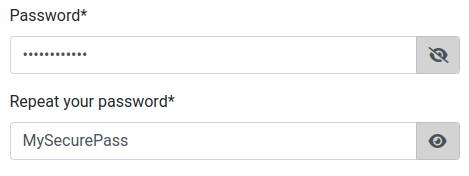
Requirements
Font Awesome. It is included in the widget by default.
Install
` pip install django-password-eye `
In settings, add django_password_eye to INSTALLED_APPS:
By default, it includes the Font Awesome css library
If you do not want to include it because you already include it from another template, just set this in your settings file:
` DJANGO_PASSWORD_EYE_INCLUDE_FONT_AWESOME = False `
Usage
Import PasswordEye and use it instead of the traditional Password field.
from django_password_eye.fields import PasswordEye
class LoginForm(forms.Form):
    username = forms.CharField(max_length=150,
                           widget=forms.TextInput(attrs={'class': 'form-control', 'placeholder': _('Login')}),
                           label='')
    password = PasswordEye(label='')
Independent behavior for inputs
In case you need to trigger the show/hide password for any PasswordEye field, specify the PasswordEyeWidget for the PasswordEye and add the parameter independent=True, which defaults to false:
from django_password_eye.fields import PasswordEye
from django_password_eye.widgets import PasswordEyeWidget

input = PasswordEye(widget=PasswordEyeWidget(independent=True))
code
CSS classes
By using the css class django_password_eye as selector, you can customize the entire widget. Check template input.html.
I suggest to modify link class to add cursor: hand/pointer, but it is up to you.
Source code
The code was taken from this link
1 maintainer

Release files for django-password-eye 1.1.4
For a detailed explanation of source distributions (sdists) and built distributions (wheels), please see the package formats documentation.
Source distribution (sdist)
| File | Size | Uploaded | |
|---|---|---|---|
| django_password_eye-1.1.4.tar.gz | 43.1 kB | Details |
Built distribution (wheel)
| File | Interpreter | ABI | Platform | Reset |
|---|---|---|---|---|
| django_password_eye-1.1.4-py3-none-any.whl | Python 3 | none | any | Details |
Total release size: 74.1 kB
Release files / django_password_eye-1.1.4.tar.gz
| Download URL | django_password_eye-1.1.4.tar.gz |
|---|---|
| Size | 43.1 kB |
| Tags | Source |
|
SHA-256 checksum How to use checksums |
96fd7221aa379471d8fbe9850ba86eebb9dcb5f89908e51e05713f2beec148b6
|
|
BLAKE2b-256 checksum How to use checksums |
573d16a61eceb4c7f3fdb1cb04bfddbcf5deeee79bcf74965ca0372eab3bfe22
|
| Upload date | |
|
Uploaded using Trusted Publishing? What is trusted publishing? |
No |
| Uploaded via |
twine/4.0.2 CPython/3.11.10
|
Release files / django_password_eye-1.1.4-py3-none-any.whl
| Download URL | django_password_eye-1.1.4-py3-none-any.whl |
|---|---|
| Size | 31.0 kB |
| Tags | Python 3 |
|
SHA-256 checksum How to use checksums |
6c5e008e096c4c63860b60f36b6c072c370392508a68f315b9e3a988af510cf5
|
|
BLAKE2b-256 checksum How to use checksums |
dcc00b8503cb9ff12d465c19412eed0a1949be5c51d5010fbf4314d219d93cd7
|
| Upload date | |
|
Uploaded using Trusted Publishing? What is trusted publishing? |
No |
| Uploaded via |
twine/4.0.2 CPython/3.11.10
|














