
Django Password Eye

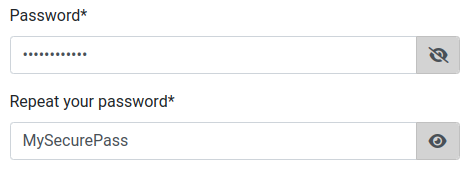
A Django field and widget to show the ‘eye’ icon that shows and hides password.
Requirements
Font Awesome. It is included in the widget by default.
Install
` pip install django-password-eye `
In settings, add django_password_eye to INSTALLED_APPS:
By default, it includes the Font Awesome css library
If you do not want to include it because you already include it from another template, just set this in your settings file:
` DJANGO_PASSWORD_EYE_INCLUDE_FONT_AWESOME = False `
Usage
Import PasswordEye and use it instead of the traditional Password field.
from django_password_eye.fields import PasswordEye
class LoginForm(forms.Form):
    username = forms.CharField(max_length=150,
                           widget=forms.TextInput(attrs={'class': 'form-control', 'placeholder': _('Login')}),
                           label='')
    password = PasswordEye(label='')
Independent behavior for inputs
In case you need to trigger the show/hide password for any PasswordEye field, specify the PasswordEyeWidget for the PasswordEye and add the parameter independent=True, which defaults to false:
from django_password_eye.fields import PasswordEye
from django_password_eye.widgets import PasswordEyeWidget

input = PasswordEye(widget=PasswordEyeWidget(independent=True))
code
CSS classes
By using the css class django_password_eye as selector, you can customize the entire widget. Check template input.html.
I suggest to modify link class to add cursor: hand/pointer, but it is up to you.
Source code
The code was taken from this link
1 maintainer

Metadata
1 maintainer
Release files for django-password-eye 1.1.4
For a detailed explanation of source distributions (sdists) and built distributions (wheels), please see the package formats documentation.
Source distribution (sdist)
| File | Size | Uploaded | Provenance | Actions |
|---|---|---|---|---|
| django_password_eye-1.1.4.tar.gz | 43.1 kB | Without provenance | Details for django_password_eye-1.1.4.tar.gz |
Built distribution (wheel)
| File | Interpreter | ABI | Platform | Actions Reset |
|---|---|---|---|---|
| django_password_eye-1.1.4-py3-none-any.whl | Python 3 | none | any | Details for django_password_eye-1.1.4-py3-none-any.whl |
Total release size: 74.1 kB
Release files / django_password_eye-1.1.4.tar.gz
| Download URL | django_password_eye-1.1.4.tar.gz |
|---|---|
| Size | 43.1 kB |
| Tags | Source |
|
SHA-256 checksum How to use checksums |
96fd7221aa379471d8fbe9850ba86eebb9dcb5f89908e51e05713f2beec148b6
|
|
BLAKE2b-256 checksum How to use checksums |
573d16a61eceb4c7f3fdb1cb04bfddbcf5deeee79bcf74965ca0372eab3bfe22
|
| Upload date | |
|
Uploaded using Trusted Publishing? What is trusted publishing? |
No |
| Uploaded via |
twine/4.0.2 CPython/3.11.10
|
Release files / django_password_eye-1.1.4-py3-none-any.whl
| Download URL | django_password_eye-1.1.4-py3-none-any.whl |
|---|---|
| Size | 31.0 kB |
| Tags | Python 3 |
|
SHA-256 checksum How to use checksums |
6c5e008e096c4c63860b60f36b6c072c370392508a68f315b9e3a988af510cf5
|
|
BLAKE2b-256 checksum How to use checksums |
dcc00b8503cb9ff12d465c19412eed0a1949be5c51d5010fbf4314d219d93cd7
|
| Upload date | |
|
Uploaded using Trusted Publishing? What is trusted publishing? |
No |
| Uploaded via |
twine/4.0.2 CPython/3.11.10
|
Security for django-password-eye 1.1.4
Provenance
Provenance describes where a file came from. On PyPI, provenance is shared via attestations, which provide a verifiable record of the build or publishing details. View details, limitations and caveats.
No provenance found
None of the files in this release were uploaded with provenance metadata.
A note on package security
PyPI is a repository for distributing packages, not a service for auditing them. While third-party security researchers and our staff do their best to detect and remove malicious packages, PyPI cannot guarantee the quality, security or suitability of any given package.
To learn more about protecting yourself from malicious actors, visit our package security documentation.














