
| Info: | Faster REST API development using Django and mongodb |
|---|---|
| Repository: | https://github.com/knroy/django-pds |
pds stands for platform data service. you need to create rest api faster? just a few configuration and let's go? django-pds is here to help.
django-pds :: Faster REST API development using Django and mongodb with row level security and out of the box built in frontend query support.
django-pds provides few sophisticated methods, configurable to create REST API with Django and MongoDB faster.
quick start
Install:
pip install django_pds
Create new app:
python manage.py startapp api
Add django-pds and api app in INSTALLED_APPS in settings. As we are going to use rest api, rest_framework and corsheaders apps are needed too. django_pds built on top of MongoEngine and Django. When you use MongoEngine, admin is not supported directly. So, the basic structure of INSTALLED_APPS list is like below,
INSTALLED_APPS = [
    'rest_framework',
    'django.contrib.staticfiles',
    'corsheaders',
    'django_pds',
    'api'
]
django settings file will be looking like the following code:
.....

import mongoengine

...
...

ALLOWED_HOSTS = ['*']

REST_FRAMEWORK = {
    'UNAUTHENTICATED_USER': None
}

INSTALLED_APPS = [
    'rest_framework',
    'django.contrib.staticfiles',
    'corsheaders',
    'django_pds',
    'api'
]

MIDDLEWARE = [
    'corsheaders.middleware.CorsMiddleware',
    'django.middleware.common.CommonMiddleware'
]

CORS_ORIGIN_ALLOW_ALL = True

CORS_ALLOW_METHODS = (
    'DELETE',
    'GET',
    'OPTIONS',
    'PATCH',
    'POST',
    'PUT',
)

.....
.....
.....

DATABASES = {}
# mongodb connection
MONGODB_DATABASE_NAME = 'django_pds_db'
mongoengine.connect(MONGODB_DATABASE_NAME)

.....
.....
defining document schema:
from mongoengine import *

from django_pds.core.base import SimpleBaseDocument

class Page(SimpleBaseDocument):
    title = StringField(max_length=200, required=True)
    tags = ListField(StringField(required=True), required=True)
Create Insert Rest API:
create a class named RestInsert in api app views.py file
import json
from uuid import uuid4

from rest_framework import status
from rest_framework.response import Response

from django_pds.core.pds.generic import data_insert
from django_pds.core.rest.response import error_response, success_response
from django_pds.core.rest.views import BaseAPIView


class RestInsert(BaseAPIView):

    def post(self):
        try:

            document_name = 'Page'
            data = {
                "ItemId": str(uuid4()),
                "title": "Using django-pds",
                "tags": ["django", "django-pds", "mongoengine"]
            }

            # as we are not checking row level security,
            # ignoring offered row level security

            error, result = data_insert(document_name, data, ignore_security=True)

            if error:
                response = error_response(result)
                return Response(response, status=status.HTTP_400_BAD_REQUEST)
            response = success_response(result)
            return Response(response, status=status.HTTP_400_BAD_REQUEST)

        except BaseException as e:
            response = error_response(str(e))
            return Response(response, status=status.HTTP_400_BAD_REQUEST)
add the view in api.urls.py:
from django.urls import re_path

from .views import RestInsert

urlpatterns = [
    re_path(r'^insert$', RestInsert.as_view(), name='rest api insert'),
]
and add rest api app in the app app_name.urls:
from django.urls import include, re_path

urlpatterns = [
    re_path(r'^rest_api/', include('api.urls'))
]
how to make it dynamic? How to send data with request or from frontend and collect them in the API from the request and insert into the database?
we need to change the RestInsert API View a little bit, here it goes:
from django_pds.core.rest.decorators import required
....

class RestInsert(BaseAPIView):

    # required decorator check request.data
    # before calling the post method for these required params
    @required("document_name", "data")
    def post(self, request):
        try:

            # we are expecting payload with the request

            document_name = request.data['document_name']
            data = request.data['data']

            # as we are not checking row level security,
            # ignoring offered row level security
    .....
and to request to this REST API endpoint, use postman or curl.
curl request:
curl --header "Content-Type: application/json" \
  --request POST \
  --data '{
	"document_name": "Page",
	"data": {
		"ItemId": "30447042-e0a3-4f15-8fd0-b3742d9538a9",
		"title": "django pds test page",
		"tags": ["mongoengine", "django-pds"]
	}
}' \
  http://localhost:8000/rest_api/insert
or using postman:
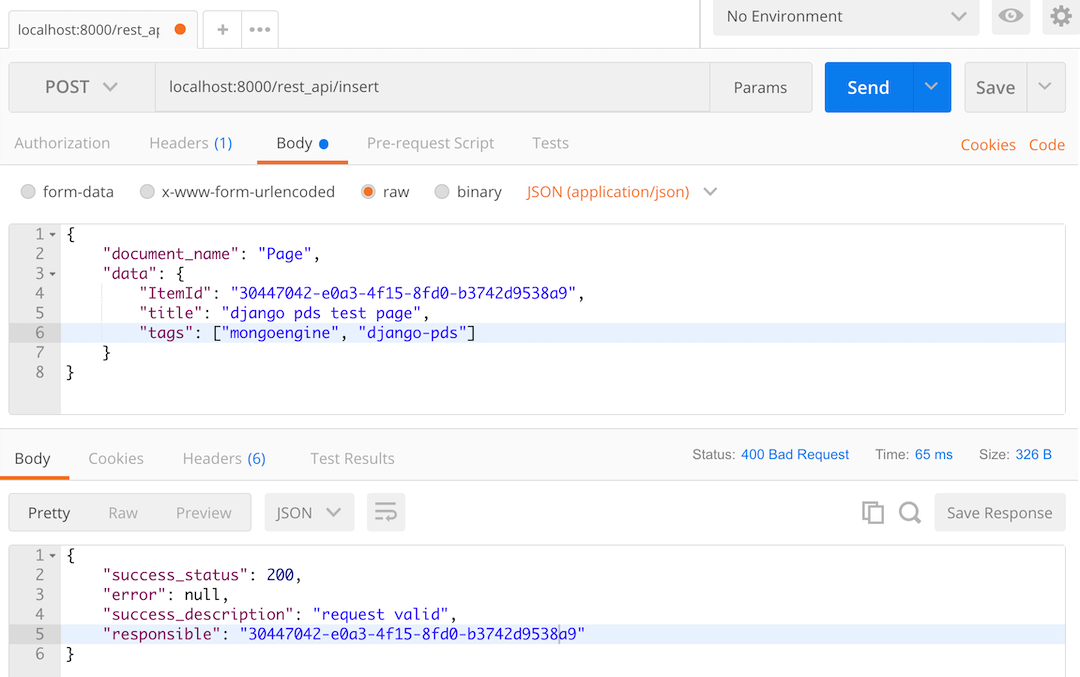
Continue reading the django-pds wiki to know about CRUD operation made easy with Django PDS.
1 maintainer

Metadata
1 maintainer
Release files for django-pds 0.0.6
For a detailed explanation of source distributions (sdists) and built distributions (wheels), please see the package formats documentation.
Source distribution (sdist)
| File | Size | Uploaded | |
|---|---|---|---|
| django-pds-0.0.6.tar.gz | 21.0 kB | Details |
Built distribution (wheel)
| File | Interpreter | ABI | Platform | Reset |
|---|---|---|---|---|
| django_pds-0.0.6-py3-none-any.whl | Python 3 | none | any | Details |
Total release size: 51.0 kB
Release files / django-pds-0.0.6.tar.gz
| Download URL | django-pds-0.0.6.tar.gz |
|---|---|
| Size | 21.0 kB |
| Tags | Source |
|
SHA-256 checksum How to use checksums |
959c0b9e64057dc6fd4b63b6f81bae279cc7a57dbf873da35cc72fcb0902fcc2
|
|
BLAKE2b-256 checksum How to use checksums |
a355d59b40b95074f0a55b108f3895f561f60465d76a2a84b15d8622cbffd4db
|
| Upload date | |
|
Uploaded using Trusted Publishing? What is trusted publishing? |
No |
| Uploaded via |
twine/3.1.1 pkginfo/1.5.0.1 requests/2.23.0 setuptools/46.1.3 requests-toolbelt/0.9.1 tqdm/4.45.0 CPython/3.8.0
|
Release files / django_pds-0.0.6-py3-none-any.whl
| Download URL | django_pds-0.0.6-py3-none-any.whl |
|---|---|
| Size | 30.0 kB |
| Tags | Python 3 |
|
SHA-256 checksum How to use checksums |
23aa7c326da8f288da96654c638470a1119a85554b7a46b0aa94ac4d13f5ce12
|
|
BLAKE2b-256 checksum How to use checksums |
f48a33b62c19c367b66652263e157113b62faedf0aaaa3a16288a30b825c232c
|
| Upload date | |
|
Uploaded using Trusted Publishing? What is trusted publishing? |
No |
| Uploaded via |
twine/3.1.1 pkginfo/1.5.0.1 requests/2.23.0 setuptools/46.1.3 requests-toolbelt/0.9.1 tqdm/4.45.0 CPython/3.8.0
|














