
Unit Conversion fields for Django and Postgres


Project description
django-pint-field






Store, validate, and convert physical quantities in Django using Pint.
Why Django Pint Field?
Django Pint Field enables you to:
- Store quantities (like 1 gram, 3 miles, 8.120391 angstroms) in your Django models
- Edit quantities in forms with automatic unit conversion
- Compare quantities in different units (e.g., compare weights in pounds vs. kilograms)
- Display quantities in user-preferred units while maintaining accurate comparisons
- Perform aggregations and lookups across different units of measurement
The package uses a PostgreSQL composite field to store both the magnitude and units, along with a base-unit comparator value for accurate comparisons. This approach ensures that users can work with their preferred units while maintaining data integrity and comparability. For this reason, the project only works with PostgreSQL databases.
Requirements
- Python 3.11+
- Django 4.2+
- PostgreSQL database
- Pint 0.24+
Installation
pip install django-pint-field
Add to your INSTALLED_APPS:
INSTALLED_APPS = [
    # ...
    "django_pint_field",
    # ...
]
Run migrations:
python manage.py migrate django_pint_field
Failure to run django-pint-field migrations before running migrations for models using PintFields will result in errors. The migration creates a required composite type in your PostgreSQL database.

Previous versions of the package added three composite types to the database. The newest migration modifies the columns with these types to use a single composite type.
Tips for Upgrading from Legacy django-pint-field
If using [django-pgtrigger](https://django-pgtrigger.readthedocs.io/en/latest/commands/) or other packages that depend on it (e.g.: django-pghistory), we highly recommend that you temporarily uninstall all triggers before running the django-pint-field migrations. It is also a good practice to make a backup of your database before running the migration. Users freshly installing `django-pint-field` do not need to worry about this warning.
python manage.py pgtrigger uninstall
Then run the migrations:
python manage.py migrate django_pint_field
Reinstall the triggers after the migrations are complete:
python manage.py pgtrigger install
Quick Start
- Define your model:
from decimal import Decimal
from django.db import models
from django_pint_field.models import DecimalPintField


class Product(models.Model):
    name = models.CharField(max_length=100)
    weight = DecimalPintField(
        default_unit="gram",
        unit_choices=["gram", "kilogram", "pound", "ounce"],
    )
- Use it in your code:
from django_pint_field.units import ureg

# Create objects
product = Product.objects.create(
    name="Coffee Bag",
    weight=ureg.Quantity(Decimal("340"), "gram"),
)

# Query using different units
products = Product.objects.filter(
    weight__gte=ureg.Quantity(Decimal("0.5"), "kilogram"),
)

# Access values
print(product.weight)  # 340 gram
print(product.weight.quantity)  # 340 gram (accessing the Pint Quantity object)
# Convert to different units
print(product.weight.quantity.to("kilogram"))  # 0.340 kilogram
print(product.weight.kilogram)  # 0.340 kilogram
print(product.weight.kilogram__2)  # 0.34 kilogram  (rounded to 2 decimal places)
Features
Field Types
- IntegerPintField: For whole number quantities
- DecimalPintField: For precise decimal quantities
Form Fields and Widgets
- Built-in form fields with unit conversion
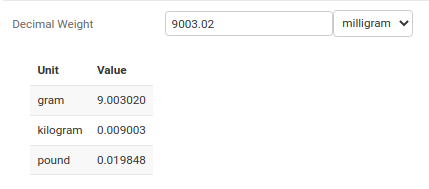
- TabledPintFieldWidget for displaying unit conversion tables
- Customizable validation and unit choices
Form Fields
- IntegerPintFormField: Used in forms with IntegerPintField.
- DecimalPintFormField: Used in forms with DecimalPintField.
Widgets
- PintFieldWidget: Default widget for all django pint field types.
- TabledPintFieldWidget: Provides a table showing conversion to each of the
unit_choices.
Django REST Framework Integration
from django_pint_field.rest import DecimalPintRestField


class ProductSerializer(serializers.ModelSerializer):
    weight = DecimalPintRestField()

    class Meta:
        model = Product
        fields = ["name", "weight"]
The package is tested to work with both Django REST Framework and Django Ninja.
Supported Lookups
exactgt,gtelt,lterangeisnull
Aggregation Support
from django_pint_field.aggregates import PintAvg, PintSum

Product.objects.aggregate(
    avg_weight=PintAvg("weight"),
    total_weight=PintSum("weight"),
)
Supported Aggregates
PintAvgPintCountPintMaxPintMinPintSumPintStdDevPintVariance
Advanced Usage
Custom Units
Create your own unit registry:
from pint import UnitRegistry

custom_ureg = UnitRegistry(non_int_type=Decimal)
custom_ureg.define("custom_unit = [custom]")

# In settings.py
DJANGO_PINT_FIELD_UNIT_REGISTER = custom_ureg
Indexing
Django Pint Field supports creating indexes on the comparator components of Pint fields. Indexes can improve query performance when filtering, ordering, or joining on Pint field values.
Single Field Index
from django_pint_field.indexes import PintFieldComparatorIndex


class Package(models.Model):
    weight = DecimalPintField("gram")

    class Meta:
        indexes = [PintFieldComparatorIndex(fields=["weight"])]
Multi-Field Index
from django_pint_field.indexes import PintFieldComparatorIndex


class Package(models.Model):
    weight = DecimalPintField("gram")
    volume = DecimalPintField("liter")

    class Meta:
        indexes = [PintFieldComparatorIndex(fields=["weight", "volume"])]
You can also use additional index options, as usual. e.g.:
name: Custom index namecondition: Partial index conditioninclude: Additional columns to include in the indexdb_tablespace: Custom tablespace for the index
Settings
# settings.py

# Set decimal precision for the entire project
DJANGO_PINT_FIELD_DECIMAL_PRECISION = 40

# Configure custom unit registry
DJANGO_PINT_FIELD_UNIT_REGISTER = custom_ureg

# Set default format for quantity display
DJANGO_PINT_FIELD_DEFAULT_FORMAT = "D"  # Options: D, P, ~P, etc.
Credits
Modified from django-pint with a focus on composite field storage and enhanced comparison capabilities.
Release history Release notifications | RSS feed


Download files
Download the file for your platform. If you're not sure which to choose, learn more about installing packages.
Source Distribution
Built Distribution
Filter files by name, interpreter, ABI, and platform.
If you're not sure about the file name format, learn more about wheel file names.
Copy a direct link to the current filters
File details
Details for the file django_pint_field-2026.5.1.tar.gz.
File metadata
- Download URL: django_pint_field-2026.5.1.tar.gz
- Upload date:
- Size: 48.7 kB
- Tags: Source
- Uploaded using Trusted Publishing? No
- Uploaded via: uv/0.11.3 {"installer":{"name":"uv","version":"0.11.3","subcommand":["publish"]},"python":null,"implementation":{"name":null,"version":null},"distro":{"name":"Ubuntu","version":"24.04","id":"noble","libc":null},"system":{"name":null,"release":null},"cpu":null,"openssl_version":null,"setuptools_version":null,"rustc_version":null,"ci":null}
File hashes
| Algorithm | Hash digest | |
|---|---|---|
| SHA256 |
ffd003c80297b1658b53458b859568311fed8bcbee5962404b3b0d036834bea0
|
|
| MD5 |
1c0faec9db18950668149f46af5f35aa
|
|
| BLAKE2b-256 |
f7d114442987c09771c3ba2ffaeb3b441fdcf567d746a3c00855bdd597162caf
|
File details
Details for the file django_pint_field-2026.5.1-py3-none-any.whl.
File metadata
- Download URL: django_pint_field-2026.5.1-py3-none-any.whl
- Upload date:
- Size: 54.6 kB
- Tags: Python 3
- Uploaded using Trusted Publishing? No
- Uploaded via: uv/0.11.3 {"installer":{"name":"uv","version":"0.11.3","subcommand":["publish"]},"python":null,"implementation":{"name":null,"version":null},"distro":{"name":"Ubuntu","version":"24.04","id":"noble","libc":null},"system":{"name":null,"release":null},"cpu":null,"openssl_version":null,"setuptools_version":null,"rustc_version":null,"ci":null}
File hashes
| Algorithm | Hash digest | |
|---|---|---|
| SHA256 |
5636d89f61f0c8265fdd65e1993b05eb6ae174d902b28da297a30dde477c77df
|
|
| MD5 |
3ab920c3c7588b9fa98ee6e7dd25b9c1
|
|
| BLAKE2b-256 |
3f6e2552eed5eb03ea874b711b75d04a296dbbb5216ac9398d2ca0aa038ea5a7
|






