
A django planet and feeds (RSS and ATOM) aggregator application for Django.

Project description
django-planet






A reusable Django app for building RSS/Atom feed aggregator websites (aka "Planet" sites).
Django-planet makes it easy to create a planet-style feed aggregator. Collect posts from multiple blogs and websites, store them in your database, and display them with built-in views and templates—or build your own custom front-end.
📑 Table of Contents
- ✨ Features
- 📦 Installation & Configuration
- 📖 Usage
- 📸 Screenshots
- 🧪 Testing
- 🤝 Contributing
- 📄 License
- 🙏 Acknowledgements
- 💬 Support
✨ Features
- RSS and Atom feed parsing - Supports both RSS and Atom feed formats via feedparser
- Automatic feed updates - Management commands to add feeds and update all feeds
- Blog, Feed, Post, and Author models - Complete data model with relationships
- Built-in views and templates - Ready-to-use views for blogs, feeds, posts, and authors
- Django admin integration - Manage all content through Django's admin interface
- Search functionality - Built-in search across posts, blogs, feeds, and authors
- SEO-friendly URLs - Slugified URLs with automatic redirects
- Custom managers - QuerySet methods for filtering by blog, feed, author
- Template tags - Custom template tags for common operations
- Pagination support - Uses django-pagination-py3 for easy pagination
📦 Installation & Configuration
Via pip
pip install django-planet
From source
git clone https://github.com/matagus/django-planet.git
cd django-planet
pip install -e .
Configure your Django project
- Add
planetandpaginationto yourINSTALLED_APPSinsettings.py:
INSTALLED_APPS = [
    # Django apps
    "django.contrib.admin",
    "django.contrib.auth",
    "django.contrib.contenttypes",
    "django.contrib.sessions",
    "django.contrib.messages",
    "django.contrib.staticfiles",

    # Third-party apps
    "planet",
    "pagination",  # Required dependency
]
- Add pagination middleware to
MIDDLEWAREinsettings.py:
MIDDLEWARE = [
    # ... other middleware
    "pagination.middleware.PaginationMiddleware",
]
- (Optional) Configure planet settings in
settings.py:
PLANET = {
    "USER_AGENT": "MyPlanet/1.0",  # Customize the User-Agent for feed requests
    "RECENT_POSTS_LIMIT": 10,  # Number of recent posts to show
    "RECENT_BLOGS_LIMIT": 10,  # Number of recent blogs to show
    "FETCH_ORIGINAL_CONTENT": False,  # Fetch and archive full post content from the original URL
    "FETCH_CONTENT_DELAY": 0,  # Seconds to wait between content fetches (int or float)
}
Original Content Archiving
When FETCH_ORIGINAL_CONTENT is True, django-planet will fetch the full HTML of each post's original URL using readability-lxml to extract the article body. The result is stored in Post.original_content and shown on the post detail page instead of the feed summary.
PLANET = {
    "FETCH_ORIGINAL_CONTENT": True,
    "FETCH_CONTENT_DELAY": 1,  # 1 second between fetches to be polite to servers
}
- If fetching fails for a post, a WARNING is logged and
original_contentremainsNone(the feed summary is shown as fallback). - Use the
planet_fetch_post_contentmanagement command to backfill existing posts.
- Run migrations:
python manage.py migrate
- Include planet URLs in your project's
urls.py:
from django.urls import path, include

urlpatterns = [
    path("admin/", admin.site.urls),
    path("", include("planet.urls")),  # or path("planet/", include("planet.urls"))
]
📖 Usage
Adding Feeds
You can add feeds using the management command:
python manage.py planet_add_feed https://example.com/feed.xml
This will:
- Parse the feed and create a Blog entry if it doesn't exist
- Create the Feed entry
- Import all posts from the feed
- Create Author entries and link them to posts
Updating Feeds
Update all active feeds to fetch new posts:
python manage.py planet_update_all_feeds
This command:
- Iterates through all feeds
- Fetches new entries
- Creates new Post and Author entries as needed
- Updates feed metadata (last_checked, etag)
Set up periodic updates:
For production, schedule this command to run periodically:
Using cron:
# Run every hour
0 * * * * /path/to/venv/bin/python /path/to/project/manage.py planet_update_all_feeds
Built-in Views
Django-planet provides these URL patterns:
/- Post list (index)/posts/- All posts/posts/<id>/<slug>/- Post detail/blogs/- All blogs/blogs/<id>/<slug>/- Blog detail (shows all posts from that blog)/feeds/- All feeds/feeds/<id>/<slug>/- Feed detail (shows all posts from that feed)/authors/- All authors/authors/<id>/<slug>/- Author detail (shows all posts by that author)/search/- Search form endpoint
Templates
Planet includes a complete set of templates:
planet/templates/planet/
├── base.html                    # Base template
├── posts/
│   ├── list.html               # Post list view
│   ├── detail.html             # Post detail view
│   └── blocks/
│       └── list.html           # Reusable post list block
├── blogs/
│   ├── list.html               # Blog list view
│   ├── detail.html             # Blog detail view
│   └── blocks/
│       └── list.html           # Reusable blog list block
├── feeds/
│   ├── list.html               # Feed list view
│   ├── detail.html             # Feed detail view
│   └── blocks/
│       └── list_for_author.html
└── authors/
    ├── list.html               # Author list view
    ├── detail.html             # Author detail view
    └── blocks/
        ├── list.html           # Reusable author list block
        └── list_for_feed.html
Using Template Tags
Django-planet includes custom template tags for common operations. Load them in your templates:
{% load planet_tags %}
Available Template Tags
Filters
clean_html - Cleans HTML content by removing inline styles, style tags, and script tags
{{ post.content|clean_html }}
This filter:
- Removes inline
styleattributes - Removes
<style>and<script>tags - Replaces multiple consecutive
<br/>tags (3+) with just two - Returns safe HTML that won't be escaped
Simple Tags
get_first_paragraph - Extracts the first paragraph or sentence from post content
{% get_first_paragraph post.content as excerpt %}
{{ excerpt }}
This tag:
- Strips all HTML tags
- Normalizes whitespace
- Returns the first sentence longer than 80 characters
- Falls back to the first 80 characters if no long sentence is found
- Useful for creating post excerpts or previews
get_authors_for_blog - Returns all authors who have written posts for a specific blog
{% get_authors_for_blog blog as authors %}
{% for author in authors %}
  <a href="{{ author.get_absolute_url }}">{{ author.name }}</a>
{% endfor %}
blogs_for_author - Returns all blogs that an author has contributed to
{% blogs_for_author author as blogs %}
{% for blog in blogs %}
  <a href="{{ blog.get_absolute_url }}">{{ blog.title }}</a>
{% endfor %}
Inclusion Tags
Inclusion tags render complete HTML blocks with their own templates.
authors_for_feed - Renders a list of all authors who have posts in a feed
{% authors_for_feed feed %}
Uses template: planet/authors/blocks/list_for_feed.html
feeds_for_author - Renders a list of all feeds an author has contributed to
{% feeds_for_author author %}
Uses template: planet/feeds/blocks/list_for_author.html
recent_posts - Renders a list of the most recent posts across all blogs
{% recent_posts %}
Uses template: planet/posts/blocks/list.html
Limit controlled by PLANET["RECENT_POSTS_LIMIT"] setting (default: 10)
recent_blogs - Renders a list of the most recently added blogs
{% recent_blogs %}
Uses template: planet/blogs/blocks/list.html
Limit controlled by PLANET["RECENT_BLOGS_LIMIT"] setting (default: 10)
Admin Interface
All models are registered in Django admin with sensible defaults:
- BlogAdmin
- FeedAdmin
- PostAdmin
- AuthorAdmin
All admin interfaces include search and filtering capabilities.
Management Commands
planet_add_feed <feed_url>
- Adds a new feed to the database
- Creates Blog if it doesn't exist
- Imports all existing posts from the feed
- Creates Author entries for post authors
planet_update_all_feeds
- Updates all active feeds
- Fetches new posts from each feed
- Updates feed metadata (etag, last_checked)
- Creates new Post and Author entries as needed
planet_fetch_post_content
- Backfills
original_contentfor posts where it is missing - Optional
--feed <id>argument to limit to a specific feed - Optional
--limit <n>argument to cap the number of posts processed - Respects
FETCH_CONTENT_DELAYbetween requests
🔍 Post Filtering
By default, all feed entries are saved. You can configure a post filter backend to accept only relevant posts before they are stored.
Configuration
PLANET = {
    "POST_FILTER_BACKEND": "planet.backends.accept_all.AcceptAllBackend",  # default
    "TOPIC_KEYWORDS": [],
}
Built-in Backends
planet.backends.accept_all.AcceptAllBackend (default)
Accepts every entry unchanged. No configuration required.
planet.backends.keyword.KeywordFilterBackend
Accepts entries whose title or summary contains at least one of the configured keywords (case-insensitive). Rejected entries are logged at INFO level.
PLANET = {
    "POST_FILTER_BACKEND": "planet.backends.keyword.KeywordFilterBackend",
    "TOPIC_KEYWORDS": ["python", "django", "open source"],
}
When TOPIC_KEYWORDS is empty the backend accepts all entries (fail-open).
Writing a Custom Backend
Subclass BasePostFilterBackend and implement filter_entries:
from planet.backends.base import BasePostFilterBackend

class MyBackend(BasePostFilterBackend):
    def filter_entries(self, entries, feed):
        # entries: list of feedparser entry objects
        # feed: planet.models.Feed instance
        return [e for e in entries if passes_my_check(e)]
Then point to it in your settings:
PLANET = {
    "POST_FILTER_BACKEND": "myapp.backends.MyBackend",
}
📋 Logging
django-planet uses Python's standard logging module. All loggers use names under the planet.* namespace (e.g. planet.utils, planet.management.commands.planet_update_all_feeds).
Following Python library best practices, no handlers are attached by default — the host project controls all logging output. Add a LOGGING configuration in your Django settings to see log output:
LOGGING = {
    "version": 1,
    "disable_existing_loggers": False,
    "handlers": {
        "console": {
            "class": "logging.StreamHandler",
        },
    },
    "loggers": {
        "planet": {
            "handlers": ["console"],
            "level": "INFO",  # Use "DEBUG" for more verbosity
        },
    },
}
At INFO level you'll see feed add/update summaries and 304 skips. At DEBUG level you'll also see individual fetch details, per-entry creation, and to_datetime() edge cases.
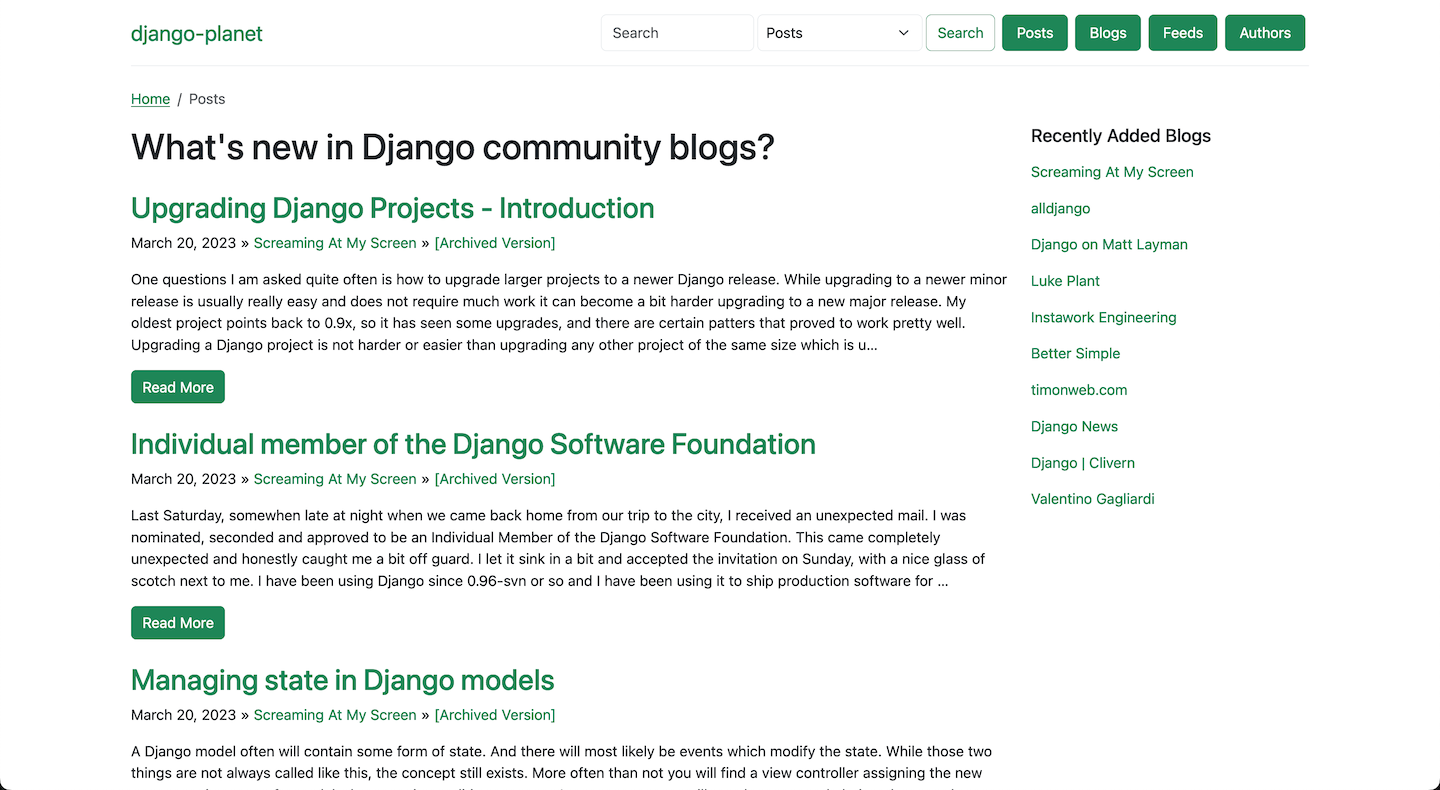
📸 Screenshots
Post List
Blog View
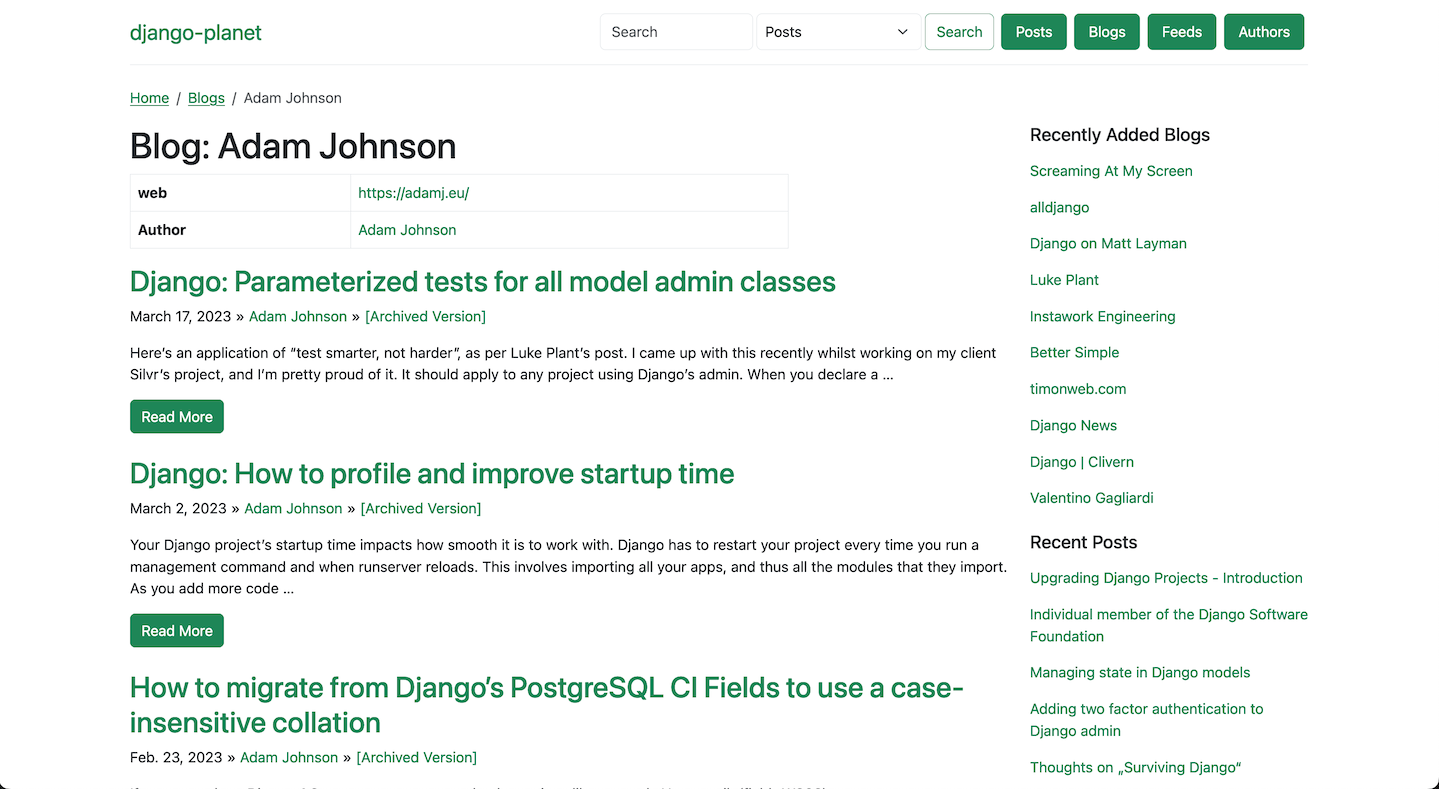
Full Post View
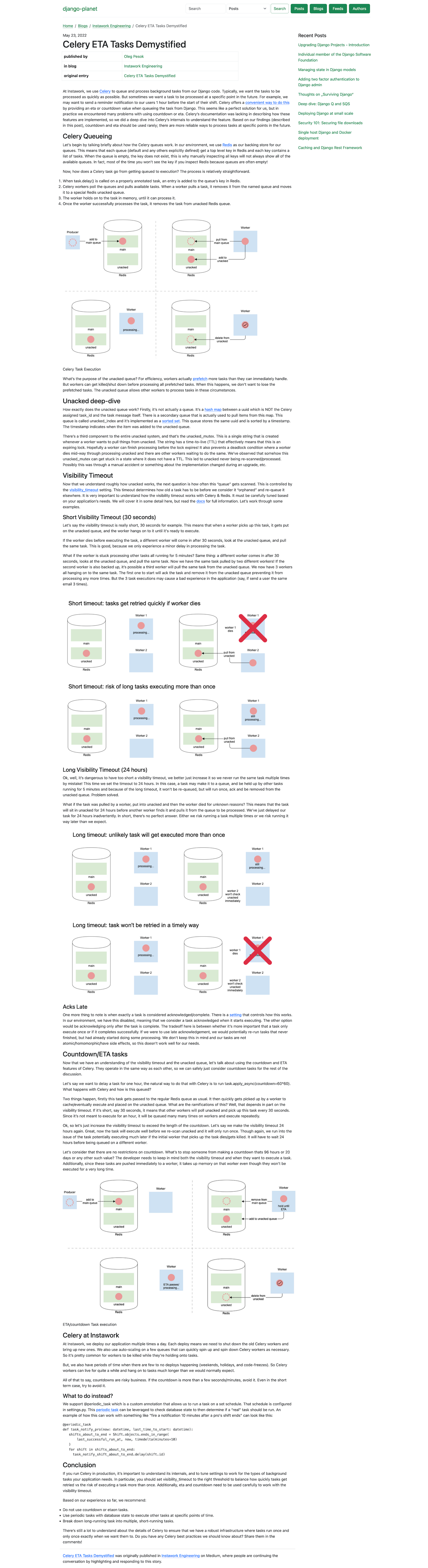
Live Demo
Check out the live demo: django-planet.matagus.dev
Demo source code is available in the project/ directory.
🧪 Testing
You can run tests either with Hatch (recommended for testing multiple Python/Django versions) or directly.
With Hatch (recommended)
Django-planet uses Hatch for testing across multiple Python and Django versions.
Run all tests
Test across all Python/Django version combinations:
hatch run test:test
Run tests for specific versions
# Python 3.14 + Django 6.0
hatch run test.py3.14-6.0:test

# Python 3.14 + Django 5.2
hatch run test.py3.14-5.2:test

# Python 3.11 + Django 5.1
hatch run test.py3.11-5.1:test
Run with coverage
hatch run test:cov
This will:
- Run tests with coverage tracking
- Generate a coverage report
- Output results to the terminal
View test matrix
See all available Python/Django test combinations:
hatch env show test
Without Hatch
If you prefer to run tests directly without Hatch:
-
Install test dependencies:
pip install coverage factory_boy
-
Run tests using Django's test runner:
python -m django test --settings tests.settings
-
Run tests with coverage:
coverage run -m django test --settings tests.settings
coverage report
-
Generate coverage JSON:
coverage json
🤝 Contributing
Contributions are welcome! ❤️
Development Setup
-
Fork the repository
-
Clone your fork:
git clone https://github.com/YOUR_USERNAME/django-planet.git
cd django-planet
-
Install development dependencies:
pip install -e .
pip install pre-commit
-
Set up pre-commit hooks:
pre-commit installThis will automatically run code quality checks (ruff, black, codespell, etc.) before each commit.
-
(Optional) Run pre-commit on all files manually:
pre-commit run --all-files
Quick Contribution Guide
- Create a feature branch (
git checkout -b feature/new-feature) - Make your changes
- Run tests (see above)
- Pre-commit hooks will run automatically when you commit
- Commit your changes (
git commit -m 'Add new feature') - Push to the branch (
git push origin feature/new-feature) - Open a Pull Request
📄 License
django-planet is released under the BSD 3-Clause License - see the LICENSE file for more information.
🙏 Acknowledgements
Developed and built using:



Inspired by:
- Feedjack - Original Django feed aggregator
- Mark Pilgrim's Feedparser - Universal feed parser library
💬 Support
- Issues: GitHub Issues
- Discussions: GitHub Discussions
- PyPI: pypi.org/project/django-planet
Project details
Release history Release notifications | RSS feed


Download files
Download the file for your platform. If you're not sure which to choose, learn more about installing packages.
Source Distribution
Built Distribution
Filter files by name, interpreter, ABI, and platform.
If you're not sure about the file name format, learn more about wheel file names.
Copy a direct link to the current filters
File details
Details for the file django_planet-1.1.0.tar.gz.
File metadata
- Download URL: django_planet-1.1.0.tar.gz
- Upload date:
- Size: 31.3 kB
- Tags: Source
- Uploaded using Trusted Publishing? No
- Uploaded via: twine/6.1.0 CPython/3.13.12
File hashes
| Algorithm | Hash digest | |
|---|---|---|
| SHA256 |
a66ea8b0f89fb6fb4f5ca121285c5cc014e1138bdd582cdf99c122195ed03740
|
|
| MD5 |
9017145058485b14e4784ac78f8767c0
|
|
| BLAKE2b-256 |
6043453f1085fda23fc047e4afdd2fe043a22aded7fef7d342d51f43da2b466e
|
File details
Details for the file django_planet-1.1.0-py3-none-any.whl.
File metadata
- Download URL: django_planet-1.1.0-py3-none-any.whl
- Upload date:
- Size: 47.2 kB
- Tags: Python 3
- Uploaded using Trusted Publishing? No
- Uploaded via: twine/6.1.0 CPython/3.13.12
File hashes
| Algorithm | Hash digest | |
|---|---|---|
| SHA256 |
20dbcf48dd08317138f2848fc3a9a3969d848decd6444b4be140577362fa8e27
|
|
| MD5 |
be9966fc7c8f55906a64630914090461
|
|
| BLAKE2b-256 |
d1103095da05551331a5eac7943f3c72962c7d12e573ccde63105367b422d780
|






