
A reuseable Django application for collecing information about the running server processes. We try to cause as little additional overhead: django-processinfo creates most of the time only one database query to update the data.
The most important data that django-processinfo will be captured:
Process statistics:
process PID, start time, life times
Number of average/max living processes
min/average/max response times
Total request/exceptions count
Memory statistics:
min/average/max memory usage (VmRSS, VmPeak)
System informations:
System memory usage
Swap usage
load average
django-processinfo splits some of these data per SITE_ID, so you can see e.g. which site is mostly used.
What is it not:
track user actions
collect infos which are found in e.g. apache.log
Its not a sourcecode profiler (read https://code.djangoproject.com/wiki/ProfilingDjango)
more info: https://www.python-forum.de/viewtopic.php?f=6&t=27168 (de)
limitation
This only works, if /proc/$$/status exists. So only on unix/linux like platforms, yet.
TODO
Add unittests
screenshots
Here some screenshots (from v0.2 - 19.08.2011) how it looks like:
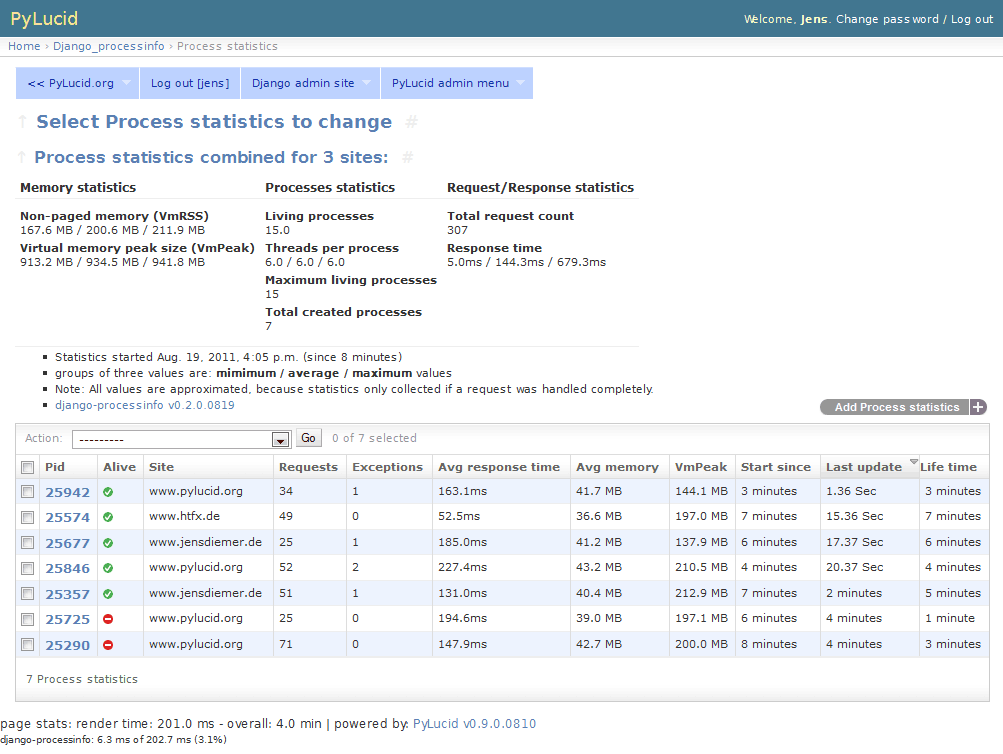
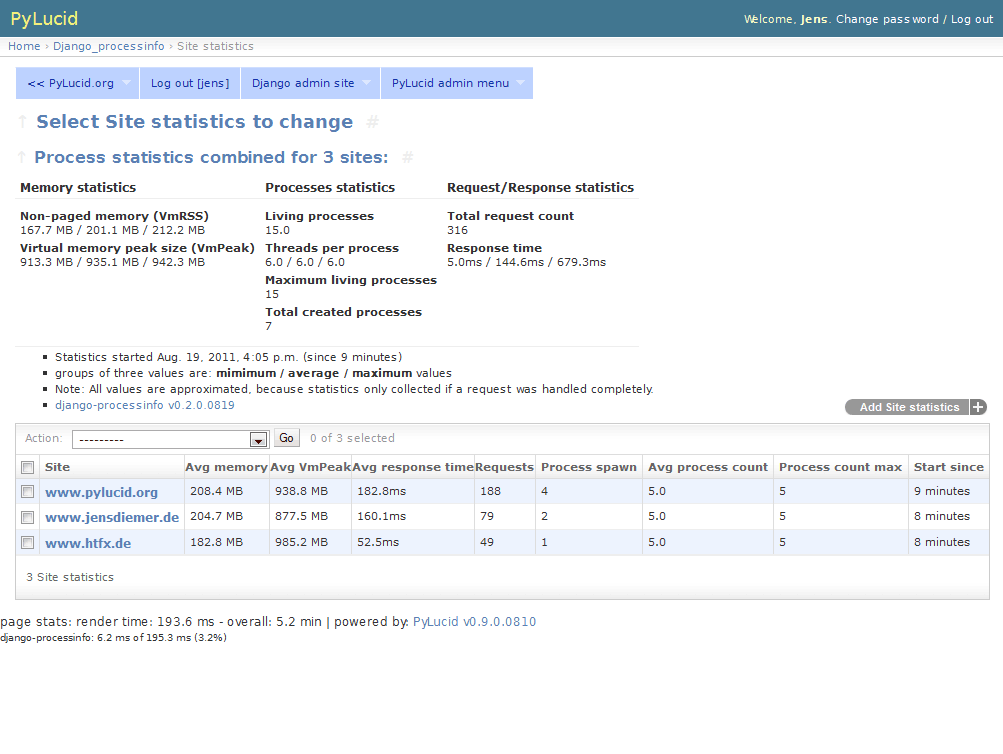
install
install it e.g.:
pip install django-processinfo
add settings (see below)
create tables (run syncdb)
settings
add this to your settings.py:
import os

import django_processinfo


INSTALLED_APPS = (
    ...
    'django_processinfo',
    ...
)

MIDDLEWARE = (
    'django_processinfo.middlewares.ProcessInfoMiddleware',
    ...
)

# Put templates above admin contrib, e.g.:
TEMPLATE_DIRS = (
    ...
    os.path.join(os.path.abspath(os.path.dirname(django_processinfo.__file__)), "templates/"),
    ...
)

# include app settings from ./django_processinfo/app_settings.py
from django_processinfo import app_settings as PROCESSINFO

# Change settings like this:
PROCESSINFO.ADD_INFO = True
ProcessInfoMiddleware
The ProcessInfoMiddleware can actually be inserted anywhere. However, it should be added far above. Thus, to capture everything.
For performance enhancement, you can put ProcessInfoMiddleware after LocalSyncCacheMiddleware. But then, however, lacks statistical values on every cache hit!
app settings
Available django-processinfo settings can you found in ./django_processinfo/app_settings.py
developer info
e.g.:
~$ git clone https://github.com/jedie/django-processinfo.git
~$ cd django-processinfo
~/django-processinfo$ make
help                 List all commands
install-poetry       install or update poetry
install              install PyInventory via poetry
update               update the sources and installation
lint                 Run code formatters and linter
fix-code-style       Fix code formatting
tox-listenvs         List all tox test environments
tox                  Run pytest via tox with all environments
tox-py36             Run pytest via tox with *python v3.6*
tox-py37             Run pytest via tox with *python v3.7*
tox-py38             Run pytest via tox with *python v3.8*
pytest               Run pytest
update-rst-readme    update README.rst from README.creole
publish              Release new version to PyPi
run-dev-server       Run the django dev server in endless loop.
run test project
There exists a test project that can be easy run localy using the django dev. server and SQLite database. To run this project, do this:
~/django-processinfo$ make run-dev-server
You must also setup a test user, call this:
~/django-processinfo$ ./manage.sh createsuperuser
Django compatibility
Version |
Python |
Django |
|---|---|---|
>=v1.1.0 |
3.7,3.8,3.9,3.10 |
3.2,4.0,4.1 |
v0.9.0 |
python 3 |
django v2.2 LTS |
v0.8.0 |
python 3 |
django v1.11 LTS |
v0.7.0 |
python 2 |
django v1.5 |
v0.6.1 |
python 2 |
django v1.4 |
history
dev - compare v1.1.0…master
TBC
-
Test against Django 3.2, 4.0 and 4.1 with Python 3.7, 3.8, 3.9 and 3.10
Modernize project setup
v1.0.2 - 09.12.2020 - compare v1.0.1…v1.0.2
Bugfix “DataError: smallint out of range” on bigger PID numbers
v1.0.1 - 2.11.2020 - compare v1.0.0…v1.0.1
Bugfix injected footer
Fix/cleanup change list
Bugfix test project manage.sh
cleanup test project
v1.0.0 - 1.11.2020 - compare v0.9.0…v1.0.0
modernize project setup using poetry
Add a test project
Add tests
upgrade code style
v0.9.0 - 26.02.2020 - compare v0.8.0…v0.9.0
Updates for Django 2.2
v0.8.0 - 09.03.2018 - compare v0.7.1…v0.8.0
Updates for Python v3 and Django 1.11
v0.7.1 - 20.08.2015 - compare v0.6.3…v0.7.1
Changes for django 1.5 support
change setup install_requires to Django v1.3.x - v1.5.x
Bugfix in templates: missed i18n
v0.6.3 - 24.08.2012
remove auto commit date from version
v0.6.2
Auto cleanup ProcessInfo table to protect against overloading.
Don’t insert django-processinfo “time cost” info if response.status_code is not 200
v0.6.1
Tested also with django v1.4
change setup install_requires to Django v1.3.x - v1.4.x
v0.6.0
Add “Reset all data” in object tools.
Make “Remove dead PIDs” and “Reset all data” available on both admin pages.
v0.5.2
v0.5.1
Add “Remove dead PIDs” as admin view in “Process statistics” object tools (top, right, grey links)
v0.5.0
Model changes: Please recreate tables, e.g.: ./manage.py reset django_processinfo
New: Display some static system informations (uname, domain name, ip adress, python version, sys.prefix)
New: current living processes (also per site)
display sum of user/system mode time
v0.4.1
Bugfix for UnicodeEncodeError in setup: Use new solution, see: https://code.google.com/p/python-creole/wiki/UseInSetup
v0.4
Bugfix with “Total created processes”
Display “Process lifetime”
v0.3.0
Display some system information from /proc/meminfo and ‘load average’
Many Bugfixes
v0.2.0
Many things changes! Recreate tables, e.g: ./manage.py reset django_processinfo
v0.1.0
first Version
Donation
links
GitHub |
|
PyPi |
contact
Come into the conversation, besides the github communication features:
Forum |
|
IRC |
#pylucid on freenode.net (Yes, the PyLucid channel…) |
webchat |
Note: this file is generated from README.creole 2022-08-16 18:56:10 with "python-creole"
1 maintainer

Metadata
1 maintainer
Release files for django-processinfo 1.1.0
For a detailed explanation of source distributions (sdists) and built distributions (wheels), please see the package formats documentation.
Source distribution (sdist)
| File | Size | Uploaded | |
|---|---|---|---|
| django-processinfo-1.1.0.tar.gz | 24.2 kB | Details |
Built distribution (wheel)
| File | Interpreter | ABI | Platform | Reset |
|---|---|---|---|---|
| django_processinfo-1.1.0-py3-none-any.whl | Python 3 | none | any | Details |
Total release size: 53.7 kB
Release files / django-processinfo-1.1.0.tar.gz
| Download URL | django-processinfo-1.1.0.tar.gz |
|---|---|
| Size | 24.2 kB |
| Tags | Source |
|
SHA-256 checksum How to use checksums |
e5d883c2bd4d3a197357bb381a4c19165b5c9ff9a852f96b0dd1ccfd98e2e4a2
|
|
BLAKE2b-256 checksum How to use checksums |
fa5300c837e3e470d10d78077eb52ac7d5dbf203b97dbf6133461da6d8e69391
|
| Upload date | |
|
Uploaded using Trusted Publishing? What is trusted publishing? |
No |
| Uploaded via |
twine/4.0.1 CPython/3.9.5
|
Release files / django_processinfo-1.1.0-py3-none-any.whl
| Download URL | django_processinfo-1.1.0-py3-none-any.whl |
|---|---|
| Size | 29.5 kB |
| Tags | Python 3 |
|
SHA-256 checksum How to use checksums |
c7d1fe2203655925294c860878509fe2a6eb1a5390a170c848023e4619b903da
|
|
BLAKE2b-256 checksum How to use checksums |
7a69a0b33c6001ad848bf63f0287762fee377a630c73798d10be63f1c99fd58e
|
| Upload date | |
|
Uploaded using Trusted Publishing? What is trusted publishing? |
No |
| Uploaded via |
twine/4.0.1 CPython/3.9.5
|














