
A Django admin widget for building complex queries using jQuery QueryBuilder

Project description
Django Query Builder Widget
A Django admin widget that integrates jQuery QueryBuilder for building complex database queries through an intuitive visual interface.
Preview
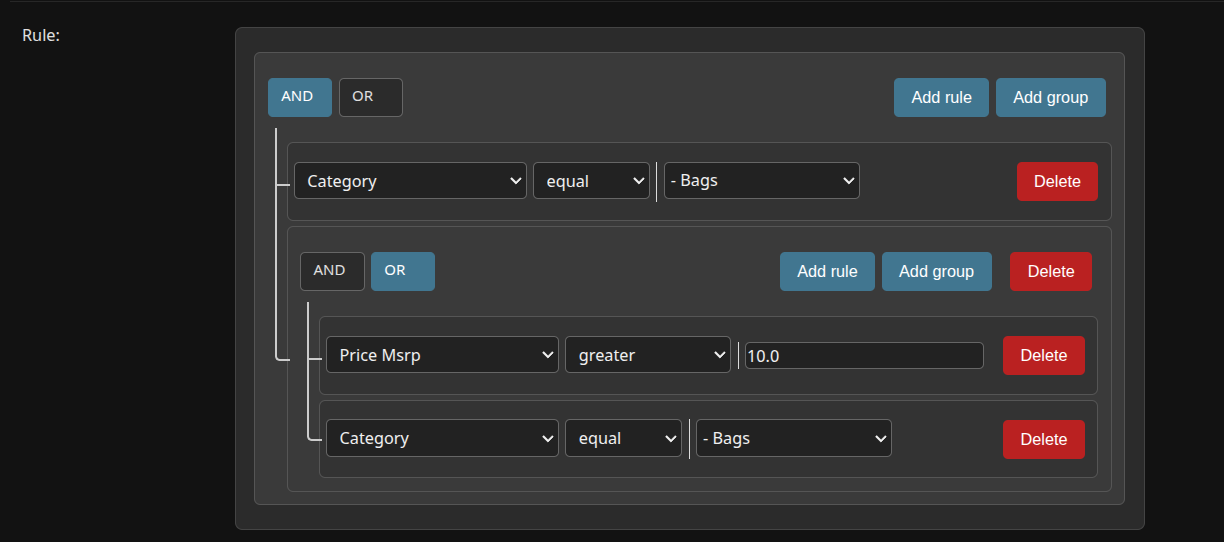
Features
- Visual query building interface in Django admin
- Automatic field detection from Django models
- Support for all major Django field types
- Customizable operators per field type
- Support for custom fields and operators
- JSON-based query storage
- Works seamlessly with Django admin
Installation
Install via pip:
pip install django-query-builder-widget
Quick Start
1. Add to your Django project
Add the app to your INSTALLED_APPS in settings.py:
INSTALLED_APPS = [
    # ...
    'django_query_builder_widget',
    # ...
]
2. Collect static files
python manage.py collectstatic
3. Use in your admin
from django.contrib import admin
from django_query_builder_widget import QueryBuilderWidget
from .models import YourModel

class YourModelAdmin(admin.ModelAdmin):
    formfield_overrides = {
        models.JSONField: {'widget': QueryBuilderWidget(model=YourModel)},
    }

admin.site.register(YourModel, YourModelAdmin)
Usage Examples
Basic Usage with Model
from django_query_builder_widget import QueryBuilderWidget

# Auto-generate filters from model fields
widget = QueryBuilderWidget(model=MyModel)
Specify Specific Fields
# Only include specific fields
widget = QueryBuilderWidget(
    model=MyModel,
    fields=['name', 'email', 'age', 'created_at']
)
Custom Field Configuration
widget = QueryBuilderWidget(
    model=MyModel,
    field_config={
        'status': {
            'widget': 'select',
            'choices': [
                ('active', 'Active'),
                ('inactive', 'Inactive'),
                ('pending', 'Pending')
            ]
        },
        'priority': {
            'operators': ['equal', 'not_equal', 'greater', 'less']
        }
    }
)
Add Custom Filters
widget = QueryBuilderWidget(
    model=MyModel,
    extra_filters=[
        {
            'id': 'custom_field',
            'label': 'Custom Field',
            'type': 'string',
            'operators': ['equal', 'contains'],
            'input': 'text'
        }
    ]
)
Field Type Mapping
The widget automatically maps Django field types to QueryBuilder types:
| Django Field | QueryBuilder Type | Default Operators |
|---|---|---|
| CharField, TextField, EmailField, URLField | string | equal, not_equal, contains, not_contains, begins_with, ends_with, is_null, is_not_null |
| IntegerField, BigIntegerField, PositiveIntegerField | integer | equal, not_equal, less, less_or_equal, greater, greater_or_equal, between, is_null, is_not_null |
| FloatField, DecimalField | double | equal, not_equal, less, less_or_equal, greater, greater_or_equal, between, is_null, is_not_null |
| BooleanField | boolean | equal |
| DateField | date | equal, not_equal, less, less_or_equal, greater, greater_or_equal, between, is_null, is_not_null |
| DateTimeField | datetime | equal, not_equal, less, less_or_equal, greater, greater_or_equal, between, is_null, is_not_null |
| TimeField | time | equal, not_equal, less, less_or_equal, greater, greater_or_equal, between |
| ForeignKey, OneToOneField | integer | equal, not_equal, less, less_or_equal, greater, greater_or_equal, between, is_null, is_not_null |
Configuration Options
Widget Parameters
model: Django model class to generate filters fromfields: List of field names to include (default: all fields)field_config: Dictionary of custom configurations per fieldextra_filters: List of additional custom filtersattrs: Standard Django widget attributes
Field Configuration Options
Each field can be customized with:
widget: Input type ('text', 'textarea', 'select', 'radio', 'checkbox', 'number')choicesorvalues: List of tuples or dictionary for select optionsoperators: List of allowed operators for the field
Output Format
The widget stores queries as JSON in the following format:
{
  "condition": "AND",
  "rules": [
    {
      "id": "name",
      "field": "name",
      "type": "string",
      "input": "text",
      "operator": "contains",
      "value": "John"
    },
    {
      "condition": "OR",
      "rules": [
        {
          "id": "age",
          "field": "age",
          "type": "integer",
          "input": "number",
          "operator": "greater",
          "value": 25
        }
      ]
    }
  ]
}
Requirements
- Python >= 3.8
- Django >= 3.2
License
This project is licensed under the MIT License - see the LICENSE file for details.
Credits
This widget integrates jQuery QueryBuilder by Damien Sorel.
Contributing
Contributions are welcome! Please feel free to submit a Pull Request.
Support
If you encounter any issues or have questions, please file an issue on the GitHub repository.


Download files
Download the file for your platform. If you're not sure which to choose, learn more about installing packages.
Source Distribution
Built Distribution
Filter files by name, interpreter, ABI, and platform.
If you're not sure about the file name format, learn more about wheel file names.
Copy a direct link to the current filters
File details
Details for the file django_query_builder_widget-0.0.4.tar.gz.
File metadata
- Download URL: django_query_builder_widget-0.0.4.tar.gz
- Upload date:
- Size: 63.2 kB
- Tags: Source
- Uploaded using Trusted Publishing? No
- Uploaded via: twine/6.2.0 CPython/3.13.7
File hashes
| Algorithm | Hash digest | |
|---|---|---|
| SHA256 |
4bd84723eceb95614854382e1f7464ef20129f91cd9e460fd0af3d1cbe4b572e
|
|
| MD5 |
9bca87c12c6707ff4abd7ea155580fb3
|
|
| BLAKE2b-256 |
663ef88b91e6aa339a7edb7b64934bbcb7e40de0f1c400a5a5b4a86284372a1d
|
File details
Details for the file django_query_builder_widget-0.0.4-py3-none-any.whl.
File metadata
- Download URL: django_query_builder_widget-0.0.4-py3-none-any.whl
- Upload date:
- Size: 62.6 kB
- Tags: Python 3
- Uploaded using Trusted Publishing? No
- Uploaded via: twine/6.2.0 CPython/3.13.7
File hashes
| Algorithm | Hash digest | |
|---|---|---|
| SHA256 |
3b1c1aac76dfceb70f6075660e89e9c61e8050ec5a62c16f46e4eb9621cd22cc
|
|
| MD5 |
d75fa5b4a57b10302720a26ab12cb98c
|
|
| BLAKE2b-256 |
d46637947e88797264bd30a399fac3f5a5a8d8268916f19495c3602bcecd2d54
|






